 |
eVision Python API
|
|
eVision Python API
|
Represents a rectangular grid, to be used by readers to read QRCodes, matrix codes, or bar codes. More...
Public Member Functions | |
| None | __init__ (self) |
| Constructs a eVision.EGrid object. | |
| None | __init__ (self, int numCellsX, int numCellsY, eVision.ERectangle area, float extension) |
| Constructs a eVision.EGrid object. | |
| None | __init__ (self, eVision.EGrid other) |
| Constructs a eVision.EGrid object. | |
| None | SetEnableRow (self, int row, bool enable) |
| Enable/Disable Row. | |
| None | SetEnableColumn (self, int column, bool enable) |
| Enable/Disable Column. | |
| None | SetEnableCell (self, int column, int row, bool enable) |
| Enable/Disable Cell. | |
| bool | GetCellEnabled (self, int column, int row) |
| Returns true if Cell is enabled and false otherwise. | |
| eVision.ERegion | GetCellRegion (self, int column, int row) |
| Returns the region of a grid cell given its indices in an eVision.EGrid object. | |
| None | DrawGrid (self, eVision.EDrawAdapter|None drawAdapter, eVision.EGridDrawOptions options, eVision.EFrame frame, float zoomX, float zoomY, float panX, float panY) |
| Draws the grid. | |
| None | DrawGrid (self, eVision.EDrawAdapter|None drawAdapter, eVision.EGridDrawOptions options, float zoomX, float zoomY, float panX, float panY) |
| Draws the grid. | |
| eVision.EEditionMode | HitTest (self, int x, int y, float zoomX, float zoomY, float panX, float panY) |
| Detects if the cursor is placed over one of the dragging handles. | |
| eVision.EEditionMode | HitTest (self, int x, int y, eVision.EFrame frame, float zoomX, float zoomY, float panX, float panY) |
| Detects if the cursor is placed over one of the dragging handles. | |
| None | Drag (self, int x, int y, eVision.EFrame frame, float zoomX, float zoomY, float panX, float panY) |
| Moves the specified handle to a new position and updates all placement parameters of the grid. | |
| None | Drag (self, int x, int y, eVision.EFrame frame, float zoomX, float zoomY, float panX) |
| Moves the specified handle to a new position and updates all placement parameters of the grid. | |
| None | Drag (self, int x, int y, eVision.EFrame frame, float zoomX, float zoomY) |
| Moves the specified handle to a new position and updates all placement parameters of the grid. | |
| None | Drag (self, int x, int y, eVision.EFrame frame, float zoomX) |
| Moves the specified handle to a new position and updates all placement parameters of the grid. | |
| None | Drag (self, int x, int y, eVision.EFrame frame) |
| Moves the specified handle to a new position and updates all placement parameters of the grid. | |
| None | Drag (self, int x, int y, float zoomX, float zoomY, float panX, float panY) |
| Moves the specified handle to a new position and updates all placement parameters of the grid. | |
| None | Drag (self, int x, int y, float zoomX, float zoomY, float panX) |
| Moves the specified handle to a new position and updates all placement parameters of the grid. | |
| None | Drag (self, int x, int y, float zoomX, float zoomY) |
| Moves the specified handle to a new position and updates all placement parameters of the grid. | |
| None | Drag (self, int x, int y, float zoomX) |
| Moves the specified handle to a new position and updates all placement parameters of the grid. | |
| None | Drag (self, int x, int y) |
| Moves the specified handle to a new position and updates all placement parameters of the grid. | |
| None | Load (self, str path) |
| Load the eVision.EGrid configuration. | |
| None | Load (self, eVision.ESerializer|None serializer) |
| Load the eVision.EGrid configuration. | |
| None | Save (self, str path) |
| Save the eVision.EGrid configuration. | |
| None | Save (self, eVision.ESerializer|None serializer) |
| Save the eVision.EGrid configuration. | |
| int | NumRows (self) |
| Returns the number of rows in the grid. | |
| int | NumCols (self) |
| Returns the number of columns in the grid. | |
| eVision.ERectangle | Area (self) |
| Returns the area of an eVision.EGrid object. | |
| Area (self, eVision.ERectangle value) | |
| Returns the area of an eVision.EGrid object. | |
| float | Extension (self) |
| Returns the extension of an eVision.EGrid object. | |
| Extension (self, float value) | |
| Returns the extension of an eVision.EGrid object. | |
| eVision.EEditionMode | EditionMode (self) |
| Graphical edition mode. | |
| EditionMode (self, eVision.EEditionMode value) | |
| Graphical edition mode. | |
Protected Member Functions | |
| _EnableAll__setter (self, bool value) | |
| Enable/Disable all cells. | |
Properties | |
| EnableAll | |
Represents a rectangular grid, to be used by readers to read QRCodes, matrix codes, or bar codes.
Remarks:
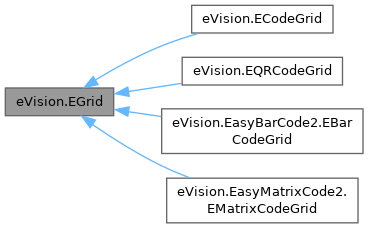
An eVision.EGrid object only contains geometrical information, such as the area, extension, and indices of the grid. Specialized implementations can be found for QRCodes, matrix codes, and bar codes.
License(s): EasyQRCode or EasyMatrixCode or EasyBarCode
| None eVision.EGrid.__init__ | ( | self | ) |
Constructs a eVision.EGrid object.
| None eVision.EGrid.__init__ | ( | self, | |
| int | numCellsX, | ||
| int | numCellsY, | ||
| eVision.ERectangle | area, | ||
| float | extension ) |
Constructs a eVision.EGrid object.
| numCellsX | Number of cells in column direction. |
| numCellsY | Number of cells in row direction. |
| area | Area of the grid. |
| extension | extension of the cells grid. |
| None eVision.EGrid.__init__ | ( | self, | |
| eVision.EGrid | other ) |
Constructs a eVision.EGrid object.
| other | Another eVision.EGrid object to be copied in the new eVision.EGrid object. |
|
protected |
Enable/Disable all cells.
Remarks:
By default, all grid cells are enabled.
| eVision.ERectangle eVision.EGrid.Area | ( | self | ) |
Returns the area of an eVision.EGrid object.
| eVision.EGrid.Area | ( | self, | |
| eVision.ERectangle | value ) |
Returns the area of an eVision.EGrid object.
| None eVision.EGrid.Drag | ( | self, | |
| int | x, | ||
| int | y ) |
Moves the specified handle to a new position and updates all placement parameters of the grid.
Remarks:
If zooming and/or panning were used when drawing the region, the same values must be used with eVision.EGrid.HitTest and eVision.EGrid.Drag.
| x | x-coordinate of the mouse cursor. |
| y | y-coordinate of the mouse cursor. |
| None eVision.EGrid.Drag | ( | self, | |
| int | x, | ||
| int | y, | ||
| eVision.EFrame | frame ) |
Moves the specified handle to a new position and updates all placement parameters of the grid.
Remarks:
If zooming and/or panning were used when drawing the region, the same values must be used with eVision.EGrid.HitTest and eVision.EGrid.Drag.
| x | x-coordinate of the mouse cursor. |
| y | y-coordinate of the mouse cursor. |
| frame | Frame to transform coordinates with. |
| None eVision.EGrid.Drag | ( | self, | |
| int | x, | ||
| int | y, | ||
| eVision.EFrame | frame, | ||
| float | zoomX ) |
Moves the specified handle to a new position and updates all placement parameters of the grid.
Remarks:
If zooming and/or panning were used when drawing the region, the same values must be used with eVision.EGrid.HitTest and eVision.EGrid.Drag.
| x | x-coordinate of the mouse cursor. |
| y | y-coordinate of the mouse cursor. |
| frame | Frame to transform coordinates with. |
| zoomX | Horizontal zoom factor. By default, true scale is used. |
| None eVision.EGrid.Drag | ( | self, | |
| int | x, | ||
| int | y, | ||
| eVision.EFrame | frame, | ||
| float | zoomX, | ||
| float | zoomY ) |
Moves the specified handle to a new position and updates all placement parameters of the grid.
Remarks:
If zooming and/or panning were used when drawing the region, the same values must be used with eVision.EGrid.HitTest and eVision.EGrid.Drag.
| x | x-coordinate of the mouse cursor. |
| y | y-coordinate of the mouse cursor. |
| frame | Frame to transform coordinates with. |
| zoomX | Horizontal zoom factor. By default, true scale is used. |
| zoomY | Vertical zoom factor. By default, true scale is used. |
| None eVision.EGrid.Drag | ( | self, | |
| int | x, | ||
| int | y, | ||
| eVision.EFrame | frame, | ||
| float | zoomX, | ||
| float | zoomY, | ||
| float | panX ) |
Moves the specified handle to a new position and updates all placement parameters of the grid.
Remarks:
If zooming and/or panning were used when drawing the region, the same values must be used with eVision.EGrid.HitTest and eVision.EGrid.Drag.
| x | x-coordinate of the mouse cursor. |
| y | y-coordinate of the mouse cursor. |
| frame | Frame to transform coordinates with. |
| zoomX | Horizontal zoom factor. By default, true scale is used. |
| zoomY | Vertical zoom factor. By default, true scale is used. |
| panX | Horizontal pan offset. By default, no pan is added. |
| None eVision.EGrid.Drag | ( | self, | |
| int | x, | ||
| int | y, | ||
| eVision.EFrame | frame, | ||
| float | zoomX, | ||
| float | zoomY, | ||
| float | panX, | ||
| float | panY ) |
Moves the specified handle to a new position and updates all placement parameters of the grid.
Remarks:
If zooming and/or panning were used when drawing the region, the same values must be used with eVision.EGrid.HitTest and eVision.EGrid.Drag.
| x | x-coordinate of the mouse cursor. |
| y | y-coordinate of the mouse cursor. |
| frame | Frame to transform coordinates with. |
| zoomX | Horizontal zoom factor. By default, true scale is used. |
| zoomY | Vertical zoom factor. By default, true scale is used. |
| panX | Horizontal pan offset. By default, no pan is added. |
| panY | Vertical pan offset. By default, no pan is added. |
| None eVision.EGrid.Drag | ( | self, | |
| int | x, | ||
| int | y, | ||
| float | zoomX ) |
Moves the specified handle to a new position and updates all placement parameters of the grid.
Remarks:
If zooming and/or panning were used when drawing the region, the same values must be used with eVision.EGrid.HitTest and eVision.EGrid.Drag.
| x | x-coordinate of the mouse cursor. |
| y | y-coordinate of the mouse cursor. |
| zoomX | Horizontal zoom factor. By default, true scale is used. |
| None eVision.EGrid.Drag | ( | self, | |
| int | x, | ||
| int | y, | ||
| float | zoomX, | ||
| float | zoomY ) |
Moves the specified handle to a new position and updates all placement parameters of the grid.
Remarks:
If zooming and/or panning were used when drawing the region, the same values must be used with eVision.EGrid.HitTest and eVision.EGrid.Drag.
| x | x-coordinate of the mouse cursor. |
| y | y-coordinate of the mouse cursor. |
| zoomX | Horizontal zoom factor. By default, true scale is used. |
| zoomY | Vertical zoom factor. By default, true scale is used. |
| None eVision.EGrid.Drag | ( | self, | |
| int | x, | ||
| int | y, | ||
| float | zoomX, | ||
| float | zoomY, | ||
| float | panX ) |
Moves the specified handle to a new position and updates all placement parameters of the grid.
Remarks:
If zooming and/or panning were used when drawing the region, the same values must be used with eVision.EGrid.HitTest and eVision.EGrid.Drag.
| x | x-coordinate of the mouse cursor. |
| y | y-coordinate of the mouse cursor. |
| zoomX | Horizontal zoom factor. By default, true scale is used. |
| zoomY | Vertical zoom factor. By default, true scale is used. |
| panX | Horizontal pan offset. By default, no pan is added. |
| None eVision.EGrid.Drag | ( | self, | |
| int | x, | ||
| int | y, | ||
| float | zoomX, | ||
| float | zoomY, | ||
| float | panX, | ||
| float | panY ) |
Moves the specified handle to a new position and updates all placement parameters of the grid.
Remarks:
If zooming and/or panning were used when drawing the region, the same values must be used with eVision.EGrid.HitTest and eVision.EGrid.Drag.
| x | x-coordinate of the mouse cursor. |
| y | y-coordinate of the mouse cursor. |
| zoomX | Horizontal zoom factor. By default, true scale is used. |
| zoomY | Vertical zoom factor. By default, true scale is used. |
| panX | Horizontal pan offset. By default, no pan is added. |
| panY | Vertical pan offset. By default, no pan is added. |
| None eVision.EGrid.DrawGrid | ( | self, | |
| eVision.EDrawAdapter | None | drawAdapter, | ||
| eVision.EGridDrawOptions | options, | ||
| eVision.EFrame | frame, | ||
| float | zoomX, | ||
| float | zoomY, | ||
| float | panX, | ||
| float | panY ) |
Draws the grid.
Remarks:
The zoomX, zoomY, panX and panY parameters can be used to scale and/or translate the drawing operations.
| drawAdapter | Handle to the device context of the destination window. |
| options | Options for grid drawing. |
| frame | Frame associated with the pattern. |
| zoomX | Horizontal zooming factor. |
| zoomY | Vertical zooming factor. If set to 0, the horizontal zooming factor will be used for isotropic zooming. |
| panX | Horizontal panning value expressed in pixels. By default, no panning occurs. |
| panY | Vertical panning value expressed in pixels. By default, no panning occurs. |
| None eVision.EGrid.DrawGrid | ( | self, | |
| eVision.EDrawAdapter | None | drawAdapter, | ||
| eVision.EGridDrawOptions | options, | ||
| float | zoomX, | ||
| float | zoomY, | ||
| float | panX, | ||
| float | panY ) |
Draws the grid.
Remarks:
The zoomX, zoomY, panX and panY parameters can be used to scale and/or translate the drawing operations.
| drawAdapter | Handle to the device context of the destination window. |
| options | Options for grid drawing. |
| zoomX | Horizontal zooming factor. |
| zoomY | Vertical zooming factor. If set to 0, the horizontal zooming factor will be used for isotropic zooming. |
| panX | Horizontal panning value expressed in pixels. By default, no panning occurs. |
| panY | Vertical panning value expressed in pixels. By default, no panning occurs. |
| eVision.EEditionMode eVision.EGrid.EditionMode | ( | self | ) |
Graphical edition mode.
| eVision.EGrid.EditionMode | ( | self, | |
| eVision.EEditionMode | value ) |
Graphical edition mode.
| float eVision.EGrid.Extension | ( | self | ) |
Returns the extension of an eVision.EGrid object.
| eVision.EGrid.Extension | ( | self, | |
| float | value ) |
Returns the extension of an eVision.EGrid object.
| bool eVision.EGrid.GetCellEnabled | ( | self, | |
| int | column, | ||
| int | row ) |
Returns true if Cell is enabled and false otherwise.
Remarks:
By default, all grid cells are enabled.
| column | The column of the cell. |
| row | The row of the cell. |
| eVision.ERegion eVision.EGrid.GetCellRegion | ( | self, | |
| int | column, | ||
| int | row ) |
Returns the region of a grid cell given its indices in an eVision.EGrid object.
| column | The column of the cell. |
| row | The row of the cell. |
| eVision.EEditionMode eVision.EGrid.HitTest | ( | self, | |
| int | x, | ||
| int | y, | ||
| eVision.EFrame | frame, | ||
| float | zoomX, | ||
| float | zoomY, | ||
| float | panX, | ||
| float | panY ) |
Detects if the cursor is placed over one of the dragging handles.
Remarks:
Returns an eVision.EEditionMode indicating the type of handle under the mouse.
If zooming and/or panning were used when drawing the region, the same values must be used with eVision.EGrid.HitTest and eVision.EGrid.Drag.
| x | x-coordinate of the mouse cursor. |
| y | y-coordinate of the mouse cursor. |
| frame | Frame of reference in which the grid is defined. |
| zoomX | Horizontal zoom factor. By default, true scale is used. |
| zoomY | Vertical zoom factor. By default, true scale is used. |
| panX | Horizontal pan offset. By default, no pan is added. |
| panY | Vertical pan offset. By default, no pan is added. |
| eVision.EEditionMode eVision.EGrid.HitTest | ( | self, | |
| int | x, | ||
| int | y, | ||
| float | zoomX, | ||
| float | zoomY, | ||
| float | panX, | ||
| float | panY ) |
Detects if the cursor is placed over one of the dragging handles.
Remarks:
Returns an eVision.EEditionMode indicating the type of handle under the mouse.
If zooming and/or panning were used when drawing the region, the same values must be used with eVision.EGrid.HitTest and eVision.EGrid.Drag.
| x | x-coordinate of the mouse cursor. |
| y | y-coordinate of the mouse cursor. |
| zoomX | Horizontal zoom factor. By default, true scale is used. |
| zoomY | Vertical zoom factor. By default, true scale is used. |
| panX | Horizontal pan offset. By default, no pan is added. |
| panY | Vertical pan offset. By default, no pan is added. |
| None eVision.EGrid.Load | ( | self, | |
| eVision.ESerializer | None | serializer ) |
Load the eVision.EGrid configuration.
The given eVision.ESerializer must have been created for reading.
| serializer | The serializer. |
| None eVision.EGrid.Load | ( | self, | |
| str | path ) |
Load the eVision.EGrid configuration.
The given eVision.ESerializer must have been created for reading.
| path | The file path. |
| int eVision.EGrid.NumCols | ( | self | ) |
Returns the number of columns in the grid.
| int eVision.EGrid.NumRows | ( | self | ) |
Returns the number of rows in the grid.
| None eVision.EGrid.Save | ( | self, | |
| eVision.ESerializer | None | serializer ) |
Save the eVision.EGrid configuration.
The given eVision.ESerializer must have been created for writing.
| serializer | The serializer. |
| None eVision.EGrid.Save | ( | self, | |
| str | path ) |
Save the eVision.EGrid configuration.
The given eVision.ESerializer must have been created for writing.
| path | The file path. |
| None eVision.EGrid.SetEnableCell | ( | self, | |
| int | column, | ||
| int | row, | ||
| bool | enable ) |
Enable/Disable Cell.
Remarks:
By default, all grid cells are enabled.
| column | The column of the cell to (dis/en)able. |
| row | The row of the cell to (dis/en)able. |
| enable | Whether to enable or disable the cell. |
| None eVision.EGrid.SetEnableColumn | ( | self, | |
| int | column, | ||
| bool | enable ) |
Enable/Disable Column.
Remarks:
By default, all grid cells are enabled.
| column | The column of the cells to (dis/en)able. |
| enable | Whether to enable or disable the cells. |
| None eVision.EGrid.SetEnableRow | ( | self, | |
| int | row, | ||
| bool | enable ) |
Enable/Disable Row.
Remarks:
By default, all grid cells are enabled.
| row | The row of the cells to (dis/en)able. |
| enable | Whether to enable or disable the cells. |
|
static |
 1.17.0