 |
eVision Python API
|
|
eVision Python API
|
eVision.EasyDeepLearning.EDataset manages a dataset of images. More...
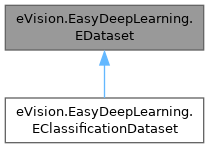
Public Member Functions | |
| None | __init__ (self) |
| Constructs a eVision.EasyDeepLearning.EDataset object. | |
| None | __init__ (self, eVision.EasyDeepLearning.EDataset other) |
| Copy constructor of a eVision.EasyDeepLearning.EDataset object. | |
| None | Load (self, str path) |
| Loads a classification dataset from disk. | |
| None | Load (self, eVision.ESerializer|None serializer) |
| Loads a classification dataset from disk. | |
| None | Save (self, str path) |
| Saves a classification dataset to disk, containing the file paths to the images in the dataset and their associated label. | |
| None | Save (self, eVision.ESerializer|None serializer) |
| Saves a classification dataset to disk, containing the file paths to the images in the dataset and their associated label. | |
| None | SaveWithRelativePath (self, str path) |
| Saves the dataset with image paths relative to the directory in which the dataset file is saved. | |
| None | Export (self, str directory, eVision.EImageFileType fileType, int quality) |
| Exports the dataset and its images to the given directory. | |
| None | Export (self, str directory, eVision.EImageFileType fileType) |
| Exports the dataset and its images to the given directory. | |
| None | Export (self, str directory) |
| Exports the dataset and its images to the given directory. | |
| None | Export (self, str directory, bool keepFilename, eVision.EImageFileType fileType, int quality) |
| Exports the dataset and its images to the given directory. | |
| None | Export (self, str directory, bool keepFilename, eVision.EImageFileType fileType) |
| Exports the dataset and its images to the given directory. | |
| None | Export (self, str directory, bool keepFilename) |
| Exports the dataset and its images to the given directory. | |
| None | Export (self, str directory, int width, int height, int channels, eVision.EImageFileType fileType, int quality) |
| Exports the dataset and its images to the given directory. | |
| None | Export (self, str directory, int width, int height, int channels, eVision.EImageFileType fileType) |
| Exports the dataset and its images to the given directory. | |
| None | Export (self, str directory, int width, int height, int channels) |
| Exports the dataset and its images to the given directory. | |
| None | Export (self, str directory, int width, int height, int channels, bool keepFilename, eVision.EImageFileType fileType, int quality) |
| Exports the dataset and its images to the given directory. | |
| None | Export (self, str directory, int width, int height, int channels, bool keepFilename, eVision.EImageFileType fileType) |
| Exports the dataset and its images to the given directory. | |
| None | Export (self, str directory, int width, int height, int channels, bool keepFilename) |
| Exports the dataset and its images to the given directory. | |
| None | Clear (self) |
| Clears the dataset. | |
| eVision.EasyDeepLearning.EImageAnnotationFormat | GetAvailableImageAnnotationFormat (self, str imageFile) |
| Image annotation file formats that are available next to the image file. | |
| eVision.EasyDeepLearning.EImageAnnotationFormat | GetAvailableImageAnnotationFormat (self, int imgId) |
| Image annotation file formats that are available next to the image file. | |
| None | ImportYOLOTXTAnnotations (self, int imgId, str labelFile) |
| Imports YOLO TXT annotations (for EasyLocate Bounding Box). | |
| None | ImportYOLOTXTAnnotations (self, str labelFile) |
| Imports YOLO TXT annotations (for EasyLocate Bounding Box). | |
| None | ImportPascalVOCXMLAnnotations (self, int imgId) |
| Imports Pascal VOC XML annotations (for EasyLocate Bounding Box). | |
| None | ImportPascalVOCXMLAnnotations (self) |
| Imports Pascal VOC XML annotations (for EasyLocate Bounding Box). | |
| int | AddImage (self, str imagePath) |
| Adds an image to the dataset. | |
| int | AddImage (self, str imagePath, str label) |
| Adds an image to the dataset. | |
| int | AddImage (self, str imagePath, int originX, int originY, int width, int height, eVision.ERegion mask) |
| Adds an image to the dataset. | |
| int | AddImage (self, str imagePath, int originX, int originY, int width, int height, eVision.ERegion mask, str label) |
| Adds an image to the dataset. | |
| int | AddImage (self, eVision.EBaseROI img) |
| Adds an image to the dataset. | |
| int | AddImage (self, eVision.EBaseROI img, str label) |
| Adds an image to the dataset. | |
| int | AddImage (self, eVision.EBaseROI img, int originX, int originY, int width, int height, eVision.ERegion mask) |
| Adds an image to the dataset. | |
| int | AddImage (self, eVision.EBaseROI img, int originX, int originY, int width, int height, eVision.ERegion mask, str label) |
| Adds an image to the dataset. | |
| int | AddImages (self, str filter) |
| Adds all the images present in the directory specified by the parameter path and whose filename matches the filter. | |
| int | AddImages (self, str filter, str label) |
| Adds all the images present in the directory specified by the parameter path and whose filename matches the filter. | |
| int | AddImages (self, str filter, int originX, int originY, int width, int height, eVision.ERegion mask) |
| Adds all the images present in the directory specified by the parameter path and whose filename matches the filter. | |
| int | AddImages (self, str filter, int originX, int originY, int width, int height, eVision.ERegion mask, str label) |
| Adds all the images present in the directory specified by the parameter path and whose filename matches the filter. | |
| int | AddImagesFromCSV (self, str csvFile, int imageColumn, int labelColumn, int skipLines, str separator) |
| Adds images using a CSV (Comma Separated Value) file where each row correspond to an image and the file path and label of each image is given in the columns imageColumn and labelColumn respectively. | |
| int | AddImagesFromCSV (self, str csvFile, int imageColumn, int labelColumn, int skipLines) |
| Adds images using a CSV (Comma Separated Value) file where each row correspond to an image and the file path and label of each image is given in the columns imageColumn and labelColumn respectively. | |
| int | AddImagesFromCSV (self, str csvFile, int imageColumn, int labelColumn) |
| Adds images using a CSV (Comma Separated Value) file where each row correspond to an image and the file path and label of each image is given in the columns imageColumn and labelColumn respectively. | |
| int | AddImagesFromCSV (self, str csvFile, int imageColumn) |
| Adds images using a CSV (Comma Separated Value) file where each row correspond to an image and the file path and label of each image is given in the columns imageColumn and labelColumn respectively. | |
| int | AddImagesFromCSV (self, str csvFile) |
| Adds images using a CSV (Comma Separated Value) file where each row correspond to an image and the file path and label of each image is given in the columns imageColumn and labelColumn respectively. | |
| None | RemoveImage (self, int imgId) |
| Removes the image at the given index. | |
| int | GetNumImagesForFile (self, str filePath) |
| Get the number of images in the dataset that are associated with the given image file. | |
| eVision.EBaseROI|None | GetImageCopy (self, int index) |
| Gets a copy of the i-th image of the dataset. | |
| None | GetImageCopy (self, int index, eVision.EBaseROI img) |
| Gets a copy of the i-th image of the dataset. | |
| str | GetImagePath (self, int index) |
| Gets the path of the i-th image of the dataset. | |
| bool | IsImageFile (self, int index) |
| Whether the image is stored as a file path towards an image. | |
| bool | IsEmbeddedImage (self, int index) |
| Whether the image is embedded into the dataset and is not a reference towards an image file. | |
| str | GetImageLabel (self, int index) |
| Gets the label of the i-th image of the dataset. | |
| None | SetImageLabel (self, int index, str label) |
| Sets the label of images in the dataset. | |
| None | SetImageLabel (self, str filter, str label) |
| Sets the label of images in the dataset. | |
| None | UnsetImageLabel (self, int index) |
| Unset the label of the given image of the dataset. | |
| bool | HasLabel (self, int index) |
| Whether an image has a classification label. | |
| list[int] | GetImagesIndexesWithLabel (self, str label) |
| Gets a list of index corresponding to the images associated with the given label. | |
| list[int] | GetImagesIndexesWithLabel (self, int labelIndex) |
| Gets a list of index corresponding to the images associated with the given label. | |
| None | AddLabel (self, str label) |
| Adds a label to the dataset. | |
| str | GetLabel (self, int i) |
| Gets the i-th label of the dataset (starting from 0 to eVision.EasyDeepLearning.EDataset.NumLabels - 1). | |
| None | SetLabel (self, int index, str label) |
| Sets the i-th label of the dataset (starting from 0 to eVision.EasyDeepLearning.EDataset.NumLabels - 1). | |
| float | GetLabelWeight (self, int index) |
| Gets the weight associated to the i-th label of the dataset (starting from 0 to eVision.EasyDeepLearning.EDataset.NumLabels - 1). | |
| None | SetLabelWeight (self, int index, float weight) |
| Sets the weight associated to the i-th label of the dataset (starting from 0 to eVision.EasyDeepLearning.EDataset.NumLabels - 1). | |
| None | SetLabelColor (self, int index, eVision.ERGBColor color) |
| Sets the label color for a classification label. | |
| eVision.ERGBColor | GetLabelColor (self, int index) |
| Gets the label color for a classification label. | |
| None | SetLabelOpacity (self, int index, int opacity) |
| Sets the label opacity for a classification label. | |
| int | GetLabelOpacity (self, int index) |
| Gets the label opacity for a classification label. | |
| None | RemoveLabel (self, str label) |
| Removes a label from the dataset. | |
| None | RemoveLabel (self, int labelId) |
| Removes a label from the dataset. | |
| None | SetSegmentationMap (self, int imageIndex, eVision.EROIBW16 segmentationMap) |
| Sets the segmentation map of an image. | |
| eVision.EImageBW16 | GetSegmentationMap (self, int imageIndex) |
| Gets the segmentation map of an image. | |
| None | UnsetSegmentation (self, int imageIndex) |
| Unsets the segmentation of an image. | |
| None | ResetSegmentation (self, int imageIndex) |
| Resets the segmentation of an image by setting all pixels to background. | |
| None | AddRegionToSegment (self, int imageIndex, int segmentationLabelIndex, eVision.ERegion region) |
| Adds a region (see eVision.ERegion) to the given segment of an image. | |
| None | AddRegionToSegment (self, int imageIndex, str label, eVision.ERegion region) |
| Adds a region (see eVision.ERegion) to the given segment of an image. | |
| eVision.ERegion | GetRegionForSegment (self, int imageIndex, int segmentationLabelIndex) |
| Gets a region corresponding to the pixels of the given segment. | |
| eVision.ERegion | GetRegionForSegment (self, int imageIndex, str segmentationLabel) |
| Gets a region corresponding to the pixels of the given segment. | |
| int | GetNumImagesForSegmentationLabel (self, int labelId) |
| Number of images containing the given segmentation label. | |
| int | GetNumImagesForSegmentationLabel (self, str label) |
| Number of images containing the given segmentation label. | |
| int | GetNumPixelsForSegmentationLabel (self, int labelId) |
| Number of pixels assigned to the given segmentation label. | |
| int | GetNumPixelsForSegmentationLabel (self, str label) |
| Number of pixels assigned to the given segmentation label. | |
| bool | HasSegmentation (self, int imageId) |
| Whether the image has a segmentation. | |
| bool | HasForegroundSegments (self, int imageId) |
| Whether the image segmentation contains segments that are not background. | |
| int | GetNumSegmentedBlobs (self, int imageId) |
| Number of segmented blobs in the image for all non-background labels or for a specific label. | |
| int | GetNumSegmentedBlobs (self, int imageId, str label) |
| Number of segmented blobs in the image for all non-background labels or for a specific label. | |
| int | GetNumSegmentedBlobs (self, int imageId, int labelId) |
| Number of segmented blobs in the image for all non-background labels or for a specific label. | |
| str | GetSegmentationLabel (self, int index) |
| Gets the segmentation label. | |
| None | SetSegmentationLabel (self, int index, str label) |
| Sets the segmentation labels. | |
| int | AddSegmentationLabel (self, str label, float labelWeight) |
| Adds a segmentation label. | |
| int | AddSegmentationLabel (self, str label) |
| Adds a segmentation label. | |
| None | RemoveSegmentationLabel (self, str label) |
| Remove a segmentation label. | |
| None | RemoveSegmentationLabel (self, int index) |
| Remove a segmentation label. | |
| float | GetSegmentationLabelWeight (self, int index) |
| Gets the segmentation label weights. | |
| float | GetSegmentationLabelWeight (self, str label) |
| Gets the segmentation label weights. | |
| None | SetSegmentationLabelWeight (self, int index, float weight) |
| Sets the segmentation label weight. | |
| None | SetSegmentationLabelWeight (self, str label, float weight) |
| Sets the segmentation label weight. | |
| None | SetSegmentationLabelColor (self, int index, eVision.ERGBColor color) |
| Sets the label color for a segmentation label. | |
| eVision.ERGBColor | GetSegmentationLabelColor (self, int index) |
| Gets the label color for a segmentation label. | |
| None | SetSegmentationLabelOpacity (self, int index, int opacity) |
| Sets the label opacity for a segmentation label. | |
| int | GetSegmentationLabelOpacity (self, int index) |
| Gets the label opacity for a segmentation label. | |
| None | ResetImageObjectLabeling (self, int imageIndex) |
| Resets the object labeling for the specified image. | |
| None | UnsetImageObjectLabeling (self, int imageIndex) |
| Unsets the object labeling for the specified image. | |
| list[eVision._eVision.EasyDeepLearning.ELocatorObject] | GetImageObjects (self, int imageIndex) |
| Gets all the objects of the specified image. | |
| int | GetImageNumObjects (self, int imageIndex) |
| Number of objects for the specified image. | |
| eVision.EasyDeepLearning.ELocatorObject | GetImageObject (self, int imageIndex, int objectIndex) |
| Gets the specified object for the given image. | |
| None | SetImageObject (self, int imageIndex, int objectIndex, eVision.EasyDeepLearning.ELocatorObject obj) |
| Sets the specified object for the given image. | |
| None | SetImageObject (self, int imageIndex, int objectIndex, str label) |
| Sets the specified object for the given image. | |
| None | SetImageObject (self, int imageIndex, int objectIndex, eVision.ERectangleRegion region) |
| Sets the specified object for the given image. | |
| None | AddImageObject (self, int imageIndex, eVision.EasyDeepLearning.ELocatorObject obj) |
| Adds an object to the image. | |
| None | AddImageObject (self, int imageIndex, str label, eVision.ERectangleRegion box) |
| Adds an object to the image. | |
| None | RemoveImageObject (self, int imageIndex, int objectIndex) |
| Removes an object from an image. | |
| str | GetObjectLabel (self, int labelIndex) |
| Object label. | |
| None | SetObjectLabel (self, int labelIndex, str newLabel) |
| Sets an object label. | |
| None | SetObjectLabel (self, str oldLabel, str newLabel) |
| Sets an object label. | |
| None | AddObjectLabel (self, str label, float weight) |
| Adds an object label. | |
| None | AddObjectLabel (self, str label) |
| Adds an object label. | |
| None | RemoveObjectLabel (self, int labelIndex) |
| Removes an object label. | |
| None | RemoveObjectLabel (self, str label) |
| Removes an object label. | |
| None | SetObjectLabelWeight (self, int labelIndex, float weight) |
| Sets the weight of an object label. | |
| None | SetObjectLabelWeight (self, str label, float weight) |
| Sets the weight of an object label. | |
| float | GetObjectLabelWeight (self, int labelIndex) |
| Gets the weight of an object label. | |
| float | GetObjectLabelWeight (self, str label) |
| Gets the weight of an object label. | |
| None | SetObjectLabelColor (self, int index, eVision.ERGBColor color) |
| Sets the label color for an object label. | |
| eVision.ERGBColor | GetObjectLabelColor (self, int index) |
| Gets the label color for an object label. | |
| None | SetObjectLabelOpacity (self, int index, int opacity) |
| Sets the label opacity for an object label. | |
| int | GetObjectLabelOpacity (self, int index) |
| Gets the label opacity for an object label. | |
| bool | HasObjectLabeling (self, int imageIndex) |
| Whether the image is labeled for object detection and use with eVision.EasyDeepLearning.ELocator. | |
| int | GetNumImagesWithObjectLabel (self, int labelIdx) |
| Number of images that contain an object with the given label. | |
| int | GetNumImagesWithObjectLabel (self, str label) |
| Number of images that contain an object with the given label. | |
| int | GetNumObjectsWithLabel (self, int labelIdx) |
| Number of objects with the given label. | |
| int | GetNumObjectsWithLabel (self, str label) |
| Number of objects with the given label. | |
| bool | HasOCRAnnotations (self, int imgId) |
| Whether the specified image has OCR annotations. | |
| None | UnsetOCRAnnotations (self, int imgId) |
| Unsets the OCR labeling for the specified image. | |
| list[eVision._eVision.EasyDeepOCR.ETextLine] | GetOCRAnnotations (self, int imgId) |
| Ground truth text lines for the specified image. | |
| None | SetOCRAnnotations (self, int imgId, list[eVision._eVision.EasyDeepOCR.ETextLine] texts) |
| Sets the ground truth text lines for the specified image. | |
| None | SplitDataset (self, eVision.EasyDeepLearning.EDataset d1, eVision.EasyDeepLearning.EDataset d2, float proportion, bool random) |
| Splits the dataset in two parts to be used for training and validation respectively. | |
| None | SplitDataset (self, eVision.EasyDeepLearning.EDataset d1, eVision.EasyDeepLearning.EDataset d2, float proportion) |
| Splits the dataset in two parts to be used for training and validation respectively. | |
| None | SplitDataset (self, eVision.EasyDeepLearning.EDataset d1, eVision.EasyDeepLearning.EDataset d2) |
| Splits the dataset in two parts to be used for training and validation respectively. | |
| None | SplitDatasetForSegmentation (self, eVision.EasyDeepLearning.EDataset d1, eVision.EasyDeepLearning.EDataset d2, float proportion, bool random) |
| Splits the dataset in two parts for a supervised segmenter. | |
| None | SplitDatasetForSegmentation (self, eVision.EasyDeepLearning.EDataset d1, eVision.EasyDeepLearning.EDataset d2, float proportion) |
| Splits the dataset in two parts for a supervised segmenter. | |
| None | SplitDatasetForSegmentation (self, eVision.EasyDeepLearning.EDataset d1, eVision.EasyDeepLearning.EDataset d2) |
| Splits the dataset in two parts for a supervised segmenter. | |
| None | SplitDatasetForLocator (self, eVision.EasyDeepLearning.EDataset d1, eVision.EasyDeepLearning.EDataset d2, float proportion, bool random) |
| Splits the dataset in two parts for training and validation of a eVision.EasyDeepLearning.ELocator tool. | |
| None | SplitDatasetForLocator (self, eVision.EasyDeepLearning.EDataset d1, eVision.EasyDeepLearning.EDataset d2, float proportion) |
| Splits the dataset in two parts for training and validation of a eVision.EasyDeepLearning.ELocator tool. | |
| None | SplitDatasetForLocator (self, eVision.EasyDeepLearning.EDataset d1, eVision.EasyDeepLearning.EDataset d2) |
| Splits the dataset in two parts for training and validation of a eVision.EasyDeepLearning.ELocator tool. | |
| eVision.EasyDeepLearning.EDatasetSplit | GetSplit (self, float trainingProportion, float validationPropotion, eVision.EasyDeepLearning.EDeepLearningToolType toolType, str goodLabel) |
| Generates a split. | |
| eVision.EasyDeepLearning.EDatasetSplit | GetSplit (self, float trainingProportion, float validationPropotion, eVision.EasyDeepLearning.EDeepLearningToolType toolType, str goodLabel, int seed) |
| Generates a split. | |
| eVision.EasyDeepLearning.EDataset | ExtractSplit (self, eVision.EasyDeepLearning.EDatasetSplit split, eVision.EasyDeepLearning.EDatasetType type) |
| Creates a new eVision.EasyDeepLearning.EDataset containing only the images of the given split type. | |
| None | SetRegionOfInterest (self, int imageIndex, int xOrg, int yOrg, int width, int height) |
| Sets the region of interest for the specified image. | |
| int | GetRegionOfInterestOriginX (self, int imageIndex) |
| Region of interest origin abscissa for the specified image. | |
| int | GetRegionOfInterestOriginY (self, int imageIndex) |
| Region of interest origin ordinate for the specified image. | |
| int | GetRegionOfInterestWidth (self, int imageIndex) |
| Region of interest width for the specified image. | |
| int | GetRegionOfInterestHeight (self, int imageIndex) |
| Region of interest height for the specified image. | |
| eVision.ERegion | GetMask (self, int imageIndex) |
| Gets the mask region/don't care area for the given image. | |
| None | SetMask (self, int imageIndex, eVision.ERegion mask) |
| Sets the mask region/don't care area for the given image. | |
| int | Width (self) |
| Width of the region of interest of the first image added to the dataset. | |
| int | Height (self) |
| Height of the region of interest of the first image added to the dataset. | |
| int | Channels (self) |
| Number of channels of the first image added to the dataset. | |
| int | NumImages (self) |
| Number of images in the dataset. | |
| int | NumImageFiles (self) |
| Number of different image files contained in the dataset. | |
| int | NumLabeledImages (self) |
| Number of images that have a classification label. | |
| int | NumUnlabeledImages (self) |
| Number of images that doesn't have any classification label. | |
| list[int] | LabeledImagesIndexes (self) |
| Gets a list of index corresponding to the images that have a classification label. | |
| list[int] | TextLabeledImagesIndexes (self) |
| Gets a list of index corresponding to the images that have a text only label. | |
| list[int] | ImagesIndexesWithNoLabel (self) |
| Gets a list of index corresponding to the images with no classification labels. | |
| int | NumLabels (self) |
| Number of labels in the dataset. | |
| int | NumSegmentationLabels (self) |
| Number of segmentation labels. | |
| int | NumImagesWithSegmentation (self) |
| Number of images that have a ground truth segmentation. | |
| int | NumImagesWithoutSegmentation (self) |
| Number of images that doesn't have a ground truth segmentation. | |
| int | NumImagesWithoutForegroundSegments (self) |
| Number of images that have a ground truth segmentation that has no foreground segments and is thus entirely composed of background pixels. | |
| int | NumImagesWithForegroundSegments (self) |
| Number of images that have a ground truth segmentation that has foreground segments and is this not entirely composed of background pixels. | |
| int | NumObjectLabels (self) |
| Number of object labels. | |
| int | NumImagesWithObjectLabeling (self) |
| Number of images in the dataset that are labeled for object detection. | |
| int | NumImagesWithoutObjectLabeling (self) |
| Number of images in the dataset that are not labeled for object detection. | |
| int | NumImagesWithoutObjects (self) |
| Number of images in the dataset that are labeled for object detection but have been associated with no object. | |
| int | NumImagesWithObjects (self) |
| Number of images in the dataset that are labeled for object detection and have 1 or more objects. | |
| float | SameLabelMaxOverlap (self) |
| Maximum overlap between objects with the same label in the dataset. | |
| float | AbsoluteMaxOverlap (self) |
| Absolute maximum overlap between objects in the dataset. | |
| int | MaxNumObjectPerImage (self) |
| Maximum number of objects for an image in the dataset. | |
| int | ObjectSize (self) |
| Object size for EasyLocate Interest point. | |
| ObjectSize (self, int value) | |
| Object size for EasyLocate Interest point. | |
| int | NumImagesWithOCR (self) |
| Number of images with OCR annotations. | |
| int | NumImagesWithoutOCR (self) |
| Number of images without OCR annotations. | |
| int | NumTexts (self) |
| Number of annotated texts in the dataset. | |
| eVision.EasyDeepLearning.EDataset | TextDataset (self) |
| Transforms the current dataset to have only subwindow containing the actual text to read. | |
| eVision.EasyDeepLearning.EDataset | TextOrientationDataset (self) |
| Transforms the current text dataset to duplicate it with half image flipped, adding corresponding ground truth. | |
Protected Member Functions | |
| _BasePath__setter (self, str value) | |
| Sets the base path for the images specified with a relative path. | |
Properties | |
| BasePath | |
eVision.EasyDeepLearning.EDataset manages a dataset of images.
A dataset is a collection of images with different types of labeling: labeling for the classification of images, labeling for the segmentation of pixels, and/or labeling for the detection of objects (classification and localization).
The dataset maintains 3 sets of labels for each type of labeling:
The classification and segmentation labels are entirely user defined. The set of segmentation labels will always contain at least the "Background" label representing pixels of the images that have no relevant information for your task (for example, in a defect segmentation application, the "Background" pixels would be the pixels without any defects).
For each type of labeling, an image can either be unlabeled or labeled. When an image in unlabeled for a given type of labeling, the image won't be used for training a deep learning tool that requires this type of labeling.
The image in the dataset can be stored as path to an image file or as an eVision image structure. Supported structures are 8-bits monochrome (eVision.EImageBW8), 16-bits monochrome (eVision.EImageBW16), and 24-bits color (eVision.EROIC24, eVision.EImageC24).
The dataset associates with each image a region of interest and a mask/don't care area. By default, the region of interest of an image is its full extent and its mask is empty.
A dataset can contain images with different sizes (with and height of their region of interest). However, the dataset has a default resolution (see eVision.EasyDeepLearning.EDataset.Width and eVision.EasyDeepLearning.EDataset.Height) that is used by deep learning tools that require the same input image size such as the eVision.EasyDeepLearning.EClassifier. When the images have different sizes, the default resolution will be the resolution of the region of interest of the first image added to the dataset.
Remarks:
License(s): BasicTypes
| None eVision.EasyDeepLearning.EDataset.__init__ | ( | self | ) |
Constructs a eVision.EasyDeepLearning.EDataset object.
| None eVision.EasyDeepLearning.EDataset.__init__ | ( | self, | |
| eVision.EasyDeepLearning.EDataset | other ) |
Copy constructor of a eVision.EasyDeepLearning.EDataset object.
| other | Reference to the eVision.EasyDeepLearning.EDataset object that should be copied |
|
protected |
Sets the base path for the images specified with a relative path.
Remarks:
The base path is not serialized. It must be set after loading a dataset file.
| float eVision.EasyDeepLearning.EDataset.AbsoluteMaxOverlap | ( | self | ) |
Absolute maximum overlap between objects in the dataset.
| int eVision.EasyDeepLearning.EDataset.AddImage | ( | self, | |
| eVision.EBaseROI | img ) |
Adds an image to the dataset.
The image can be specified by its path on the filesystem (parameter imagePath) or by an eVision image buffer (parameter img).
By default, an image will have no classification label and no segmentation. The label of the image can be directly specified when adding the image to the dataset. If the given label was not in the classification labels of the dataset, it will be automatically added to them.
If no region of interest and/or mask is specified, the region of interest of the image will be its full extent and its mask will be empty.
The method returns the index of the image in the dataset. This index is equal to eVision.EasyDeepLearning.EDataset.NumImages - 1 and can be used to add, remove, or modify the annotations for the image.
Remarks:
When adding eVision images (eVision.EBaseROI) to a dataset, the dataset will retain a copy of the image.
When specifying an individual region of interest and/or mask, the dataset will retain a copy of these.
| img | The image |
| int eVision.EasyDeepLearning.EDataset.AddImage | ( | self, | |
| eVision.EBaseROI | img, | ||
| int | originX, | ||
| int | originY, | ||
| int | width, | ||
| int | height, | ||
| eVision.ERegion | mask ) |
Adds an image to the dataset.
The image can be specified by its path on the filesystem (parameter imagePath) or by an eVision image buffer (parameter img).
By default, an image will have no classification label and no segmentation. The label of the image can be directly specified when adding the image to the dataset. If the given label was not in the classification labels of the dataset, it will be automatically added to them.
If no region of interest and/or mask is specified, the region of interest of the image will be its full extent and its mask will be empty.
The method returns the index of the image in the dataset. This index is equal to eVision.EasyDeepLearning.EDataset.NumImages - 1 and can be used to add, remove, or modify the annotations for the image.
Remarks:
When adding eVision images (eVision.EBaseROI) to a dataset, the dataset will retain a copy of the image.
When specifying an individual region of interest and/or mask, the dataset will retain a copy of these.
| img | The image |
| originX | Region of interest origin abscissa |
| originY | Region of interest origin ordinate |
| width | Region of interest width |
| height | Region of interest height |
| mask | The mask for the image (with respect to the region of interest) |
| int eVision.EasyDeepLearning.EDataset.AddImage | ( | self, | |
| eVision.EBaseROI | img, | ||
| int | originX, | ||
| int | originY, | ||
| int | width, | ||
| int | height, | ||
| eVision.ERegion | mask, | ||
| str | label ) |
Adds an image to the dataset.
The image can be specified by its path on the filesystem (parameter imagePath) or by an eVision image buffer (parameter img).
By default, an image will have no classification label and no segmentation. The label of the image can be directly specified when adding the image to the dataset. If the given label was not in the classification labels of the dataset, it will be automatically added to them.
If no region of interest and/or mask is specified, the region of interest of the image will be its full extent and its mask will be empty.
The method returns the index of the image in the dataset. This index is equal to eVision.EasyDeepLearning.EDataset.NumImages - 1 and can be used to add, remove, or modify the annotations for the image.
Remarks:
When adding eVision images (eVision.EBaseROI) to a dataset, the dataset will retain a copy of the image.
When specifying an individual region of interest and/or mask, the dataset will retain a copy of these.
| img | The image |
| originX | Region of interest origin abscissa |
| originY | Region of interest origin ordinate |
| width | Region of interest width |
| height | Region of interest height |
| mask | The mask for the image (with respect to the region of interest) |
| label | The label |
| int eVision.EasyDeepLearning.EDataset.AddImage | ( | self, | |
| eVision.EBaseROI | img, | ||
| str | label ) |
Adds an image to the dataset.
The image can be specified by its path on the filesystem (parameter imagePath) or by an eVision image buffer (parameter img).
By default, an image will have no classification label and no segmentation. The label of the image can be directly specified when adding the image to the dataset. If the given label was not in the classification labels of the dataset, it will be automatically added to them.
If no region of interest and/or mask is specified, the region of interest of the image will be its full extent and its mask will be empty.
The method returns the index of the image in the dataset. This index is equal to eVision.EasyDeepLearning.EDataset.NumImages - 1 and can be used to add, remove, or modify the annotations for the image.
Remarks:
When adding eVision images (eVision.EBaseROI) to a dataset, the dataset will retain a copy of the image.
When specifying an individual region of interest and/or mask, the dataset will retain a copy of these.
| img | The image |
| label | The label |
| int eVision.EasyDeepLearning.EDataset.AddImage | ( | self, | |
| str | imagePath ) |
Adds an image to the dataset.
The image can be specified by its path on the filesystem (parameter imagePath) or by an eVision image buffer (parameter img).
By default, an image will have no classification label and no segmentation. The label of the image can be directly specified when adding the image to the dataset. If the given label was not in the classification labels of the dataset, it will be automatically added to them.
If no region of interest and/or mask is specified, the region of interest of the image will be its full extent and its mask will be empty.
The method returns the index of the image in the dataset. This index is equal to eVision.EasyDeepLearning.EDataset.NumImages - 1 and can be used to add, remove, or modify the annotations for the image.
Remarks:
When adding eVision images (eVision.EBaseROI) to a dataset, the dataset will retain a copy of the image.
When specifying an individual region of interest and/or mask, the dataset will retain a copy of these.
| imagePath | The path to an image |
| int eVision.EasyDeepLearning.EDataset.AddImage | ( | self, | |
| str | imagePath, | ||
| int | originX, | ||
| int | originY, | ||
| int | width, | ||
| int | height, | ||
| eVision.ERegion | mask ) |
Adds an image to the dataset.
The image can be specified by its path on the filesystem (parameter imagePath) or by an eVision image buffer (parameter img).
By default, an image will have no classification label and no segmentation. The label of the image can be directly specified when adding the image to the dataset. If the given label was not in the classification labels of the dataset, it will be automatically added to them.
If no region of interest and/or mask is specified, the region of interest of the image will be its full extent and its mask will be empty.
The method returns the index of the image in the dataset. This index is equal to eVision.EasyDeepLearning.EDataset.NumImages - 1 and can be used to add, remove, or modify the annotations for the image.
Remarks:
When adding eVision images (eVision.EBaseROI) to a dataset, the dataset will retain a copy of the image.
When specifying an individual region of interest and/or mask, the dataset will retain a copy of these.
| imagePath | The path to an image |
| originX | Region of interest origin abscissa |
| originY | Region of interest origin ordinate |
| width | Region of interest width |
| height | Region of interest height |
| mask | The mask for the image (with respect to the region of interest) |
| int eVision.EasyDeepLearning.EDataset.AddImage | ( | self, | |
| str | imagePath, | ||
| int | originX, | ||
| int | originY, | ||
| int | width, | ||
| int | height, | ||
| eVision.ERegion | mask, | ||
| str | label ) |
Adds an image to the dataset.
The image can be specified by its path on the filesystem (parameter imagePath) or by an eVision image buffer (parameter img).
By default, an image will have no classification label and no segmentation. The label of the image can be directly specified when adding the image to the dataset. If the given label was not in the classification labels of the dataset, it will be automatically added to them.
If no region of interest and/or mask is specified, the region of interest of the image will be its full extent and its mask will be empty.
The method returns the index of the image in the dataset. This index is equal to eVision.EasyDeepLearning.EDataset.NumImages - 1 and can be used to add, remove, or modify the annotations for the image.
Remarks:
When adding eVision images (eVision.EBaseROI) to a dataset, the dataset will retain a copy of the image.
When specifying an individual region of interest and/or mask, the dataset will retain a copy of these.
| imagePath | The path to an image |
| originX | Region of interest origin abscissa |
| originY | Region of interest origin ordinate |
| width | Region of interest width |
| height | Region of interest height |
| mask | The mask for the image (with respect to the region of interest) |
| label | The label |
| int eVision.EasyDeepLearning.EDataset.AddImage | ( | self, | |
| str | imagePath, | ||
| str | label ) |
Adds an image to the dataset.
The image can be specified by its path on the filesystem (parameter imagePath) or by an eVision image buffer (parameter img).
By default, an image will have no classification label and no segmentation. The label of the image can be directly specified when adding the image to the dataset. If the given label was not in the classification labels of the dataset, it will be automatically added to them.
If no region of interest and/or mask is specified, the region of interest of the image will be its full extent and its mask will be empty.
The method returns the index of the image in the dataset. This index is equal to eVision.EasyDeepLearning.EDataset.NumImages - 1 and can be used to add, remove, or modify the annotations for the image.
Remarks:
When adding eVision images (eVision.EBaseROI) to a dataset, the dataset will retain a copy of the image.
When specifying an individual region of interest and/or mask, the dataset will retain a copy of these.
| imagePath | The path to an image |
| label | The label |
| None eVision.EasyDeepLearning.EDataset.AddImageObject | ( | self, | |
| int | imageIndex, | ||
| eVision.EasyDeepLearning.ELocatorObject | obj ) |
Adds an object to the image.
Remarks:
The image will be marked as labeled for object detection (eVision.EasyDeepLearning.EDataset.HasObjectLabeling equals to true) after a call to this method.
The object must be located at least partially within the region of interest of the image. Otherwise, when the object is completely outside of the region of interest, an exception will be thrown.
If the label of the object does not exist in the object labels of the dataset, the label will be added to the object labels of the dataset.
| imageIndex | Index of the image |
| obj | Object |
| None eVision.EasyDeepLearning.EDataset.AddImageObject | ( | self, | |
| int | imageIndex, | ||
| str | label, | ||
| eVision.ERectangleRegion | box ) |
Adds an object to the image.
Remarks:
The image will be marked as labeled for object detection (eVision.EasyDeepLearning.EDataset.HasObjectLabeling equals to true) after a call to this method.
The object must be located at least partially within the region of interest of the image. Otherwise, when the object is completely outside of the region of interest, an exception will be thrown.
If the label of the object does not exist in the object labels of the dataset, the label will be added to the object labels of the dataset.
| imageIndex | Index of the image |
| label | Label of the object |
| box | Axis-aligned rectangle |
| int eVision.EasyDeepLearning.EDataset.AddImages | ( | self, | |
| str | filter ) |
Adds all the images present in the directory specified by the parameter path and whose filename matches the filter.
By default, all the images will have no classification label and no classification. However, a label can be directly specified for all of the images.
The method returns the number of images added to the dataset.
Remarks:
The filter is a glob pattern. This means the wildcard characters "*" and "?" correspond to "zero or more character" and "a single character" respectively. For example, the filter "*_good_*.png" will match any filename that contains the string "_good_" and has a png extension.
| filter | A glob filter |
| int eVision.EasyDeepLearning.EDataset.AddImages | ( | self, | |
| str | filter, | ||
| int | originX, | ||
| int | originY, | ||
| int | width, | ||
| int | height, | ||
| eVision.ERegion | mask ) |
Adds all the images present in the directory specified by the parameter path and whose filename matches the filter.
By default, all the images will have no classification label and no classification. However, a label can be directly specified for all of the images.
The method returns the number of images added to the dataset.
Remarks:
The filter is a glob pattern. This means the wildcard characters "*" and "?" correspond to "zero or more character" and "a single character" respectively. For example, the filter "*_good_*.png" will match any filename that contains the string "_good_" and has a png extension.
| filter | A glob filter |
| originX | Region of interest origin abscissa |
| originY | Region of interest origin ordinate |
| width | Region of interest width |
| height | Region of interest height |
| mask | The mask for the images |
| int eVision.EasyDeepLearning.EDataset.AddImages | ( | self, | |
| str | filter, | ||
| int | originX, | ||
| int | originY, | ||
| int | width, | ||
| int | height, | ||
| eVision.ERegion | mask, | ||
| str | label ) |
Adds all the images present in the directory specified by the parameter path and whose filename matches the filter.
By default, all the images will have no classification label and no classification. However, a label can be directly specified for all of the images.
The method returns the number of images added to the dataset.
Remarks:
The filter is a glob pattern. This means the wildcard characters "*" and "?" correspond to "zero or more character" and "a single character" respectively. For example, the filter "*_good_*.png" will match any filename that contains the string "_good_" and has a png extension.
| filter | A glob filter |
| originX | Region of interest origin abscissa |
| originY | Region of interest origin ordinate |
| width | Region of interest width |
| height | Region of interest height |
| mask | The mask for the images |
| label | A label. |
| int eVision.EasyDeepLearning.EDataset.AddImages | ( | self, | |
| str | filter, | ||
| str | label ) |
Adds all the images present in the directory specified by the parameter path and whose filename matches the filter.
By default, all the images will have no classification label and no classification. However, a label can be directly specified for all of the images.
The method returns the number of images added to the dataset.
Remarks:
The filter is a glob pattern. This means the wildcard characters "*" and "?" correspond to "zero or more character" and "a single character" respectively. For example, the filter "*_good_*.png" will match any filename that contains the string "_good_" and has a png extension.
| filter | A glob filter |
| label | A label. |
| int eVision.EasyDeepLearning.EDataset.AddImagesFromCSV | ( | self, | |
| str | csvFile ) |
Adds images using a CSV (Comma Separated Value) file where each row correspond to an image and the file path and label of each image is given in the columns imageColumn and labelColumn respectively.
If the image path in the CSV file are relative, we use the directory containing the given CSV file as the root of the image paths.
The method returns the number of images added to the dataset.
| int eVision.EasyDeepLearning.EDataset.AddImagesFromCSV | ( | self, | |
| str | csvFile, | ||
| int | imageColumn ) |
Adds images using a CSV (Comma Separated Value) file where each row correspond to an image and the file path and label of each image is given in the columns imageColumn and labelColumn respectively.
If the image path in the CSV file are relative, we use the directory containing the given CSV file as the root of the image paths.
The method returns the number of images added to the dataset.
| int eVision.EasyDeepLearning.EDataset.AddImagesFromCSV | ( | self, | |
| str | csvFile, | ||
| int | imageColumn, | ||
| int | labelColumn ) |
Adds images using a CSV (Comma Separated Value) file where each row correspond to an image and the file path and label of each image is given in the columns imageColumn and labelColumn respectively.
If the image path in the CSV file are relative, we use the directory containing the given CSV file as the root of the image paths.
The method returns the number of images added to the dataset.
| int eVision.EasyDeepLearning.EDataset.AddImagesFromCSV | ( | self, | |
| str | csvFile, | ||
| int | imageColumn, | ||
| int | labelColumn, | ||
| int | skipLines ) |
Adds images using a CSV (Comma Separated Value) file where each row correspond to an image and the file path and label of each image is given in the columns imageColumn and labelColumn respectively.
If the image path in the CSV file are relative, we use the directory containing the given CSV file as the root of the image paths.
The method returns the number of images added to the dataset.
| int eVision.EasyDeepLearning.EDataset.AddImagesFromCSV | ( | self, | |
| str | csvFile, | ||
| int | imageColumn, | ||
| int | labelColumn, | ||
| int | skipLines, | ||
| str | separator ) |
Adds images using a CSV (Comma Separated Value) file where each row correspond to an image and the file path and label of each image is given in the columns imageColumn and labelColumn respectively.
If the image path in the CSV file are relative, we use the directory containing the given CSV file as the root of the image paths.
The method returns the number of images added to the dataset.
| None eVision.EasyDeepLearning.EDataset.AddLabel | ( | self, | |
| str | label ) |
Adds a label to the dataset.
| label | Name of the new label |
| None eVision.EasyDeepLearning.EDataset.AddObjectLabel | ( | self, | |
| str | label ) |
Adds an object label.
| label | Label to add |
| None eVision.EasyDeepLearning.EDataset.AddObjectLabel | ( | self, | |
| str | label, | ||
| float | weight ) |
Adds an object label.
| label | Label to add |
| weight | Weight of the label |
| None eVision.EasyDeepLearning.EDataset.AddRegionToSegment | ( | self, | |
| int | imageIndex, | ||
| int | segmentationLabelIndex, | ||
| eVision.ERegion | region ) |
Adds a region (see eVision.ERegion) to the given segment of an image.
If, before this call, the image had no segmentation, the pixels not in the given region will be set to the background segmentation label.
| imageIndex | Image index |
| segmentationLabelIndex | Segmentation label index |
| region | Region to add |
| None eVision.EasyDeepLearning.EDataset.AddRegionToSegment | ( | self, | |
| int | imageIndex, | ||
| str | label, | ||
| eVision.ERegion | region ) |
Adds a region (see eVision.ERegion) to the given segment of an image.
If, before this call, the image had no segmentation, the pixels not in the given region will be set to the background segmentation label.
| imageIndex | Image index |
| label | Segmentation label |
| region | Region to add |
| int eVision.EasyDeepLearning.EDataset.AddSegmentationLabel | ( | self, | |
| str | label ) |
Adds a segmentation label.
The index of the new segmentation labels is returned by the method.
| label | Name of the segmentation label |
| int eVision.EasyDeepLearning.EDataset.AddSegmentationLabel | ( | self, | |
| str | label, | ||
| float | labelWeight ) |
Adds a segmentation label.
The index of the new segmentation labels is returned by the method.
| label | Name of the segmentation label |
| labelWeight | Weight of the segmentation label |
| int eVision.EasyDeepLearning.EDataset.Channels | ( | self | ) |
Number of channels of the first image added to the dataset.
| None eVision.EasyDeepLearning.EDataset.Clear | ( | self | ) |
Clears the dataset.
Reimplemented in eVision.EasyDeepLearning.EClassificationDataset.
| None eVision.EasyDeepLearning.EDataset.Export | ( | self, | |
| str | directory ) |
Exports the dataset and its images to the given directory.
By default, the images will be saved under the filename "Image_[id].[ext]" where [id] is the index of the image in the dataset and [ext] is the image extension. If fileType is set to EImageFileType_Auto, [ext] will be the same as the original image. Otherwise, [ext] will be deduced from the specified file type. If keepFilename is set to true, the images will keep their original filename (except for their extensions). In two images have the same filename, an index will be automatically added to avoid nay conflict. A width, height, and number of channels can be optionally specified to reformat all the images in the dataset. Note that, in this case, only the ROI of the image will be exported.
| directory | A string containing the full path to the directory. |
| None eVision.EasyDeepLearning.EDataset.Export | ( | self, | |
| str | directory, | ||
| bool | keepFilename ) |
Exports the dataset and its images to the given directory.
By default, the images will be saved under the filename "Image_[id].[ext]" where [id] is the index of the image in the dataset and [ext] is the image extension. If fileType is set to EImageFileType_Auto, [ext] will be the same as the original image. Otherwise, [ext] will be deduced from the specified file type. If keepFilename is set to true, the images will keep their original filename (except for their extensions). In two images have the same filename, an index will be automatically added to avoid nay conflict. A width, height, and number of channels can be optionally specified to reformat all the images in the dataset. Note that, in this case, only the ROI of the image will be exported.
| directory | A string containing the full path to the directory. |
| keepFilename | Keep the original filename of the images |
| None eVision.EasyDeepLearning.EDataset.Export | ( | self, | |
| str | directory, | ||
| bool | keepFilename, | ||
| eVision.EImageFileType | fileType ) |
Exports the dataset and its images to the given directory.
By default, the images will be saved under the filename "Image_[id].[ext]" where [id] is the index of the image in the dataset and [ext] is the image extension. If fileType is set to EImageFileType_Auto, [ext] will be the same as the original image. Otherwise, [ext] will be deduced from the specified file type. If keepFilename is set to true, the images will keep their original filename (except for their extensions). In two images have the same filename, an index will be automatically added to avoid nay conflict. A width, height, and number of channels can be optionally specified to reformat all the images in the dataset. Note that, in this case, only the ROI of the image will be exported.
| directory | A string containing the full path to the directory. |
| keepFilename | Keep the original filename of the images |
| fileType | File type for the exported file. If EImageFileType_Auto, the same file type as the original image is used. |
| None eVision.EasyDeepLearning.EDataset.Export | ( | self, | |
| str | directory, | ||
| bool | keepFilename, | ||
| eVision.EImageFileType | fileType, | ||
| int | quality ) |
Exports the dataset and its images to the given directory.
By default, the images will be saved under the filename "Image_[id].[ext]" where [id] is the index of the image in the dataset and [ext] is the image extension. If fileType is set to EImageFileType_Auto, [ext] will be the same as the original image. Otherwise, [ext] will be deduced from the specified file type. If keepFilename is set to true, the images will keep their original filename (except for their extensions). In two images have the same filename, an index will be automatically added to avoid nay conflict. A width, height, and number of channels can be optionally specified to reformat all the images in the dataset. Note that, in this case, only the ROI of the image will be exported.
| directory | A string containing the full path to the directory. |
| keepFilename | Keep the original filename of the images |
| fileType | File type for the exported file. If EImageFileType_Auto, the same file type as the original image is used. |
| quality | Quality or compression parameters for eVision.EBaseROI.SavePng, eVision.EBaseROI.SaveJpeg, or eVision.EBaseROI.SaveJpeg2K. A value of -1 means the default value. |
| None eVision.EasyDeepLearning.EDataset.Export | ( | self, | |
| str | directory, | ||
| eVision.EImageFileType | fileType ) |
Exports the dataset and its images to the given directory.
By default, the images will be saved under the filename "Image_[id].[ext]" where [id] is the index of the image in the dataset and [ext] is the image extension. If fileType is set to EImageFileType_Auto, [ext] will be the same as the original image. Otherwise, [ext] will be deduced from the specified file type. If keepFilename is set to true, the images will keep their original filename (except for their extensions). In two images have the same filename, an index will be automatically added to avoid nay conflict. A width, height, and number of channels can be optionally specified to reformat all the images in the dataset. Note that, in this case, only the ROI of the image will be exported.
| directory | A string containing the full path to the directory. |
| fileType | File type for the exported file. If EImageFileType_Auto, the same file type as the original image is used. |
| None eVision.EasyDeepLearning.EDataset.Export | ( | self, | |
| str | directory, | ||
| eVision.EImageFileType | fileType, | ||
| int | quality ) |
Exports the dataset and its images to the given directory.
By default, the images will be saved under the filename "Image_[id].[ext]" where [id] is the index of the image in the dataset and [ext] is the image extension. If fileType is set to EImageFileType_Auto, [ext] will be the same as the original image. Otherwise, [ext] will be deduced from the specified file type. If keepFilename is set to true, the images will keep their original filename (except for their extensions). In two images have the same filename, an index will be automatically added to avoid nay conflict. A width, height, and number of channels can be optionally specified to reformat all the images in the dataset. Note that, in this case, only the ROI of the image will be exported.
| directory | A string containing the full path to the directory. |
| fileType | File type for the exported file. If EImageFileType_Auto, the same file type as the original image is used. |
| quality | Quality or compression parameters for eVision.EBaseROI.SavePng, eVision.EBaseROI.SaveJpeg, or eVision.EBaseROI.SaveJpeg2K. A value of -1 means the default value. |
| None eVision.EasyDeepLearning.EDataset.Export | ( | self, | |
| str | directory, | ||
| int | width, | ||
| int | height, | ||
| int | channels ) |
Exports the dataset and its images to the given directory.
By default, the images will be saved under the filename "Image_[id].[ext]" where [id] is the index of the image in the dataset and [ext] is the image extension. If fileType is set to EImageFileType_Auto, [ext] will be the same as the original image. Otherwise, [ext] will be deduced from the specified file type. If keepFilename is set to true, the images will keep their original filename (except for their extensions). In two images have the same filename, an index will be automatically added to avoid nay conflict. A width, height, and number of channels can be optionally specified to reformat all the images in the dataset. Note that, in this case, only the ROI of the image will be exported.
| directory | A string containing the full path to the directory. |
| width | Width of the image. |
| height | Height of the image. |
| channels | Number of channels of the image (only 1 and 3 are valid, for grayscale and RGB respectively). |
| None eVision.EasyDeepLearning.EDataset.Export | ( | self, | |
| str | directory, | ||
| int | width, | ||
| int | height, | ||
| int | channels, | ||
| bool | keepFilename ) |
Exports the dataset and its images to the given directory.
By default, the images will be saved under the filename "Image_[id].[ext]" where [id] is the index of the image in the dataset and [ext] is the image extension. If fileType is set to EImageFileType_Auto, [ext] will be the same as the original image. Otherwise, [ext] will be deduced from the specified file type. If keepFilename is set to true, the images will keep their original filename (except for their extensions). In two images have the same filename, an index will be automatically added to avoid nay conflict. A width, height, and number of channels can be optionally specified to reformat all the images in the dataset. Note that, in this case, only the ROI of the image will be exported.
| directory | A string containing the full path to the directory. |
| width | Width of the image. |
| height | Height of the image. |
| channels | Number of channels of the image (only 1 and 3 are valid, for grayscale and RGB respectively). |
| keepFilename | Keep the original filename of the images |
| None eVision.EasyDeepLearning.EDataset.Export | ( | self, | |
| str | directory, | ||
| int | width, | ||
| int | height, | ||
| int | channels, | ||
| bool | keepFilename, | ||
| eVision.EImageFileType | fileType ) |
Exports the dataset and its images to the given directory.
By default, the images will be saved under the filename "Image_[id].[ext]" where [id] is the index of the image in the dataset and [ext] is the image extension. If fileType is set to EImageFileType_Auto, [ext] will be the same as the original image. Otherwise, [ext] will be deduced from the specified file type. If keepFilename is set to true, the images will keep their original filename (except for their extensions). In two images have the same filename, an index will be automatically added to avoid nay conflict. A width, height, and number of channels can be optionally specified to reformat all the images in the dataset. Note that, in this case, only the ROI of the image will be exported.
| directory | A string containing the full path to the directory. |
| width | Width of the image. |
| height | Height of the image. |
| channels | Number of channels of the image (only 1 and 3 are valid, for grayscale and RGB respectively). |
| keepFilename | Keep the original filename of the images |
| fileType | File type for the exported file. If EImageFileType_Auto, the same file type as the original image is used. |
| None eVision.EasyDeepLearning.EDataset.Export | ( | self, | |
| str | directory, | ||
| int | width, | ||
| int | height, | ||
| int | channels, | ||
| bool | keepFilename, | ||
| eVision.EImageFileType | fileType, | ||
| int | quality ) |
Exports the dataset and its images to the given directory.
By default, the images will be saved under the filename "Image_[id].[ext]" where [id] is the index of the image in the dataset and [ext] is the image extension. If fileType is set to EImageFileType_Auto, [ext] will be the same as the original image. Otherwise, [ext] will be deduced from the specified file type. If keepFilename is set to true, the images will keep their original filename (except for their extensions). In two images have the same filename, an index will be automatically added to avoid nay conflict. A width, height, and number of channels can be optionally specified to reformat all the images in the dataset. Note that, in this case, only the ROI of the image will be exported.
| directory | A string containing the full path to the directory. |
| width | Width of the image. |
| height | Height of the image. |
| channels | Number of channels of the image (only 1 and 3 are valid, for grayscale and RGB respectively). |
| keepFilename | Keep the original filename of the images |
| fileType | File type for the exported file. If EImageFileType_Auto, the same file type as the original image is used. |
| quality | Quality or compression parameters for eVision.EBaseROI.SavePng, eVision.EBaseROI.SaveJpeg, or eVision.EBaseROI.SaveJpeg2K. A value of -1 means the default value. |
| None eVision.EasyDeepLearning.EDataset.Export | ( | self, | |
| str | directory, | ||
| int | width, | ||
| int | height, | ||
| int | channels, | ||
| eVision.EImageFileType | fileType ) |
Exports the dataset and its images to the given directory.
By default, the images will be saved under the filename "Image_[id].[ext]" where [id] is the index of the image in the dataset and [ext] is the image extension. If fileType is set to EImageFileType_Auto, [ext] will be the same as the original image. Otherwise, [ext] will be deduced from the specified file type. If keepFilename is set to true, the images will keep their original filename (except for their extensions). In two images have the same filename, an index will be automatically added to avoid nay conflict. A width, height, and number of channels can be optionally specified to reformat all the images in the dataset. Note that, in this case, only the ROI of the image will be exported.
| directory | A string containing the full path to the directory. |
| width | Width of the image. |
| height | Height of the image. |
| channels | Number of channels of the image (only 1 and 3 are valid, for grayscale and RGB respectively). |
| fileType | File type for the exported file. If EImageFileType_Auto, the same file type as the original image is used. |
| None eVision.EasyDeepLearning.EDataset.Export | ( | self, | |
| str | directory, | ||
| int | width, | ||
| int | height, | ||
| int | channels, | ||
| eVision.EImageFileType | fileType, | ||
| int | quality ) |
Exports the dataset and its images to the given directory.
By default, the images will be saved under the filename "Image_[id].[ext]" where [id] is the index of the image in the dataset and [ext] is the image extension. If fileType is set to EImageFileType_Auto, [ext] will be the same as the original image. Otherwise, [ext] will be deduced from the specified file type. If keepFilename is set to true, the images will keep their original filename (except for their extensions). In two images have the same filename, an index will be automatically added to avoid nay conflict. A width, height, and number of channels can be optionally specified to reformat all the images in the dataset. Note that, in this case, only the ROI of the image will be exported.
| directory | A string containing the full path to the directory. |
| width | Width of the image. |
| height | Height of the image. |
| channels | Number of channels of the image (only 1 and 3 are valid, for grayscale and RGB respectively). |
| fileType | File type for the exported file. If EImageFileType_Auto, the same file type as the original image is used. |
| quality | Quality or compression parameters for eVision.EBaseROI.SavePng, eVision.EBaseROI.SaveJpeg, or eVision.EBaseROI.SaveJpeg2K. A value of -1 means the default value. |
| eVision.EasyDeepLearning.EDataset eVision.EasyDeepLearning.EDataset.ExtractSplit | ( | self, | |
| eVision.EasyDeepLearning.EDatasetSplit | split, | ||
| eVision.EasyDeepLearning.EDatasetType | type ) |
Creates a new eVision.EasyDeepLearning.EDataset containing only the images of the given split type.
| split | Split |
| type | Type of the split to extract |
Reimplemented in eVision.EasyDeepLearning.EClassificationDataset.
| eVision.EasyDeepLearning.EImageAnnotationFormat eVision.EasyDeepLearning.EDataset.GetAvailableImageAnnotationFormat | ( | self, | |
| int | imgId ) |
Image annotation file formats that are available next to the image file.
| imgId | Index of an image |
| eVision.EasyDeepLearning.EImageAnnotationFormat eVision.EasyDeepLearning.EDataset.GetAvailableImageAnnotationFormat | ( | self, | |
| str | imageFile ) |
Image annotation file formats that are available next to the image file.
| imageFile | Path to an image file |
| eVision.EBaseROI | None eVision.EasyDeepLearning.EDataset.GetImageCopy | ( | self, | |
| int | index ) |
Gets a copy of the i-th image of the dataset.
| index | The index of the image. |
| None eVision.EasyDeepLearning.EDataset.GetImageCopy | ( | self, | |
| int | index, | ||
| eVision.EBaseROI | img ) |
Gets a copy of the i-th image of the dataset.
| index | The index of the image. |
| img | Image object to copy the image into. |
| str eVision.EasyDeepLearning.EDataset.GetImageLabel | ( | self, | |
| int | index ) |
Gets the label of the i-th image of the dataset.
An exception is thrown if the image has no classification label.
| index | The index of the image for which to get the label. |
| int eVision.EasyDeepLearning.EDataset.GetImageNumObjects | ( | self, | |
| int | imageIndex ) |
Number of objects for the specified image.
| imageIndex | Index of the image |
| eVision.EasyDeepLearning.ELocatorObject eVision.EasyDeepLearning.EDataset.GetImageObject | ( | self, | |
| int | imageIndex, | ||
| int | objectIndex ) |
Gets the specified object for the given image.
| imageIndex | Index of the image |
| objectIndex | Index of the object between 0 and eVision.EasyDeepLearning.EDataset.GetImageNumObjects |
| list[eVision._eVision.EasyDeepLearning.ELocatorObject] eVision.EasyDeepLearning.EDataset.GetImageObjects | ( | self, | |
| int | imageIndex ) |
Gets all the objects of the specified image.
| imageIndex | Index of the image |
| str eVision.EasyDeepLearning.EDataset.GetImagePath | ( | self, | |
| int | index ) |
Gets the path of the i-th image of the dataset.
If the image was not given using a path, the method will throw an exception.
| index | The index of the image for which to get the path. |
| list[int] eVision.EasyDeepLearning.EDataset.GetImagesIndexesWithLabel | ( | self, | |
| int | labelIndex ) |
Gets a list of index corresponding to the images associated with the given label.
| labelIndex | The index of the label (starting from 0 to eVision.EasyDeepLearning.EDataset.NumLabels - 1) |
| list[int] eVision.EasyDeepLearning.EDataset.GetImagesIndexesWithLabel | ( | self, | |
| str | label ) |
Gets a list of index corresponding to the images associated with the given label.
| label | The label |
| str eVision.EasyDeepLearning.EDataset.GetLabel | ( | self, | |
| int | i ) |
Gets the i-th label of the dataset (starting from 0 to eVision.EasyDeepLearning.EDataset.NumLabels - 1).
| i | Label index |
| eVision.ERGBColor eVision.EasyDeepLearning.EDataset.GetLabelColor | ( | self, | |
| int | index ) |
Gets the label color for a classification label.
| index | Label index (0 to eVision.EasyDeepLearning.EDataset.NumLabels - 1). |
| int eVision.EasyDeepLearning.EDataset.GetLabelOpacity | ( | self, | |
| int | index ) |
Gets the label opacity for a classification label.
| index | Label index (0 to eVision.EasyDeepLearning.EDataset.NumLabels - 1). |
| float eVision.EasyDeepLearning.EDataset.GetLabelWeight | ( | self, | |
| int | index ) |
Gets the weight associated to the i-th label of the dataset (starting from 0 to eVision.EasyDeepLearning.EDataset.NumLabels - 1).
| index | Label index |
| eVision.ERegion eVision.EasyDeepLearning.EDataset.GetMask | ( | self, | |
| int | imageIndex ) |
Gets the mask region/don't care area for the given image.
The mask is defined with respect to the region of interest of the image.
| imageIndex | Index of the image for which to get the mask region |
| int eVision.EasyDeepLearning.EDataset.GetNumImagesForFile | ( | self, | |
| str | filePath ) |
Get the number of images in the dataset that are associated with the given image file.
Remarks:
The number of image files can be different than the number of images of the dataset. An image file can correspond to several dataset images (with different ROI).
| filePath | the path to the image. |
| int eVision.EasyDeepLearning.EDataset.GetNumImagesForSegmentationLabel | ( | self, | |
| int | labelId ) |
Number of images containing the given segmentation label.
| labelId | Index of the segmentation label |
| int eVision.EasyDeepLearning.EDataset.GetNumImagesForSegmentationLabel | ( | self, | |
| str | label ) |
Number of images containing the given segmentation label.
| label | Segmentation label |
| int eVision.EasyDeepLearning.EDataset.GetNumImagesWithObjectLabel | ( | self, | |
| int | labelIdx ) |
Number of images that contain an object with the given label.
| labelIdx | Index of the object label. |
| int eVision.EasyDeepLearning.EDataset.GetNumImagesWithObjectLabel | ( | self, | |
| str | label ) |
Number of images that contain an object with the given label.
| label | Label. |
| int eVision.EasyDeepLearning.EDataset.GetNumObjectsWithLabel | ( | self, | |
| int | labelIdx ) |
Number of objects with the given label.
| labelIdx | Index of the object label. |
| int eVision.EasyDeepLearning.EDataset.GetNumObjectsWithLabel | ( | self, | |
| str | label ) |
Number of objects with the given label.
| label | Label. |
| int eVision.EasyDeepLearning.EDataset.GetNumPixelsForSegmentationLabel | ( | self, | |
| int | labelId ) |
Number of pixels assigned to the given segmentation label.
| labelId | Index of the segmentation label |
| int eVision.EasyDeepLearning.EDataset.GetNumPixelsForSegmentationLabel | ( | self, | |
| str | label ) |
Number of pixels assigned to the given segmentation label.
| label | Segmentation label |
| int eVision.EasyDeepLearning.EDataset.GetNumSegmentedBlobs | ( | self, | |
| int | imageId ) |
Number of segmented blobs in the image for all non-background labels or for a specific label.
Remarks:
A segmented blob is a contiguous area assigned to a label different than "Background".
| imageId | Image index |
| int eVision.EasyDeepLearning.EDataset.GetNumSegmentedBlobs | ( | self, | |
| int | imageId, | ||
| int | labelId ) |
Number of segmented blobs in the image for all non-background labels or for a specific label.
Remarks:
A segmented blob is a contiguous area assigned to a label different than "Background".
| imageId | Image index |
| labelId | Label index |
| int eVision.EasyDeepLearning.EDataset.GetNumSegmentedBlobs | ( | self, | |
| int | imageId, | ||
| str | label ) |
Number of segmented blobs in the image for all non-background labels or for a specific label.
Remarks:
A segmented blob is a contiguous area assigned to a label different than "Background".
| imageId | Image index |
| label | Label |
| str eVision.EasyDeepLearning.EDataset.GetObjectLabel | ( | self, | |
| int | labelIndex ) |
Object label.
| labelIndex | Index of the object label between 0 and eVision.EasyDeepLearning.EDataset.NumObjectLabels |
| eVision.ERGBColor eVision.EasyDeepLearning.EDataset.GetObjectLabelColor | ( | self, | |
| int | index ) |
Gets the label color for an object label.
| index | Label index (0 to eVision.EasyDeepLearning.EDataset.NumLabels - 1). |
| int eVision.EasyDeepLearning.EDataset.GetObjectLabelOpacity | ( | self, | |
| int | index ) |
Gets the label opacity for an object label.
| index | Label index (0 to eVision.EasyDeepLearning.EDataset.NumLabels - 1). |
| float eVision.EasyDeepLearning.EDataset.GetObjectLabelWeight | ( | self, | |
| int | labelIndex ) |
Gets the weight of an object label.
| labelIndex | Index of the object label |
| float eVision.EasyDeepLearning.EDataset.GetObjectLabelWeight | ( | self, | |
| str | label ) |
Gets the weight of an object label.
| label | Label |
| list[eVision._eVision.EasyDeepOCR.ETextLine] eVision.EasyDeepLearning.EDataset.GetOCRAnnotations | ( | self, | |
| int | imgId ) |
Ground truth text lines for the specified image.
| imgId | Index of the image. |
| eVision.ERegion eVision.EasyDeepLearning.EDataset.GetRegionForSegment | ( | self, | |
| int | imageIndex, | ||
| int | segmentationLabelIndex ) |
Gets a region corresponding to the pixels of the given segment.
| imageIndex | Image index |
| segmentationLabelIndex | Segmentation label index |
| eVision.ERegion eVision.EasyDeepLearning.EDataset.GetRegionForSegment | ( | self, | |
| int | imageIndex, | ||
| str | segmentationLabel ) |
Gets a region corresponding to the pixels of the given segment.
| imageIndex | Image index |
| segmentationLabel | Segmentation label |
| int eVision.EasyDeepLearning.EDataset.GetRegionOfInterestHeight | ( | self, | |
| int | imageIndex ) |
Region of interest height for the specified image.
| imageIndex | Index of the image. |
| int eVision.EasyDeepLearning.EDataset.GetRegionOfInterestOriginX | ( | self, | |
| int | imageIndex ) |
Region of interest origin abscissa for the specified image.
| imageIndex | Index of the image. |
| int eVision.EasyDeepLearning.EDataset.GetRegionOfInterestOriginY | ( | self, | |
| int | imageIndex ) |
Region of interest origin ordinate for the specified image.
| imageIndex | Index of the image. |
| int eVision.EasyDeepLearning.EDataset.GetRegionOfInterestWidth | ( | self, | |
| int | imageIndex ) |
Region of interest width for the specified image.
| imageIndex | Index of the image. |
| str eVision.EasyDeepLearning.EDataset.GetSegmentationLabel | ( | self, | |
| int | index ) |
Gets the segmentation label.
Remarks:
The segmentation label index 0 is reserved and corresponds to the "background" label. This segmentation label can't be changed.
| index | Index of the segmentation label |
| eVision.ERGBColor eVision.EasyDeepLearning.EDataset.GetSegmentationLabelColor | ( | self, | |
| int | index ) |
Gets the label color for a segmentation label.
| index | Label index (0 to eVision.EasyDeepLearning.EDataset.NumLabels - 1). |
| int eVision.EasyDeepLearning.EDataset.GetSegmentationLabelOpacity | ( | self, | |
| int | index ) |
Gets the label opacity for a segmentation label.
| index | Label index (0 to eVision.EasyDeepLearning.EDataset.NumLabels - 1). |
| float eVision.EasyDeepLearning.EDataset.GetSegmentationLabelWeight | ( | self, | |
| int | index ) |
Gets the segmentation label weights.
| index | Index of the segmentation label |
| float eVision.EasyDeepLearning.EDataset.GetSegmentationLabelWeight | ( | self, | |
| str | label ) |
Gets the segmentation label weights.
| label | Segmentation label |
| eVision.EImageBW16 eVision.EasyDeepLearning.EDataset.GetSegmentationMap | ( | self, | |
| int | imageIndex ) |
Gets the segmentation map of an image.
The segmentation map is a 16-bit eVision.EROIBW16 image where the value of each pixel is equal to the corresponding segmentation label index (see eVision.EasyDeepLearning.EDataset.GetSegmentationLabel).
If an image has no segmentation (eVision.EasyDeepLearning.EDataset.HasSegmentation), the getter will throw an exception.
| imageIndex | Image index |
| eVision.EasyDeepLearning.EDatasetSplit eVision.EasyDeepLearning.EDataset.GetSplit | ( | self, | |
| float | trainingProportion, | ||
| float | validationPropotion, | ||
| eVision.EasyDeepLearning.EDeepLearningToolType | toolType, | ||
| str | goodLabel ) |
Generates a split.
| trainingProportion | Approximate proportion of training images |
| validationPropotion | Approximate proportion of validation images |
| toolType | Tool type for which to generate the split |
| goodLabel | The good label for EasySegment Unsupervised split |
| eVision.EasyDeepLearning.EDatasetSplit eVision.EasyDeepLearning.EDataset.GetSplit | ( | self, | |
| float | trainingProportion, | ||
| float | validationPropotion, | ||
| eVision.EasyDeepLearning.EDeepLearningToolType | toolType, | ||
| str | goodLabel, | ||
| int | seed ) |
Generates a split.
| trainingProportion | Approximate proportion of training images |
| validationPropotion | Approximate proportion of validation images |
| toolType | Tool type for which to generate the split |
| goodLabel | The good label for EasySegment Unsupervised split |
| seed | Seed for randomization |
| bool eVision.EasyDeepLearning.EDataset.HasForegroundSegments | ( | self, | |
| int | imageId ) |
Whether the image segmentation contains segments that are not background.
If the image has no segmentation, this method throws an exception.
| imageId | Image index |
| bool eVision.EasyDeepLearning.EDataset.HasLabel | ( | self, | |
| int | index ) |
Whether an image has a classification label.
| index | Index of an image. |
| bool eVision.EasyDeepLearning.EDataset.HasObjectLabeling | ( | self, | |
| int | imageIndex ) |
Whether the image is labeled for object detection and use with eVision.EasyDeepLearning.ELocator.
| imageIndex | Index of the image |
| bool eVision.EasyDeepLearning.EDataset.HasOCRAnnotations | ( | self, | |
| int | imgId ) |
Whether the specified image has OCR annotations.
| imgId | Index of the image. |
| bool eVision.EasyDeepLearning.EDataset.HasSegmentation | ( | self, | |
| int | imageId ) |
Whether the image has a segmentation.
| imageId | Image index |
| int eVision.EasyDeepLearning.EDataset.Height | ( | self | ) |
Height of the region of interest of the first image added to the dataset.
| list[int] eVision.EasyDeepLearning.EDataset.ImagesIndexesWithNoLabel | ( | self | ) |
Gets a list of index corresponding to the images with no classification labels.
| None eVision.EasyDeepLearning.EDataset.ImportPascalVOCXMLAnnotations | ( | self | ) |
Imports Pascal VOC XML annotations (for EasyLocate Bounding Box).
This method may add new labels to the object labels.
The version that do not take an image index attempts to import the annotation from all images currently in the dataset.
| None eVision.EasyDeepLearning.EDataset.ImportPascalVOCXMLAnnotations | ( | self, | |
| int | imgId ) |
Imports Pascal VOC XML annotations (for EasyLocate Bounding Box).
This method may add new labels to the object labels.
The version that do not take an image index attempts to import the annotation from all images currently in the dataset.
| imgId | The image index for which to import the annotation |
| None eVision.EasyDeepLearning.EDataset.ImportYOLOTXTAnnotations | ( | self, | |
| int | imgId, | ||
| str | labelFile ) |
Imports YOLO TXT annotations (for EasyLocate Bounding Box).
You need to specify the list of labels associated with the YOLO TXT annotations through an array of string or through a file containing this list. This method may add new labels to the object labels.
The version that do not take an image index attempts to import the annotation from all images currently in the dataset.
| imgId | The image index for which to import the annotation |
| labelFile | Path to a file containing the label list |
| None eVision.EasyDeepLearning.EDataset.ImportYOLOTXTAnnotations | ( | self, | |
| str | labelFile ) |
Imports YOLO TXT annotations (for EasyLocate Bounding Box).
You need to specify the list of labels associated with the YOLO TXT annotations through an array of string or through a file containing this list. This method may add new labels to the object labels.
The version that do not take an image index attempts to import the annotation from all images currently in the dataset.
| labelFile | Path to a file containing the label list |
| bool eVision.EasyDeepLearning.EDataset.IsEmbeddedImage | ( | self, | |
| int | index ) |
Whether the image is embedded into the dataset and is not a reference towards an image file.
| index | Index of the image. |
| bool eVision.EasyDeepLearning.EDataset.IsImageFile | ( | self, | |
| int | index ) |
Whether the image is stored as a file path towards an image.
| index | Index of the image. |
| list[int] eVision.EasyDeepLearning.EDataset.LabeledImagesIndexes | ( | self | ) |
Gets a list of index corresponding to the images that have a classification label.
| None eVision.EasyDeepLearning.EDataset.Load | ( | self, | |
| eVision.ESerializer | None | serializer ) |
Loads a classification dataset from disk.
| serializer | The serializer. |
| None eVision.EasyDeepLearning.EDataset.Load | ( | self, | |
| str | path ) |
Loads a classification dataset from disk.
| path | A string containing the full path to the dataset file. |
| int eVision.EasyDeepLearning.EDataset.MaxNumObjectPerImage | ( | self | ) |
Maximum number of objects for an image in the dataset.
If no images has object labeling (see eVision.EasyDeepLearning.EDataset.HasObjectLabeling), the method returns -1.
| int eVision.EasyDeepLearning.EDataset.NumImageFiles | ( | self | ) |
Number of different image files contained in the dataset.
Remarks:
The number of image files can be different than the number of images of the dataset. An image file can correspond to several dataset images (with different ROI).
| int eVision.EasyDeepLearning.EDataset.NumImages | ( | self | ) |
Number of images in the dataset.
| int eVision.EasyDeepLearning.EDataset.NumImagesWithForegroundSegments | ( | self | ) |
Number of images that have a ground truth segmentation that has foreground segments and is this not entirely composed of background pixels.
| int eVision.EasyDeepLearning.EDataset.NumImagesWithObjectLabeling | ( | self | ) |
Number of images in the dataset that are labeled for object detection.
| int eVision.EasyDeepLearning.EDataset.NumImagesWithObjects | ( | self | ) |
Number of images in the dataset that are labeled for object detection and have 1 or more objects.
| int eVision.EasyDeepLearning.EDataset.NumImagesWithOCR | ( | self | ) |
Number of images with OCR annotations.
| int eVision.EasyDeepLearning.EDataset.NumImagesWithoutForegroundSegments | ( | self | ) |
Number of images that have a ground truth segmentation that has no foreground segments and is thus entirely composed of background pixels.
| int eVision.EasyDeepLearning.EDataset.NumImagesWithoutObjectLabeling | ( | self | ) |
Number of images in the dataset that are not labeled for object detection.
| int eVision.EasyDeepLearning.EDataset.NumImagesWithoutObjects | ( | self | ) |
Number of images in the dataset that are labeled for object detection but have been associated with no object.
| int eVision.EasyDeepLearning.EDataset.NumImagesWithoutOCR | ( | self | ) |
Number of images without OCR annotations.
| int eVision.EasyDeepLearning.EDataset.NumImagesWithoutSegmentation | ( | self | ) |
Number of images that doesn't have a ground truth segmentation.
| int eVision.EasyDeepLearning.EDataset.NumImagesWithSegmentation | ( | self | ) |
Number of images that have a ground truth segmentation.
| int eVision.EasyDeepLearning.EDataset.NumLabeledImages | ( | self | ) |
Number of images that have a classification label.
| int eVision.EasyDeepLearning.EDataset.NumLabels | ( | self | ) |
Number of labels in the dataset.
| int eVision.EasyDeepLearning.EDataset.NumObjectLabels | ( | self | ) |
Number of object labels.
| int eVision.EasyDeepLearning.EDataset.NumSegmentationLabels | ( | self | ) |
Number of segmentation labels.
A dataset has always at least one segmentation label: "background".
| int eVision.EasyDeepLearning.EDataset.NumTexts | ( | self | ) |
Number of annotated texts in the dataset.
| int eVision.EasyDeepLearning.EDataset.NumUnlabeledImages | ( | self | ) |
Number of images that doesn't have any classification label.
| int eVision.EasyDeepLearning.EDataset.ObjectSize | ( | self | ) |
Object size for EasyLocate Interest point.
| eVision.EasyDeepLearning.EDataset.ObjectSize | ( | self, | |
| int | value ) |
Object size for EasyLocate Interest point.
| None eVision.EasyDeepLearning.EDataset.RemoveImage | ( | self, | |
| int | imgId ) |
Removes the image at the given index.
All annotations (label, segmentation, objects) will be lost.
| imgId | Index of the image to remove |
| None eVision.EasyDeepLearning.EDataset.RemoveImageObject | ( | self, | |
| int | imageIndex, | ||
| int | objectIndex ) |
Removes an object from an image.
| imageIndex | Index of the image |
| objectIndex | Index of the object between 0 and eVision.EasyDeepLearning.EDataset.GetImageNumObjects |
| None eVision.EasyDeepLearning.EDataset.RemoveLabel | ( | self, | |
| int | labelId ) |
Removes a label from the dataset.
All the images associated with this label will be set to unlabeled (see eVision.EasyDeepLearning.EDataset.HasLabel).
| labelId | Index of the label to remove |
| None eVision.EasyDeepLearning.EDataset.RemoveLabel | ( | self, | |
| str | label ) |
Removes a label from the dataset.
All the images associated with this label will be set to unlabeled (see eVision.EasyDeepLearning.EDataset.HasLabel).
| label | Name of the label to remove |
| None eVision.EasyDeepLearning.EDataset.RemoveObjectLabel | ( | self, | |
| int | labelIndex ) |
Removes an object label.
| labelIndex | Index of the object label to remove |
| None eVision.EasyDeepLearning.EDataset.RemoveObjectLabel | ( | self, | |
| str | label ) |
Removes an object label.
| label | Label to remove |
| None eVision.EasyDeepLearning.EDataset.RemoveSegmentationLabel | ( | self, | |
| int | index ) |
Remove a segmentation label.
This method sets all the pixels in the dataset assigned to this label to the background label.
| index | Index of the segmentation label to remove |
| None eVision.EasyDeepLearning.EDataset.RemoveSegmentationLabel | ( | self, | |
| str | label ) |
Remove a segmentation label.
This method sets all the pixels in the dataset assigned to this label to the background label.
| label | Name of the segmentation label to remove |
| None eVision.EasyDeepLearning.EDataset.ResetImageObjectLabeling | ( | self, | |
| int | imageIndex ) |
Resets the object labeling for the specified image.
This sets the image as having been labeled for object detection with no object present in the image.
| imageIndex | Index of the image |
| None eVision.EasyDeepLearning.EDataset.ResetSegmentation | ( | self, | |
| int | imageIndex ) |
Resets the segmentation of an image by setting all pixels to background.
| imageIndex | Image index |
| float eVision.EasyDeepLearning.EDataset.SameLabelMaxOverlap | ( | self | ) |
Maximum overlap between objects with the same label in the dataset.
| None eVision.EasyDeepLearning.EDataset.Save | ( | self, | |
| eVision.ESerializer | None | serializer ) |
Saves a classification dataset to disk, containing the file paths to the images in the dataset and their associated label.
Remarks:
This method only save the image that were given to this eVision.EasyDeepLearning.EDataset instance as eVision.EBaseROI pointers.
To obtain a portable eVision.EasyDeepLearning.EDataset file, please use eVision.EasyDeepLearning.EDataset.Export.
| serializer | The serializer. |
| None eVision.EasyDeepLearning.EDataset.Save | ( | self, | |
| str | path ) |
Saves a classification dataset to disk, containing the file paths to the images in the dataset and their associated label.
Remarks:
This method only save the image that were given to this eVision.EasyDeepLearning.EDataset instance as eVision.EBaseROI pointers.
To obtain a portable eVision.EasyDeepLearning.EDataset file, please use eVision.EasyDeepLearning.EDataset.Export.
| path | A string containing the full path to the dataset file. |
| None eVision.EasyDeepLearning.EDataset.SaveWithRelativePath | ( | self, | |
| str | path ) |
Saves the dataset with image paths relative to the directory in which the dataset file is saved.
| None eVision.EasyDeepLearning.EDataset.SetImageLabel | ( | self, | |
| int | index, | ||
| str | label ) |
Sets the label of images in the dataset.
Remarks:
The filter is a glob pattern. This means the wildcard characters "*" and "?" correspond to "zero or more character" and "a single character" respectively. For example, the filter "*_good_*.png" will match any filename that contains the string "_good_" and has a png extension.
| index | The index of the image for which to set the label. |
| label | The label |
| None eVision.EasyDeepLearning.EDataset.SetImageLabel | ( | self, | |
| str | filter, | ||
| str | label ) |
Sets the label of images in the dataset.
Remarks:
The filter is a glob pattern. This means the wildcard characters "*" and "?" correspond to "zero or more character" and "a single character" respectively. For example, the filter "*_good_*.png" will match any filename that contains the string "_good_" and has a png extension.
| filter | A glob filter |
| label | The label |
| None eVision.EasyDeepLearning.EDataset.SetImageObject | ( | self, | |
| int | imageIndex, | ||
| int | objectIndex, | ||
| eVision.EasyDeepLearning.ELocatorObject | obj ) |
Sets the specified object for the given image.
Remarks:
If the label of the object does not exist in the object labels of the dataset, the label will be added to the object labels of the dataset.
| imageIndex | Index of the image |
| objectIndex | Index of the object between 0 and eVision.EasyDeepLearning.EDataset.GetImageNumObjects |
| obj | Object |
| None eVision.EasyDeepLearning.EDataset.SetImageObject | ( | self, | |
| int | imageIndex, | ||
| int | objectIndex, | ||
| eVision.ERectangleRegion | region ) |
Sets the specified object for the given image.
Remarks:
If the label of the object does not exist in the object labels of the dataset, the label will be added to the object labels of the dataset.
| imageIndex | Index of the image |
| objectIndex | Index of the object between 0 and eVision.EasyDeepLearning.EDataset.GetImageNumObjects |
| region | New region for the object |
| None eVision.EasyDeepLearning.EDataset.SetImageObject | ( | self, | |
| int | imageIndex, | ||
| int | objectIndex, | ||
| str | label ) |
Sets the specified object for the given image.
Remarks:
If the label of the object does not exist in the object labels of the dataset, the label will be added to the object labels of the dataset.
| imageIndex | Index of the image |
| objectIndex | Index of the object between 0 and eVision.EasyDeepLearning.EDataset.GetImageNumObjects |
| label | New label for the object |
| None eVision.EasyDeepLearning.EDataset.SetLabel | ( | self, | |
| int | index, | ||
| str | label ) |
Sets the i-th label of the dataset (starting from 0 to eVision.EasyDeepLearning.EDataset.NumLabels - 1).
This operation does not add a new label to the dataset but simply renames an existing label.
| index | Label index |
| label | Replacement label |
| None eVision.EasyDeepLearning.EDataset.SetLabelColor | ( | self, | |
| int | index, | ||
| eVision.ERGBColor | color ) |
Sets the label color for a classification label.
| index | Label index (0 to eVision.EasyDeepLearning.EDataset.NumLabels - 1). |
| color | New color for the label |
| None eVision.EasyDeepLearning.EDataset.SetLabelOpacity | ( | self, | |
| int | index, | ||
| int | opacity ) |
Sets the label opacity for a classification label.
| index | Label index (0 to eVision.EasyDeepLearning.EDataset.NumLabels - 1). |
| opacity | New opacity for the label |
| None eVision.EasyDeepLearning.EDataset.SetLabelWeight | ( | self, | |
| int | index, | ||
| float | weight ) |
Sets the weight associated to the i-th label of the dataset (starting from 0 to eVision.EasyDeepLearning.EDataset.NumLabels - 1).
This operation does not add a new label.
| index | Label index |
| weight | Weight to be set |
| None eVision.EasyDeepLearning.EDataset.SetMask | ( | self, | |
| int | imageIndex, | ||
| eVision.ERegion | mask ) |
Sets the mask region/don't care area for the given image.
The mask is defined with respect to the region of interest of the image.
| imageIndex | Index of the image for which to get the mask region |
| mask | Mask to set on the image |
| None eVision.EasyDeepLearning.EDataset.SetObjectLabel | ( | self, | |
| int | labelIndex, | ||
| str | newLabel ) |
Sets an object label.
| labelIndex | Index of the object label |
| newLabel | New label to be set |
| None eVision.EasyDeepLearning.EDataset.SetObjectLabel | ( | self, | |
| str | oldLabel, | ||
| str | newLabel ) |
Sets an object label.
| oldLabel | Old label to change |
| newLabel | New label to be set |
| None eVision.EasyDeepLearning.EDataset.SetObjectLabelColor | ( | self, | |
| int | index, | ||
| eVision.ERGBColor | color ) |
Sets the label color for an object label.
| index | Label index (0 to eVision.EasyDeepLearning.EDataset.NumLabels - 1). |
| color | New color for the label |
| None eVision.EasyDeepLearning.EDataset.SetObjectLabelOpacity | ( | self, | |
| int | index, | ||
| int | opacity ) |
Sets the label opacity for an object label.
| index | Label index (0 to eVision.EasyDeepLearning.EDataset.NumLabels - 1). |
| opacity | New opacity for the label |
| None eVision.EasyDeepLearning.EDataset.SetObjectLabelWeight | ( | self, | |
| int | labelIndex, | ||
| float | weight ) |
Sets the weight of an object label.
| labelIndex | Index of the object label |
| weight | New weight |
| None eVision.EasyDeepLearning.EDataset.SetObjectLabelWeight | ( | self, | |
| str | label, | ||
| float | weight ) |
Sets the weight of an object label.
| label | Label |
| weight | New weight |
| None eVision.EasyDeepLearning.EDataset.SetOCRAnnotations | ( | self, | |
| int | imgId, | ||
| list[eVision._eVision.EasyDeepOCR.ETextLine] | texts ) |
Sets the ground truth text lines for the specified image.
| imgId | Index of the image. |
| texts | Text lines of the image. |
| None eVision.EasyDeepLearning.EDataset.SetRegionOfInterest | ( | self, | |
| int | imageIndex, | ||
| int | xOrg, | ||
| int | yOrg, | ||
| int | width, | ||
| int | height ) |
Sets the region of interest for the specified image.
Remarks:
Any objects or segmentation located outside of the region of interest will be lost.
| imageIndex | Index of the image. |
| xOrg | ROI origin abscissa |
| yOrg | ROI origin ordinate |
| width | ROI width |
| height | ROI height |
| None eVision.EasyDeepLearning.EDataset.SetSegmentationLabel | ( | self, | |
| int | index, | ||
| str | label ) |
Sets the segmentation labels.
Remarks:
The segmentation label index 0 is reserved and corresponds to the "background" label. This segmentation label can't be changed.
| index | Index of the segmentation label |
| label | String representing the segmentation label |
| None eVision.EasyDeepLearning.EDataset.SetSegmentationLabelColor | ( | self, | |
| int | index, | ||
| eVision.ERGBColor | color ) |
Sets the label color for a segmentation label.
| index | Label index (0 to eVision.EasyDeepLearning.EDataset.NumLabels - 1). |
| color | New color for the label |
| None eVision.EasyDeepLearning.EDataset.SetSegmentationLabelOpacity | ( | self, | |
| int | index, | ||
| int | opacity ) |
Sets the label opacity for a segmentation label.
| index | Label index (0 to eVision.EasyDeepLearning.EDataset.NumLabels - 1). |
| opacity | New opacity for the label |
| None eVision.EasyDeepLearning.EDataset.SetSegmentationLabelWeight | ( | self, | |
| int | index, | ||
| float | weight ) |
Sets the segmentation label weight.
| index | Index of the segmentation label |
| weight | Weight of the segmentation label |
| None eVision.EasyDeepLearning.EDataset.SetSegmentationLabelWeight | ( | self, | |
| str | label, | ||
| float | weight ) |
Sets the segmentation label weight.
| label | Segmentation label |
| weight | Weight of the segmentation label |
| None eVision.EasyDeepLearning.EDataset.SetSegmentationMap | ( | self, | |
| int | imageIndex, | ||
| eVision.EROIBW16 | segmentationMap ) |
Sets the segmentation map of an image.
The segmentation map is a 16-bit eVision.EROIBW16 image where the value of each pixel is equal to the corresponding segmentation label index (see eVision.EasyDeepLearning.EDataset.GetSegmentationLabel).
If an image has no segmentation (eVision.EasyDeepLearning.EDataset.HasSegmentation), the getter will throw an exception.
| imageIndex | Image index |
| segmentationMap | Segmentation map |
| None eVision.EasyDeepLearning.EDataset.SplitDataset | ( | self, | |
| eVision.EasyDeepLearning.EDataset | d1, | ||
| eVision.EasyDeepLearning.EDataset | d2 ) |
Splits the dataset in two parts to be used for training and validation respectively.
| d1 | First part of the dataset |
| d2 | Second part of the dataset |
Reimplemented in eVision.EasyDeepLearning.EClassificationDataset, eVision.EasyDeepLearning.EClassificationDataset, and eVision.EasyDeepLearning.EClassificationDataset.
| None eVision.EasyDeepLearning.EDataset.SplitDataset | ( | self, | |
| eVision.EasyDeepLearning.EDataset | d1, | ||
| eVision.EasyDeepLearning.EDataset | d2, | ||
| float | proportion ) |
Splits the dataset in two parts to be used for training and validation respectively.
| d1 | First part of the dataset |
| d2 | Second part of the dataset |
| proportion | Proportion of image of each class to put into the first part. The remaining images are put in d2 |
Reimplemented in eVision.EasyDeepLearning.EClassificationDataset, eVision.EasyDeepLearning.EClassificationDataset, and eVision.EasyDeepLearning.EClassificationDataset.
| None eVision.EasyDeepLearning.EDataset.SplitDataset | ( | self, | |
| eVision.EasyDeepLearning.EDataset | d1, | ||
| eVision.EasyDeepLearning.EDataset | d2, | ||
| float | proportion, | ||
| bool | random ) |
Splits the dataset in two parts to be used for training and validation respectively.
| d1 | First part of the dataset |
| d2 | Second part of the dataset |
| proportion | Proportion of image of each class to put into the first part. The remaining images are put in d2 |
| random | Randomly sample the images. |
Reimplemented in eVision.EasyDeepLearning.EClassificationDataset, eVision.EasyDeepLearning.EClassificationDataset, and eVision.EasyDeepLearning.EClassificationDataset.
| None eVision.EasyDeepLearning.EDataset.SplitDatasetForLocator | ( | self, | |
| eVision.EasyDeepLearning.EDataset | d1, | ||
| eVision.EasyDeepLearning.EDataset | d2 ) |
Splits the dataset in two parts for training and validation of a eVision.EasyDeepLearning.ELocator tool.
Images without object labeling are excluded from the split.
Remarks:
The method ensures that all the object labels are represented in d1. Thus, even when the parameter random is set to false, the images in d1 and d2 can be ordered differently than they were in the original dataset.
| d1 | First part of the dataset |
| d2 | Second part of the dataset |
Reimplemented in eVision.EasyDeepLearning.EClassificationDataset, eVision.EasyDeepLearning.EClassificationDataset, and eVision.EasyDeepLearning.EClassificationDataset.
| None eVision.EasyDeepLearning.EDataset.SplitDatasetForLocator | ( | self, | |
| eVision.EasyDeepLearning.EDataset | d1, | ||
| eVision.EasyDeepLearning.EDataset | d2, | ||
| float | proportion ) |
Splits the dataset in two parts for training and validation of a eVision.EasyDeepLearning.ELocator tool.
Images without object labeling are excluded from the split.
Remarks:
The method ensures that all the object labels are represented in d1. Thus, even when the parameter random is set to false, the images in d1 and d2 can be ordered differently than they were in the original dataset.
| d1 | First part of the dataset |
| d2 | Second part of the dataset |
| proportion | Proportion of image of each class to put into the first part. The remaining images are put in d2 |
Reimplemented in eVision.EasyDeepLearning.EClassificationDataset, eVision.EasyDeepLearning.EClassificationDataset, and eVision.EasyDeepLearning.EClassificationDataset.
| None eVision.EasyDeepLearning.EDataset.SplitDatasetForLocator | ( | self, | |
| eVision.EasyDeepLearning.EDataset | d1, | ||
| eVision.EasyDeepLearning.EDataset | d2, | ||
| float | proportion, | ||
| bool | random ) |
Splits the dataset in two parts for training and validation of a eVision.EasyDeepLearning.ELocator tool.
Images without object labeling are excluded from the split.
Remarks:
The method ensures that all the object labels are represented in d1. Thus, even when the parameter random is set to false, the images in d1 and d2 can be ordered differently than they were in the original dataset.
| d1 | First part of the dataset |
| d2 | Second part of the dataset |
| proportion | Proportion of image of each class to put into the first part. The remaining images are put in d2 |
| random | Randomly sample the images. |
Reimplemented in eVision.EasyDeepLearning.EClassificationDataset, eVision.EasyDeepLearning.EClassificationDataset, and eVision.EasyDeepLearning.EClassificationDataset.
| None eVision.EasyDeepLearning.EDataset.SplitDatasetForSegmentation | ( | self, | |
| eVision.EasyDeepLearning.EDataset | d1, | ||
| eVision.EasyDeepLearning.EDataset | d2 ) |
Splits the dataset in two parts for a supervised segmenter.
The two parts are to be used for training and validation respectively.
Remarks:
The method ensures that all the segmentation labels are represented in d1. Thus, even when the parameter random is set to false, the images in d1 and d2 can be ordered differently than they were in the original dataset.
| d1 | First part of the dataset |
| d2 | Second part of the dataset |
Reimplemented in eVision.EasyDeepLearning.EClassificationDataset, eVision.EasyDeepLearning.EClassificationDataset, and eVision.EasyDeepLearning.EClassificationDataset.
| None eVision.EasyDeepLearning.EDataset.SplitDatasetForSegmentation | ( | self, | |
| eVision.EasyDeepLearning.EDataset | d1, | ||
| eVision.EasyDeepLearning.EDataset | d2, | ||
| float | proportion ) |
Splits the dataset in two parts for a supervised segmenter.
The two parts are to be used for training and validation respectively.
Remarks:
The method ensures that all the segmentation labels are represented in d1. Thus, even when the parameter random is set to false, the images in d1 and d2 can be ordered differently than they were in the original dataset.
| d1 | First part of the dataset |
| d2 | Second part of the dataset |
| proportion | Proportion of image of each class to put into the first part. The remaining images are put in d2 |
Reimplemented in eVision.EasyDeepLearning.EClassificationDataset, eVision.EasyDeepLearning.EClassificationDataset, and eVision.EasyDeepLearning.EClassificationDataset.
| None eVision.EasyDeepLearning.EDataset.SplitDatasetForSegmentation | ( | self, | |
| eVision.EasyDeepLearning.EDataset | d1, | ||
| eVision.EasyDeepLearning.EDataset | d2, | ||
| float | proportion, | ||
| bool | random ) |
Splits the dataset in two parts for a supervised segmenter.
The two parts are to be used for training and validation respectively.
Remarks:
The method ensures that all the segmentation labels are represented in d1. Thus, even when the parameter random is set to false, the images in d1 and d2 can be ordered differently than they were in the original dataset.
| d1 | First part of the dataset |
| d2 | Second part of the dataset |
| proportion | Proportion of image of each class to put into the first part. The remaining images are put in d2 |
| random | Randomly sample the images. |
Reimplemented in eVision.EasyDeepLearning.EClassificationDataset, eVision.EasyDeepLearning.EClassificationDataset, and eVision.EasyDeepLearning.EClassificationDataset.
| eVision.EasyDeepLearning.EDataset eVision.EasyDeepLearning.EDataset.TextDataset | ( | self | ) |
Transforms the current dataset to have only subwindow containing the actual text to read.
| list[int] eVision.EasyDeepLearning.EDataset.TextLabeledImagesIndexes | ( | self | ) |
Gets a list of index corresponding to the images that have a text only label.
| eVision.EasyDeepLearning.EDataset eVision.EasyDeepLearning.EDataset.TextOrientationDataset | ( | self | ) |
Transforms the current text dataset to duplicate it with half image flipped, adding corresponding ground truth.
| None eVision.EasyDeepLearning.EDataset.UnsetImageLabel | ( | self, | |
| int | index ) |
Unset the label of the given image of the dataset.
After this operation, the given image will have no classification labels.
| index | Index of the image for which to unset the label |
| None eVision.EasyDeepLearning.EDataset.UnsetImageObjectLabeling | ( | self, | |
| int | imageIndex ) |
Unsets the object labeling for the specified image.
This sets the image as not having been labeled for object detection. This image won't be use for training with a eVision.EasyDeepLearning.ELocator tool.
| imageIndex | Index of the image |
| None eVision.EasyDeepLearning.EDataset.UnsetOCRAnnotations | ( | self, | |
| int | imgId ) |
Unsets the OCR labeling for the specified image.
| imgId | Index of the image. |
| None eVision.EasyDeepLearning.EDataset.UnsetSegmentation | ( | self, | |
| int | imageIndex ) |
Unsets the segmentation of an image.
After this operation, the image will have no segmentation.
| imageIndex | Image index |
| int eVision.EasyDeepLearning.EDataset.Width | ( | self | ) |
Width of the region of interest of the first image added to the dataset.
|
static |
 1.17.0