 |
eVision .NET API
|
|
eVision .NET API
|
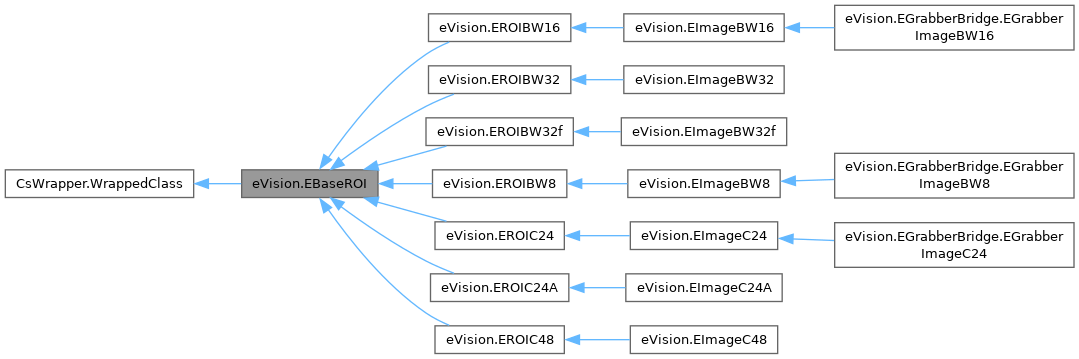
This represents the abstract base class for all ROI and image classes. More...
Public Member Functions | |
| bool | IsAttached () |
| Returns true if the ROI is attached to an image. | |
| bool | IsAnROI () |
| Tests whether this object is an ROI or an image. | |
| bool | HasSubROI (eVision.EBaseROI subROI) |
| Tests whether this object has a given attached ROI. | |
| eVision.EBaseROI | GetNextSiblingSubROI (eVision.EBaseROI subROI) |
| This method returns the ROI that is the next sibling of the supplied ROI in the list of sub-ROIs. | |
| eVision.EBaseROI | GetNextROI (eVision.EBaseROI startROI) |
| Returns the next ROI in the list starting at startROI or null if there is no next ROI. | |
| void | SetImagePtr (int width, int height, IntPtr imagePointer, int bitsPerRow) |
| Sets the pointer to an externally allocated image buffer. | |
| void | SetImagePtr (int width, int height, IntPtr imagePointer) |
| Sets the pointer to an externally allocated image buffer. | |
| void | UseExternalBuffer (int width, int height, IntPtr buffer, int rowPitch) |
| Sets the pointer to an externally allocated image buffer. | |
| IntPtr | GetImagePtr (int x, int y) |
| Returns a pointer to the pixel at given coordinates within the image/ROI. | |
| IntPtr | GetImagePtr () |
| Returns a pointer to the pixel at given coordinates within the image/ROI. | |
| void | CropToImage () |
| This method reduces the ROI size so that it is completely contained within its topmost parent image bounds (if such an image exists at the top of the hierarchy). This means that, after calling this method, either the ROI has a zero size, or all of its pixels map to valid pixels of the underlying image buffer. If the ROI is already contained within its parent image bounds, then this method does nothing. | |
| void | SetPlacement (int originX, int originY, int width, int height) |
| Sets the placement of an ROI, relative to its parent ROI/image. | |
| void | SetPlacement (eVision.ERegion region, int paddingTop, int paddingBottom, int paddingLeft, int paddingRight) |
| Sets the placement of an ROI, relative to its parent ROI/image. | |
| void | SetPlacement (eVision.ERegion region, int paddingTop, int paddingBottom, int paddingLeft) |
| Sets the placement of an ROI, relative to its parent ROI/image. | |
| void | SetPlacement (eVision.ERegion region, int paddingTop, int paddingBottom) |
| Sets the placement of an ROI, relative to its parent ROI/image. | |
| void | SetPlacement (eVision.ERegion region, int paddingTop) |
| Sets the placement of an ROI, relative to its parent ROI/image. | |
| void | SetPlacement (eVision.ERegion region) |
| Sets the placement of an ROI, relative to its parent ROI/image. | |
| void | SetPlacement (eVision.ERegion region, eVision.EFrame frame, int paddingTop, int paddingBottom, int paddingLeft, int paddingRight) |
| Sets the placement of an ROI, relative to its parent ROI/image. | |
| void | SetPlacement (eVision.ERegion region, eVision.EFrame frame, int paddingTop, int paddingBottom, int paddingLeft) |
| Sets the placement of an ROI, relative to its parent ROI/image. | |
| void | SetPlacement (eVision.ERegion region, eVision.EFrame frame, int paddingTop, int paddingBottom) |
| Sets the placement of an ROI, relative to its parent ROI/image. | |
| void | SetPlacement (eVision.ERegion region, eVision.EFrame frame, int paddingTop) |
| Sets the placement of an ROI, relative to its parent ROI/image. | |
| void | SetPlacement (eVision.ERegion region, eVision.EFrame frame) |
| Sets the placement of an ROI, relative to its parent ROI/image. | |
| eVision.EBaseROI[] | GetSubBaseROIs (bool recursive) |
| Returns all the children, and possibly recursively all their children, too. | |
| eVision.EBaseROI[] | GetSubBaseROIs () |
| Returns all the children, and possibly recursively all their children, too. | |
| eVision.EDragHandle | HitTest (int x, int y, float zoomX, float zoomY, float panX, float panY) |
| Detects if the cursor is placed over one of the dragging handles. | |
| eVision.EDragHandle | HitTest (int x, int y, float zoomX, float zoomY, float panX) |
| Detects if the cursor is placed over one of the dragging handles. | |
| eVision.EDragHandle | HitTest (int x, int y, float zoomX, float zoomY) |
| Detects if the cursor is placed over one of the dragging handles. | |
| eVision.EDragHandle | HitTest (int x, int y, float zoomX) |
| Detects if the cursor is placed over one of the dragging handles. | |
| eVision.EDragHandle | HitTest (int x, int y) |
| Detects if the cursor is placed over one of the dragging handles. | |
| bool | IsPointInside (eVision.EPoint position) |
| Detects if the position is inside current ROI. | |
| bool | IsPixelInside (int x, int y) |
| Detects if a pixel (given its x and y coordinates) is inside current ROI. | |
| void | Drag (eVision.EDragHandle dragHandle, int x, int y, float zoomX, float zoomY, float panX, float panY) |
| Moves the specified handle to a new position and updates all placement parameters of the ROI. | |
| void | Drag (eVision.EDragHandle dragHandle, int x, int y, float zoomX, float zoomY, float panX) |
| Moves the specified handle to a new position and updates all placement parameters of the ROI. | |
| void | Drag (eVision.EDragHandle dragHandle, int x, int y, float zoomX, float zoomY) |
| Moves the specified handle to a new position and updates all placement parameters of the ROI. | |
| void | Drag (eVision.EDragHandle dragHandle, int x, int y, float zoomX) |
| Moves the specified handle to a new position and updates all placement parameters of the ROI. | |
| void | Drag (eVision.EDragHandle dragHandle, int x, int y) |
| Moves the specified handle to a new position and updates all placement parameters of the ROI. | |
| void | Serialize (eVision.ESerializer serializer) |
| Serializes the EBaseROI. | |
| void | Detach () |
| void | Attach (eVision.EBaseROI parent) |
| This method attaches the ROI to another ROI or image. | |
| void | Attach (eVision.EBaseROI parent, int orgX, int orgY, int width, int height) |
| This method attaches the ROI to another ROI or image. | |
| void | Attach (eVision.EBaseROI parent, int orgX, int orgY, int width) |
| This method attaches the ROI to another ROI or image. | |
| void | Attach (eVision.EBaseROI parent, int orgX, int orgY) |
| This method attaches the ROI to another ROI or image. | |
| void | Attach (eVision.EBaseROI parent, eVision.ERegion region, int paddingTop, int paddingBottom, int paddingLeft, int paddingRight) |
| This method attaches the ROI to another ROI or image. | |
| void | Attach (eVision.EBaseROI parent, eVision.ERegion region, int paddingTop, int paddingBottom, int paddingLeft) |
| This method attaches the ROI to another ROI or image. | |
| void | Attach (eVision.EBaseROI parent, eVision.ERegion region, int paddingTop, int paddingBottom) |
| This method attaches the ROI to another ROI or image. | |
| void | Attach (eVision.EBaseROI parent, eVision.ERegion region, int paddingTop) |
| This method attaches the ROI to another ROI or image. | |
| void | Attach (eVision.EBaseROI parent, eVision.ERegion region) |
| This method attaches the ROI to another ROI or image. | |
| void | Attach (eVision.EBaseROI parent, eVision.ERegion region, eVision.EFrame frame, int paddingTop, int paddingBottom, int paddingLeft, int paddingRight) |
| This method attaches the ROI to another ROI or image. | |
| void | Attach (eVision.EBaseROI parent, eVision.ERegion region, eVision.EFrame frame, int paddingTop, int paddingBottom, int paddingLeft) |
| This method attaches the ROI to another ROI or image. | |
| void | Attach (eVision.EBaseROI parent, eVision.ERegion region, eVision.EFrame frame, int paddingTop, int paddingBottom) |
| This method attaches the ROI to another ROI or image. | |
| void | Attach (eVision.EBaseROI parent, eVision.ERegion region, eVision.EFrame frame, int paddingTop) |
| This method attaches the ROI to another ROI or image. | |
| void | Attach (eVision.EBaseROI parent, eVision.ERegion region, eVision.EFrame frame) |
| This method attaches the ROI to another ROI or image. | |
| void | CopyTo (eVision.EBaseROI dest) |
| Copies all the data of the current EBaseROI object into another EBaseROI object and returns it. | |
| void | SetSize (int width, int height) |
| Sets the width and height of an ROI/image. | |
| void | SetSize (eVision.EBaseROI other) |
| Sets the width and height of an ROI/image. | |
| void | DrawFrame (eVision.EDrawAdapter graphicContext, eVision.EFramePosition framePosition, bool handles, float zoomX, float zoomY, float panX, float panY) |
| Draws a rectangular frame around an image or ROI. | |
| void | DrawFrame (eVision.EDrawAdapter graphicContext, eVision.EFramePosition framePosition, bool handles, float zoomX, float zoomY, float panX) |
| Draws a rectangular frame around an image or ROI. | |
| void | DrawFrame (eVision.EDrawAdapter graphicContext, eVision.EFramePosition framePosition, bool handles, float zoomX, float zoomY) |
| Draws a rectangular frame around an image or ROI. | |
| void | DrawFrame (eVision.EDrawAdapter graphicContext, eVision.EFramePosition framePosition, bool handles, float zoomX) |
| Draws a rectangular frame around an image or ROI. | |
| void | DrawFrame (eVision.EDrawAdapter graphicContext, eVision.EFramePosition framePosition, bool handles) |
| Draws a rectangular frame around an image or ROI. | |
| void | DrawFrame (eVision.EDrawAdapter graphicContext, bool handles, float zoomX, float zoomY, float panX, float panY) |
| Draws a rectangular frame around an image or ROI. | |
| void | DrawFrame (eVision.EDrawAdapter graphicContext, bool handles, float zoomX, float zoomY, float panX) |
| Draws a rectangular frame around an image or ROI. | |
| void | DrawFrame (eVision.EDrawAdapter graphicContext, bool handles, float zoomX, float zoomY) |
| Draws a rectangular frame around an image or ROI. | |
| void | DrawFrame (eVision.EDrawAdapter graphicContext, bool handles, float zoomX) |
| Draws a rectangular frame around an image or ROI. | |
| void | DrawFrame (eVision.EDrawAdapter graphicContext, bool handles) |
| Draws a rectangular frame around an image or ROI. | |
| void | DrawFrame (IntPtr graphicContext, bool handles, float zoomX, float zoomY, float panX, float panY) |
| Draws a rectangular frame around an image or ROI. | |
| void | DrawFrame (IntPtr graphicContext, bool handles, float zoomX, float zoomY, float panX) |
| Draws a rectangular frame around an image or ROI. | |
| void | DrawFrame (IntPtr graphicContext, bool handles, float zoomX, float zoomY) |
| Draws a rectangular frame around an image or ROI. | |
| void | DrawFrame (IntPtr graphicContext, bool handles, float zoomX) |
| Draws a rectangular frame around an image or ROI. | |
| void | DrawFrame (IntPtr graphicContext, bool handles) |
| Draws a rectangular frame around an image or ROI. | |
| void | DrawFrame (IntPtr graphicContext, eVision.EFramePosition framePosition, bool handles, float zoomX, float zoomY, float panX, float panY) |
| Draws a rectangular frame around an image or ROI. | |
| void | DrawFrame (IntPtr graphicContext, eVision.EFramePosition framePosition, bool handles, float zoomX, float zoomY, float panX) |
| Draws a rectangular frame around an image or ROI. | |
| void | DrawFrame (IntPtr graphicContext, eVision.EFramePosition framePosition, bool handles, float zoomX, float zoomY) |
| Draws a rectangular frame around an image or ROI. | |
| void | DrawFrame (IntPtr graphicContext, eVision.EFramePosition framePosition, bool handles, float zoomX) |
| Draws a rectangular frame around an image or ROI. | |
| void | DrawFrame (IntPtr graphicContext, eVision.EFramePosition framePosition, bool handles) |
| Draws a rectangular frame around an image or ROI. | |
| void | DrawFrame (IntPtr graphicContext, eVision.ERGBColor color, bool handles, float zoomX, float zoomY, float panX, float panY) |
| Draws a rectangular frame around an image or ROI. | |
| void | DrawFrame (IntPtr graphicContext, eVision.ERGBColor color, bool handles, float zoomX, float zoomY, float panX) |
| Draws a rectangular frame around an image or ROI. | |
| void | DrawFrame (IntPtr graphicContext, eVision.ERGBColor color, bool handles, float zoomX, float zoomY) |
| Draws a rectangular frame around an image or ROI. | |
| void | DrawFrame (IntPtr graphicContext, eVision.ERGBColor color, bool handles, float zoomX) |
| Draws a rectangular frame around an image or ROI. | |
| void | DrawFrame (IntPtr graphicContext, eVision.ERGBColor color, bool handles) |
| Draws a rectangular frame around an image or ROI. | |
| void | Draw (eVision.EDrawAdapter graphicContext, float zoomX, float zoomY, float panX, float panY) |
| Draws an ROI/image in a device context. | |
| void | Draw (eVision.EDrawAdapter graphicContext, float zoomX, float zoomY, float panX) |
| Draws an ROI/image in a device context. | |
| void | Draw (eVision.EDrawAdapter graphicContext, float zoomX, float zoomY) |
| Draws an ROI/image in a device context. | |
| void | Draw (eVision.EDrawAdapter graphicContext, float zoomX) |
| Draws an ROI/image in a device context. | |
| void | Draw (eVision.EDrawAdapter graphicContext) |
| Draws an ROI/image in a device context. | |
| void | Draw (eVision.EDrawAdapter graphicContext, eVision.EC24Vector c24Vector, float zoomX, float zoomY, float panX, float panY) |
| Draws an ROI/image in a device context. | |
| void | Draw (eVision.EDrawAdapter graphicContext, eVision.EC24Vector c24Vector, float zoomX, float zoomY, float panX) |
| Draws an ROI/image in a device context. | |
| void | Draw (eVision.EDrawAdapter graphicContext, eVision.EC24Vector c24Vector, float zoomX, float zoomY) |
| Draws an ROI/image in a device context. | |
| void | Draw (eVision.EDrawAdapter graphicContext, eVision.EC24Vector c24Vector, float zoomX) |
| Draws an ROI/image in a device context. | |
| void | Draw (eVision.EDrawAdapter graphicContext, eVision.EC24Vector c24Vector) |
| Draws an ROI/image in a device context. | |
| void | Draw (eVision.EDrawAdapter graphicContext, eVision.EBW8Vector bw8Vector, float zoomX, float zoomY, float panX, float panY) |
| Draws an ROI/image in a device context. | |
| void | Draw (eVision.EDrawAdapter graphicContext, eVision.EBW8Vector bw8Vector, float zoomX, float zoomY, float panX) |
| Draws an ROI/image in a device context. | |
| void | Draw (eVision.EDrawAdapter graphicContext, eVision.EBW8Vector bw8Vector, float zoomX, float zoomY) |
| Draws an ROI/image in a device context. | |
| void | Draw (eVision.EDrawAdapter graphicContext, eVision.EBW8Vector bw8Vector, float zoomX) |
| Draws an ROI/image in a device context. | |
| void | Draw (eVision.EDrawAdapter graphicContext, eVision.EBW8Vector bw8Vector) |
| Draws an ROI/image in a device context. | |
| void | Draw (IntPtr graphicContext, float zoomX, float zoomY, float panX, float panY) |
| Draws an ROI/image in a device context. | |
| void | Draw (IntPtr graphicContext, float zoomX, float zoomY, float panX) |
| Draws an ROI/image in a device context. | |
| void | Draw (IntPtr graphicContext, float zoomX, float zoomY) |
| Draws an ROI/image in a device context. | |
| void | Draw (IntPtr graphicContext, float zoomX) |
| Draws an ROI/image in a device context. | |
| void | Draw (IntPtr graphicContext) |
| Draws an ROI/image in a device context. | |
| void | Draw (IntPtr graphicContext, eVision.EC24Vector c24Vector, float zoomX, float zoomY, float panX, float panY) |
| Draws an ROI/image in a device context. | |
| void | Draw (IntPtr graphicContext, eVision.EC24Vector c24Vector, float zoomX, float zoomY, float panX) |
| Draws an ROI/image in a device context. | |
| void | Draw (IntPtr graphicContext, eVision.EC24Vector c24Vector, float zoomX, float zoomY) |
| Draws an ROI/image in a device context. | |
| void | Draw (IntPtr graphicContext, eVision.EC24Vector c24Vector, float zoomX) |
| Draws an ROI/image in a device context. | |
| void | Draw (IntPtr graphicContext, eVision.EC24Vector c24Vector) |
| Draws an ROI/image in a device context. | |
| void | Draw (IntPtr graphicContext, eVision.EBW8Vector bw8Vector, float zoomX, float zoomY, float panX, float panY) |
| Draws an ROI/image in a device context. | |
| void | Draw (IntPtr graphicContext, eVision.EBW8Vector bw8Vector, float zoomX, float zoomY, float panX) |
| Draws an ROI/image in a device context. | |
| void | Draw (IntPtr graphicContext, eVision.EBW8Vector bw8Vector, float zoomX, float zoomY) |
| Draws an ROI/image in a device context. | |
| void | Draw (IntPtr graphicContext, eVision.EBW8Vector bw8Vector, float zoomX) |
| Draws an ROI/image in a device context. | |
| void | Draw (IntPtr graphicContext, eVision.EBW8Vector bw8Vector) |
| Draws an ROI/image in a device context. | |
| void | DrawFrameWithCurrentPen (IntPtr graphicContext, bool handles, float zoomX, float zoomY, float panX, float panY) |
| Draws a rectangular frame around an image or ROI. | |
| void | DrawFrameWithCurrentPen (IntPtr graphicContext, bool handles, float zoomX, float zoomY, float panX) |
| Draws a rectangular frame around an image or ROI. | |
| void | DrawFrameWithCurrentPen (IntPtr graphicContext, bool handles, float zoomX, float zoomY) |
| Draws a rectangular frame around an image or ROI. | |
| void | DrawFrameWithCurrentPen (IntPtr graphicContext, bool handles, float zoomX) |
| Draws a rectangular frame around an image or ROI. | |
| void | DrawFrameWithCurrentPen (IntPtr graphicContext, bool handles) |
| Draws a rectangular frame around an image or ROI. | |
| void | DrawFrameWithCurrentPen (IntPtr graphicContext, eVision.EFramePosition framePosition, bool handles, float zoomX, float zoomY, float panX, float panY) |
| Draws a rectangular frame around an image or ROI. | |
| void | DrawFrameWithCurrentPen (IntPtr graphicContext, eVision.EFramePosition framePosition, bool handles, float zoomX, float zoomY, float panX) |
| Draws a rectangular frame around an image or ROI. | |
| void | DrawFrameWithCurrentPen (IntPtr graphicContext, eVision.EFramePosition framePosition, bool handles, float zoomX, float zoomY) |
| Draws a rectangular frame around an image or ROI. | |
| void | DrawFrameWithCurrentPen (IntPtr graphicContext, eVision.EFramePosition framePosition, bool handles, float zoomX) |
| Draws a rectangular frame around an image or ROI. | |
| void | DrawFrameWithCurrentPen (IntPtr graphicContext, eVision.EFramePosition framePosition, bool handles) |
| Draws a rectangular frame around an image or ROI. | |
| void | Load (string path) |
| Restores an image stored in the given file. | |
| void | Load (eVision.ESerializer serializer) |
| Restores an image stored in the given file. | |
| void | Save (string path, eVision.EImageFileType type) |
| Saves the EBaseROI object to the given file. | |
| void | Save (string path) |
| Saves the EBaseROI object to the given file. | |
| void | Save (eVision.ESerializer serializer) |
| Saves the EBaseROI object to the given file. | |
| void | SavePng (string path, int compression) |
| Saves the EBaseROI object to the given file, in PNG format. | |
| void | SavePng (string path) |
| Saves the EBaseROI object to the given file, in PNG format. | |
| void | SaveJpeg (string path, int quality) |
| Saves the EBaseROI object to the given file, in JPEG format. | |
| void | SaveJpeg (string path) |
| Saves the EBaseROI object to the given file, in JPEG format. | |
| void | SaveJpeg2K (string path, int quality) |
| Saves the EBaseROI object to the given file, in JPEG 2000 format. | |
| void | SaveJpeg2K (string path) |
| Saves the EBaseROI object to the given file, in JPEG 2000 format. | |
| void | DrawFrame (System.Drawing.Graphics graphicContext, bool handles, float zoomX, float zoomY, float panX, float panY) |
| Draws a rectangular frame around an image or ROI. | |
| void | DrawFrame (System.Drawing.Graphics graphicContext, bool handles, float zoomX, float zoomY, float panX) |
| Draws a rectangular frame around an image or ROI. | |
| void | DrawFrame (System.Drawing.Graphics graphicContext, bool handles, float zoomX, float zoomY) |
| Draws a rectangular frame around an image or ROI. | |
| void | DrawFrame (System.Drawing.Graphics graphicContext, bool handles, float zoomX) |
| Draws a rectangular frame around an image or ROI. | |
| void | DrawFrame (System.Drawing.Graphics graphicContext, bool handles) |
| Draws a rectangular frame around an image or ROI. | |
| void | DrawFrame (System.Drawing.Graphics graphicContext, eVision.EFramePosition framePosition, bool handles, float zoomX, float zoomY, float panX, float panY) |
| Draws a rectangular frame around an image or ROI. | |
| void | DrawFrame (System.Drawing.Graphics graphicContext, eVision.EFramePosition framePosition, bool handles, float zoomX, float zoomY, float panX) |
| Draws a rectangular frame around an image or ROI. | |
| void | DrawFrame (System.Drawing.Graphics graphicContext, eVision.EFramePosition framePosition, bool handles, float zoomX, float zoomY) |
| Draws a rectangular frame around an image or ROI. | |
| void | DrawFrame (System.Drawing.Graphics graphicContext, eVision.EFramePosition framePosition, bool handles, float zoomX) |
| Draws a rectangular frame around an image or ROI. | |
| void | DrawFrame (System.Drawing.Graphics graphicContext, eVision.EFramePosition framePosition, bool handles) |
| Draws a rectangular frame around an image or ROI. | |
| void | DrawFrame (System.Drawing.Graphics graphicContext, eVision.ERGBColor color, bool handles, float zoomX, float zoomY, float panX, float panY) |
| Draws a rectangular frame around an image or ROI. | |
| void | DrawFrame (System.Drawing.Graphics graphicContext, eVision.ERGBColor color, bool handles, float zoomX, float zoomY, float panX) |
| Draws a rectangular frame around an image or ROI. | |
| void | DrawFrame (System.Drawing.Graphics graphicContext, eVision.ERGBColor color, bool handles, float zoomX, float zoomY) |
| Draws a rectangular frame around an image or ROI. | |
| void | DrawFrame (System.Drawing.Graphics graphicContext, eVision.ERGBColor color, bool handles, float zoomX) |
| Draws a rectangular frame around an image or ROI. | |
| void | DrawFrame (System.Drawing.Graphics graphicContext, eVision.ERGBColor color, bool handles) |
| Draws a rectangular frame around an image or ROI. | |
| void | Draw (System.Drawing.Graphics graphicContext, float zoomX, float zoomY, float panX, float panY) |
| Draws an ROI/image in a device context. | |
| void | Draw (System.Drawing.Graphics graphicContext, float zoomX, float zoomY, float panX) |
| Draws an ROI/image in a device context. | |
| void | Draw (System.Drawing.Graphics graphicContext, float zoomX, float zoomY) |
| Draws an ROI/image in a device context. | |
| void | Draw (System.Drawing.Graphics graphicContext, float zoomX) |
| Draws an ROI/image in a device context. | |
| void | Draw (System.Drawing.Graphics graphicContext) |
| Draws an ROI/image in a device context. | |
| void | Draw (System.Drawing.Graphics graphicContext, eVision.EC24Vector c24Vector, float zoomX, float zoomY, float panX, float panY) |
| Draws an ROI/image in a device context. | |
| void | Draw (System.Drawing.Graphics graphicContext, eVision.EC24Vector c24Vector, float zoomX, float zoomY, float panX) |
| Draws an ROI/image in a device context. | |
| void | Draw (System.Drawing.Graphics graphicContext, eVision.EC24Vector c24Vector, float zoomX, float zoomY) |
| Draws an ROI/image in a device context. | |
| void | Draw (System.Drawing.Graphics graphicContext, eVision.EC24Vector c24Vector, float zoomX) |
| Draws an ROI/image in a device context. | |
| void | Draw (System.Drawing.Graphics graphicContext, eVision.EC24Vector c24Vector) |
| Draws an ROI/image in a device context. | |
| void | Draw (System.Drawing.Graphics graphicContext, eVision.EBW8Vector bw8Vector, float zoomX, float zoomY, float panX, float panY) |
| Draws an ROI/image in a device context. | |
| void | Draw (System.Drawing.Graphics graphicContext, eVision.EBW8Vector bw8Vector, float zoomX, float zoomY, float panX) |
| Draws an ROI/image in a device context. | |
| void | Draw (System.Drawing.Graphics graphicContext, eVision.EBW8Vector bw8Vector, float zoomX, float zoomY) |
| Draws an ROI/image in a device context. | |
| void | Draw (System.Drawing.Graphics graphicContext, eVision.EBW8Vector bw8Vector, float zoomX) |
| Draws an ROI/image in a device context. | |
| void | Draw (System.Drawing.Graphics graphicContext, eVision.EBW8Vector bw8Vector) |
| Draws an ROI/image in a device context. | |
Properties | |
| eVision.EBaseROI | BaseTopParent [get] |
| Returns the image at the top of the hierarchy, or NULL if there is no image on top. | |
| eVision.EBaseROI | BaseImage [get] |
| Returns the image associated with this ROI, or NULL if there is no image associated. | |
| eVision.EBaseROI | Parent [get] |
| Returns the hierarchical parent of this object. | |
| eVision.EBaseROI | FirstSubROI [get] |
| See GetFirstSubROI in the derived classes. | |
| eVision.EBaseROI | NextSiblingROI [get] |
| This method returns the ROI that is the next sibling of this ROI. | |
| int | RowPitch [get] |
| Gets the pitch of a row (the number of bytes between two vertically adjacent pixels). This is also valid for BW1 images (one bit per pixel). | |
| int | ColPitch [get] |
| Gets the pitch of a column (number of bytes between two horizontally adjacent pixels). For BW1 (one bit per pixel) images, this value is undefined. | |
| uint | BitsPerPixel [get] |
| Gets the number of storage bits per pixel. | |
| int | OrgX [get, set] |
| Gets or sets the x-coordinate of the upper left corner of the ROI, relative to its parent ROI/image. | |
| int | OrgY [get, set] |
| Gets or sets the y-coordinate of the upper left corner of the ROI, relative to its parent ROI/image. | |
| int | Width [get, set] |
| If EBaseROI is a ROI, gets or sets the width of the ROI. Otherwise, if EBaseROI is an image, gets or sets the width of the image (SetWidth has the same effect as EBaseROI.SetSize). | |
| int | Height [get, set] |
| If EBaseROI is a ROI, gets or sets the height of the ROI. Otherwise, if EBaseROI is an image, gets or sets the height of the image (SetHeight has the same effect as EBaseROI.SetSize). | |
| bool | IsVoid [get] |
| Tests if the topmost parent image of this hierarchy has a zero size. | |
| int | TotalOrgX [get] |
| Gets the x-coordinate of the upper left pixel of the ROI, relative to its topmost parent upper left pixel. | |
| int | TotalOrgY [get] |
| Gets the y-coordinate of the upper left pixel of the ROI, relative to its topmost parent upper left pixel. | |
| int | TotalWidth [get] |
| Gets the width, in pixels, of the ROI topmost parent. | |
| int | TotalHeight [get] |
| Gets the height, in pixels, of the ROI topmost parent. | |
| uint | PlanesPerPixel [get] |
| Gets the number of color components in each pixel of the ROI/image. | |
| eVision.EColorSystem | ColorSystem [get, set] |
| Gets or sets the color system used by this image, as defined by the EColorSystem enumeration. | |
| eVision.EImageType | Type [get] |
| Gets the ROI/image pixel type, as defined by the EImageType enumeration. | |
| string | Author [get, set] |
| Gets or sets the Author attribute of the ROI/image. This is a convenience property that allows storing some information in the ROI/image. Please note that not all file formats preserve this information. | |
| string | Comment [get, set] |
| Gets or sets the Comment attribute of the ROI/image. This is a convenience property that allows storing some information in the ROI/image. Please note that not all file formats preserve this information. | |
| string | Date [get, set] |
| Gets or sets the Date attribute of the ROI/image. This is a convenience property that allows storing some information in the ROI/image. Please note that not all file formats preserve this information. | |
| string | Title [get, set] |
| Gets or sets the Title attribute of the ROI/image. This is a convenience property that allows storing some information in the ROI/image. Please note that not all file formats preserve this information. | |
This represents the abstract base class for all ROI and image classes.
License(s): BasicTypes
| void eVision.EBaseROI.Attach | ( | eVision.EBaseROI | parent | ) |
This method attaches the ROI to another ROI or image.
Only ROIs can be attached. An image can never be attached to another image or ROI. Optionally, the ROI can be moved and resized after attachment by supplying additional parameters.
| parent | ROI or image on which to attach the ROI. |
| void eVision.EBaseROI.Attach | ( | eVision.EBaseROI | parent, |
| eVision.ERegion | region ) |
This method attaches the ROI to another ROI or image.
Only ROIs can be attached. An image can never be attached to another image or ROI. Optionally, the ROI can be moved and resized after attachment by supplying additional parameters.
| parent | ROI or image on which to attach the ROI. |
| region | Region whose bounding box defines the position and size of the ROI after attachment. |
| void eVision.EBaseROI.Attach | ( | eVision.EBaseROI | parent, |
| eVision.ERegion | region, | ||
| eVision.EFrame | frame ) |
This method attaches the ROI to another ROI or image.
Only ROIs can be attached. An image can never be attached to another image or ROI. Optionally, the ROI can be moved and resized after attachment by supplying additional parameters.
| parent | ROI or image on which to attach the ROI. |
| region | Region whose bounding box defines the position and size of the ROI after attachment. |
| frame | Frame used to transform the region from local to sensor coordinates before computing the bounding box. |
| void eVision.EBaseROI.Attach | ( | eVision.EBaseROI | parent, |
| eVision.ERegion | region, | ||
| eVision.EFrame | frame, | ||
| int | paddingTop ) |
This method attaches the ROI to another ROI or image.
Only ROIs can be attached. An image can never be attached to another image or ROI. Optionally, the ROI can be moved and resized after attachment by supplying additional parameters.
| parent | ROI or image on which to attach the ROI. |
| region | Region whose bounding box defines the position and size of the ROI after attachment. |
| frame | Frame used to transform the region from local to sensor coordinates before computing the bounding box. |
| paddingTop | Number of pixels added above the bounding box. |
| void eVision.EBaseROI.Attach | ( | eVision.EBaseROI | parent, |
| eVision.ERegion | region, | ||
| eVision.EFrame | frame, | ||
| int | paddingTop, | ||
| int | paddingBottom ) |
This method attaches the ROI to another ROI or image.
Only ROIs can be attached. An image can never be attached to another image or ROI. Optionally, the ROI can be moved and resized after attachment by supplying additional parameters.
| parent | ROI or image on which to attach the ROI. |
| region | Region whose bounding box defines the position and size of the ROI after attachment. |
| frame | Frame used to transform the region from local to sensor coordinates before computing the bounding box. |
| paddingTop | Number of pixels added above the bounding box. |
| paddingBottom | Number of pixels added below the bounding box. |
| void eVision.EBaseROI.Attach | ( | eVision.EBaseROI | parent, |
| eVision.ERegion | region, | ||
| eVision.EFrame | frame, | ||
| int | paddingTop, | ||
| int | paddingBottom, | ||
| int | paddingLeft ) |
This method attaches the ROI to another ROI or image.
Only ROIs can be attached. An image can never be attached to another image or ROI. Optionally, the ROI can be moved and resized after attachment by supplying additional parameters.
| parent | ROI or image on which to attach the ROI. |
| region | Region whose bounding box defines the position and size of the ROI after attachment. |
| frame | Frame used to transform the region from local to sensor coordinates before computing the bounding box. |
| paddingTop | Number of pixels added above the bounding box. |
| paddingBottom | Number of pixels added below the bounding box. |
| paddingLeft | Number of pixels added to the left of the bounding box. |
| void eVision.EBaseROI.Attach | ( | eVision.EBaseROI | parent, |
| eVision.ERegion | region, | ||
| eVision.EFrame | frame, | ||
| int | paddingTop, | ||
| int | paddingBottom, | ||
| int | paddingLeft, | ||
| int | paddingRight ) |
This method attaches the ROI to another ROI or image.
Only ROIs can be attached. An image can never be attached to another image or ROI. Optionally, the ROI can be moved and resized after attachment by supplying additional parameters.
| parent | ROI or image on which to attach the ROI. |
| region | Region whose bounding box defines the position and size of the ROI after attachment. |
| frame | Frame used to transform the region from local to sensor coordinates before computing the bounding box. |
| paddingTop | Number of pixels added above the bounding box. |
| paddingBottom | Number of pixels added below the bounding box. |
| paddingLeft | Number of pixels added to the left of the bounding box. |
| paddingRight | Number of pixels added to the right of the bounding box. |
| void eVision.EBaseROI.Attach | ( | eVision.EBaseROI | parent, |
| eVision.ERegion | region, | ||
| int | paddingTop ) |
This method attaches the ROI to another ROI or image.
Only ROIs can be attached. An image can never be attached to another image or ROI. Optionally, the ROI can be moved and resized after attachment by supplying additional parameters.
| parent | ROI or image on which to attach the ROI. |
| region | Region whose bounding box defines the position and size of the ROI after attachment. |
| paddingTop | Number of pixels added above the bounding box. |
| void eVision.EBaseROI.Attach | ( | eVision.EBaseROI | parent, |
| eVision.ERegion | region, | ||
| int | paddingTop, | ||
| int | paddingBottom ) |
This method attaches the ROI to another ROI or image.
Only ROIs can be attached. An image can never be attached to another image or ROI. Optionally, the ROI can be moved and resized after attachment by supplying additional parameters.
| parent | ROI or image on which to attach the ROI. |
| region | Region whose bounding box defines the position and size of the ROI after attachment. |
| paddingTop | Number of pixels added above the bounding box. |
| paddingBottom | Number of pixels added below the bounding box. |
| void eVision.EBaseROI.Attach | ( | eVision.EBaseROI | parent, |
| eVision.ERegion | region, | ||
| int | paddingTop, | ||
| int | paddingBottom, | ||
| int | paddingLeft ) |
This method attaches the ROI to another ROI or image.
Only ROIs can be attached. An image can never be attached to another image or ROI. Optionally, the ROI can be moved and resized after attachment by supplying additional parameters.
| parent | ROI or image on which to attach the ROI. |
| region | Region whose bounding box defines the position and size of the ROI after attachment. |
| paddingTop | Number of pixels added above the bounding box. |
| paddingBottom | Number of pixels added below the bounding box. |
| paddingLeft | Number of pixels added to the left of the bounding box. |
| void eVision.EBaseROI.Attach | ( | eVision.EBaseROI | parent, |
| eVision.ERegion | region, | ||
| int | paddingTop, | ||
| int | paddingBottom, | ||
| int | paddingLeft, | ||
| int | paddingRight ) |
This method attaches the ROI to another ROI or image.
Only ROIs can be attached. An image can never be attached to another image or ROI. Optionally, the ROI can be moved and resized after attachment by supplying additional parameters.
| parent | ROI or image on which to attach the ROI. |
| region | Region whose bounding box defines the position and size of the ROI after attachment. |
| paddingTop | Number of pixels added above the bounding box. |
| paddingBottom | Number of pixels added below the bounding box. |
| paddingLeft | Number of pixels added to the left of the bounding box. |
| paddingRight | Number of pixels added to the right of the bounding box. |
| void eVision.EBaseROI.Attach | ( | eVision.EBaseROI | parent, |
| int | orgX, | ||
| int | orgY ) |
This method attaches the ROI to another ROI or image.
Only ROIs can be attached. An image can never be attached to another image or ROI. Optionally, the ROI can be moved and resized after attachment by supplying additional parameters.
| parent | ROI or image on which to attach the ROI. |
| orgX | When specified, sets the new x-coordinate of the ROI top-left corner. |
| orgY | When specified, sets the new y-coordinate of the ROI top-left corner. |
| void eVision.EBaseROI.Attach | ( | eVision.EBaseROI | parent, |
| int | orgX, | ||
| int | orgY, | ||
| int | width ) |
This method attaches the ROI to another ROI or image.
Only ROIs can be attached. An image can never be attached to another image or ROI. Optionally, the ROI can be moved and resized after attachment by supplying additional parameters.
| parent | ROI or image on which to attach the ROI. |
| orgX | When specified, sets the new x-coordinate of the ROI top-left corner. |
| orgY | When specified, sets the new y-coordinate of the ROI top-left corner. |
| width | When specified, sets the new width of the ROI. |
| void eVision.EBaseROI.Attach | ( | eVision.EBaseROI | parent, |
| int | orgX, | ||
| int | orgY, | ||
| int | width, | ||
| int | height ) |
This method attaches the ROI to another ROI or image.
Only ROIs can be attached. An image can never be attached to another image or ROI. Optionally, the ROI can be moved and resized after attachment by supplying additional parameters.
| parent | ROI or image on which to attach the ROI. |
| orgX | When specified, sets the new x-coordinate of the ROI top-left corner. |
| orgY | When specified, sets the new y-coordinate of the ROI top-left corner. |
| width | When specified, sets the new width of the ROI. |
| height | When specified, sets the new height of the ROI. |
| void eVision.EBaseROI.CopyTo | ( | eVision.EBaseROI | dest | ) |
Copies all the data of the current EBaseROI object into another EBaseROI object and returns it.
This method copies all the object date to the destination object. The attached ROIs are copied recursively and attached to the destination object. They will be deleted automatically when the destination object is deleted.
When the buffer of the source image has been provided by a call to UseExternalBuffer, the pointer will be copied into the destination image. Both images will thus refer the same external buffer.
| void eVision.EBaseROI.CropToImage | ( | ) |
This method reduces the ROI size so that it is completely contained within its topmost parent image bounds (if such an image exists at the top of the hierarchy). This means that, after calling this method, either the ROI has a zero size, or all of its pixels map to valid pixels of the underlying image buffer. If the ROI is already contained within its parent image bounds, then this method does nothing.
| void eVision.EBaseROI.Detach | ( | ) |
| void eVision.EBaseROI.Drag | ( | eVision.EDragHandle | dragHandle, |
| int | x, | ||
| int | y ) |
Moves the specified handle to a new position and updates all placement parameters of the ROI.
| dragHandle | Handle identifier, as defined by EDragHandle. The value returned by EBaseROI.HitTest should be used. |
| x | x-coordinate of the mouse cursor. |
| y | y-coordinate of the mouse cursor. |
If zooming and/or panning were used when drawing the ROI, the same values must be used with EBaseROI.HitTest and EBaseROI.Drag.
| void eVision.EBaseROI.Drag | ( | eVision.EDragHandle | dragHandle, |
| int | x, | ||
| int | y, | ||
| float | zoomX ) |
Moves the specified handle to a new position and updates all placement parameters of the ROI.
| dragHandle | Handle identifier, as defined by EDragHandle. The value returned by EBaseROI.HitTest should be used. |
| x | x-coordinate of the mouse cursor. |
| y | y-coordinate of the mouse cursor. |
| zoomX | Horizontal zoom factor. By default, true scale is used. |
If zooming and/or panning were used when drawing the ROI, the same values must be used with EBaseROI.HitTest and EBaseROI.Drag.
| void eVision.EBaseROI.Drag | ( | eVision.EDragHandle | dragHandle, |
| int | x, | ||
| int | y, | ||
| float | zoomX, | ||
| float | zoomY ) |
Moves the specified handle to a new position and updates all placement parameters of the ROI.
| dragHandle | Handle identifier, as defined by EDragHandle. The value returned by EBaseROI.HitTest should be used. |
| x | x-coordinate of the mouse cursor. |
| y | y-coordinate of the mouse cursor. |
| zoomX | Horizontal zoom factor. By default, true scale is used. |
| zoomY | Vertical zoom factor. By default, true scale is used. |
If zooming and/or panning were used when drawing the ROI, the same values must be used with EBaseROI.HitTest and EBaseROI.Drag.
| void eVision.EBaseROI.Drag | ( | eVision.EDragHandle | dragHandle, |
| int | x, | ||
| int | y, | ||
| float | zoomX, | ||
| float | zoomY, | ||
| float | panX ) |
Moves the specified handle to a new position and updates all placement parameters of the ROI.
| dragHandle | Handle identifier, as defined by EDragHandle. The value returned by EBaseROI.HitTest should be used. |
| x | x-coordinate of the mouse cursor. |
| y | y-coordinate of the mouse cursor. |
| zoomX | Horizontal zoom factor. By default, true scale is used. |
| zoomY | Vertical zoom factor. By default, true scale is used. |
| panX | Horizontal panning value expressed in pixels. By default, no panning occurs. |
If zooming and/or panning were used when drawing the ROI, the same values must be used with EBaseROI.HitTest and EBaseROI.Drag.
| void eVision.EBaseROI.Drag | ( | eVision.EDragHandle | dragHandle, |
| int | x, | ||
| int | y, | ||
| float | zoomX, | ||
| float | zoomY, | ||
| float | panX, | ||
| float | panY ) |
Moves the specified handle to a new position and updates all placement parameters of the ROI.
| dragHandle | Handle identifier, as defined by EDragHandle. The value returned by EBaseROI.HitTest should be used. |
| x | x-coordinate of the mouse cursor. |
| y | y-coordinate of the mouse cursor. |
| zoomX | Horizontal zoom factor. By default, true scale is used. |
| zoomY | Vertical zoom factor. By default, true scale is used. |
| panX | Horizontal panning value expressed in pixels. By default, no panning occurs. |
| panY | Vertical panning value expressed in pixels. By default, no panning occurs. |
If zooming and/or panning were used when drawing the ROI, the same values must be used with EBaseROI.HitTest and EBaseROI.Drag.
| void eVision.EBaseROI.Draw | ( | eVision.EDrawAdapter | graphicContext | ) |
Draws an ROI/image in a device context.
| graphicContext | Handle to the device context of the destination window. |
An ROI/image can be drawn (its pixels rendered) using a device context. The horizontal and vertical zooming factors can be different and must be contained in the 1/16..16 range. (MFC users can use the CDC::GetSafeHdc() method to obtain a suitable device context handle from a CDC instance.)
| void eVision.EBaseROI.Draw | ( | eVision.EDrawAdapter | graphicContext, |
| eVision.EBW8Vector | bw8Vector ) |
Draws an ROI/image in a device context.
| graphicContext | Handle to the device context of the destination window. |
| bw8Vector | When supplied, this parameter allows using a LUT that maps from BW8 to BW8 when drawing. |
An ROI/image can be drawn (its pixels rendered) using a device context. The horizontal and vertical zooming factors can be different and must be contained in the 1/16..16 range. (MFC users can use the CDC::GetSafeHdc() method to obtain a suitable device context handle from a CDC instance.)
| void eVision.EBaseROI.Draw | ( | eVision.EDrawAdapter | graphicContext, |
| eVision.EBW8Vector | bw8Vector, | ||
| float | zoomX ) |
Draws an ROI/image in a device context.
| graphicContext | Handle to the device context of the destination window. |
| bw8Vector | When supplied, this parameter allows using a LUT that maps from BW8 to BW8 when drawing. |
| zoomX | Magnification factor for zooming in or out in the horizontal direction. By default, the image is displayed in true scale. |
An ROI/image can be drawn (its pixels rendered) using a device context. The horizontal and vertical zooming factors can be different and must be contained in the 1/16..16 range. (MFC users can use the CDC::GetSafeHdc() method to obtain a suitable device context handle from a CDC instance.)
| void eVision.EBaseROI.Draw | ( | eVision.EDrawAdapter | graphicContext, |
| eVision.EBW8Vector | bw8Vector, | ||
| float | zoomX, | ||
| float | zoomY ) |
Draws an ROI/image in a device context.
| graphicContext | Handle to the device context of the destination window. |
| bw8Vector | When supplied, this parameter allows using a LUT that maps from BW8 to BW8 when drawing. |
| zoomX | Magnification factor for zooming in or out in the horizontal direction. By default, the image is displayed in true scale. |
| zoomY | Magnification factor for zooming in or out in the vertical direction. Setting a 0 value (which is the default) will result in isotropic scaling (i.e. equal horizontal and vertical factors). |
An ROI/image can be drawn (its pixels rendered) using a device context. The horizontal and vertical zooming factors can be different and must be contained in the 1/16..16 range. (MFC users can use the CDC::GetSafeHdc() method to obtain a suitable device context handle from a CDC instance.)
| void eVision.EBaseROI.Draw | ( | eVision.EDrawAdapter | graphicContext, |
| eVision.EBW8Vector | bw8Vector, | ||
| float | zoomX, | ||
| float | zoomY, | ||
| float | panX ) |
Draws an ROI/image in a device context.
| graphicContext | Handle to the device context of the destination window. |
| bw8Vector | When supplied, this parameter allows using a LUT that maps from BW8 to BW8 when drawing. |
| zoomX | Magnification factor for zooming in or out in the horizontal direction. By default, the image is displayed in true scale. |
| zoomY | Magnification factor for zooming in or out in the vertical direction. Setting a 0 value (which is the default) will result in isotropic scaling (i.e. equal horizontal and vertical factors). |
| panX | Horizontal panning value expressed in pixels. By default, no panning occurs. |
An ROI/image can be drawn (its pixels rendered) using a device context. The horizontal and vertical zooming factors can be different and must be contained in the 1/16..16 range. (MFC users can use the CDC::GetSafeHdc() method to obtain a suitable device context handle from a CDC instance.)
| void eVision.EBaseROI.Draw | ( | eVision.EDrawAdapter | graphicContext, |
| eVision.EBW8Vector | bw8Vector, | ||
| float | zoomX, | ||
| float | zoomY, | ||
| float | panX, | ||
| float | panY ) |
Draws an ROI/image in a device context.
| graphicContext | Handle to the device context of the destination window. |
| bw8Vector | When supplied, this parameter allows using a LUT that maps from BW8 to BW8 when drawing. |
| zoomX | Magnification factor for zooming in or out in the horizontal direction. By default, the image is displayed in true scale. |
| zoomY | Magnification factor for zooming in or out in the vertical direction. Setting a 0 value (which is the default) will result in isotropic scaling (i.e. equal horizontal and vertical factors). |
| panX | Horizontal panning value expressed in pixels. By default, no panning occurs. |
| panY | Vertical panning value expressed in pixels. By default, no panning occurs. |
An ROI/image can be drawn (its pixels rendered) using a device context. The horizontal and vertical zooming factors can be different and must be contained in the 1/16..16 range. (MFC users can use the CDC::GetSafeHdc() method to obtain a suitable device context handle from a CDC instance.)
| void eVision.EBaseROI.Draw | ( | eVision.EDrawAdapter | graphicContext, |
| eVision.EC24Vector | c24Vector ) |
Draws an ROI/image in a device context.
| graphicContext | Handle to the device context of the destination window. |
| c24Vector | When supplied, this parameter allows using a LUT that maps from BW8 to C24 when drawing (false colors). |
An ROI/image can be drawn (its pixels rendered) using a device context. The horizontal and vertical zooming factors can be different and must be contained in the 1/16..16 range. (MFC users can use the CDC::GetSafeHdc() method to obtain a suitable device context handle from a CDC instance.)
| void eVision.EBaseROI.Draw | ( | eVision.EDrawAdapter | graphicContext, |
| eVision.EC24Vector | c24Vector, | ||
| float | zoomX ) |
Draws an ROI/image in a device context.
| graphicContext | Handle to the device context of the destination window. |
| c24Vector | When supplied, this parameter allows using a LUT that maps from BW8 to C24 when drawing (false colors). |
| zoomX | Magnification factor for zooming in or out in the horizontal direction. By default, the image is displayed in true scale. |
An ROI/image can be drawn (its pixels rendered) using a device context. The horizontal and vertical zooming factors can be different and must be contained in the 1/16..16 range. (MFC users can use the CDC::GetSafeHdc() method to obtain a suitable device context handle from a CDC instance.)
| void eVision.EBaseROI.Draw | ( | eVision.EDrawAdapter | graphicContext, |
| eVision.EC24Vector | c24Vector, | ||
| float | zoomX, | ||
| float | zoomY ) |
Draws an ROI/image in a device context.
| graphicContext | Handle to the device context of the destination window. |
| c24Vector | When supplied, this parameter allows using a LUT that maps from BW8 to C24 when drawing (false colors). |
| zoomX | Magnification factor for zooming in or out in the horizontal direction. By default, the image is displayed in true scale. |
| zoomY | Magnification factor for zooming in or out in the vertical direction. Setting a 0 value (which is the default) will result in isotropic scaling (i.e. equal horizontal and vertical factors). |
An ROI/image can be drawn (its pixels rendered) using a device context. The horizontal and vertical zooming factors can be different and must be contained in the 1/16..16 range. (MFC users can use the CDC::GetSafeHdc() method to obtain a suitable device context handle from a CDC instance.)
| void eVision.EBaseROI.Draw | ( | eVision.EDrawAdapter | graphicContext, |
| eVision.EC24Vector | c24Vector, | ||
| float | zoomX, | ||
| float | zoomY, | ||
| float | panX ) |
Draws an ROI/image in a device context.
| graphicContext | Handle to the device context of the destination window. |
| c24Vector | When supplied, this parameter allows using a LUT that maps from BW8 to C24 when drawing (false colors). |
| zoomX | Magnification factor for zooming in or out in the horizontal direction. By default, the image is displayed in true scale. |
| zoomY | Magnification factor for zooming in or out in the vertical direction. Setting a 0 value (which is the default) will result in isotropic scaling (i.e. equal horizontal and vertical factors). |
| panX | Horizontal panning value expressed in pixels. By default, no panning occurs. |
An ROI/image can be drawn (its pixels rendered) using a device context. The horizontal and vertical zooming factors can be different and must be contained in the 1/16..16 range. (MFC users can use the CDC::GetSafeHdc() method to obtain a suitable device context handle from a CDC instance.)
| void eVision.EBaseROI.Draw | ( | eVision.EDrawAdapter | graphicContext, |
| eVision.EC24Vector | c24Vector, | ||
| float | zoomX, | ||
| float | zoomY, | ||
| float | panX, | ||
| float | panY ) |
Draws an ROI/image in a device context.
| graphicContext | Handle to the device context of the destination window. |
| c24Vector | When supplied, this parameter allows using a LUT that maps from BW8 to C24 when drawing (false colors). |
| zoomX | Magnification factor for zooming in or out in the horizontal direction. By default, the image is displayed in true scale. |
| zoomY | Magnification factor for zooming in or out in the vertical direction. Setting a 0 value (which is the default) will result in isotropic scaling (i.e. equal horizontal and vertical factors). |
| panX | Horizontal panning value expressed in pixels. By default, no panning occurs. |
| panY | Vertical panning value expressed in pixels. By default, no panning occurs. |
An ROI/image can be drawn (its pixels rendered) using a device context. The horizontal and vertical zooming factors can be different and must be contained in the 1/16..16 range. (MFC users can use the CDC::GetSafeHdc() method to obtain a suitable device context handle from a CDC instance.)
| void eVision.EBaseROI.Draw | ( | eVision.EDrawAdapter | graphicContext, |
| float | zoomX ) |
Draws an ROI/image in a device context.
| graphicContext | Handle to the device context of the destination window. |
| zoomX | Magnification factor for zooming in or out in the horizontal direction. By default, the image is displayed in true scale. |
An ROI/image can be drawn (its pixels rendered) using a device context. The horizontal and vertical zooming factors can be different and must be contained in the 1/16..16 range. (MFC users can use the CDC::GetSafeHdc() method to obtain a suitable device context handle from a CDC instance.)
| void eVision.EBaseROI.Draw | ( | eVision.EDrawAdapter | graphicContext, |
| float | zoomX, | ||
| float | zoomY ) |
Draws an ROI/image in a device context.
| graphicContext | Handle to the device context of the destination window. |
| zoomX | Magnification factor for zooming in or out in the horizontal direction. By default, the image is displayed in true scale. |
| zoomY | Magnification factor for zooming in or out in the vertical direction. Setting a 0 value (which is the default) will result in isotropic scaling (i.e. equal horizontal and vertical factors). |
An ROI/image can be drawn (its pixels rendered) using a device context. The horizontal and vertical zooming factors can be different and must be contained in the 1/16..16 range. (MFC users can use the CDC::GetSafeHdc() method to obtain a suitable device context handle from a CDC instance.)
| void eVision.EBaseROI.Draw | ( | eVision.EDrawAdapter | graphicContext, |
| float | zoomX, | ||
| float | zoomY, | ||
| float | panX ) |
Draws an ROI/image in a device context.
| graphicContext | Handle to the device context of the destination window. |
| zoomX | Magnification factor for zooming in or out in the horizontal direction. By default, the image is displayed in true scale. |
| zoomY | Magnification factor for zooming in or out in the vertical direction. Setting a 0 value (which is the default) will result in isotropic scaling (i.e. equal horizontal and vertical factors). |
| panX | Horizontal panning value expressed in pixels. By default, no panning occurs. |
An ROI/image can be drawn (its pixels rendered) using a device context. The horizontal and vertical zooming factors can be different and must be contained in the 1/16..16 range. (MFC users can use the CDC::GetSafeHdc() method to obtain a suitable device context handle from a CDC instance.)
| void eVision.EBaseROI.Draw | ( | eVision.EDrawAdapter | graphicContext, |
| float | zoomX, | ||
| float | zoomY, | ||
| float | panX, | ||
| float | panY ) |
Draws an ROI/image in a device context.
| graphicContext | Handle to the device context of the destination window. |
| zoomX | Magnification factor for zooming in or out in the horizontal direction. By default, the image is displayed in true scale. |
| zoomY | Magnification factor for zooming in or out in the vertical direction. Setting a 0 value (which is the default) will result in isotropic scaling (i.e. equal horizontal and vertical factors). |
| panX | Horizontal panning value expressed in pixels. By default, no panning occurs. |
| panY | Vertical panning value expressed in pixels. By default, no panning occurs. |
An ROI/image can be drawn (its pixels rendered) using a device context. The horizontal and vertical zooming factors can be different and must be contained in the 1/16..16 range. (MFC users can use the CDC::GetSafeHdc() method to obtain a suitable device context handle from a CDC instance.)
| void eVision.EBaseROI.Draw | ( | IntPtr | graphicContext | ) |
Draws an ROI/image in a device context.
| graphicContext | Handle to the device context of the destination window. |
An ROI/image can be drawn (its pixels rendered) using a device context. The horizontal and vertical zooming factors can be different and must be contained in the 1/16..16 range. (MFC users can use the CDC::GetSafeHdc() method to obtain a suitable device context handle from a CDC instance.)
Use the overload taking an EDrawAdapter by using an instance of EWindowsDrawAdapter.
Deprecated in version 23.12. Scheduled to be removed in version 27.6.
| void eVision.EBaseROI.Draw | ( | IntPtr | graphicContext, |
| eVision.EBW8Vector | bw8Vector ) |
Draws an ROI/image in a device context.
| graphicContext | Handle to the device context of the destination window. |
| bw8Vector | When supplied, this parameter allows using a LUT that maps from BW8 to BW8 when drawing. |
An ROI/image can be drawn (its pixels rendered) using a device context. The horizontal and vertical zooming factors can be different and must be contained in the 1/16..16 range. (MFC users can use the CDC::GetSafeHdc() method to obtain a suitable device context handle from a CDC instance.)
Use the overload taking an EDrawAdapter by using an instance of EWindowsDrawAdapter.
Deprecated in version 23.12. Scheduled to be removed in version 27.6.
| void eVision.EBaseROI.Draw | ( | IntPtr | graphicContext, |
| eVision.EBW8Vector | bw8Vector, | ||
| float | zoomX ) |
Draws an ROI/image in a device context.
| graphicContext | Handle to the device context of the destination window. |
| bw8Vector | When supplied, this parameter allows using a LUT that maps from BW8 to BW8 when drawing. |
| zoomX | Magnification factor for zooming in or out in the horizontal direction. By default, the image is displayed in true scale. |
An ROI/image can be drawn (its pixels rendered) using a device context. The horizontal and vertical zooming factors can be different and must be contained in the 1/16..16 range. (MFC users can use the CDC::GetSafeHdc() method to obtain a suitable device context handle from a CDC instance.)
Use the overload taking an EDrawAdapter by using an instance of EWindowsDrawAdapter.
Deprecated in version 23.12. Scheduled to be removed in version 27.6.
| void eVision.EBaseROI.Draw | ( | IntPtr | graphicContext, |
| eVision.EBW8Vector | bw8Vector, | ||
| float | zoomX, | ||
| float | zoomY ) |
Draws an ROI/image in a device context.
| graphicContext | Handle to the device context of the destination window. |
| bw8Vector | When supplied, this parameter allows using a LUT that maps from BW8 to BW8 when drawing. |
| zoomX | Magnification factor for zooming in or out in the horizontal direction. By default, the image is displayed in true scale. |
| zoomY | Magnification factor for zooming in or out in the vertical direction. Setting a 0 value (which is the default) will result in isotropic scaling (i.e. equal horizontal and vertical factors). |
An ROI/image can be drawn (its pixels rendered) using a device context. The horizontal and vertical zooming factors can be different and must be contained in the 1/16..16 range. (MFC users can use the CDC::GetSafeHdc() method to obtain a suitable device context handle from a CDC instance.)
Use the overload taking an EDrawAdapter by using an instance of EWindowsDrawAdapter.
Deprecated in version 23.12. Scheduled to be removed in version 27.6.
| void eVision.EBaseROI.Draw | ( | IntPtr | graphicContext, |
| eVision.EBW8Vector | bw8Vector, | ||
| float | zoomX, | ||
| float | zoomY, | ||
| float | panX ) |
Draws an ROI/image in a device context.
| graphicContext | Handle to the device context of the destination window. |
| bw8Vector | When supplied, this parameter allows using a LUT that maps from BW8 to BW8 when drawing. |
| zoomX | Magnification factor for zooming in or out in the horizontal direction. By default, the image is displayed in true scale. |
| zoomY | Magnification factor for zooming in or out in the vertical direction. Setting a 0 value (which is the default) will result in isotropic scaling (i.e. equal horizontal and vertical factors). |
| panX | Horizontal panning value expressed in pixels. By default, no panning occurs. |
An ROI/image can be drawn (its pixels rendered) using a device context. The horizontal and vertical zooming factors can be different and must be contained in the 1/16..16 range. (MFC users can use the CDC::GetSafeHdc() method to obtain a suitable device context handle from a CDC instance.)
Use the overload taking an EDrawAdapter by using an instance of EWindowsDrawAdapter.
Deprecated in version 23.12. Scheduled to be removed in version 27.6.
| void eVision.EBaseROI.Draw | ( | IntPtr | graphicContext, |
| eVision.EBW8Vector | bw8Vector, | ||
| float | zoomX, | ||
| float | zoomY, | ||
| float | panX, | ||
| float | panY ) |
Draws an ROI/image in a device context.
| graphicContext | Handle to the device context of the destination window. |
| bw8Vector | When supplied, this parameter allows using a LUT that maps from BW8 to BW8 when drawing. |
| zoomX | Magnification factor for zooming in or out in the horizontal direction. By default, the image is displayed in true scale. |
| zoomY | Magnification factor for zooming in or out in the vertical direction. Setting a 0 value (which is the default) will result in isotropic scaling (i.e. equal horizontal and vertical factors). |
| panX | Horizontal panning value expressed in pixels. By default, no panning occurs. |
| panY | Vertical panning value expressed in pixels. By default, no panning occurs. |
An ROI/image can be drawn (its pixels rendered) using a device context. The horizontal and vertical zooming factors can be different and must be contained in the 1/16..16 range. (MFC users can use the CDC::GetSafeHdc() method to obtain a suitable device context handle from a CDC instance.)
Use the overload taking an EDrawAdapter by using an instance of EWindowsDrawAdapter.
Deprecated in version 23.12. Scheduled to be removed in version 27.6.
| void eVision.EBaseROI.Draw | ( | IntPtr | graphicContext, |
| eVision.EC24Vector | c24Vector ) |
Draws an ROI/image in a device context.
| graphicContext | Handle to the device context of the destination window. |
| c24Vector | When supplied, this parameter allows using a LUT that maps from BW8 to C24 when drawing (false colors). |
An ROI/image can be drawn (its pixels rendered) using a device context. The horizontal and vertical zooming factors can be different and must be contained in the 1/16..16 range. (MFC users can use the CDC::GetSafeHdc() method to obtain a suitable device context handle from a CDC instance.)
Use the overload taking an EDrawAdapter by using an instance of EWindowsDrawAdapter.
Deprecated in version 23.12. Scheduled to be removed in version 27.6.
| void eVision.EBaseROI.Draw | ( | IntPtr | graphicContext, |
| eVision.EC24Vector | c24Vector, | ||
| float | zoomX ) |
Draws an ROI/image in a device context.
| graphicContext | Handle to the device context of the destination window. |
| c24Vector | When supplied, this parameter allows using a LUT that maps from BW8 to C24 when drawing (false colors). |
| zoomX | Magnification factor for zooming in or out in the horizontal direction. By default, the image is displayed in true scale. |
An ROI/image can be drawn (its pixels rendered) using a device context. The horizontal and vertical zooming factors can be different and must be contained in the 1/16..16 range. (MFC users can use the CDC::GetSafeHdc() method to obtain a suitable device context handle from a CDC instance.)
Use the overload taking an EDrawAdapter by using an instance of EWindowsDrawAdapter.
Deprecated in version 23.12. Scheduled to be removed in version 27.6.
| void eVision.EBaseROI.Draw | ( | IntPtr | graphicContext, |
| eVision.EC24Vector | c24Vector, | ||
| float | zoomX, | ||
| float | zoomY ) |
Draws an ROI/image in a device context.
| graphicContext | Handle to the device context of the destination window. |
| c24Vector | When supplied, this parameter allows using a LUT that maps from BW8 to C24 when drawing (false colors). |
| zoomX | Magnification factor for zooming in or out in the horizontal direction. By default, the image is displayed in true scale. |
| zoomY | Magnification factor for zooming in or out in the vertical direction. Setting a 0 value (which is the default) will result in isotropic scaling (i.e. equal horizontal and vertical factors). |
An ROI/image can be drawn (its pixels rendered) using a device context. The horizontal and vertical zooming factors can be different and must be contained in the 1/16..16 range. (MFC users can use the CDC::GetSafeHdc() method to obtain a suitable device context handle from a CDC instance.)
Use the overload taking an EDrawAdapter by using an instance of EWindowsDrawAdapter.
Deprecated in version 23.12. Scheduled to be removed in version 27.6.
| void eVision.EBaseROI.Draw | ( | IntPtr | graphicContext, |
| eVision.EC24Vector | c24Vector, | ||
| float | zoomX, | ||
| float | zoomY, | ||
| float | panX ) |
Draws an ROI/image in a device context.
| graphicContext | Handle to the device context of the destination window. |
| c24Vector | When supplied, this parameter allows using a LUT that maps from BW8 to C24 when drawing (false colors). |
| zoomX | Magnification factor for zooming in or out in the horizontal direction. By default, the image is displayed in true scale. |
| zoomY | Magnification factor for zooming in or out in the vertical direction. Setting a 0 value (which is the default) will result in isotropic scaling (i.e. equal horizontal and vertical factors). |
| panX | Horizontal panning value expressed in pixels. By default, no panning occurs. |
An ROI/image can be drawn (its pixels rendered) using a device context. The horizontal and vertical zooming factors can be different and must be contained in the 1/16..16 range. (MFC users can use the CDC::GetSafeHdc() method to obtain a suitable device context handle from a CDC instance.)
Use the overload taking an EDrawAdapter by using an instance of EWindowsDrawAdapter.
Deprecated in version 23.12. Scheduled to be removed in version 27.6.
| void eVision.EBaseROI.Draw | ( | IntPtr | graphicContext, |
| eVision.EC24Vector | c24Vector, | ||
| float | zoomX, | ||
| float | zoomY, | ||
| float | panX, | ||
| float | panY ) |
Draws an ROI/image in a device context.
| graphicContext | Handle to the device context of the destination window. |
| c24Vector | When supplied, this parameter allows using a LUT that maps from BW8 to C24 when drawing (false colors). |
| zoomX | Magnification factor for zooming in or out in the horizontal direction. By default, the image is displayed in true scale. |
| zoomY | Magnification factor for zooming in or out in the vertical direction. Setting a 0 value (which is the default) will result in isotropic scaling (i.e. equal horizontal and vertical factors). |
| panX | Horizontal panning value expressed in pixels. By default, no panning occurs. |
| panY | Vertical panning value expressed in pixels. By default, no panning occurs. |
An ROI/image can be drawn (its pixels rendered) using a device context. The horizontal and vertical zooming factors can be different and must be contained in the 1/16..16 range. (MFC users can use the CDC::GetSafeHdc() method to obtain a suitable device context handle from a CDC instance.)
Use the overload taking an EDrawAdapter by using an instance of EWindowsDrawAdapter.
Deprecated in version 23.12. Scheduled to be removed in version 27.6.
| void eVision.EBaseROI.Draw | ( | IntPtr | graphicContext, |
| float | zoomX ) |
Draws an ROI/image in a device context.
| graphicContext | Handle to the device context of the destination window. |
| zoomX | Magnification factor for zooming in or out in the horizontal direction. By default, the image is displayed in true scale. |
An ROI/image can be drawn (its pixels rendered) using a device context. The horizontal and vertical zooming factors can be different and must be contained in the 1/16..16 range. (MFC users can use the CDC::GetSafeHdc() method to obtain a suitable device context handle from a CDC instance.)
Use the overload taking an EDrawAdapter by using an instance of EWindowsDrawAdapter.
Deprecated in version 23.12. Scheduled to be removed in version 27.6.
| void eVision.EBaseROI.Draw | ( | IntPtr | graphicContext, |
| float | zoomX, | ||
| float | zoomY ) |
Draws an ROI/image in a device context.
| graphicContext | Handle to the device context of the destination window. |
| zoomX | Magnification factor for zooming in or out in the horizontal direction. By default, the image is displayed in true scale. |
| zoomY | Magnification factor for zooming in or out in the vertical direction. Setting a 0 value (which is the default) will result in isotropic scaling (i.e. equal horizontal and vertical factors). |
An ROI/image can be drawn (its pixels rendered) using a device context. The horizontal and vertical zooming factors can be different and must be contained in the 1/16..16 range. (MFC users can use the CDC::GetSafeHdc() method to obtain a suitable device context handle from a CDC instance.)
Use the overload taking an EDrawAdapter by using an instance of EWindowsDrawAdapter.
Deprecated in version 23.12. Scheduled to be removed in version 27.6.
| void eVision.EBaseROI.Draw | ( | IntPtr | graphicContext, |
| float | zoomX, | ||
| float | zoomY, | ||
| float | panX ) |
Draws an ROI/image in a device context.
| graphicContext | Handle to the device context of the destination window. |
| zoomX | Magnification factor for zooming in or out in the horizontal direction. By default, the image is displayed in true scale. |
| zoomY | Magnification factor for zooming in or out in the vertical direction. Setting a 0 value (which is the default) will result in isotropic scaling (i.e. equal horizontal and vertical factors). |
| panX | Horizontal panning value expressed in pixels. By default, no panning occurs. |
An ROI/image can be drawn (its pixels rendered) using a device context. The horizontal and vertical zooming factors can be different and must be contained in the 1/16..16 range. (MFC users can use the CDC::GetSafeHdc() method to obtain a suitable device context handle from a CDC instance.)
Use the overload taking an EDrawAdapter by using an instance of EWindowsDrawAdapter.
Deprecated in version 23.12. Scheduled to be removed in version 27.6.
| void eVision.EBaseROI.Draw | ( | IntPtr | graphicContext, |
| float | zoomX, | ||
| float | zoomY, | ||
| float | panX, | ||
| float | panY ) |
Draws an ROI/image in a device context.
| graphicContext | Handle to the device context of the destination window. |
| zoomX | Magnification factor for zooming in or out in the horizontal direction. By default, the image is displayed in true scale. |
| zoomY | Magnification factor for zooming in or out in the vertical direction. Setting a 0 value (which is the default) will result in isotropic scaling (i.e. equal horizontal and vertical factors). |
| panX | Horizontal panning value expressed in pixels. By default, no panning occurs. |
| panY | Vertical panning value expressed in pixels. By default, no panning occurs. |
An ROI/image can be drawn (its pixels rendered) using a device context. The horizontal and vertical zooming factors can be different and must be contained in the 1/16..16 range. (MFC users can use the CDC::GetSafeHdc() method to obtain a suitable device context handle from a CDC instance.)
Use the overload taking an EDrawAdapter by using an instance of EWindowsDrawAdapter.
Deprecated in version 23.12. Scheduled to be removed in version 27.6.
| void eVision.EBaseROI.Draw | ( | System.Drawing.Graphics | graphicContext | ) |
Draws an ROI/image in a device context.
| graphicContext | Handle to the device context of the destination window. |
An ROI/image can be drawn (its pixels rendered) using a device context. The horizontal and vertical zooming factors can be different and must be contained in the 1/16..16 range. (MFC users can use the CDC::GetSafeHdc() method to obtain a suitable device context handle from a CDC instance.)
Use the overload taking an EDrawAdapter by using an instance of EWindowsDrawAdapter.
Deprecated in version 23.12. Scheduled to be removed in version 27.6.
| void eVision.EBaseROI.Draw | ( | System.Drawing.Graphics | graphicContext, |
| eVision.EBW8Vector | bw8Vector ) |
Draws an ROI/image in a device context.
| graphicContext | Handle to the device context of the destination window. |
| bw8Vector | When supplied, this parameter allows using a LUT that maps from BW8 to BW8 when drawing. |
An ROI/image can be drawn (its pixels rendered) using a device context. The horizontal and vertical zooming factors can be different and must be contained in the 1/16..16 range. (MFC users can use the CDC::GetSafeHdc() method to obtain a suitable device context handle from a CDC instance.)
Use the overload taking an EDrawAdapter by using an instance of EWindowsDrawAdapter.
Deprecated in version 23.12. Scheduled to be removed in version 27.6.
| void eVision.EBaseROI.Draw | ( | System.Drawing.Graphics | graphicContext, |
| eVision.EBW8Vector | bw8Vector, | ||
| float | zoomX ) |
Draws an ROI/image in a device context.
| graphicContext | Handle to the device context of the destination window. |
| bw8Vector | When supplied, this parameter allows using a LUT that maps from BW8 to BW8 when drawing. |
| zoomX | Magnification factor for zooming in or out in the horizontal direction. By default, the image is displayed in true scale. |
An ROI/image can be drawn (its pixels rendered) using a device context. The horizontal and vertical zooming factors can be different and must be contained in the 1/16..16 range. (MFC users can use the CDC::GetSafeHdc() method to obtain a suitable device context handle from a CDC instance.)
Use the overload taking an EDrawAdapter by using an instance of EWindowsDrawAdapter.
Deprecated in version 23.12. Scheduled to be removed in version 27.6.
| void eVision.EBaseROI.Draw | ( | System.Drawing.Graphics | graphicContext, |
| eVision.EBW8Vector | bw8Vector, | ||
| float | zoomX, | ||
| float | zoomY ) |
Draws an ROI/image in a device context.
| graphicContext | Handle to the device context of the destination window. |
| bw8Vector | When supplied, this parameter allows using a LUT that maps from BW8 to BW8 when drawing. |
| zoomX | Magnification factor for zooming in or out in the horizontal direction. By default, the image is displayed in true scale. |
| zoomY | Magnification factor for zooming in or out in the vertical direction. Setting a 0 value (which is the default) will result in isotropic scaling (i.e. equal horizontal and vertical factors). |
An ROI/image can be drawn (its pixels rendered) using a device context. The horizontal and vertical zooming factors can be different and must be contained in the 1/16..16 range. (MFC users can use the CDC::GetSafeHdc() method to obtain a suitable device context handle from a CDC instance.)
Use the overload taking an EDrawAdapter by using an instance of EWindowsDrawAdapter.
Deprecated in version 23.12. Scheduled to be removed in version 27.6.
| void eVision.EBaseROI.Draw | ( | System.Drawing.Graphics | graphicContext, |
| eVision.EBW8Vector | bw8Vector, | ||
| float | zoomX, | ||
| float | zoomY, | ||
| float | panX ) |
Draws an ROI/image in a device context.
| graphicContext | Handle to the device context of the destination window. |
| bw8Vector | When supplied, this parameter allows using a LUT that maps from BW8 to BW8 when drawing. |
| zoomX | Magnification factor for zooming in or out in the horizontal direction. By default, the image is displayed in true scale. |
| zoomY | Magnification factor for zooming in or out in the vertical direction. Setting a 0 value (which is the default) will result in isotropic scaling (i.e. equal horizontal and vertical factors). |
| panX | Horizontal panning value expressed in pixels. By default, no panning occurs. |
An ROI/image can be drawn (its pixels rendered) using a device context. The horizontal and vertical zooming factors can be different and must be contained in the 1/16..16 range. (MFC users can use the CDC::GetSafeHdc() method to obtain a suitable device context handle from a CDC instance.)
Use the overload taking an EDrawAdapter by using an instance of EWindowsDrawAdapter.
Deprecated in version 23.12. Scheduled to be removed in version 27.6.
| void eVision.EBaseROI.Draw | ( | System.Drawing.Graphics | graphicContext, |
| eVision.EBW8Vector | bw8Vector, | ||
| float | zoomX, | ||
| float | zoomY, | ||
| float | panX, | ||
| float | panY ) |
Draws an ROI/image in a device context.
| graphicContext | Handle to the device context of the destination window. |
| bw8Vector | When supplied, this parameter allows using a LUT that maps from BW8 to BW8 when drawing. |
| zoomX | Magnification factor for zooming in or out in the horizontal direction. By default, the image is displayed in true scale. |
| zoomY | Magnification factor for zooming in or out in the vertical direction. Setting a 0 value (which is the default) will result in isotropic scaling (i.e. equal horizontal and vertical factors). |
| panX | Horizontal panning value expressed in pixels. By default, no panning occurs. |
| panY | Vertical panning value expressed in pixels. By default, no panning occurs. |
An ROI/image can be drawn (its pixels rendered) using a device context. The horizontal and vertical zooming factors can be different and must be contained in the 1/16..16 range. (MFC users can use the CDC::GetSafeHdc() method to obtain a suitable device context handle from a CDC instance.)
Use the overload taking an EDrawAdapter by using an instance of EWindowsDrawAdapter.
Deprecated in version 23.12. Scheduled to be removed in version 27.6.
| void eVision.EBaseROI.Draw | ( | System.Drawing.Graphics | graphicContext, |
| eVision.EC24Vector | c24Vector ) |
Draws an ROI/image in a device context.
| graphicContext | Handle to the device context of the destination window. |
| c24Vector | When supplied, this parameter allows using a LUT that maps from BW8 to C24 when drawing (false colors). |
An ROI/image can be drawn (its pixels rendered) using a device context. The horizontal and vertical zooming factors can be different and must be contained in the 1/16..16 range. (MFC users can use the CDC::GetSafeHdc() method to obtain a suitable device context handle from a CDC instance.)
Use the overload taking an EDrawAdapter by using an instance of EWindowsDrawAdapter.
Deprecated in version 23.12. Scheduled to be removed in version 27.6.
| void eVision.EBaseROI.Draw | ( | System.Drawing.Graphics | graphicContext, |
| eVision.EC24Vector | c24Vector, | ||
| float | zoomX ) |
Draws an ROI/image in a device context.
| graphicContext | Handle to the device context of the destination window. |
| c24Vector | When supplied, this parameter allows using a LUT that maps from BW8 to C24 when drawing (false colors). |
| zoomX | Magnification factor for zooming in or out in the horizontal direction. By default, the image is displayed in true scale. |
An ROI/image can be drawn (its pixels rendered) using a device context. The horizontal and vertical zooming factors can be different and must be contained in the 1/16..16 range. (MFC users can use the CDC::GetSafeHdc() method to obtain a suitable device context handle from a CDC instance.)
Use the overload taking an EDrawAdapter by using an instance of EWindowsDrawAdapter.
Deprecated in version 23.12. Scheduled to be removed in version 27.6.
| void eVision.EBaseROI.Draw | ( | System.Drawing.Graphics | graphicContext, |
| eVision.EC24Vector | c24Vector, | ||
| float | zoomX, | ||
| float | zoomY ) |
Draws an ROI/image in a device context.
| graphicContext | Handle to the device context of the destination window. |
| c24Vector | When supplied, this parameter allows using a LUT that maps from BW8 to C24 when drawing (false colors). |
| zoomX | Magnification factor for zooming in or out in the horizontal direction. By default, the image is displayed in true scale. |
| zoomY | Magnification factor for zooming in or out in the vertical direction. Setting a 0 value (which is the default) will result in isotropic scaling (i.e. equal horizontal and vertical factors). |
An ROI/image can be drawn (its pixels rendered) using a device context. The horizontal and vertical zooming factors can be different and must be contained in the 1/16..16 range. (MFC users can use the CDC::GetSafeHdc() method to obtain a suitable device context handle from a CDC instance.)
Use the overload taking an EDrawAdapter by using an instance of EWindowsDrawAdapter.
Deprecated in version 23.12. Scheduled to be removed in version 27.6.
| void eVision.EBaseROI.Draw | ( | System.Drawing.Graphics | graphicContext, |
| eVision.EC24Vector | c24Vector, | ||
| float | zoomX, | ||
| float | zoomY, | ||
| float | panX ) |
Draws an ROI/image in a device context.
| graphicContext | Handle to the device context of the destination window. |
| c24Vector | When supplied, this parameter allows using a LUT that maps from BW8 to C24 when drawing (false colors). |
| zoomX | Magnification factor for zooming in or out in the horizontal direction. By default, the image is displayed in true scale. |
| zoomY | Magnification factor for zooming in or out in the vertical direction. Setting a 0 value (which is the default) will result in isotropic scaling (i.e. equal horizontal and vertical factors). |
| panX | Horizontal panning value expressed in pixels. By default, no panning occurs. |
An ROI/image can be drawn (its pixels rendered) using a device context. The horizontal and vertical zooming factors can be different and must be contained in the 1/16..16 range. (MFC users can use the CDC::GetSafeHdc() method to obtain a suitable device context handle from a CDC instance.)
Use the overload taking an EDrawAdapter by using an instance of EWindowsDrawAdapter.
Deprecated in version 23.12. Scheduled to be removed in version 27.6.
| void eVision.EBaseROI.Draw | ( | System.Drawing.Graphics | graphicContext, |
| eVision.EC24Vector | c24Vector, | ||
| float | zoomX, | ||
| float | zoomY, | ||
| float | panX, | ||
| float | panY ) |
Draws an ROI/image in a device context.
| graphicContext | Handle to the device context of the destination window. |
| c24Vector | When supplied, this parameter allows using a LUT that maps from BW8 to C24 when drawing (false colors). |
| zoomX | Magnification factor for zooming in or out in the horizontal direction. By default, the image is displayed in true scale. |
| zoomY | Magnification factor for zooming in or out in the vertical direction. Setting a 0 value (which is the default) will result in isotropic scaling (i.e. equal horizontal and vertical factors). |
| panX | Horizontal panning value expressed in pixels. By default, no panning occurs. |
| panY | Vertical panning value expressed in pixels. By default, no panning occurs. |
An ROI/image can be drawn (its pixels rendered) using a device context. The horizontal and vertical zooming factors can be different and must be contained in the 1/16..16 range. (MFC users can use the CDC::GetSafeHdc() method to obtain a suitable device context handle from a CDC instance.)
Use the overload taking an EDrawAdapter by using an instance of EWindowsDrawAdapter.
Deprecated in version 23.12. Scheduled to be removed in version 27.6.
| void eVision.EBaseROI.Draw | ( | System.Drawing.Graphics | graphicContext, |
| float | zoomX ) |
Draws an ROI/image in a device context.
| graphicContext | Handle to the device context of the destination window. |
| zoomX | Magnification factor for zooming in or out in the horizontal direction. By default, the image is displayed in true scale. |
An ROI/image can be drawn (its pixels rendered) using a device context. The horizontal and vertical zooming factors can be different and must be contained in the 1/16..16 range. (MFC users can use the CDC::GetSafeHdc() method to obtain a suitable device context handle from a CDC instance.)
Use the overload taking an EDrawAdapter by using an instance of EWindowsDrawAdapter.
Deprecated in version 23.12. Scheduled to be removed in version 27.6.
| void eVision.EBaseROI.Draw | ( | System.Drawing.Graphics | graphicContext, |
| float | zoomX, | ||
| float | zoomY ) |
Draws an ROI/image in a device context.
| graphicContext | Handle to the device context of the destination window. |
| zoomX | Magnification factor for zooming in or out in the horizontal direction. By default, the image is displayed in true scale. |
| zoomY | Magnification factor for zooming in or out in the vertical direction. Setting a 0 value (which is the default) will result in isotropic scaling (i.e. equal horizontal and vertical factors). |
An ROI/image can be drawn (its pixels rendered) using a device context. The horizontal and vertical zooming factors can be different and must be contained in the 1/16..16 range. (MFC users can use the CDC::GetSafeHdc() method to obtain a suitable device context handle from a CDC instance.)
Use the overload taking an EDrawAdapter by using an instance of EWindowsDrawAdapter.
Deprecated in version 23.12. Scheduled to be removed in version 27.6.
| void eVision.EBaseROI.Draw | ( | System.Drawing.Graphics | graphicContext, |
| float | zoomX, | ||
| float | zoomY, | ||
| float | panX ) |
Draws an ROI/image in a device context.
| graphicContext | Handle to the device context of the destination window. |
| zoomX | Magnification factor for zooming in or out in the horizontal direction. By default, the image is displayed in true scale. |
| zoomY | Magnification factor for zooming in or out in the vertical direction. Setting a 0 value (which is the default) will result in isotropic scaling (i.e. equal horizontal and vertical factors). |
| panX | Horizontal panning value expressed in pixels. By default, no panning occurs. |
An ROI/image can be drawn (its pixels rendered) using a device context. The horizontal and vertical zooming factors can be different and must be contained in the 1/16..16 range. (MFC users can use the CDC::GetSafeHdc() method to obtain a suitable device context handle from a CDC instance.)
Use the overload taking an EDrawAdapter by using an instance of EWindowsDrawAdapter.
Deprecated in version 23.12. Scheduled to be removed in version 27.6.
| void eVision.EBaseROI.Draw | ( | System.Drawing.Graphics | graphicContext, |
| float | zoomX, | ||
| float | zoomY, | ||
| float | panX, | ||
| float | panY ) |
Draws an ROI/image in a device context.
| graphicContext | Handle to the device context of the destination window. |
| zoomX | Magnification factor for zooming in or out in the horizontal direction. By default, the image is displayed in true scale. |
| zoomY | Magnification factor for zooming in or out in the vertical direction. Setting a 0 value (which is the default) will result in isotropic scaling (i.e. equal horizontal and vertical factors). |
| panX | Horizontal panning value expressed in pixels. By default, no panning occurs. |
| panY | Vertical panning value expressed in pixels. By default, no panning occurs. |
An ROI/image can be drawn (its pixels rendered) using a device context. The horizontal and vertical zooming factors can be different and must be contained in the 1/16..16 range. (MFC users can use the CDC::GetSafeHdc() method to obtain a suitable device context handle from a CDC instance.)
Use the overload taking an EDrawAdapter by using an instance of EWindowsDrawAdapter.
Deprecated in version 23.12. Scheduled to be removed in version 27.6.
| void eVision.EBaseROI.DrawFrame | ( | eVision.EDrawAdapter | graphicContext, |
| bool | handles ) |
Draws a rectangular frame around an image or ROI.
| graphicContext | Handle to the device context of the destination window. |
| handles | true if handles are to be drawn. |
A frame can be drawn (using a device context) around an image or ROI, possibly with 9 sizing handles. A suitable default pen is used. Zooming and panning are possible. Please note that panning is applied before zooming. (MFC users can use the CDC::GetSafeHdc() method to obtain a suitable device context handle from a CDC instance.)
| void eVision.EBaseROI.DrawFrame | ( | eVision.EDrawAdapter | graphicContext, |
| bool | handles, | ||
| float | zoomX ) |
Draws a rectangular frame around an image or ROI.
| graphicContext | Handle to the device context of the destination window. |
| handles | true if handles are to be drawn. |
| zoomX | Magnification factor for zooming in or out in the horizontal direction. By default, the image is displayed in true scale. |
A frame can be drawn (using a device context) around an image or ROI, possibly with 9 sizing handles. A suitable default pen is used. Zooming and panning are possible. Please note that panning is applied before zooming. (MFC users can use the CDC::GetSafeHdc() method to obtain a suitable device context handle from a CDC instance.)
| void eVision.EBaseROI.DrawFrame | ( | eVision.EDrawAdapter | graphicContext, |
| bool | handles, | ||
| float | zoomX, | ||
| float | zoomY ) |
Draws a rectangular frame around an image or ROI.
| graphicContext | Handle to the device context of the destination window. |
| handles | true if handles are to be drawn. |
| zoomX | Magnification factor for zooming in or out in the horizontal direction. By default, the image is displayed in true scale. |
| zoomY | Magnification factor for zooming in or out in the vertical direction. Setting a 0 value (which is the default) will result in isotropic scaling (i.e. equal horizontal and vertical factors). |
A frame can be drawn (using a device context) around an image or ROI, possibly with 9 sizing handles. A suitable default pen is used. Zooming and panning are possible. Please note that panning is applied before zooming. (MFC users can use the CDC::GetSafeHdc() method to obtain a suitable device context handle from a CDC instance.)
| void eVision.EBaseROI.DrawFrame | ( | eVision.EDrawAdapter | graphicContext, |
| bool | handles, | ||
| float | zoomX, | ||
| float | zoomY, | ||
| float | panX ) |
Draws a rectangular frame around an image or ROI.
| graphicContext | Handle to the device context of the destination window. |
| handles | true if handles are to be drawn. |
| zoomX | Magnification factor for zooming in or out in the horizontal direction. By default, the image is displayed in true scale. |
| zoomY | Magnification factor for zooming in or out in the vertical direction. Setting a 0 value (which is the default) will result in isotropic scaling (i.e. equal horizontal and vertical factors). |
| panX | Horizontal panning value expressed in pixels. By default, no panning occurs. |
A frame can be drawn (using a device context) around an image or ROI, possibly with 9 sizing handles. A suitable default pen is used. Zooming and panning are possible. Please note that panning is applied before zooming. (MFC users can use the CDC::GetSafeHdc() method to obtain a suitable device context handle from a CDC instance.)
| void eVision.EBaseROI.DrawFrame | ( | eVision.EDrawAdapter | graphicContext, |
| bool | handles, | ||
| float | zoomX, | ||
| float | zoomY, | ||
| float | panX, | ||
| float | panY ) |
Draws a rectangular frame around an image or ROI.
| graphicContext | Handle to the device context of the destination window. |
| handles | true if handles are to be drawn. |
| zoomX | Magnification factor for zooming in or out in the horizontal direction. By default, the image is displayed in true scale. |
| zoomY | Magnification factor for zooming in or out in the vertical direction. Setting a 0 value (which is the default) will result in isotropic scaling (i.e. equal horizontal and vertical factors). |
| panX | Horizontal panning value expressed in pixels. By default, no panning occurs. |
| panY | Vertical panning value expressed in pixels. By default, no panning occurs. |
A frame can be drawn (using a device context) around an image or ROI, possibly with 9 sizing handles. A suitable default pen is used. Zooming and panning are possible. Please note that panning is applied before zooming. (MFC users can use the CDC::GetSafeHdc() method to obtain a suitable device context handle from a CDC instance.)
| void eVision.EBaseROI.DrawFrame | ( | eVision.EDrawAdapter | graphicContext, |
| eVision.EFramePosition | framePosition, | ||
| bool | handles ) |
Draws a rectangular frame around an image or ROI.
| graphicContext | Handle to the device context of the destination window. |
| framePosition | Positioning of the frame relative to the ROI. |
| handles | true if handles are to be drawn. |
A frame can be drawn (using a device context) around an image or ROI, possibly with 9 sizing handles. A suitable default pen is used. Zooming and panning are possible. Please note that panning is applied before zooming. (MFC users can use the CDC::GetSafeHdc() method to obtain a suitable device context handle from a CDC instance.)
| void eVision.EBaseROI.DrawFrame | ( | eVision.EDrawAdapter | graphicContext, |
| eVision.EFramePosition | framePosition, | ||
| bool | handles, | ||
| float | zoomX ) |
Draws a rectangular frame around an image or ROI.
| graphicContext | Handle to the device context of the destination window. |
| framePosition | Positioning of the frame relative to the ROI. |
| handles | true if handles are to be drawn. |
| zoomX | Magnification factor for zooming in or out in the horizontal direction. By default, the image is displayed in true scale. |
A frame can be drawn (using a device context) around an image or ROI, possibly with 9 sizing handles. A suitable default pen is used. Zooming and panning are possible. Please note that panning is applied before zooming. (MFC users can use the CDC::GetSafeHdc() method to obtain a suitable device context handle from a CDC instance.)
| void eVision.EBaseROI.DrawFrame | ( | eVision.EDrawAdapter | graphicContext, |
| eVision.EFramePosition | framePosition, | ||
| bool | handles, | ||
| float | zoomX, | ||
| float | zoomY ) |
Draws a rectangular frame around an image or ROI.
| graphicContext | Handle to the device context of the destination window. |
| framePosition | Positioning of the frame relative to the ROI. |
| handles | true if handles are to be drawn. |
| zoomX | Magnification factor for zooming in or out in the horizontal direction. By default, the image is displayed in true scale. |
| zoomY | Magnification factor for zooming in or out in the vertical direction. Setting a 0 value (which is the default) will result in isotropic scaling (i.e. equal horizontal and vertical factors). |
A frame can be drawn (using a device context) around an image or ROI, possibly with 9 sizing handles. A suitable default pen is used. Zooming and panning are possible. Please note that panning is applied before zooming. (MFC users can use the CDC::GetSafeHdc() method to obtain a suitable device context handle from a CDC instance.)
| void eVision.EBaseROI.DrawFrame | ( | eVision.EDrawAdapter | graphicContext, |
| eVision.EFramePosition | framePosition, | ||
| bool | handles, | ||
| float | zoomX, | ||
| float | zoomY, | ||
| float | panX ) |
Draws a rectangular frame around an image or ROI.
| graphicContext | Handle to the device context of the destination window. |
| framePosition | Positioning of the frame relative to the ROI. |
| handles | true if handles are to be drawn. |
| zoomX | Magnification factor for zooming in or out in the horizontal direction. By default, the image is displayed in true scale. |
| zoomY | Magnification factor for zooming in or out in the vertical direction. Setting a 0 value (which is the default) will result in isotropic scaling (i.e. equal horizontal and vertical factors). |
| panX | Horizontal panning value expressed in pixels. By default, no panning occurs. |
A frame can be drawn (using a device context) around an image or ROI, possibly with 9 sizing handles. A suitable default pen is used. Zooming and panning are possible. Please note that panning is applied before zooming. (MFC users can use the CDC::GetSafeHdc() method to obtain a suitable device context handle from a CDC instance.)
| void eVision.EBaseROI.DrawFrame | ( | eVision.EDrawAdapter | graphicContext, |
| eVision.EFramePosition | framePosition, | ||
| bool | handles, | ||
| float | zoomX, | ||
| float | zoomY, | ||
| float | panX, | ||
| float | panY ) |
Draws a rectangular frame around an image or ROI.
| graphicContext | Handle to the device context of the destination window. |
| framePosition | Positioning of the frame relative to the ROI. |
| handles | true if handles are to be drawn. |
| zoomX | Magnification factor for zooming in or out in the horizontal direction. By default, the image is displayed in true scale. |
| zoomY | Magnification factor for zooming in or out in the vertical direction. Setting a 0 value (which is the default) will result in isotropic scaling (i.e. equal horizontal and vertical factors). |
| panX | Horizontal panning value expressed in pixels. By default, no panning occurs. |
| panY | Vertical panning value expressed in pixels. By default, no panning occurs. |
A frame can be drawn (using a device context) around an image or ROI, possibly with 9 sizing handles. A suitable default pen is used. Zooming and panning are possible. Please note that panning is applied before zooming. (MFC users can use the CDC::GetSafeHdc() method to obtain a suitable device context handle from a CDC instance.)
| void eVision.EBaseROI.DrawFrame | ( | IntPtr | graphicContext, |
| bool | handles ) |
Draws a rectangular frame around an image or ROI.
| graphicContext | Handle to the device context of the destination window. |
| handles | true if handles are to be drawn. |
A frame can be drawn (using a device context) around an image or ROI, possibly with 9 sizing handles. A suitable default pen is used. Zooming and panning are possible. Please note that panning is applied before zooming. (MFC users can use the CDC::GetSafeHdc() method to obtain a suitable device context handle from a CDC instance.)
Use the overload taking an EDrawAdapter by using an instance of EWindowsDrawAdapter.
Deprecated in version 23.12. Scheduled to be removed in version 27.6.
| void eVision.EBaseROI.DrawFrame | ( | IntPtr | graphicContext, |
| bool | handles, | ||
| float | zoomX ) |
Draws a rectangular frame around an image or ROI.
| graphicContext | Handle to the device context of the destination window. |
| handles | true if handles are to be drawn. |
| zoomX | Magnification factor for zooming in or out in the horizontal direction. By default, the image is displayed in true scale. |
A frame can be drawn (using a device context) around an image or ROI, possibly with 9 sizing handles. A suitable default pen is used. Zooming and panning are possible. Please note that panning is applied before zooming. (MFC users can use the CDC::GetSafeHdc() method to obtain a suitable device context handle from a CDC instance.)
Use the overload taking an EDrawAdapter by using an instance of EWindowsDrawAdapter.
Deprecated in version 23.12. Scheduled to be removed in version 27.6.
| void eVision.EBaseROI.DrawFrame | ( | IntPtr | graphicContext, |
| bool | handles, | ||
| float | zoomX, | ||
| float | zoomY ) |
Draws a rectangular frame around an image or ROI.
| graphicContext | Handle to the device context of the destination window. |
| handles | true if handles are to be drawn. |
| zoomX | Magnification factor for zooming in or out in the horizontal direction. By default, the image is displayed in true scale. |
| zoomY | Magnification factor for zooming in or out in the vertical direction. Setting a 0 value (which is the default) will result in isotropic scaling (i.e. equal horizontal and vertical factors). |
A frame can be drawn (using a device context) around an image or ROI, possibly with 9 sizing handles. A suitable default pen is used. Zooming and panning are possible. Please note that panning is applied before zooming. (MFC users can use the CDC::GetSafeHdc() method to obtain a suitable device context handle from a CDC instance.)
Use the overload taking an EDrawAdapter by using an instance of EWindowsDrawAdapter.
Deprecated in version 23.12. Scheduled to be removed in version 27.6.
| void eVision.EBaseROI.DrawFrame | ( | IntPtr | graphicContext, |
| bool | handles, | ||
| float | zoomX, | ||
| float | zoomY, | ||
| float | panX ) |
Draws a rectangular frame around an image or ROI.
| graphicContext | Handle to the device context of the destination window. |
| handles | true if handles are to be drawn. |
| zoomX | Magnification factor for zooming in or out in the horizontal direction. By default, the image is displayed in true scale. |
| zoomY | Magnification factor for zooming in or out in the vertical direction. Setting a 0 value (which is the default) will result in isotropic scaling (i.e. equal horizontal and vertical factors). |
| panX | Horizontal panning value expressed in pixels. By default, no panning occurs. |
A frame can be drawn (using a device context) around an image or ROI, possibly with 9 sizing handles. A suitable default pen is used. Zooming and panning are possible. Please note that panning is applied before zooming. (MFC users can use the CDC::GetSafeHdc() method to obtain a suitable device context handle from a CDC instance.)
Use the overload taking an EDrawAdapter by using an instance of EWindowsDrawAdapter.
Deprecated in version 23.12. Scheduled to be removed in version 27.6.
| void eVision.EBaseROI.DrawFrame | ( | IntPtr | graphicContext, |
| bool | handles, | ||
| float | zoomX, | ||
| float | zoomY, | ||
| float | panX, | ||
| float | panY ) |
Draws a rectangular frame around an image or ROI.
| graphicContext | Handle to the device context of the destination window. |
| handles | true if handles are to be drawn. |
| zoomX | Magnification factor for zooming in or out in the horizontal direction. By default, the image is displayed in true scale. |
| zoomY | Magnification factor for zooming in or out in the vertical direction. Setting a 0 value (which is the default) will result in isotropic scaling (i.e. equal horizontal and vertical factors). |
| panX | Horizontal panning value expressed in pixels. By default, no panning occurs. |
| panY | Vertical panning value expressed in pixels. By default, no panning occurs. |
A frame can be drawn (using a device context) around an image or ROI, possibly with 9 sizing handles. A suitable default pen is used. Zooming and panning are possible. Please note that panning is applied before zooming. (MFC users can use the CDC::GetSafeHdc() method to obtain a suitable device context handle from a CDC instance.)
Use the overload taking an EDrawAdapter by using an instance of EWindowsDrawAdapter.
Deprecated in version 23.12. Scheduled to be removed in version 27.6.
| void eVision.EBaseROI.DrawFrame | ( | IntPtr | graphicContext, |
| eVision.EFramePosition | framePosition, | ||
| bool | handles ) |
Draws a rectangular frame around an image or ROI.
| graphicContext | Handle to the device context of the destination window. |
| framePosition | Positioning of the frame relative to the ROI. |
| handles | true if handles are to be drawn. |
A frame can be drawn (using a device context) around an image or ROI, possibly with 9 sizing handles. A suitable default pen is used. Zooming and panning are possible. Please note that panning is applied before zooming. (MFC users can use the CDC::GetSafeHdc() method to obtain a suitable device context handle from a CDC instance.)
Use the overload taking an EDrawAdapter by using an instance of EWindowsDrawAdapter.
Deprecated in version 23.12. Scheduled to be removed in version 27.6.
| void eVision.EBaseROI.DrawFrame | ( | IntPtr | graphicContext, |
| eVision.EFramePosition | framePosition, | ||
| bool | handles, | ||
| float | zoomX ) |
Draws a rectangular frame around an image or ROI.
| graphicContext | Handle to the device context of the destination window. |
| framePosition | Positioning of the frame relative to the ROI. |
| handles | true if handles are to be drawn. |
| zoomX | Magnification factor for zooming in or out in the horizontal direction. By default, the image is displayed in true scale. |
A frame can be drawn (using a device context) around an image or ROI, possibly with 9 sizing handles. A suitable default pen is used. Zooming and panning are possible. Please note that panning is applied before zooming. (MFC users can use the CDC::GetSafeHdc() method to obtain a suitable device context handle from a CDC instance.)
Use the overload taking an EDrawAdapter by using an instance of EWindowsDrawAdapter.
Deprecated in version 23.12. Scheduled to be removed in version 27.6.
| void eVision.EBaseROI.DrawFrame | ( | IntPtr | graphicContext, |
| eVision.EFramePosition | framePosition, | ||
| bool | handles, | ||
| float | zoomX, | ||
| float | zoomY ) |
Draws a rectangular frame around an image or ROI.
| graphicContext | Handle to the device context of the destination window. |
| framePosition | Positioning of the frame relative to the ROI. |
| handles | true if handles are to be drawn. |
| zoomX | Magnification factor for zooming in or out in the horizontal direction. By default, the image is displayed in true scale. |
| zoomY | Magnification factor for zooming in or out in the vertical direction. Setting a 0 value (which is the default) will result in isotropic scaling (i.e. equal horizontal and vertical factors). |
A frame can be drawn (using a device context) around an image or ROI, possibly with 9 sizing handles. A suitable default pen is used. Zooming and panning are possible. Please note that panning is applied before zooming. (MFC users can use the CDC::GetSafeHdc() method to obtain a suitable device context handle from a CDC instance.)
Use the overload taking an EDrawAdapter by using an instance of EWindowsDrawAdapter.
Deprecated in version 23.12. Scheduled to be removed in version 27.6.
| void eVision.EBaseROI.DrawFrame | ( | IntPtr | graphicContext, |
| eVision.EFramePosition | framePosition, | ||
| bool | handles, | ||
| float | zoomX, | ||
| float | zoomY, | ||
| float | panX ) |
Draws a rectangular frame around an image or ROI.
| graphicContext | Handle to the device context of the destination window. |
| framePosition | Positioning of the frame relative to the ROI. |
| handles | true if handles are to be drawn. |
| zoomX | Magnification factor for zooming in or out in the horizontal direction. By default, the image is displayed in true scale. |
| zoomY | Magnification factor for zooming in or out in the vertical direction. Setting a 0 value (which is the default) will result in isotropic scaling (i.e. equal horizontal and vertical factors). |
| panX | Horizontal panning value expressed in pixels. By default, no panning occurs. |
A frame can be drawn (using a device context) around an image or ROI, possibly with 9 sizing handles. A suitable default pen is used. Zooming and panning are possible. Please note that panning is applied before zooming. (MFC users can use the CDC::GetSafeHdc() method to obtain a suitable device context handle from a CDC instance.)
Use the overload taking an EDrawAdapter by using an instance of EWindowsDrawAdapter.
Deprecated in version 23.12. Scheduled to be removed in version 27.6.
| void eVision.EBaseROI.DrawFrame | ( | IntPtr | graphicContext, |
| eVision.EFramePosition | framePosition, | ||
| bool | handles, | ||
| float | zoomX, | ||
| float | zoomY, | ||
| float | panX, | ||
| float | panY ) |
Draws a rectangular frame around an image or ROI.
| graphicContext | Handle to the device context of the destination window. |
| framePosition | Positioning of the frame relative to the ROI. |
| handles | true if handles are to be drawn. |
| zoomX | Magnification factor for zooming in or out in the horizontal direction. By default, the image is displayed in true scale. |
| zoomY | Magnification factor for zooming in or out in the vertical direction. Setting a 0 value (which is the default) will result in isotropic scaling (i.e. equal horizontal and vertical factors). |
| panX | Horizontal panning value expressed in pixels. By default, no panning occurs. |
| panY | Vertical panning value expressed in pixels. By default, no panning occurs. |
A frame can be drawn (using a device context) around an image or ROI, possibly with 9 sizing handles. A suitable default pen is used. Zooming and panning are possible. Please note that panning is applied before zooming. (MFC users can use the CDC::GetSafeHdc() method to obtain a suitable device context handle from a CDC instance.)
Use the overload taking an EDrawAdapter by using an instance of EWindowsDrawAdapter.
Deprecated in version 23.12. Scheduled to be removed in version 27.6.
| void eVision.EBaseROI.DrawFrame | ( | IntPtr | graphicContext, |
| eVision.ERGBColor | color, | ||
| bool | handles ) |
Draws a rectangular frame around an image or ROI.
| graphicContext | Handle to the device context of the destination window. |
| color | Color in which to draw the frame. |
| handles | true if handles are to be drawn. |
A frame can be drawn (using a device context) around an image or ROI, possibly with 9 sizing handles. A suitable default pen is used. Zooming and panning are possible. Please note that panning is applied before zooming. (MFC users can use the CDC::GetSafeHdc() method to obtain a suitable device context handle from a CDC instance.)
Use the overload taking an EDrawAdapter by using an instance of EWindowsDrawAdapter.
Deprecated in version 23.12. Scheduled to be removed in version 27.6.
| void eVision.EBaseROI.DrawFrame | ( | IntPtr | graphicContext, |
| eVision.ERGBColor | color, | ||
| bool | handles, | ||
| float | zoomX ) |
Draws a rectangular frame around an image or ROI.
| graphicContext | Handle to the device context of the destination window. |
| color | Color in which to draw the frame. |
| handles | true if handles are to be drawn. |
| zoomX | Magnification factor for zooming in or out in the horizontal direction. By default, the image is displayed in true scale. |
A frame can be drawn (using a device context) around an image or ROI, possibly with 9 sizing handles. A suitable default pen is used. Zooming and panning are possible. Please note that panning is applied before zooming. (MFC users can use the CDC::GetSafeHdc() method to obtain a suitable device context handle from a CDC instance.)
Use the overload taking an EDrawAdapter by using an instance of EWindowsDrawAdapter.
Deprecated in version 23.12. Scheduled to be removed in version 27.6.
| void eVision.EBaseROI.DrawFrame | ( | IntPtr | graphicContext, |
| eVision.ERGBColor | color, | ||
| bool | handles, | ||
| float | zoomX, | ||
| float | zoomY ) |
Draws a rectangular frame around an image or ROI.
| graphicContext | Handle to the device context of the destination window. |
| color | Color in which to draw the frame. |
| handles | true if handles are to be drawn. |
| zoomX | Magnification factor for zooming in or out in the horizontal direction. By default, the image is displayed in true scale. |
| zoomY | Magnification factor for zooming in or out in the vertical direction. Setting a 0 value (which is the default) will result in isotropic scaling (i.e. equal horizontal and vertical factors). |
A frame can be drawn (using a device context) around an image or ROI, possibly with 9 sizing handles. A suitable default pen is used. Zooming and panning are possible. Please note that panning is applied before zooming. (MFC users can use the CDC::GetSafeHdc() method to obtain a suitable device context handle from a CDC instance.)
Use the overload taking an EDrawAdapter by using an instance of EWindowsDrawAdapter.
Deprecated in version 23.12. Scheduled to be removed in version 27.6.
| void eVision.EBaseROI.DrawFrame | ( | IntPtr | graphicContext, |
| eVision.ERGBColor | color, | ||
| bool | handles, | ||
| float | zoomX, | ||
| float | zoomY, | ||
| float | panX ) |
Draws a rectangular frame around an image or ROI.
| graphicContext | Handle to the device context of the destination window. |
| color | Color in which to draw the frame. |
| handles | true if handles are to be drawn. |
| zoomX | Magnification factor for zooming in or out in the horizontal direction. By default, the image is displayed in true scale. |
| zoomY | Magnification factor for zooming in or out in the vertical direction. Setting a 0 value (which is the default) will result in isotropic scaling (i.e. equal horizontal and vertical factors). |
| panX | Horizontal panning value expressed in pixels. By default, no panning occurs. |
A frame can be drawn (using a device context) around an image or ROI, possibly with 9 sizing handles. A suitable default pen is used. Zooming and panning are possible. Please note that panning is applied before zooming. (MFC users can use the CDC::GetSafeHdc() method to obtain a suitable device context handle from a CDC instance.)
Use the overload taking an EDrawAdapter by using an instance of EWindowsDrawAdapter.
Deprecated in version 23.12. Scheduled to be removed in version 27.6.
| void eVision.EBaseROI.DrawFrame | ( | IntPtr | graphicContext, |
| eVision.ERGBColor | color, | ||
| bool | handles, | ||
| float | zoomX, | ||
| float | zoomY, | ||
| float | panX, | ||
| float | panY ) |
Draws a rectangular frame around an image or ROI.
| graphicContext | Handle to the device context of the destination window. |
| color | Color in which to draw the frame. |
| handles | true if handles are to be drawn. |
| zoomX | Magnification factor for zooming in or out in the horizontal direction. By default, the image is displayed in true scale. |
| zoomY | Magnification factor for zooming in or out in the vertical direction. Setting a 0 value (which is the default) will result in isotropic scaling (i.e. equal horizontal and vertical factors). |
| panX | Horizontal panning value expressed in pixels. By default, no panning occurs. |
| panY | Vertical panning value expressed in pixels. By default, no panning occurs. |
A frame can be drawn (using a device context) around an image or ROI, possibly with 9 sizing handles. A suitable default pen is used. Zooming and panning are possible. Please note that panning is applied before zooming. (MFC users can use the CDC::GetSafeHdc() method to obtain a suitable device context handle from a CDC instance.)
Use the overload taking an EDrawAdapter by using an instance of EWindowsDrawAdapter.
Deprecated in version 23.12. Scheduled to be removed in version 27.6.
| void eVision.EBaseROI.DrawFrame | ( | System.Drawing.Graphics | graphicContext, |
| bool | handles ) |
Draws a rectangular frame around an image or ROI.
| graphicContext | Handle to the device context of the destination window. |
| handles | true if handles are to be drawn. |
A frame can be drawn (using a device context) around an image or ROI, possibly with 9 sizing handles. A suitable default pen is used. Zooming and panning are possible. Please note that panning is applied before zooming. (MFC users can use the CDC::GetSafeHdc() method to obtain a suitable device context handle from a CDC instance.)
Use the overload taking an EDrawAdapter by using an instance of EWindowsDrawAdapter.
Deprecated in version 23.12. Scheduled to be removed in version 27.6.
| void eVision.EBaseROI.DrawFrame | ( | System.Drawing.Graphics | graphicContext, |
| bool | handles, | ||
| float | zoomX ) |
Draws a rectangular frame around an image or ROI.
| graphicContext | Handle to the device context of the destination window. |
| handles | true if handles are to be drawn. |
| zoomX | Magnification factor for zooming in or out in the horizontal direction. By default, the image is displayed in true scale. |
A frame can be drawn (using a device context) around an image or ROI, possibly with 9 sizing handles. A suitable default pen is used. Zooming and panning are possible. Please note that panning is applied before zooming. (MFC users can use the CDC::GetSafeHdc() method to obtain a suitable device context handle from a CDC instance.)
Use the overload taking an EDrawAdapter by using an instance of EWindowsDrawAdapter.
Deprecated in version 23.12. Scheduled to be removed in version 27.6.
| void eVision.EBaseROI.DrawFrame | ( | System.Drawing.Graphics | graphicContext, |
| bool | handles, | ||
| float | zoomX, | ||
| float | zoomY ) |
Draws a rectangular frame around an image or ROI.
| graphicContext | Handle to the device context of the destination window. |
| handles | true if handles are to be drawn. |
| zoomX | Magnification factor for zooming in or out in the horizontal direction. By default, the image is displayed in true scale. |
| zoomY | Magnification factor for zooming in or out in the vertical direction. Setting a 0 value (which is the default) will result in isotropic scaling (i.e. equal horizontal and vertical factors). |
A frame can be drawn (using a device context) around an image or ROI, possibly with 9 sizing handles. A suitable default pen is used. Zooming and panning are possible. Please note that panning is applied before zooming. (MFC users can use the CDC::GetSafeHdc() method to obtain a suitable device context handle from a CDC instance.)
Use the overload taking an EDrawAdapter by using an instance of EWindowsDrawAdapter.
Deprecated in version 23.12. Scheduled to be removed in version 27.6.
| void eVision.EBaseROI.DrawFrame | ( | System.Drawing.Graphics | graphicContext, |
| bool | handles, | ||
| float | zoomX, | ||
| float | zoomY, | ||
| float | panX ) |
Draws a rectangular frame around an image or ROI.
| graphicContext | Handle to the device context of the destination window. |
| handles | true if handles are to be drawn. |
| zoomX | Magnification factor for zooming in or out in the horizontal direction. By default, the image is displayed in true scale. |
| zoomY | Magnification factor for zooming in or out in the vertical direction. Setting a 0 value (which is the default) will result in isotropic scaling (i.e. equal horizontal and vertical factors). |
| panX | Horizontal panning value expressed in pixels. By default, no panning occurs. |
A frame can be drawn (using a device context) around an image or ROI, possibly with 9 sizing handles. A suitable default pen is used. Zooming and panning are possible. Please note that panning is applied before zooming. (MFC users can use the CDC::GetSafeHdc() method to obtain a suitable device context handle from a CDC instance.)
Use the overload taking an EDrawAdapter by using an instance of EWindowsDrawAdapter.
Deprecated in version 23.12. Scheduled to be removed in version 27.6.
| void eVision.EBaseROI.DrawFrame | ( | System.Drawing.Graphics | graphicContext, |
| bool | handles, | ||
| float | zoomX, | ||
| float | zoomY, | ||
| float | panX, | ||
| float | panY ) |
Draws a rectangular frame around an image or ROI.
| graphicContext | Handle to the device context of the destination window. |
| handles | true if handles are to be drawn. |
| zoomX | Magnification factor for zooming in or out in the horizontal direction. By default, the image is displayed in true scale. |
| zoomY | Magnification factor for zooming in or out in the vertical direction. Setting a 0 value (which is the default) will result in isotropic scaling (i.e. equal horizontal and vertical factors). |
| panX | Horizontal panning value expressed in pixels. By default, no panning occurs. |
| panY | Vertical panning value expressed in pixels. By default, no panning occurs. |
A frame can be drawn (using a device context) around an image or ROI, possibly with 9 sizing handles. A suitable default pen is used. Zooming and panning are possible. Please note that panning is applied before zooming. (MFC users can use the CDC::GetSafeHdc() method to obtain a suitable device context handle from a CDC instance.)
Use the overload taking an EDrawAdapter by using an instance of EWindowsDrawAdapter.
Deprecated in version 23.12. Scheduled to be removed in version 27.6.
| void eVision.EBaseROI.DrawFrame | ( | System.Drawing.Graphics | graphicContext, |
| eVision.EFramePosition | framePosition, | ||
| bool | handles ) |
Draws a rectangular frame around an image or ROI.
| graphicContext | Handle to the device context of the destination window. |
| framePosition | Positioning of the frame relative to the ROI. |
| handles | true if handles are to be drawn. |
A frame can be drawn (using a device context) around an image or ROI, possibly with 9 sizing handles. A suitable default pen is used. Zooming and panning are possible. Please note that panning is applied before zooming. (MFC users can use the CDC::GetSafeHdc() method to obtain a suitable device context handle from a CDC instance.)
Use the overload taking an EDrawAdapter by using an instance of EWindowsDrawAdapter.
Deprecated in version 23.12. Scheduled to be removed in version 27.6.
| void eVision.EBaseROI.DrawFrame | ( | System.Drawing.Graphics | graphicContext, |
| eVision.EFramePosition | framePosition, | ||
| bool | handles, | ||
| float | zoomX ) |
Draws a rectangular frame around an image or ROI.
| graphicContext | Handle to the device context of the destination window. |
| framePosition | Positioning of the frame relative to the ROI. |
| handles | true if handles are to be drawn. |
| zoomX | Magnification factor for zooming in or out in the horizontal direction. By default, the image is displayed in true scale. |
A frame can be drawn (using a device context) around an image or ROI, possibly with 9 sizing handles. A suitable default pen is used. Zooming and panning are possible. Please note that panning is applied before zooming. (MFC users can use the CDC::GetSafeHdc() method to obtain a suitable device context handle from a CDC instance.)
Use the overload taking an EDrawAdapter by using an instance of EWindowsDrawAdapter.
Deprecated in version 23.12. Scheduled to be removed in version 27.6.
| void eVision.EBaseROI.DrawFrame | ( | System.Drawing.Graphics | graphicContext, |
| eVision.EFramePosition | framePosition, | ||
| bool | handles, | ||
| float | zoomX, | ||
| float | zoomY ) |
Draws a rectangular frame around an image or ROI.
| graphicContext | Handle to the device context of the destination window. |
| framePosition | Positioning of the frame relative to the ROI. |
| handles | true if handles are to be drawn. |
| zoomX | Magnification factor for zooming in or out in the horizontal direction. By default, the image is displayed in true scale. |
| zoomY | Magnification factor for zooming in or out in the vertical direction. Setting a 0 value (which is the default) will result in isotropic scaling (i.e. equal horizontal and vertical factors). |
A frame can be drawn (using a device context) around an image or ROI, possibly with 9 sizing handles. A suitable default pen is used. Zooming and panning are possible. Please note that panning is applied before zooming. (MFC users can use the CDC::GetSafeHdc() method to obtain a suitable device context handle from a CDC instance.)
Use the overload taking an EDrawAdapter by using an instance of EWindowsDrawAdapter.
Deprecated in version 23.12. Scheduled to be removed in version 27.6.
| void eVision.EBaseROI.DrawFrame | ( | System.Drawing.Graphics | graphicContext, |
| eVision.EFramePosition | framePosition, | ||
| bool | handles, | ||
| float | zoomX, | ||
| float | zoomY, | ||
| float | panX ) |
Draws a rectangular frame around an image or ROI.
| graphicContext | Handle to the device context of the destination window. |
| framePosition | Positioning of the frame relative to the ROI. |
| handles | true if handles are to be drawn. |
| zoomX | Magnification factor for zooming in or out in the horizontal direction. By default, the image is displayed in true scale. |
| zoomY | Magnification factor for zooming in or out in the vertical direction. Setting a 0 value (which is the default) will result in isotropic scaling (i.e. equal horizontal and vertical factors). |
| panX | Horizontal panning value expressed in pixels. By default, no panning occurs. |
A frame can be drawn (using a device context) around an image or ROI, possibly with 9 sizing handles. A suitable default pen is used. Zooming and panning are possible. Please note that panning is applied before zooming. (MFC users can use the CDC::GetSafeHdc() method to obtain a suitable device context handle from a CDC instance.)
Use the overload taking an EDrawAdapter by using an instance of EWindowsDrawAdapter.
Deprecated in version 23.12. Scheduled to be removed in version 27.6.
| void eVision.EBaseROI.DrawFrame | ( | System.Drawing.Graphics | graphicContext, |
| eVision.EFramePosition | framePosition, | ||
| bool | handles, | ||
| float | zoomX, | ||
| float | zoomY, | ||
| float | panX, | ||
| float | panY ) |
Draws a rectangular frame around an image or ROI.
| graphicContext | Handle to the device context of the destination window. |
| framePosition | Positioning of the frame relative to the ROI. |
| handles | true if handles are to be drawn. |
| zoomX | Magnification factor for zooming in or out in the horizontal direction. By default, the image is displayed in true scale. |
| zoomY | Magnification factor for zooming in or out in the vertical direction. Setting a 0 value (which is the default) will result in isotropic scaling (i.e. equal horizontal and vertical factors). |
| panX | Horizontal panning value expressed in pixels. By default, no panning occurs. |
| panY | Vertical panning value expressed in pixels. By default, no panning occurs. |
A frame can be drawn (using a device context) around an image or ROI, possibly with 9 sizing handles. A suitable default pen is used. Zooming and panning are possible. Please note that panning is applied before zooming. (MFC users can use the CDC::GetSafeHdc() method to obtain a suitable device context handle from a CDC instance.)
Use the overload taking an EDrawAdapter by using an instance of EWindowsDrawAdapter.
Deprecated in version 23.12. Scheduled to be removed in version 27.6.
| void eVision.EBaseROI.DrawFrame | ( | System.Drawing.Graphics | graphicContext, |
| eVision.ERGBColor | color, | ||
| bool | handles ) |
Draws a rectangular frame around an image or ROI.
| graphicContext | Handle to the device context of the destination window. |
| color | Color in which to draw the frame. |
| handles | true if handles are to be drawn. |
A frame can be drawn (using a device context) around an image or ROI, possibly with 9 sizing handles. A suitable default pen is used. Zooming and panning are possible. Please note that panning is applied before zooming. (MFC users can use the CDC::GetSafeHdc() method to obtain a suitable device context handle from a CDC instance.)
Use the overload taking an EDrawAdapter by using an instance of EWindowsDrawAdapter.
Deprecated in version 23.12. Scheduled to be removed in version 27.6.
| void eVision.EBaseROI.DrawFrame | ( | System.Drawing.Graphics | graphicContext, |
| eVision.ERGBColor | color, | ||
| bool | handles, | ||
| float | zoomX ) |
Draws a rectangular frame around an image or ROI.
| graphicContext | Handle to the device context of the destination window. |
| color | Color in which to draw the frame. |
| handles | true if handles are to be drawn. |
| zoomX | Magnification factor for zooming in or out in the horizontal direction. By default, the image is displayed in true scale. |
A frame can be drawn (using a device context) around an image or ROI, possibly with 9 sizing handles. A suitable default pen is used. Zooming and panning are possible. Please note that panning is applied before zooming. (MFC users can use the CDC::GetSafeHdc() method to obtain a suitable device context handle from a CDC instance.)
Use the overload taking an EDrawAdapter by using an instance of EWindowsDrawAdapter.
Deprecated in version 23.12. Scheduled to be removed in version 27.6.
| void eVision.EBaseROI.DrawFrame | ( | System.Drawing.Graphics | graphicContext, |
| eVision.ERGBColor | color, | ||
| bool | handles, | ||
| float | zoomX, | ||
| float | zoomY ) |
Draws a rectangular frame around an image or ROI.
| graphicContext | Handle to the device context of the destination window. |
| color | Color in which to draw the frame. |
| handles | true if handles are to be drawn. |
| zoomX | Magnification factor for zooming in or out in the horizontal direction. By default, the image is displayed in true scale. |
| zoomY | Magnification factor for zooming in or out in the vertical direction. Setting a 0 value (which is the default) will result in isotropic scaling (i.e. equal horizontal and vertical factors). |
A frame can be drawn (using a device context) around an image or ROI, possibly with 9 sizing handles. A suitable default pen is used. Zooming and panning are possible. Please note that panning is applied before zooming. (MFC users can use the CDC::GetSafeHdc() method to obtain a suitable device context handle from a CDC instance.)
Use the overload taking an EDrawAdapter by using an instance of EWindowsDrawAdapter.
Deprecated in version 23.12. Scheduled to be removed in version 27.6.
| void eVision.EBaseROI.DrawFrame | ( | System.Drawing.Graphics | graphicContext, |
| eVision.ERGBColor | color, | ||
| bool | handles, | ||
| float | zoomX, | ||
| float | zoomY, | ||
| float | panX ) |
Draws a rectangular frame around an image or ROI.
| graphicContext | Handle to the device context of the destination window. |
| color | Color in which to draw the frame. |
| handles | true if handles are to be drawn. |
| zoomX | Magnification factor for zooming in or out in the horizontal direction. By default, the image is displayed in true scale. |
| zoomY | Magnification factor for zooming in or out in the vertical direction. Setting a 0 value (which is the default) will result in isotropic scaling (i.e. equal horizontal and vertical factors). |
| panX | Horizontal panning value expressed in pixels. By default, no panning occurs. |
A frame can be drawn (using a device context) around an image or ROI, possibly with 9 sizing handles. A suitable default pen is used. Zooming and panning are possible. Please note that panning is applied before zooming. (MFC users can use the CDC::GetSafeHdc() method to obtain a suitable device context handle from a CDC instance.)
Use the overload taking an EDrawAdapter by using an instance of EWindowsDrawAdapter.
Deprecated in version 23.12. Scheduled to be removed in version 27.6.
| void eVision.EBaseROI.DrawFrame | ( | System.Drawing.Graphics | graphicContext, |
| eVision.ERGBColor | color, | ||
| bool | handles, | ||
| float | zoomX, | ||
| float | zoomY, | ||
| float | panX, | ||
| float | panY ) |
Draws a rectangular frame around an image or ROI.
| graphicContext | Handle to the device context of the destination window. |
| color | Color in which to draw the frame. |
| handles | true if handles are to be drawn. |
| zoomX | Magnification factor for zooming in or out in the horizontal direction. By default, the image is displayed in true scale. |
| zoomY | Magnification factor for zooming in or out in the vertical direction. Setting a 0 value (which is the default) will result in isotropic scaling (i.e. equal horizontal and vertical factors). |
| panX | Horizontal panning value expressed in pixels. By default, no panning occurs. |
| panY | Vertical panning value expressed in pixels. By default, no panning occurs. |
A frame can be drawn (using a device context) around an image or ROI, possibly with 9 sizing handles. A suitable default pen is used. Zooming and panning are possible. Please note that panning is applied before zooming. (MFC users can use the CDC::GetSafeHdc() method to obtain a suitable device context handle from a CDC instance.)
Use the overload taking an EDrawAdapter by using an instance of EWindowsDrawAdapter.
Deprecated in version 23.12. Scheduled to be removed in version 27.6.
| void eVision.EBaseROI.DrawFrameWithCurrentPen | ( | IntPtr | graphicContext, |
| bool | handles ) |
Draws a rectangular frame around an image or ROI.
| graphicContext | Handle to the device context of the destination window. |
| handles | true if handles are to be drawn. |
A frame can be drawn (using a device context) around an image or ROI, possibly with 9 sizing handles. The current device context pen is used. Zooming and panning are possible. Please note that panning is applied before zooming. (MFC users can use the CDC::GetSafeHdc() method to obtain a suitable device context handle from a CDC instance.)
| void eVision.EBaseROI.DrawFrameWithCurrentPen | ( | IntPtr | graphicContext, |
| bool | handles, | ||
| float | zoomX ) |
Draws a rectangular frame around an image or ROI.
| graphicContext | Handle to the device context of the destination window. |
| handles | true if handles are to be drawn. |
| zoomX | Magnification factor for zooming in or out in the horizontal direction. By default, the image is displayed in true scale. |
A frame can be drawn (using a device context) around an image or ROI, possibly with 9 sizing handles. The current device context pen is used. Zooming and panning are possible. Please note that panning is applied before zooming. (MFC users can use the CDC::GetSafeHdc() method to obtain a suitable device context handle from a CDC instance.)
| void eVision.EBaseROI.DrawFrameWithCurrentPen | ( | IntPtr | graphicContext, |
| bool | handles, | ||
| float | zoomX, | ||
| float | zoomY ) |
Draws a rectangular frame around an image or ROI.
| graphicContext | Handle to the device context of the destination window. |
| handles | true if handles are to be drawn. |
| zoomX | Magnification factor for zooming in or out in the horizontal direction. By default, the image is displayed in true scale. |
| zoomY | Magnification factor for zooming in or out in the vertical direction. Setting a 0 value (which is the default) will result in isotropic scaling (i.e. equal horizontal and vertical factors). |
A frame can be drawn (using a device context) around an image or ROI, possibly with 9 sizing handles. The current device context pen is used. Zooming and panning are possible. Please note that panning is applied before zooming. (MFC users can use the CDC::GetSafeHdc() method to obtain a suitable device context handle from a CDC instance.)
| void eVision.EBaseROI.DrawFrameWithCurrentPen | ( | IntPtr | graphicContext, |
| bool | handles, | ||
| float | zoomX, | ||
| float | zoomY, | ||
| float | panX ) |
Draws a rectangular frame around an image or ROI.
| graphicContext | Handle to the device context of the destination window. |
| handles | true if handles are to be drawn. |
| zoomX | Magnification factor for zooming in or out in the horizontal direction. By default, the image is displayed in true scale. |
| zoomY | Magnification factor for zooming in or out in the vertical direction. Setting a 0 value (which is the default) will result in isotropic scaling (i.e. equal horizontal and vertical factors). |
| panX | Horizontal panning value expressed in pixels. By default, no panning occurs. |
A frame can be drawn (using a device context) around an image or ROI, possibly with 9 sizing handles. The current device context pen is used. Zooming and panning are possible. Please note that panning is applied before zooming. (MFC users can use the CDC::GetSafeHdc() method to obtain a suitable device context handle from a CDC instance.)
| void eVision.EBaseROI.DrawFrameWithCurrentPen | ( | IntPtr | graphicContext, |
| bool | handles, | ||
| float | zoomX, | ||
| float | zoomY, | ||
| float | panX, | ||
| float | panY ) |
Draws a rectangular frame around an image or ROI.
| graphicContext | Handle to the device context of the destination window. |
| handles | true if handles are to be drawn. |
| zoomX | Magnification factor for zooming in or out in the horizontal direction. By default, the image is displayed in true scale. |
| zoomY | Magnification factor for zooming in or out in the vertical direction. Setting a 0 value (which is the default) will result in isotropic scaling (i.e. equal horizontal and vertical factors). |
| panX | Horizontal panning value expressed in pixels. By default, no panning occurs. |
| panY | Vertical panning value expressed in pixels. By default, no panning occurs. |
A frame can be drawn (using a device context) around an image or ROI, possibly with 9 sizing handles. The current device context pen is used. Zooming and panning are possible. Please note that panning is applied before zooming. (MFC users can use the CDC::GetSafeHdc() method to obtain a suitable device context handle from a CDC instance.)
| void eVision.EBaseROI.DrawFrameWithCurrentPen | ( | IntPtr | graphicContext, |
| eVision.EFramePosition | framePosition, | ||
| bool | handles ) |
Draws a rectangular frame around an image or ROI.
| graphicContext | Handle to the device context of the destination window. |
| framePosition | Positioning of the frame relative to the ROI. |
| handles | true if handles are to be drawn. |
A frame can be drawn (using a device context) around an image or ROI, possibly with 9 sizing handles. The current device context pen is used. Zooming and panning are possible. Please note that panning is applied before zooming. (MFC users can use the CDC::GetSafeHdc() method to obtain a suitable device context handle from a CDC instance.)
| void eVision.EBaseROI.DrawFrameWithCurrentPen | ( | IntPtr | graphicContext, |
| eVision.EFramePosition | framePosition, | ||
| bool | handles, | ||
| float | zoomX ) |
Draws a rectangular frame around an image or ROI.
| graphicContext | Handle to the device context of the destination window. |
| framePosition | Positioning of the frame relative to the ROI. |
| handles | true if handles are to be drawn. |
| zoomX | Magnification factor for zooming in or out in the horizontal direction. By default, the image is displayed in true scale. |
A frame can be drawn (using a device context) around an image or ROI, possibly with 9 sizing handles. The current device context pen is used. Zooming and panning are possible. Please note that panning is applied before zooming. (MFC users can use the CDC::GetSafeHdc() method to obtain a suitable device context handle from a CDC instance.)
| void eVision.EBaseROI.DrawFrameWithCurrentPen | ( | IntPtr | graphicContext, |
| eVision.EFramePosition | framePosition, | ||
| bool | handles, | ||
| float | zoomX, | ||
| float | zoomY ) |
Draws a rectangular frame around an image or ROI.
| graphicContext | Handle to the device context of the destination window. |
| framePosition | Positioning of the frame relative to the ROI. |
| handles | true if handles are to be drawn. |
| zoomX | Magnification factor for zooming in or out in the horizontal direction. By default, the image is displayed in true scale. |
| zoomY | Magnification factor for zooming in or out in the vertical direction. Setting a 0 value (which is the default) will result in isotropic scaling (i.e. equal horizontal and vertical factors). |
A frame can be drawn (using a device context) around an image or ROI, possibly with 9 sizing handles. The current device context pen is used. Zooming and panning are possible. Please note that panning is applied before zooming. (MFC users can use the CDC::GetSafeHdc() method to obtain a suitable device context handle from a CDC instance.)
| void eVision.EBaseROI.DrawFrameWithCurrentPen | ( | IntPtr | graphicContext, |
| eVision.EFramePosition | framePosition, | ||
| bool | handles, | ||
| float | zoomX, | ||
| float | zoomY, | ||
| float | panX ) |
Draws a rectangular frame around an image or ROI.
| graphicContext | Handle to the device context of the destination window. |
| framePosition | Positioning of the frame relative to the ROI. |
| handles | true if handles are to be drawn. |
| zoomX | Magnification factor for zooming in or out in the horizontal direction. By default, the image is displayed in true scale. |
| zoomY | Magnification factor for zooming in or out in the vertical direction. Setting a 0 value (which is the default) will result in isotropic scaling (i.e. equal horizontal and vertical factors). |
| panX | Horizontal panning value expressed in pixels. By default, no panning occurs. |
A frame can be drawn (using a device context) around an image or ROI, possibly with 9 sizing handles. The current device context pen is used. Zooming and panning are possible. Please note that panning is applied before zooming. (MFC users can use the CDC::GetSafeHdc() method to obtain a suitable device context handle from a CDC instance.)
| void eVision.EBaseROI.DrawFrameWithCurrentPen | ( | IntPtr | graphicContext, |
| eVision.EFramePosition | framePosition, | ||
| bool | handles, | ||
| float | zoomX, | ||
| float | zoomY, | ||
| float | panX, | ||
| float | panY ) |
Draws a rectangular frame around an image or ROI.
| graphicContext | Handle to the device context of the destination window. |
| framePosition | Positioning of the frame relative to the ROI. |
| handles | true if handles are to be drawn. |
| zoomX | Magnification factor for zooming in or out in the horizontal direction. By default, the image is displayed in true scale. |
| zoomY | Magnification factor for zooming in or out in the vertical direction. Setting a 0 value (which is the default) will result in isotropic scaling (i.e. equal horizontal and vertical factors). |
| panX | Horizontal panning value expressed in pixels. By default, no panning occurs. |
| panY | Vertical panning value expressed in pixels. By default, no panning occurs. |
A frame can be drawn (using a device context) around an image or ROI, possibly with 9 sizing handles. The current device context pen is used. Zooming and panning are possible. Please note that panning is applied before zooming. (MFC users can use the CDC::GetSafeHdc() method to obtain a suitable device context handle from a CDC instance.)
| IntPtr eVision.EBaseROI.GetImagePtr | ( | ) |
Returns a pointer to the pixel at given coordinates within the image/ROI.
This method returns the memory address of the byte that contains the pixel (or address that contains the first byte of the pixel if it is bigger than one byte).
If the pixel coordinates are not specified, the method returns the address of the top-left pixel of the ROI/image.
| IntPtr eVision.EBaseROI.GetImagePtr | ( | int | x, |
| int | y ) |
Returns a pointer to the pixel at given coordinates within the image/ROI.
| x | The pixel x-coordinate. |
| y | The pixel y-coordinate. |
This method returns the memory address of the byte that contains the pixel (or address that contains the first byte of the pixel if it is bigger than one byte).
If the pixel coordinates are not specified, the method returns the address of the top-left pixel of the ROI/image.
| eVision.EBaseROI eVision.EBaseROI.GetNextROI | ( | eVision.EBaseROI | startROI | ) |
Returns the next ROI in the list starting at startROI or null if there is no next ROI.
Deprecated due to the high runtime cost on all operations of maintaining a ROI hierarchy.
If a ROI hierarchy is necessary it is now recommended to maintain it outside of of ROI and Image classes.
Deprecated in version 26.10. Scheduled to be removed in version 27.10.
| eVision.EBaseROI eVision.EBaseROI.GetNextSiblingSubROI | ( | eVision.EBaseROI | subROI | ) |
This method returns the ROI that is the next sibling of the supplied ROI in the list of sub-ROIs.
Deprecated due to the high runtime cost on all operations of maintaining a ROI hierarchy.
If a ROI hierarchy is necessary it is now recommended to maintain it outside of of ROI and Image classes.
Deprecated in version 26.10. Scheduled to be removed in version 27.10.
| eVision.EBaseROI[] eVision.EBaseROI.GetSubBaseROIs | ( | ) |
Returns all the children, and possibly recursively all their children, too.
Deprecated due to the high runtime cost on all operations of maintaining a ROI hierarchy.
If a ROI hierarchy is necessary it is now recommended to maintain it outside of of ROI and Image classes.
Deprecated in version 26.10. Scheduled to be removed in version 27.10.
| eVision.EBaseROI[] eVision.EBaseROI.GetSubBaseROIs | ( | bool | recursive | ) |
Returns all the children, and possibly recursively all their children, too.
| recursive | true to retrieve all sub-ROIs recursively. false otherwise. |
Deprecated due to the high runtime cost on all operations of maintaining a ROI hierarchy.
If a ROI hierarchy is necessary it is now recommended to maintain it outside of of ROI and Image classes.
Deprecated in version 26.10. Scheduled to be removed in version 27.10.
| bool eVision.EBaseROI.HasSubROI | ( | eVision.EBaseROI | subROI | ) |
Tests whether this object has a given attached ROI.
| subROI | Sub ROI to find. |
Deprecated due to the high runtime cost on all operations of maintaining a ROI hierarchy.
If a ROI hierarchy is necessary it is now recommended to maintain it outside of ROI and Image classes.
Deprecated in version 26.10. Scheduled to be removed in version 27.10.
| eVision.EDragHandle eVision.EBaseROI.HitTest | ( | int | x, |
| int | y ) |
Detects if the cursor is placed over one of the dragging handles.
| x | x-coordinate of the mouse cursor. |
| y | y-coordinate of the mouse cursor. |
Returns a handle identifier, as defined by EDragHandle. If zooming and/or panning were used when drawing the ROI, the same values must be used with EBaseROI.HitTest and EBaseROI.Drag.
| eVision.EDragHandle eVision.EBaseROI.HitTest | ( | int | x, |
| int | y, | ||
| float | zoomX ) |
Detects if the cursor is placed over one of the dragging handles.
| x | x-coordinate of the mouse cursor. |
| y | y-coordinate of the mouse cursor. |
| zoomX | Horizontal zoom factor. By default, true scale is used. |
Returns a handle identifier, as defined by EDragHandle. If zooming and/or panning were used when drawing the ROI, the same values must be used with EBaseROI.HitTest and EBaseROI.Drag.
| eVision.EDragHandle eVision.EBaseROI.HitTest | ( | int | x, |
| int | y, | ||
| float | zoomX, | ||
| float | zoomY ) |
Detects if the cursor is placed over one of the dragging handles.
| x | x-coordinate of the mouse cursor. |
| y | y-coordinate of the mouse cursor. |
| zoomX | Horizontal zoom factor. By default, true scale is used. |
| zoomY | Vertical zoom factor. By default, true scale is used. |
Returns a handle identifier, as defined by EDragHandle. If zooming and/or panning were used when drawing the ROI, the same values must be used with EBaseROI.HitTest and EBaseROI.Drag.
| eVision.EDragHandle eVision.EBaseROI.HitTest | ( | int | x, |
| int | y, | ||
| float | zoomX, | ||
| float | zoomY, | ||
| float | panX ) |
Detects if the cursor is placed over one of the dragging handles.
| x | x-coordinate of the mouse cursor. |
| y | y-coordinate of the mouse cursor. |
| zoomX | Horizontal zoom factor. By default, true scale is used. |
| zoomY | Vertical zoom factor. By default, true scale is used. |
| panX | Horizontal panning value expressed in pixels. By default, no panning occurs. |
Returns a handle identifier, as defined by EDragHandle. If zooming and/or panning were used when drawing the ROI, the same values must be used with EBaseROI.HitTest and EBaseROI.Drag.
| eVision.EDragHandle eVision.EBaseROI.HitTest | ( | int | x, |
| int | y, | ||
| float | zoomX, | ||
| float | zoomY, | ||
| float | panX, | ||
| float | panY ) |
Detects if the cursor is placed over one of the dragging handles.
| x | x-coordinate of the mouse cursor. |
| y | y-coordinate of the mouse cursor. |
| zoomX | Horizontal zoom factor. By default, true scale is used. |
| zoomY | Vertical zoom factor. By default, true scale is used. |
| panX | Horizontal panning value expressed in pixels. By default, no panning occurs. |
| panY | Vertical panning value expressed in pixels. By default, no panning occurs. |
Returns a handle identifier, as defined by EDragHandle. If zooming and/or panning were used when drawing the ROI, the same values must be used with EBaseROI.HitTest and EBaseROI.Drag.
| bool eVision.EBaseROI.IsAnROI | ( | ) |
Tests whether this object is an ROI or an image.
| bool eVision.EBaseROI.IsAttached | ( | ) |
Returns true if the ROI is attached to an image.
| bool eVision.EBaseROI.IsPixelInside | ( | int | x, |
| int | y ) |
Detects if a pixel (given its x and y coordinates) is inside current ROI.
| x | x-coordinate of the pixel. |
| y | y-coordinate of the pixel. |
For more information about image coordinate systems, please check eVision conventions.
| bool eVision.EBaseROI.IsPointInside | ( | eVision.EPoint | position | ) |
Detects if the position is inside current ROI.
| position | Position to be tested. |
For more information about image coordinate systems, please check eVision conventions.
| void eVision.EBaseROI.Load | ( | eVision.ESerializer | serializer | ) |
Restores an image stored in the given file.
| serializer | The ESerializer file-like object that is read from. |
When loading, an image is resized if need be. On the opposite, an ROI cannot be resized, and the sizes must match. The image contents around the ROI remains unchanged. If a serializer is used, then the Euresys proprietary file format is expected. This format preserves attributes and sub-ROIs. See Supported Image File Types for details about supported files. See Image File Access - Save, Load - for details about file format and compatibility. When loading a color image file into a gray-level image, the conversion equation will depend on the current ERgbStandard set.
| void eVision.EBaseROI.Load | ( | string | path | ) |
Restores an image stored in the given file.
| path | Full path of the file. |
When loading, an image is resized if need be. On the opposite, an ROI cannot be resized, and the sizes must match. The image contents around the ROI remains unchanged. If a serializer is used, then the Euresys proprietary file format is expected. This format preserves attributes and sub-ROIs. See Supported Image File Types for details about supported files. See Image File Access - Save, Load - for details about file format and compatibility. When loading a color image file into a gray-level image, the conversion equation will depend on the current ERgbStandard set.
| void eVision.EBaseROI.Save | ( | eVision.ESerializer | serializer | ) |
Saves the EBaseROI object to the given file.
| serializer | The ESerializer file-like object that is written to. |
By default, (if no format is specified), the file format is determined from the file extension. If a serializer is used, then the Euresys proprietary file format is used. This format preserves attributes and sub-ROIs. See Supported Image File Types for details about supported files. See Image File Access - Save, Load - for details about file format and compatibility.
| void eVision.EBaseROI.Save | ( | string | path | ) |
Saves the EBaseROI object to the given file.
| path | The full path of the destination file. |
By default, (if no format is specified), the file format is determined from the file extension. If a serializer is used, then the Euresys proprietary file format is used. This format preserves attributes and sub-ROIs. See Supported Image File Types for details about supported files. See Image File Access - Save, Load - for details about file format and compatibility.
| void eVision.EBaseROI.Save | ( | string | path, |
| eVision.EImageFileType | type ) |
Saves the EBaseROI object to the given file.
| path | The full path of the destination file. |
| type | File format, as defined by EImageFileType. If not specified, the file format is determined from the file extension. |
By default, (if no format is specified), the file format is determined from the file extension. If a serializer is used, then the Euresys proprietary file format is used. This format preserves attributes and sub-ROIs. See Supported Image File Types for details about supported files. See Image File Access - Save, Load - for details about file format and compatibility.
| void eVision.EBaseROI.SaveJpeg | ( | string | path | ) |
Saves the EBaseROI object to the given file, in JPEG format.
| path | The full path of the destination file. |
See Image File Access - Save, Load - for details about file format and quality.
| void eVision.EBaseROI.SaveJpeg | ( | string | path, |
| int | quality ) |
Saves the EBaseROI object to the given file, in JPEG format.
| path | The full path of the destination file. |
| quality | JPEG quality, between 0 and 100 (100 is the best quality). The default value is 75. |
See Image File Access - Save, Load - for details about file format and quality.
| void eVision.EBaseROI.SaveJpeg2K | ( | string | path | ) |
Saves the EBaseROI object to the given file, in JPEG 2000 format.
| path | The full path of the destination file. |
See Image File Access - Save, Load - for details about file format and quality.
| void eVision.EBaseROI.SaveJpeg2K | ( | string | path, |
| int | quality ) |
Saves the EBaseROI object to the given file, in JPEG 2000 format.
| path | The full path of the destination file. |
| quality | JPEG 2000 quality, between 1 and 512. The default value is 16. |
See Image File Access - Save, Load - for details about file format and quality.
| void eVision.EBaseROI.SavePng | ( | string | path | ) |
Saves the EBaseROI object to the given file, in PNG format.
| path | The full path of the destination file. |
See Image File Access - Save, Load - for details about file format and quality.
| void eVision.EBaseROI.SavePng | ( | string | path, |
| int | compression ) |
Saves the EBaseROI object to the given file, in PNG format.
| path | The full path of the destination file. |
| compression | PNG compression, between 1 and 9 (1 is the fastest and 9 is the best compression). The default value is 1. |
See Image File Access - Save, Load - for details about file format and quality.
|
abstract |
Serializes the EBaseROI.
| void eVision.EBaseROI.SetImagePtr | ( | int | width, |
| int | height, | ||
| IntPtr | imagePointer ) |
Sets the pointer to an externally allocated image buffer.
| width | The width of the supplied buffer, in pixels. |
| height | The height of the supplied buffer, in pixels. |
| imagePointer | The pointer (aligned on 4 bytes) to the buffer, which must be large enough to hold the image. |
This call is only valid on an image. An ROI gets its buffer from its parent while an image normally allocates a pixel buffer automatically. The pointer to this buffer refers to the top left pixel of the image. The next pixels are stored contiguously, row by row, from top to bottom and from left to right.
Padding at the end of a row may be used, but it must lead to rows that are multiple of 4 bytes. This method overrides the internally allocated image buffer of the EBaseROI.
As long as the image accesses this buffer, it must not be deleted.
Use EBaseROI.UseExternalBuffer instead.
Deprecated in version 26.2. Scheduled to be removed in version 27.6.
| void eVision.EBaseROI.SetImagePtr | ( | int | width, |
| int | height, | ||
| IntPtr | imagePointer, | ||
| int | bitsPerRow ) |
Sets the pointer to an externally allocated image buffer.
| width | The width of the supplied buffer, in pixels. |
| height | The height of the supplied buffer, in pixels. |
| imagePointer | The pointer (aligned on 4 bytes) to the buffer, which must be large enough to hold the image. |
| bitsPerRow | The total number of bits contained in a row, padding included. Using the value 0 (default) means that this size is computed from the buffer width and the pixel size plus a padding with the smallest possible value that leads to a multiple of 4 bytes (32 bits), which is the minimum padding accepted by this method. |
This call is only valid on an image. An ROI gets its buffer from its parent while an image normally allocates a pixel buffer automatically. The pointer to this buffer refers to the top left pixel of the image. The next pixels are stored contiguously, row by row, from top to bottom and from left to right.
Padding at the end of a row may be used, but it must lead to rows that are multiple of 4 bytes. This method overrides the internally allocated image buffer of the EBaseROI.
As long as the image accesses this buffer, it must not be deleted.
Use EBaseROI.UseExternalBuffer instead.
Deprecated in version 26.2. Scheduled to be removed in version 27.6.
| void eVision.EBaseROI.SetPlacement | ( | eVision.ERegion | region | ) |
Sets the placement of an ROI, relative to its parent ROI/image.
| region | Region whose bounding box defines the new position and size of the ROI. |
This method can only be called on ROIs. The placement of an ROI is given by the coordinates its upper left corner (origin point), relative to its parent ROI/image and by its size (width and height).
| void eVision.EBaseROI.SetPlacement | ( | eVision.ERegion | region, |
| eVision.EFrame | frame ) |
Sets the placement of an ROI, relative to its parent ROI/image.
| region | Region whose bounding box defines the new position and size of the ROI. |
| frame | Frame used to define the input region. |
This method can only be called on ROIs. The placement of an ROI is given by the coordinates its upper left corner (origin point), relative to its parent ROI/image and by its size (width and height).
| void eVision.EBaseROI.SetPlacement | ( | eVision.ERegion | region, |
| eVision.EFrame | frame, | ||
| int | paddingTop ) |
Sets the placement of an ROI, relative to its parent ROI/image.
| region | Region whose bounding box defines the new position and size of the ROI. |
| frame | Frame used to define the input region. |
| paddingTop | Number of pixels added above (or removed from, if negative) the bounding box. |
This method can only be called on ROIs. The placement of an ROI is given by the coordinates its upper left corner (origin point), relative to its parent ROI/image and by its size (width and height).
| void eVision.EBaseROI.SetPlacement | ( | eVision.ERegion | region, |
| eVision.EFrame | frame, | ||
| int | paddingTop, | ||
| int | paddingBottom ) |
Sets the placement of an ROI, relative to its parent ROI/image.
| region | Region whose bounding box defines the new position and size of the ROI. |
| frame | Frame used to define the input region. |
| paddingTop | Number of pixels added above (or removed from, if negative) the bounding box. |
| paddingBottom | Number of pixels added below (or removed from, if negative) the bounding box. |
This method can only be called on ROIs. The placement of an ROI is given by the coordinates its upper left corner (origin point), relative to its parent ROI/image and by its size (width and height).
| void eVision.EBaseROI.SetPlacement | ( | eVision.ERegion | region, |
| eVision.EFrame | frame, | ||
| int | paddingTop, | ||
| int | paddingBottom, | ||
| int | paddingLeft ) |
Sets the placement of an ROI, relative to its parent ROI/image.
| region | Region whose bounding box defines the new position and size of the ROI. |
| frame | Frame used to define the input region. |
| paddingTop | Number of pixels added above (or removed from, if negative) the bounding box. |
| paddingBottom | Number of pixels added below (or removed from, if negative) the bounding box. |
| paddingLeft | Number of pixels added to the left of (or removed from, if negative) the bounding box. |
This method can only be called on ROIs. The placement of an ROI is given by the coordinates its upper left corner (origin point), relative to its parent ROI/image and by its size (width and height).
| void eVision.EBaseROI.SetPlacement | ( | eVision.ERegion | region, |
| eVision.EFrame | frame, | ||
| int | paddingTop, | ||
| int | paddingBottom, | ||
| int | paddingLeft, | ||
| int | paddingRight ) |
Sets the placement of an ROI, relative to its parent ROI/image.
| region | Region whose bounding box defines the new position and size of the ROI. |
| frame | Frame used to define the input region. |
| paddingTop | Number of pixels added above (or removed from, if negative) the bounding box. |
| paddingBottom | Number of pixels added below (or removed from, if negative) the bounding box. |
| paddingLeft | Number of pixels added to the left of (or removed from, if negative) the bounding box. |
| paddingRight | Number of pixels added to the right of (or removed from, if negative) the bounding box. |
This method can only be called on ROIs. The placement of an ROI is given by the coordinates its upper left corner (origin point), relative to its parent ROI/image and by its size (width and height).
| void eVision.EBaseROI.SetPlacement | ( | eVision.ERegion | region, |
| int | paddingTop ) |
Sets the placement of an ROI, relative to its parent ROI/image.
| region | Region whose bounding box defines the new position and size of the ROI. |
| paddingTop | Number of pixels added above (or removed from, if negative) the bounding box. |
This method can only be called on ROIs. The placement of an ROI is given by the coordinates its upper left corner (origin point), relative to its parent ROI/image and by its size (width and height).
| void eVision.EBaseROI.SetPlacement | ( | eVision.ERegion | region, |
| int | paddingTop, | ||
| int | paddingBottom ) |
Sets the placement of an ROI, relative to its parent ROI/image.
| region | Region whose bounding box defines the new position and size of the ROI. |
| paddingTop | Number of pixels added above (or removed from, if negative) the bounding box. |
| paddingBottom | Number of pixels added below (or removed from, if negative) the bounding box. |
This method can only be called on ROIs. The placement of an ROI is given by the coordinates its upper left corner (origin point), relative to its parent ROI/image and by its size (width and height).
| void eVision.EBaseROI.SetPlacement | ( | eVision.ERegion | region, |
| int | paddingTop, | ||
| int | paddingBottom, | ||
| int | paddingLeft ) |
Sets the placement of an ROI, relative to its parent ROI/image.
| region | Region whose bounding box defines the new position and size of the ROI. |
| paddingTop | Number of pixels added above (or removed from, if negative) the bounding box. |
| paddingBottom | Number of pixels added below (or removed from, if negative) the bounding box. |
| paddingLeft | Number of pixels added to the left of (or removed from, if negative) the bounding box. |
This method can only be called on ROIs. The placement of an ROI is given by the coordinates its upper left corner (origin point), relative to its parent ROI/image and by its size (width and height).
| void eVision.EBaseROI.SetPlacement | ( | eVision.ERegion | region, |
| int | paddingTop, | ||
| int | paddingBottom, | ||
| int | paddingLeft, | ||
| int | paddingRight ) |
Sets the placement of an ROI, relative to its parent ROI/image.
| region | Region whose bounding box defines the new position and size of the ROI. |
| paddingTop | Number of pixels added above (or removed from, if negative) the bounding box. |
| paddingBottom | Number of pixels added below (or removed from, if negative) the bounding box. |
| paddingLeft | Number of pixels added to the left of (or removed from, if negative) the bounding box. |
| paddingRight | Number of pixels added to the right of (or removed from, if negative) the bounding box. |
This method can only be called on ROIs. The placement of an ROI is given by the coordinates its upper left corner (origin point), relative to its parent ROI/image and by its size (width and height).
| void eVision.EBaseROI.SetPlacement | ( | int | originX, |
| int | originY, | ||
| int | width, | ||
| int | height ) |
Sets the placement of an ROI, relative to its parent ROI/image.
| originX | New x-coordinate of the top-left pixel of this ROI. |
| originY | New y-coordinate of the top-left pixel of this ROI. |
| width | New ROI width. |
| height | New ROI height. |
This method can only be called on ROIs. The placement of an ROI is given by the coordinates its upper left corner (origin point), relative to its parent ROI/image and by its size (width and height).
| void eVision.EBaseROI.SetSize | ( | eVision.EBaseROI | other | ) |
Sets the width and height of an ROI/image.
| other | The other ROI/image whose dimensions have to be used for the current object. |
eVision will allocate a new image buffer (deallocate the old image buffer) if the supplied width and height are different from the existing ones. If an external buffer has been specified by means of UseExternalBuffer, it will be kept only if the size does not change. Creating a new eVision image buffer and setting its size creates a 4-byte aligned buffer, by default. The size of an image is specified as a number of columns (width) and rows (height). The maximum image dimensions are 2^30 by 2^30. Furthermore, it must fit into the available memory, that depends upon the physical memory, the operating system and the memory already allocated by the process in other modules or libraries. The placement of an ROI is given by the x and y coordinates of its upper left pixel relative to its parent image, and also by its width and its height.
| void eVision.EBaseROI.SetSize | ( | int | width, |
| int | height ) |
Sets the width and height of an ROI/image.
| width | The new requested ROI/image width. |
| height | The new requested ROI/image height. |
eVision will allocate a new image buffer (deallocate the old image buffer) if the supplied width and height are different from the existing ones. If an external buffer has been specified by means of UseExternalBuffer, it will be kept only if the size does not change. Creating a new eVision image buffer and setting its size creates a 4-byte aligned buffer, by default. The size of an image is specified as a number of columns (width) and rows (height). The maximum image dimensions are 2^30 by 2^30. Furthermore, it must fit into the available memory, that depends upon the physical memory, the operating system and the memory already allocated by the process in other modules or libraries. The placement of an ROI is given by the x and y coordinates of its upper left pixel relative to its parent image, and also by its width and its height.
| void eVision.EBaseROI.UseExternalBuffer | ( | int | width, |
| int | height, | ||
| IntPtr | buffer, | ||
| int | rowPitch ) |
Sets the pointer to an externally allocated image buffer.
| width | The width of the supplied buffer, in pixels. |
| height | The height of the supplied buffer, in pixels. |
| buffer | The pointer (aligned on 4 bytes) to the buffer, which must be large enough to hold the image. |
| rowPitch | The total number of bytes contained in a row, padding included. |
This call is only valid on an image. An ROI gets its buffer from its parent while an image normally allocates a pixel buffer automatically. The pointer to this buffer refers to the top left pixel of the image. The next pixels are stored contiguously, row by row, from top to bottom and from left to right.
Padding at the end of a row may be used, but it must lead to rows that are multiple of 4 bytes. This method overrides the internally allocated image buffer of the EBaseROI.
As long as the image accesses this buffer, it must not be deleted.
|
getset |
Gets or sets the Author attribute of the ROI/image. This is a convenience property that allows storing some information in the ROI/image. Please note that not all file formats preserve this information.
|
get |
Returns the image associated with this ROI, or NULL if there is no image associated.
|
get |
Returns the image at the top of the hierarchy, or NULL if there is no image on top.
Use EBaseROI.BaseImage instead.
Deprecated in version 26.10. Scheduled to be removed in version 27.10.
|
get |
Gets the number of storage bits per pixel.
|
getset |
Gets or sets the color system used by this image, as defined by the EColorSystem enumeration.
Upon object creation, a default color system is set, compatible with the ROI/image type (EColorSystem.EColorSystem_GrayLevel for gray-level types and EColorSystem.EColorSystem_Rgb for color types).
The color system associated to an image is mainly relevant when working on color images. See EasyColor (FG) for more information.
|
get |
Gets the pitch of a column (number of bytes between two horizontally adjacent pixels). For BW1 (one bit per pixel) images, this value is undefined.
|
getset |
Gets or sets the Comment attribute of the ROI/image. This is a convenience property that allows storing some information in the ROI/image. Please note that not all file formats preserve this information.
|
getset |
Gets or sets the Date attribute of the ROI/image. This is a convenience property that allows storing some information in the ROI/image. Please note that not all file formats preserve this information.
|
get |
See GetFirstSubROI in the derived classes.
Deprecated due to the high runtime cost on all operations of maintaining a ROI hierarchy.
If a ROI hierarchy is necessary it is now recommended to maintain it outside of of ROI and Image classes.
Deprecated in version 26.10. Scheduled to be removed in version 27.10.
|
getset |
If EBaseROI is a ROI, gets or sets the height of the ROI. Otherwise, if EBaseROI is an image, gets or sets the height of the image (SetHeight has the same effect as EBaseROI.SetSize).
The placement of an ROI is given by the coordinates its upper left corner (origin point), relative to its parent ROI/image and by its size (width and height).
|
get |
Tests if the topmost parent image of this hierarchy has a zero size.
For an image, this method returns true if the image size is zero.
For an ROI, this method returns true if the topmost parent image size is zero or if there is no topmost image.
|
get |
This method returns the ROI that is the next sibling of this ROI.
Deprecated due to the high runtime cost on all operations of maintaining a ROI hierarchy.
If a ROI hierarchy is necessary it is now recommended to maintain it outside of of ROI and Image classes.
Deprecated in version 26.10. Scheduled to be removed in version 27.10.
|
getset |
Gets or sets the x-coordinate of the upper left corner of the ROI, relative to its parent ROI/image.
The placement of an ROI is given by the coordinates its upper left corner (origin point), relative to its parent ROI/image and by its size (width and height).
|
getset |
Gets or sets the y-coordinate of the upper left corner of the ROI, relative to its parent ROI/image.
The placement of an ROI is given by the coordinates its upper left corner (origin point), relative to its parent ROI/image and by its size (width and height).
|
get |
Returns the hierarchical parent of this object.
Deprecated due to the high runtime cost on all operations of maintaining a ROI hierarchy.
If a ROI hierarchy is necessary it is now recommended to maintain it outside of ROI and Image classes.
To test if an ROI is attached or not you can also use EBaseROI.IsAttached.
Deprecated in version 26.10. Scheduled to be removed in version 27.10.
|
get |
Gets the number of color components in each pixel of the ROI/image.
|
get |
Gets the pitch of a row (the number of bytes between two vertically adjacent pixels). This is also valid for BW1 images (one bit per pixel).
|
getset |
Gets or sets the Title attribute of the ROI/image. This is a convenience property that allows storing some information in the ROI/image. Please note that not all file formats preserve this information.
|
get |
Gets the height, in pixels, of the ROI topmost parent.
The total size of an ROI is the size of its topmost parent.
|
get |
Gets the x-coordinate of the upper left pixel of the ROI, relative to its topmost parent upper left pixel.
The total origin coordinates of an ROI indicate the position of its upper left pixel relative to the topmost parent image.
The total origin coordinates (top-left pixel) of a topmost parent are always (0,0).
|
get |
Gets the y-coordinate of the upper left pixel of the ROI, relative to its topmost parent upper left pixel.
The total origin coordinates of an ROI indicate the position of its upper left pixel relative to the topmost parent.
The total origin coordinates (top-left pixel) of a topmost parent are always (0,0).
|
get |
Gets the width, in pixels, of the ROI topmost parent.
The total size of an ROI is the size of its topmost parent.
|
get |
Gets the ROI/image pixel type, as defined by the EImageType enumeration.
|
getset |
If EBaseROI is a ROI, gets or sets the width of the ROI. Otherwise, if EBaseROI is an image, gets or sets the width of the image (SetWidth has the same effect as EBaseROI.SetSize).
The placement of an ROI is given by the coordinates its upper left corner (origin point), relative to its parent ROI/image and by its size (width and height).
 1.17.0