 |
eVision .NET API
|
|
eVision .NET API
|
Represents a rectangular grid, to be used by readers to read QRCodes, matrix codes, or bar codes. More...
Public Member Functions | |
| EGrid () | |
| Constructs a EGrid object. | |
| EGrid (uint numCellsX, uint numCellsY, eVision.ERectangle area, float extension) | |
| Constructs a EGrid object. | |
| EGrid (eVision.EGrid other) | |
| Constructs a EGrid object. | |
| void | SetEnableRow (uint row, bool enable) |
| Enable/Disable Row. | |
| void | SetEnableColumn (uint column, bool enable) |
| Enable/Disable Column. | |
| void | SetEnableCell (uint column, uint row, bool enable) |
| Enable/Disable Cell. | |
| bool | GetCellEnabled (uint column, uint row) |
| Returns true if Cell is enabled and false otherwise. | |
| eVision.ERegion | GetCellRegion (uint column, uint row) |
| Returns the region of a grid cell given its indices in an EGrid object. | |
| void | DrawGrid (eVision.EDrawAdapter drawAdapter, eVision.EGridDrawOptions options, eVision.EFrame frame, float zoomX, float zoomY, float panX, float panY) |
| Draws the grid. | |
| void | DrawGrid (eVision.EDrawAdapter drawAdapter, eVision.EGridDrawOptions options, float zoomX, float zoomY, float panX, float panY) |
| Draws the grid. | |
| eVision.EEditionMode | HitTest (int x, int y, float zoomX, float zoomY, float panX, float panY) |
| Detects if the cursor is placed over one of the dragging handles. | |
| eVision.EEditionMode | HitTest (int x, int y, eVision.EFrame frame, float zoomX, float zoomY, float panX, float panY) |
| Detects if the cursor is placed over one of the dragging handles. | |
| virtual void | Drag (int x, int y, eVision.EFrame frame, float zoomX, float zoomY, float panX, float panY) |
| Moves the specified handle to a new position and updates all placement parameters of the grid. | |
| virtual void | Drag (int x, int y, eVision.EFrame frame, float zoomX, float zoomY, float panX) |
| Moves the specified handle to a new position and updates all placement parameters of the grid. | |
| virtual void | Drag (int x, int y, eVision.EFrame frame, float zoomX, float zoomY) |
| Moves the specified handle to a new position and updates all placement parameters of the grid. | |
| virtual void | Drag (int x, int y, eVision.EFrame frame, float zoomX) |
| Moves the specified handle to a new position and updates all placement parameters of the grid. | |
| virtual void | Drag (int x, int y, eVision.EFrame frame) |
| Moves the specified handle to a new position and updates all placement parameters of the grid. | |
| void | Drag (int x, int y, float zoomX, float zoomY, float panX, float panY) |
| Moves the specified handle to a new position and updates all placement parameters of the grid. | |
| void | Drag (int x, int y, float zoomX, float zoomY, float panX) |
| Moves the specified handle to a new position and updates all placement parameters of the grid. | |
| void | Drag (int x, int y, float zoomX, float zoomY) |
| Moves the specified handle to a new position and updates all placement parameters of the grid. | |
| void | Drag (int x, int y, float zoomX) |
| Moves the specified handle to a new position and updates all placement parameters of the grid. | |
| void | Drag (int x, int y) |
| Moves the specified handle to a new position and updates all placement parameters of the grid. | |
| void | Load (string path) |
| Load the EGrid configuration. The given ESerializer must have been created for reading. | |
| void | Load (eVision.ESerializer serializer) |
| Load the EGrid configuration. The given ESerializer must have been created for reading. | |
| void | Save (string path) |
| Save the EGrid configuration. The given ESerializer must have been created for writing. | |
| void | Save (eVision.ESerializer serializer) |
| Save the EGrid configuration. The given ESerializer must have been created for writing. | |
Properties | |
| uint | NumRows [get] |
| Returns the number of rows in the grid. | |
| uint | NumCols [get] |
| Returns the number of columns in the grid. | |
| bool | EnableAll [set] |
| Enable/Disable all cells. | |
| eVision.ERectangle | Area [get, set] |
| Returns the area of an EGrid object. | |
| float | Extension [get, set] |
| Returns the extension of an EGrid object. | |
| eVision.EEditionMode | EditionMode [get, set] |
| Graphical edition mode. | |
Represents a rectangular grid, to be used by readers to read QRCodes, matrix codes, or bar codes.
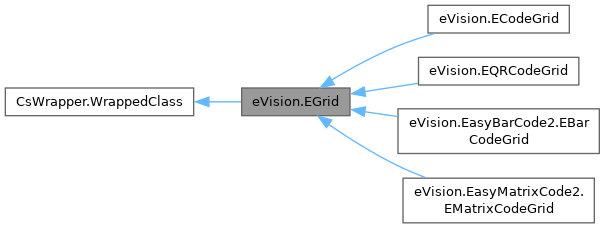
An EGrid object only contains geometrical information, such as the area, extension, and indices of the grid. Specialized implementations can be found for QRCodes, matrix codes, and bar codes.
License(s): EasyQRCode or EasyMatrixCode or EasyBarCode
| eVision.EGrid.EGrid | ( | ) |
Constructs a EGrid object.
| eVision.EGrid.EGrid | ( | uint | numCellsX, |
| uint | numCellsY, | ||
| eVision.ERectangle | area, | ||
| float | extension ) |
Constructs a EGrid object.
| numCellsX | Number of cells in column direction. |
| numCellsY | Number of cells in row direction. |
| area | Area of the grid. |
| extension | extension of the cells grid. |
| eVision.EGrid.EGrid | ( | eVision.EGrid | other | ) |
| void eVision.EGrid.Drag | ( | int | x, |
| int | y ) |
Moves the specified handle to a new position and updates all placement parameters of the grid.
| x | x-coordinate of the mouse cursor. |
| y | y-coordinate of the mouse cursor. |
If zooming and/or panning were used when drawing the region, the same values must be used with EGrid.HitTest and EGrid.Drag.
|
virtual |
Moves the specified handle to a new position and updates all placement parameters of the grid.
| x | x-coordinate of the mouse cursor. |
| y | y-coordinate of the mouse cursor. |
| frame | Frame to transform coordinates with. |
If zooming and/or panning were used when drawing the region, the same values must be used with EGrid.HitTest and EGrid.Drag.
|
virtual |
Moves the specified handle to a new position and updates all placement parameters of the grid.
| x | x-coordinate of the mouse cursor. |
| y | y-coordinate of the mouse cursor. |
| frame | Frame to transform coordinates with. |
| zoomX | Horizontal zoom factor. By default, true scale is used. |
If zooming and/or panning were used when drawing the region, the same values must be used with EGrid.HitTest and EGrid.Drag.
|
virtual |
Moves the specified handle to a new position and updates all placement parameters of the grid.
| x | x-coordinate of the mouse cursor. |
| y | y-coordinate of the mouse cursor. |
| frame | Frame to transform coordinates with. |
| zoomX | Horizontal zoom factor. By default, true scale is used. |
| zoomY | Vertical zoom factor. By default, true scale is used. |
If zooming and/or panning were used when drawing the region, the same values must be used with EGrid.HitTest and EGrid.Drag.
|
virtual |
Moves the specified handle to a new position and updates all placement parameters of the grid.
| x | x-coordinate of the mouse cursor. |
| y | y-coordinate of the mouse cursor. |
| frame | Frame to transform coordinates with. |
| zoomX | Horizontal zoom factor. By default, true scale is used. |
| zoomY | Vertical zoom factor. By default, true scale is used. |
| panX | Horizontal pan offset. By default, no pan is added. |
If zooming and/or panning were used when drawing the region, the same values must be used with EGrid.HitTest and EGrid.Drag.
|
virtual |
Moves the specified handle to a new position and updates all placement parameters of the grid.
| x | x-coordinate of the mouse cursor. |
| y | y-coordinate of the mouse cursor. |
| frame | Frame to transform coordinates with. |
| zoomX | Horizontal zoom factor. By default, true scale is used. |
| zoomY | Vertical zoom factor. By default, true scale is used. |
| panX | Horizontal pan offset. By default, no pan is added. |
| panY | Vertical pan offset. By default, no pan is added. |
If zooming and/or panning were used when drawing the region, the same values must be used with EGrid.HitTest and EGrid.Drag.
| void eVision.EGrid.Drag | ( | int | x, |
| int | y, | ||
| float | zoomX ) |
Moves the specified handle to a new position and updates all placement parameters of the grid.
| x | x-coordinate of the mouse cursor. |
| y | y-coordinate of the mouse cursor. |
| zoomX | Horizontal zoom factor. By default, true scale is used. |
If zooming and/or panning were used when drawing the region, the same values must be used with EGrid.HitTest and EGrid.Drag.
| void eVision.EGrid.Drag | ( | int | x, |
| int | y, | ||
| float | zoomX, | ||
| float | zoomY ) |
Moves the specified handle to a new position and updates all placement parameters of the grid.
| x | x-coordinate of the mouse cursor. |
| y | y-coordinate of the mouse cursor. |
| zoomX | Horizontal zoom factor. By default, true scale is used. |
| zoomY | Vertical zoom factor. By default, true scale is used. |
If zooming and/or panning were used when drawing the region, the same values must be used with EGrid.HitTest and EGrid.Drag.
| void eVision.EGrid.Drag | ( | int | x, |
| int | y, | ||
| float | zoomX, | ||
| float | zoomY, | ||
| float | panX ) |
Moves the specified handle to a new position and updates all placement parameters of the grid.
| x | x-coordinate of the mouse cursor. |
| y | y-coordinate of the mouse cursor. |
| zoomX | Horizontal zoom factor. By default, true scale is used. |
| zoomY | Vertical zoom factor. By default, true scale is used. |
| panX | Horizontal pan offset. By default, no pan is added. |
If zooming and/or panning were used when drawing the region, the same values must be used with EGrid.HitTest and EGrid.Drag.
| void eVision.EGrid.Drag | ( | int | x, |
| int | y, | ||
| float | zoomX, | ||
| float | zoomY, | ||
| float | panX, | ||
| float | panY ) |
Moves the specified handle to a new position and updates all placement parameters of the grid.
| x | x-coordinate of the mouse cursor. |
| y | y-coordinate of the mouse cursor. |
| zoomX | Horizontal zoom factor. By default, true scale is used. |
| zoomY | Vertical zoom factor. By default, true scale is used. |
| panX | Horizontal pan offset. By default, no pan is added. |
| panY | Vertical pan offset. By default, no pan is added. |
If zooming and/or panning were used when drawing the region, the same values must be used with EGrid.HitTest and EGrid.Drag.
| void eVision.EGrid.DrawGrid | ( | eVision.EDrawAdapter | drawAdapter, |
| eVision.EGridDrawOptions | options, | ||
| eVision.EFrame | frame, | ||
| float | zoomX, | ||
| float | zoomY, | ||
| float | panX, | ||
| float | panY ) |
Draws the grid.
| drawAdapter | Handle to the device context of the destination window. |
| options | Options for grid drawing. |
| frame | Frame associated with the pattern. |
| zoomX | Horizontal zooming factor. |
| zoomY | Vertical zooming factor. If set to 0, the horizontal zooming factor will be used for isotropic zooming. |
| panX | Horizontal panning value expressed in pixels. By default, no panning occurs. |
| panY | Vertical panning value expressed in pixels. By default, no panning occurs. |
The zoomX, zoomY, panX and panY parameters can be used to scale and/or translate the drawing operations.
| void eVision.EGrid.DrawGrid | ( | eVision.EDrawAdapter | drawAdapter, |
| eVision.EGridDrawOptions | options, | ||
| float | zoomX, | ||
| float | zoomY, | ||
| float | panX, | ||
| float | panY ) |
Draws the grid.
| drawAdapter | Handle to the device context of the destination window. |
| options | Options for grid drawing. |
| zoomX | Horizontal zooming factor. |
| zoomY | Vertical zooming factor. If set to 0, the horizontal zooming factor will be used for isotropic zooming. |
| panX | Horizontal panning value expressed in pixels. By default, no panning occurs. |
| panY | Vertical panning value expressed in pixels. By default, no panning occurs. |
The zoomX, zoomY, panX and panY parameters can be used to scale and/or translate the drawing operations.
| bool eVision.EGrid.GetCellEnabled | ( | uint | column, |
| uint | row ) |
Returns true if Cell is enabled and false otherwise.
| column | The column of the cell. |
| row | The row of the cell. |
By default, all grid cells are enabled.
| eVision.ERegion eVision.EGrid.GetCellRegion | ( | uint | column, |
| uint | row ) |
Returns the region of a grid cell given its indices in an EGrid object.
| column | The column of the cell. |
| row | The row of the cell. |
| eVision.EEditionMode eVision.EGrid.HitTest | ( | int | x, |
| int | y, | ||
| eVision.EFrame | frame, | ||
| float | zoomX, | ||
| float | zoomY, | ||
| float | panX, | ||
| float | panY ) |
Detects if the cursor is placed over one of the dragging handles.
| x | x-coordinate of the mouse cursor. |
| y | y-coordinate of the mouse cursor. |
| frame | Frame of reference in which the grid is defined. |
| zoomX | Horizontal zoom factor. By default, true scale is used. |
| zoomY | Vertical zoom factor. By default, true scale is used. |
| panX | Horizontal pan offset. By default, no pan is added. |
| panY | Vertical pan offset. By default, no pan is added. |
Returns an EEditionMode indicating the type of handle under the mouse.
If zooming and/or panning were used when drawing the region, the same values must be used with EGrid.HitTest and EGrid.Drag.
| eVision.EEditionMode eVision.EGrid.HitTest | ( | int | x, |
| int | y, | ||
| float | zoomX, | ||
| float | zoomY, | ||
| float | panX, | ||
| float | panY ) |
Detects if the cursor is placed over one of the dragging handles.
| x | x-coordinate of the mouse cursor. |
| y | y-coordinate of the mouse cursor. |
| zoomX | Horizontal zoom factor. By default, true scale is used. |
| zoomY | Vertical zoom factor. By default, true scale is used. |
| panX | Horizontal pan offset. By default, no pan is added. |
| panY | Vertical pan offset. By default, no pan is added. |
Returns an EEditionMode indicating the type of handle under the mouse.
If zooming and/or panning were used when drawing the region, the same values must be used with EGrid.HitTest and EGrid.Drag.
| void eVision.EGrid.Load | ( | eVision.ESerializer | serializer | ) |
Load the EGrid configuration. The given ESerializer must have been created for reading.
| serializer | The serializer. |
| void eVision.EGrid.Load | ( | string | path | ) |
Load the EGrid configuration. The given ESerializer must have been created for reading.
| path | The file path. |
| void eVision.EGrid.Save | ( | eVision.ESerializer | serializer | ) |
Save the EGrid configuration. The given ESerializer must have been created for writing.
| serializer | The serializer. |
| void eVision.EGrid.Save | ( | string | path | ) |
Save the EGrid configuration. The given ESerializer must have been created for writing.
| path | The file path. |
| void eVision.EGrid.SetEnableCell | ( | uint | column, |
| uint | row, | ||
| bool | enable ) |
Enable/Disable Cell.
| column | The column of the cell to (dis/en)able. |
| row | The row of the cell to (dis/en)able. |
| enable | Whether to enable or disable the cell. |
By default, all grid cells are enabled.
| void eVision.EGrid.SetEnableColumn | ( | uint | column, |
| bool | enable ) |
Enable/Disable Column.
| column | The column of the cells to (dis/en)able. |
| enable | Whether to enable or disable the cells. |
By default, all grid cells are enabled.
| void eVision.EGrid.SetEnableRow | ( | uint | row, |
| bool | enable ) |
Enable/Disable Row.
| row | The row of the cells to (dis/en)able. |
| enable | Whether to enable or disable the cells. |
By default, all grid cells are enabled.
|
getset |
Returns the area of an EGrid object.
|
getset |
Graphical edition mode.
|
set |
Enable/Disable all cells.
By default, all grid cells are enabled.
|
getset |
Returns the extension of an EGrid object.
|
get |
Returns the number of columns in the grid.
|
get |
Returns the number of rows in the grid.
 1.17.0