 |
eVision .NET API
|
|
eVision .NET API
|
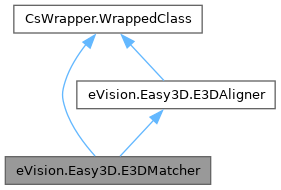
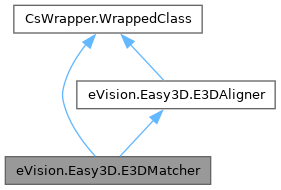
Aligns an EPointCloud or EZMap on and compares it with a reference EMesh, EPointCloud or EZMap. More...
Public Member Functions | |
| E3DMatcher () | |
| Constructs a 3D matching context. | |
| E3DMatcher (eVision.Easy3D.E3DMatcher other) | |
| Constructs a 3D matching context. | |
| override void | Load (string path) |
| Loads the E3DMatcher. The given ESerializer must have been created for reading. | |
| override void | Load (eVision.ESerializer serializer) |
| Loads the E3DMatcher. The given ESerializer must have been created for reading. | |
| override void | Save (string path) |
| Saves the E3DMatcher. The given ESerializer must have been created for writing. | |
| override void | Save (eVision.ESerializer serializer) |
| Saves the E3DMatcher. The given ESerializer must have been created for writing. | |
| eVision.Easy3D.E3DMatch | Match (eVision.Easy3D.EZMap zmap) |
| Matches the reference patterns against an EZMap or an EPointCloud. | |
| eVision.Easy3D.E3DMatch | Match (eVision.Easy3D.EPointCloud cloud, eVision.Easy3D.E3DPlane projectionPlane) |
| Matches the reference patterns against an EZMap or an EPointCloud. | |
| eVision.Easy3D.E3DMatch | Match (eVision.Easy3D.EPointCloud cloud, float azimuth, float elevation) |
| Matches the reference patterns against an EZMap or an EPointCloud. | |
| void | SetComparisonROI (eVision.ERegion regionOfInterest) |
| Sets/Gets the ERegion of the reference that should be compared. See E3DAligner.RetrieveReferencePosesProjections. By default, all the points of the reference are used for the comparison. | |
| eVision.ERegion | GetComparisonROI (int offset) |
| Sets/Gets the ERegion of the reference that should be compared. See E3DAligner.RetrieveReferencePosesProjections. By default, all the points of the reference are used for the comparison. | |
| void | ClearComparisonROI () |
| Clears the ERegion that should be compared for all of the references. See also E3DMatcher.AllComparisonROI and E3DMatcher.SetComparisonROI. | |
| void | SetComparisonNoExtraMaterial (eVision.ERegion noExtraMaterial) |
| Sets/Gets the ERegion that should not have extra material in the scan. See E3DAligner.RetrieveReferencePosesProjections. By default, all the points of the reference are used for the comparison. | |
| eVision.ERegion | GetComparisonNoExtraMaterial (int offset) |
| Sets/Gets the ERegion that should not have extra material in the scan. See E3DAligner.RetrieveReferencePosesProjections. By default, all the points of the reference are used for the comparison. | |
| void | ClearComparisonNoExtraMaterial () |
| Clears the ERegion that should not have extra material in the scan. See also E3DMatcher.AllComparisonNoExtraMaterial and E3DMatcher.SetComparisonNoExtraMaterial. | |
| void | PrepareReference () |
| Prepare the reference internal structures. By default, this is done on the first call to E3DMatcher.Match. | |
| void | GetComparisonPointCloud (eVision.Easy3D.EPointCloud comparisonCloud, bool storeDistances, bool storeColors, bool pointFromReference, bool fullModel) |
| Gets the EPointCloud on which anomalies are detected. | |
| void | GetComparisonPointCloud (eVision.Easy3D.EPointCloud comparisonCloud, bool storeDistances, bool storeColors, bool pointFromReference) |
| Gets the EPointCloud on which anomalies are detected. | |
| void | GetComparisonPointCloud (eVision.Easy3D.EPointCloud comparisonCloud, bool storeDistances, bool storeColors) |
| Gets the EPointCloud on which anomalies are detected. | |
| void | GetComparisonPointCloud (eVision.Easy3D.EPointCloud comparisonCloud, bool storeDistances) |
| Gets the EPointCloud on which anomalies are detected. | |
| void | GetComparisonPointCloud (eVision.Easy3D.EPointCloud comparisonCloud) |
| Gets the EPointCloud on which anomalies are detected. | |
| void | ResetAnomalyThresholds () |
| Sets the anomaly thresholds to their default values (computed automatically from the model size). | |
| void | SetAnomalyThresholds (float distanceThreshold, float areaThreshold) |
| Sets the thresholds related to the anomalies detection. | |
| void | GetAnomalyThresholds (out float distanceThreshold, out float areaThreshold) |
| Gets the thresholds related to the anomalies detection. | |
| void | SetAnomalyHysteresis (float distanceHysteresisThreshold, float areaHysteresisThreshold) |
| Sets the hysteresis related to the anomalies detection. | |
| void | GetAnomalyHysteresis (out float distanceHysteresisThreshold, out float areaHysteresisThreshold) |
| Gets the hysteresis related to the anomalies detection. | |
| void | SetEdgeCroppingParameters (uint numberNeighbors, float curvatureThreshold) |
| Sets the parameters driving the edge cropping. | |
| void | GetEdgeCroppingParameters (out uint numberNeighbors, out float curvatureThreshold) |
| Gets the parameters driving the edge cropping. | |
| Public Member Functions inherited from eVision.Easy3D.E3DAligner | |
| E3DAligner () | |
| Constructs a 3D Aligner. | |
| E3DAligner (eVision.Easy3D.E3DAligner other) | |
| Constructs a 3D Aligner. | |
| void | SetReference (eVision.Easy3D.EMesh mesh, eVision.Easy3D.E3DPlane plane) |
| Sets the 3D reference model that is used to create reference patterns. It may be a CAD of the object as an EMesh with reference plane(s) on which they must be projected to roughly correspond to the face visible in the scans. In that case, when a scan re-projection plane is set (E3DAligner.ScanReprojectionPlane, E3DAligner.SetFlatScan), the reference plane(s) set by this method should correspond to the scan's re-projection plane. It may also be a golden scan represented by an EZMap or an EPointCloud with reference plane indicating on which direction it must be projected. | |
| void | SetReference (eVision.Easy3D.EMesh mesh, float azimuth, float elevation) |
| Sets the 3D reference model that is used to create reference patterns. It may be a CAD of the object as an EMesh with reference plane(s) on which they must be projected to roughly correspond to the face visible in the scans. In that case, when a scan re-projection plane is set (E3DAligner.ScanReprojectionPlane, E3DAligner.SetFlatScan), the reference plane(s) set by this method should correspond to the scan's re-projection plane. It may also be a golden scan represented by an EZMap or an EPointCloud with reference plane indicating on which direction it must be projected. | |
| void | SetReference (eVision.Easy3D.EMesh mesh, eVision.Easy3D.E3DPlane[] planes) |
| Sets the 3D reference model that is used to create reference patterns. It may be a CAD of the object as an EMesh with reference plane(s) on which they must be projected to roughly correspond to the face visible in the scans. In that case, when a scan re-projection plane is set (E3DAligner.ScanReprojectionPlane, E3DAligner.SetFlatScan), the reference plane(s) set by this method should correspond to the scan's re-projection plane. It may also be a golden scan represented by an EZMap or an EPointCloud with reference plane indicating on which direction it must be projected. | |
| void | SetReference (eVision.Easy3D.EMesh mesh, float[] azimuths, float[] elevations) |
| Sets the 3D reference model that is used to create reference patterns. It may be a CAD of the object as an EMesh with reference plane(s) on which they must be projected to roughly correspond to the face visible in the scans. In that case, when a scan re-projection plane is set (E3DAligner.ScanReprojectionPlane, E3DAligner.SetFlatScan), the reference plane(s) set by this method should correspond to the scan's re-projection plane. It may also be a golden scan represented by an EZMap or an EPointCloud with reference plane indicating on which direction it must be projected. | |
| void | SetReference (eVision.Easy3D.EZMap zmap) |
| Sets the 3D reference model that is used to create reference patterns. It may be a CAD of the object as an EMesh with reference plane(s) on which they must be projected to roughly correspond to the face visible in the scans. In that case, when a scan re-projection plane is set (E3DAligner.ScanReprojectionPlane, E3DAligner.SetFlatScan), the reference plane(s) set by this method should correspond to the scan's re-projection plane. It may also be a golden scan represented by an EZMap or an EPointCloud with reference plane indicating on which direction it must be projected. | |
| void | SetReference (eVision.Easy3D.EPointCloud cloud, eVision.Easy3D.E3DPlane plane) |
| Sets the 3D reference model that is used to create reference patterns. It may be a CAD of the object as an EMesh with reference plane(s) on which they must be projected to roughly correspond to the face visible in the scans. In that case, when a scan re-projection plane is set (E3DAligner.ScanReprojectionPlane, E3DAligner.SetFlatScan), the reference plane(s) set by this method should correspond to the scan's re-projection plane. It may also be a golden scan represented by an EZMap or an EPointCloud with reference plane indicating on which direction it must be projected. | |
| void | SetReference (eVision.Easy3D.EPointCloud cloud, float azimuth, float elevation) |
| Sets the 3D reference model that is used to create reference patterns. It may be a CAD of the object as an EMesh with reference plane(s) on which they must be projected to roughly correspond to the face visible in the scans. In that case, when a scan re-projection plane is set (E3DAligner.ScanReprojectionPlane, E3DAligner.SetFlatScan), the reference plane(s) set by this method should correspond to the scan's re-projection plane. It may also be a golden scan represented by an EZMap or an EPointCloud with reference plane indicating on which direction it must be projected. | |
| void | SetFlatScan (eVision.Easy3D.EZMap scan) |
| Uses a flat scan of the setup to compute the plane on which the object lays. This helps computing alignment when the sensor does not lay on top of the objects. | |
| void | SetFlatScan (eVision.Easy3D.EZMap scan, bool objectAbovePlane) |
| Uses a flat scan of the setup to compute the plane on which the object lays. This helps computing alignment when the sensor does not lay on top of the objects. | |
| void | SetFlatScan (eVision.Easy3D.EPointCloud cloud) |
| Uses a flat scan of the setup to compute the plane on which the object lays. This helps computing alignment when the sensor does not lay on top of the objects. | |
| void | SetFlatScan (eVision.Easy3D.EPointCloud cloud, bool objectAbovePlane) |
| Uses a flat scan of the setup to compute the plane on which the object lays. This helps computing alignment when the sensor does not lay on top of the objects. | |
| void | ClearReprojectionPlane () |
| Clears re-projection plane set with E3DAligner.ScanReprojectionPlane or E3DAligner.SetFlatScan. | |
| bool | IsReprojectionPlaneSet () |
| Returns whether a re-projection plane was set with E3DAligner.ScanReprojectionPlane or E3DAligner.SetFlatScan or not. | |
| void | RetrieveReferencePosesProjections (out eVision.Easy3D.EZMap8[] referencePosesProjections) |
| Retrieves the reference patterns of the E3DAligner in the form of a vector of EZMap8. The corresponding reference poses vector can be retrieved with E3DAligner.RetrieveReferencePoses. | |
| void | RetrieveReferencePoses (out eVision.Easy3D.E3DPlane[] referencePoses) |
| Retrieves the reference poses of the E3DAligner in the form of a vector of E3DPlane. The corresponding reference patterns vector can be retrieved with E3DAligner.RetrieveReferencePosesProjections. | |
| eVision.Easy3D.E3DAlignment | Align (eVision.Easy3D.EZMap zmap) |
| Aligns an EZMap or EPointCloud on the reference model. | |
| eVision.Easy3D.E3DAlignment | Align (eVision.Easy3D.EPointCloud cloud, eVision.Easy3D.E3DPlane projectionPlane) |
| Aligns an EZMap or EPointCloud on the reference model. | |
| eVision.Easy3D.E3DAlignment | Align (eVision.Easy3D.EPointCloud cloud, float azimuth, float elevation) |
| Aligns an EZMap or EPointCloud on the reference model. | |
Properties | |
| eVision.ERegion[] | AllComparisonROI [get, set] |
| Sets/Gets the ERegion that should be compared for all of the references. A pointer to ERegion per reference pose is needed and they should be given in the corresponding order and should be of the same size than their corresponding reference poses projections. See E3DAligner.RetrieveReferencePosesProjections. By default, all the points of the reference are used for the comparison. | |
| eVision.ERegion[] | AllComparisonNoExtraMaterial [get, set] |
| Sets/Gets the ERegion that should not have extra material in the scan. A pointer to ERegion per reference pose is needed and they should be given in the corresponding order and should be of the same size than their corresponding reference poses projection. See E3DAligner.RetrieveReferencePosesProjections. By default, the points in the scan far from the reference are not considered as anomalies (except if there are missing points in the scan nearby). | |
| eVision.Easy3D.EComparisonDistanceMode | ComparisonDistanceMode [get, set] |
| Sets/Gets the distance mode for the 3D comparison. | |
| bool | EnableMissingPointAsAnomaly [get, set] |
| If True, the points that are not present in the scan (but are present in the reference), are considered as anomalies. If False, only points that are present in the scan can be considered as anomalies. | |
| bool | EnableAutomaticDecimation [get, set] |
| If True, the given cloud or ZMap is automatically decimated with a resolution depending on the distance threshold to speed-up processing. If False, all the points of the given cloud or ZMap are used to compute the distance. | |
| float | AutomaticCropFactor [get, set] |
| Sets/Gets the automatic cropping factor. The factor multiplies the anomaly distance threshold (E3DMatcher.SetAnomalyThresholds) to obtain the margin for the cropping. If the value is smaller than 0, then no crop is performed before computing the distance. | |
| eVision.Easy3D.EAnomalyThresholds | AnomalyThresholds [get, set] |
| Gets/Sets the thresholds related to the anomalies detection. | |
| eVision.Easy3D.EAnomalyThresholds | AnomalyHysteresis [get, set] |
| Gets/Sets the hysteresis related to the anomalies detection. | |
| eVision.Easy3D.EEdgeCroppingParameters | EdgeCroppingParameters [get, set] |
| Gets/Sets the parameters driving the edge cropping. | |
| bool | EnableAutomaticEdgeCropping [get, set] |
| If True, edges in the reference will be cropped automatically. This is useful to avoid false positives that could occur near the edges of the object, in particular when using normals (see E3DMatcher.ComparisonDistanceMode and EComparisonDistanceMode). To modify the parameters of the cropping, see E3DMatcher.SetEdgeCroppingParameters. | |
| Properties inherited from eVision.Easy3D.E3DAligner | |
| eVision.Easy3D.E3DPlane | ScanReprojectionPlane [get, set] |
| Sets/Gets the plane on which the model lays. This is used to re-project the scans before trying to find the position of the object within them. The E3DPlane should lay slightly below/above (depending on the orientation of the normal) the real plane, so that all points of the real plane are reprojected in the new ZMap. | |
Additional Inherited Members | |
| Static Public Member Functions inherited from eVision.Easy3D.E3DAligner | |
| static void | compute3DPositionFrom2DAligning (eVision.Easy3D.EZMap8 refZMap, eVision.Easy3D.EZMap8 scanZmap, eVision.Easy3D.E3DTransformMatrix modelToScanTransform, float angle, eVision.EPoint modelCenter, eVision.EPoint scanCenter) |
| computes transformation between the point clouds from the alignment on the ZMaps | |
Aligns an EPointCloud or EZMap on and compares it with a reference EMesh, EPointCloud or EZMap.
License(s): Easy3DMatch
| eVision.Easy3D.E3DMatcher.E3DMatcher | ( | ) |
Constructs a 3D matching context.
| eVision.Easy3D.E3DMatcher.E3DMatcher | ( | eVision.Easy3D.E3DMatcher | other | ) |
Constructs a 3D matching context.
| other | Another E3DMatcher object to be copied in the new E3DMatcher object. |
| void eVision.Easy3D.E3DMatcher.ClearComparisonNoExtraMaterial | ( | ) |
Clears the ERegion that should not have extra material in the scan. See also E3DMatcher.AllComparisonNoExtraMaterial and E3DMatcher.SetComparisonNoExtraMaterial.
| void eVision.Easy3D.E3DMatcher.ClearComparisonROI | ( | ) |
Clears the ERegion that should be compared for all of the references. See also E3DMatcher.AllComparisonROI and E3DMatcher.SetComparisonROI.
| void eVision.Easy3D.E3DMatcher.GetAnomalyHysteresis | ( | out float | distanceHysteresisThreshold, |
| out float | areaHysteresisThreshold ) |
Gets the hysteresis related to the anomalies detection.
| distanceHysteresisThreshold | The distance hysteresis threshold. Must be greater than or equal to 1. Default: 1 |
| areaHysteresisThreshold | The area hysteresis threshold. Must be smaller than or equal to 1. Default: 1. |
To be considered as an anomaly, a cluster of points with a distance greater than distanceThreshold must have an area greater than areaThreshold. See E3DMatcher.SetAnomalyThresholds. In addition, an hysteresis can be specified, such that the cluster will also have to contain a subset of points whose distance is greater than distanceHysteresisThreshold * distanceThreshold and area greater than areaHysteresisThreshold * areaThreshold. See also E3DMatcher.AnomalyThresholds.
Use E3DMatcher.AnomalyHysteresis instead.
Deprecated in version 24.6. Scheduled to be removed in version 27.6.
| void eVision.Easy3D.E3DMatcher.GetAnomalyThresholds | ( | out float | distanceThreshold, |
| out float | areaThreshold ) |
Gets the thresholds related to the anomalies detection.
| distanceThreshold | The distance threshold. |
| areaThreshold | The area threshold. |
To be considered as an anomaly, a cluster of points with a distance greater than distanceThreshold must have an area greater than areaThreshold. See also E3DMatcher.AnomalyHysteresis to more advanced anomaly detection.
Trying to get the anomaly threshold before they are set or automatically computed will throw an exception.
Use E3DMatcher.AnomalyThresholds instead.
Deprecated in version 24.6. Scheduled to be removed in version 27.6.
| eVision.ERegion eVision.Easy3D.E3DMatcher.GetComparisonNoExtraMaterial | ( | int | offset | ) |
Sets/Gets the ERegion that should not have extra material in the scan. See E3DAligner.RetrieveReferencePosesProjections. By default, all the points of the reference are used for the comparison.
| offset | offset of the ERegion to get back. |
This method is a shortcut of E3DMatcher.AllComparisonNoExtraMaterial when you only want to set/get one reference pose.
| void eVision.Easy3D.E3DMatcher.GetComparisonPointCloud | ( | eVision.Easy3D.EPointCloud | comparisonCloud | ) |
Gets the EPointCloud on which anomalies are detected.
| comparisonCloud | The EPointCloud in which to copy the data. |
| void eVision.Easy3D.E3DMatcher.GetComparisonPointCloud | ( | eVision.Easy3D.EPointCloud | comparisonCloud, |
| bool | storeDistances ) |
Gets the EPointCloud on which anomalies are detected.
| comparisonCloud | The EPointCloud in which to copy the data. |
| storeDistances | If set to True, the distances computed will be stored in the EPointCloud. |
Default: True
| void eVision.Easy3D.E3DMatcher.GetComparisonPointCloud | ( | eVision.Easy3D.EPointCloud | comparisonCloud, |
| bool | storeDistances, | ||
| bool | storeColors ) |
Gets the EPointCloud on which anomalies are detected.
| comparisonCloud | The EPointCloud in which to copy the data. |
| storeDistances | If set to True, the distances computed will be stored in the EPointCloud. |
Default: True
| storeColors | If set to True, the colors related to the distances computed will be stored in the EPointCloud. |
Default: True
| void eVision.Easy3D.E3DMatcher.GetComparisonPointCloud | ( | eVision.Easy3D.EPointCloud | comparisonCloud, |
| bool | storeDistances, | ||
| bool | storeColors, | ||
| bool | pointFromReference ) |
Gets the EPointCloud on which anomalies are detected.
| comparisonCloud | The EPointCloud in which to copy the data. |
| storeDistances | If set to True, the distances computed will be stored in the EPointCloud. |
Default: True
| storeColors | If set to True, the colors related to the distances computed will be stored in the EPointCloud. |
Default: True
| pointFromReference | If set to True, the points from the reference will be stored in comparisonCloud. Otherwise, it will be the points from the scan. If E3DMatcher.ComparisonDistanceMode is set to EComparisonDistanceMode.EComparisonDistanceMode_Normals_Advanced, result always contains points from the scan. |
Default: False
| void eVision.Easy3D.E3DMatcher.GetComparisonPointCloud | ( | eVision.Easy3D.EPointCloud | comparisonCloud, |
| bool | storeDistances, | ||
| bool | storeColors, | ||
| bool | pointFromReference, | ||
| bool | fullModel ) |
Gets the EPointCloud on which anomalies are detected.
| comparisonCloud | The EPointCloud in which to copy the data. |
| storeDistances | If set to True, the distances computed will be stored in the EPointCloud. |
Default: True
| storeColors | If set to True, the colors related to the distances computed will be stored in the EPointCloud. |
Default: True
| pointFromReference | If set to True, the points from the reference will be stored in comparisonCloud. Otherwise, it will be the points from the scan. If E3DMatcher.ComparisonDistanceMode is set to EComparisonDistanceMode.EComparisonDistanceMode_Normals_Advanced, result always contains points from the scan. |
Default: False
| fullModel | If set to True, the points that are not inside the ROI will also be in the EPointCloud. Default: False |
| eVision.ERegion eVision.Easy3D.E3DMatcher.GetComparisonROI | ( | int | offset | ) |
Sets/Gets the ERegion of the reference that should be compared. See E3DAligner.RetrieveReferencePosesProjections. By default, all the points of the reference are used for the comparison.
| offset | offset of the ERegion to get back. |
This method is a shortcut of E3DMatcher.AllComparisonROI when you only want to set/get one reference pose.
| void eVision.Easy3D.E3DMatcher.GetEdgeCroppingParameters | ( | out uint | numberNeighbors, |
| out float | curvatureThreshold ) |
Gets the parameters driving the edge cropping.
| numberNeighbors | The number of neighbors that we will use to compute the local curvature. The bigger this parameter, the thicker the cropping will be. This number must be bigger than 10. Default: 100 |
| curvatureThreshold | The curvature value above which a point is cropped (must be between 0 and 1). Default: 0.15 |
Edge cropping is disabled by default, enable it using E3DMatcher.EnableAutomaticEdgeCropping.
Use E3DMatcher.EdgeCroppingParameters instead.
Deprecated in version 24.6. Scheduled to be removed in version 27.6.
|
virtual |
Loads the E3DMatcher. The given ESerializer must have been created for reading.
| serializer | The serializer. |
Reimplemented from eVision.Easy3D.E3DAligner.
|
virtual |
Loads the E3DMatcher. The given ESerializer must have been created for reading.
| path | The file path. |
Reimplemented from eVision.Easy3D.E3DAligner.
| eVision.Easy3D.E3DMatch eVision.Easy3D.E3DMatcher.Match | ( | eVision.Easy3D.EPointCloud | cloud, |
| eVision.Easy3D.E3DPlane | projectionPlane ) |
Matches the reference patterns against an EZMap or an EPointCloud.
| cloud | The EPointCloud that will be aligned and compared with the reference. |
| projectionPlane | The plane on which the cloud is orthographically projected for alignment. |
When specifying azimuth and elevation, only the normal of the projection plane is specified. The distance from origin of the E3DPlane will be computed from the points cloud, so that all points of the cloud are visible. This might not be wanted if there are points in the cloud that are useless for the process (e.g. if we see other objects far below the model). This is also a bit slower as the plane's distance is recomputed on each scan.

| eVision.Easy3D.E3DMatch eVision.Easy3D.E3DMatcher.Match | ( | eVision.Easy3D.EPointCloud | cloud, |
| float | azimuth, | ||
| float | elevation ) |
Matches the reference patterns against an EZMap or an EPointCloud.
| cloud | The EPointCloud that will be aligned and compared with the reference. |
| azimuth | The azimuth angle of the normal of the projection plane in Easy.AngleUnit. Azimuth angles are oriented trigonometrically around the z axis. The x axis corresponds to an azimuth of 0 degrees. |
| elevation | The elevation angle of the normal of the projection plane in Easy.AngleUnit. Elevation angles represent how close the normal is to the z = 0 plane. |
When specifying azimuth and elevation, only the normal of the projection plane is specified. The distance from origin of the E3DPlane will be computed from the points cloud, so that all points of the cloud are visible. This might not be wanted if there are points in the cloud that are useless for the process (e.g. if we see other objects far below the model). This is also a bit slower as the plane's distance is recomputed on each scan.
| eVision.Easy3D.E3DMatch eVision.Easy3D.E3DMatcher.Match | ( | eVision.Easy3D.EZMap | zmap | ) |
Matches the reference patterns against an EZMap or an EPointCloud.
| zmap | The EZMap that will be aligned and compared with the reference. |
When specifying azimuth and elevation, only the normal of the projection plane is specified. The distance from origin of the E3DPlane will be computed from the points cloud, so that all points of the cloud are visible. This might not be wanted if there are points in the cloud that are useless for the process (e.g. if we see other objects far below the model). This is also a bit slower as the plane's distance is recomputed on each scan.
| void eVision.Easy3D.E3DMatcher.PrepareReference | ( | ) |
Prepare the reference internal structures. By default, this is done on the first call to E3DMatcher.Match.
| void eVision.Easy3D.E3DMatcher.ResetAnomalyThresholds | ( | ) |
Sets the anomaly thresholds to their default values (computed automatically from the model size).
|
virtual |
Saves the E3DMatcher. The given ESerializer must have been created for writing.
| serializer | The serializer. |
Reimplemented from eVision.Easy3D.E3DAligner.
|
virtual |
Saves the E3DMatcher. The given ESerializer must have been created for writing.
| path | The file path. |
Reimplemented from eVision.Easy3D.E3DAligner.
| void eVision.Easy3D.E3DMatcher.SetAnomalyHysteresis | ( | float | distanceHysteresisThreshold, |
| float | areaHysteresisThreshold ) |
Sets the hysteresis related to the anomalies detection.
| distanceHysteresisThreshold | The distance hysteresis threshold. Must be greater than or equal to 1. Default: 1 |
| areaHysteresisThreshold | The area hysteresis threshold. Must be smaller than or equal to 1. Default: 1. |
To be considered as an anomaly, a cluster of points with a distance greater than distanceThreshold must have an area greater than areaThreshold. See E3DMatcher.SetAnomalyThresholds. In addition, an hysteresis can be specified, such that the cluster will also have to contain a subset of points whose distance is greater than distanceHysteresisThreshold * distanceThreshold and area greater than areaHysteresisThreshold * areaThreshold. See also E3DMatcher.AnomalyThresholds.
Use E3DMatcher.AnomalyHysteresis instead.
Deprecated in version 24.6. Scheduled to be removed in version 27.6.
| void eVision.Easy3D.E3DMatcher.SetAnomalyThresholds | ( | float | distanceThreshold, |
| float | areaThreshold ) |
Sets the thresholds related to the anomalies detection.
| distanceThreshold | The distance threshold. Must be > 0. |
| areaThreshold | The area threshold. Must be > 0. |
To be considered as an anomaly, a cluster of points with a distance greater than distanceThreshold must have an area greater than areaThreshold. See also E3DMatcher.AnomalyHysteresis to more advanced anomaly detection.
If the anomaly thresholds aren't set, they will be computed automatically from the given reference once E3DMatcher.PrepareReference is called.
Use E3DMatcher.AnomalyThresholds instead.
Deprecated in version 24.6. Scheduled to be removed in version 27.6.
| void eVision.Easy3D.E3DMatcher.SetComparisonNoExtraMaterial | ( | eVision.ERegion | noExtraMaterial | ) |
Sets/Gets the ERegion that should not have extra material in the scan. See E3DAligner.RetrieveReferencePosesProjections. By default, all the points of the reference are used for the comparison.
| noExtraMaterial | A pointer to ERegion defining the area on which we will check no data is missing in the scan. This param is a shortcut to avoid building a vector of size 1. |
This method is a shortcut of E3DMatcher.AllComparisonNoExtraMaterial when you only want to set/get one reference pose.
| void eVision.Easy3D.E3DMatcher.SetComparisonROI | ( | eVision.ERegion | regionOfInterest | ) |
Sets/Gets the ERegion of the reference that should be compared. See E3DAligner.RetrieveReferencePosesProjections. By default, all the points of the reference are used for the comparison.
| regionOfInterest | A pointer to ERegion defining the area that will be used for comparison with the reference pose. This param is a shortcut to avoid building a vector of size 1. |
This method is a shortcut of E3DMatcher.AllComparisonROI when you only want to set/get one reference pose.
| void eVision.Easy3D.E3DMatcher.SetEdgeCroppingParameters | ( | uint | numberNeighbors, |
| float | curvatureThreshold ) |
Sets the parameters driving the edge cropping.
| numberNeighbors | The number of neighbors that we will use to compute the local curvature. The bigger this parameter, the thicker the cropping will be. This number must be bigger than 10. Default: 100 |
| curvatureThreshold | The curvature value above which a point is cropped (must be between 0 and 1). Default: 0.15 |
Edge cropping is disabled by default, enable it using E3DMatcher.EnableAutomaticEdgeCropping.
Use E3DMatcher.EdgeCroppingParameters instead.
Deprecated in version 24.6. Scheduled to be removed in version 27.6.
|
getset |
Sets/Gets the ERegion that should not have extra material in the scan. A pointer to ERegion per reference pose is needed and they should be given in the corresponding order and should be of the same size than their corresponding reference poses projection. See E3DAligner.RetrieveReferencePosesProjections. By default, the points in the scan far from the reference are not considered as anomalies (except if there are missing points in the scan nearby).
|
getset |
Sets/Gets the ERegion that should be compared for all of the references. A pointer to ERegion per reference pose is needed and they should be given in the corresponding order and should be of the same size than their corresponding reference poses projections. See E3DAligner.RetrieveReferencePosesProjections. By default, all the points of the reference are used for the comparison.
|
getset |
Gets/Sets the hysteresis related to the anomalies detection.
To be considered as an anomaly, a cluster of points with a distance greater than distanceThreshold must have an area greater than areaThreshold. See E3DMatcher.SetAnomalyThresholds. In addition, an hysteresis can be specified, such that the cluster will also have to contain a subset of points whose distance is greater than distanceHysteresisThreshold * distanceThreshold and area greater than areaHysteresisThreshold * areaThreshold. See also E3DMatcher.AnomalyThresholds.
|
getset |
Gets/Sets the thresholds related to the anomalies detection.
To be considered as an anomaly, a cluster of points with a distance greater than distanceThreshold must have an area greater than areaThreshold. See also E3DMatcher.AnomalyHysteresis to more advanced anomaly detection.
If the anomaly thresholds aren't set, they will be computed automatically from the given reference once E3DMatcher.PrepareReference is called. Trying to get the anomaly thresholds before they are set or automatically computed will throw an exception.
|
getset |
Sets/Gets the automatic cropping factor. The factor multiplies the anomaly distance threshold (E3DMatcher.SetAnomalyThresholds) to obtain the margin for the cropping. If the value is smaller than 0, then no crop is performed before computing the distance.
Default: 1
Note that if the cropping margin is too small, the E3DPoint of the anomalies will not be visible (with the function E3DMatcher.GetComparisonPointCloud and the parameter pointFromReference = False). Moreover, if the E3DMatcher.EnableMissingPointAsAnomaly is set to False, the anomalies will not be detected.
|
getset |
Sets/Gets the distance mode for the 3D comparison.
Default: EComparisonDistanceMode.EComparisonDistanceMode_Euclidean.
|
getset |
Gets/Sets the parameters driving the edge cropping.
Edge cropping is disabled by default, enable it using E3DMatcher.EnableAutomaticEdgeCropping.
|
getset |
If True, the given cloud or ZMap is automatically decimated with a resolution depending on the distance threshold to speed-up processing. If False, all the points of the given cloud or ZMap are used to compute the distance.
Default: True
|
getset |
If True, edges in the reference will be cropped automatically. This is useful to avoid false positives that could occur near the edges of the object, in particular when using normals (see E3DMatcher.ComparisonDistanceMode and EComparisonDistanceMode). To modify the parameters of the cropping, see E3DMatcher.SetEdgeCroppingParameters.
Default: False
|
getset |
If True, the points that are not present in the scan (but are present in the reference), are considered as anomalies. If False, only points that are present in the scan can be considered as anomalies.
Default: True
Setting the value to False can be interesting when for example there are different shadow effects on the reference and on the scan or if there are illumination issues in the scan.
 1.17.0