 |
eVision .NET API
|
|
eVision .NET API
|
EClassifier allows to train a classifier using an EDataset object and classify new images. More...
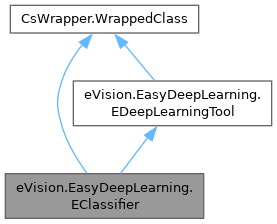
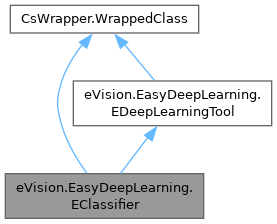
Public Member Functions | |
| EClassifier () | |
| Constructs a EClassifier object. | |
| EClassifier (eVision.EasyDeepLearning.EClassifier other) | |
| Copy constructor of a EClassifier object. | |
| override void | SerializeSettings (eVision.ESerializer serializer) |
| Serializes the classifier settings. | |
| void | LoadAsPretrained (string path) |
| Loads the classifier and use it as a pre-trained model. | |
| void | LoadOnnxModelAsPretrained (string path) |
| Loads the ONNX model as a pre-trained model. | |
| void | LoadOnnxModel (string path) |
| Loads the ONNX model for inference. | |
| bool | HasPretrainedModel () |
| Whether a pre-trained model for the current configuration can be found. | |
| eVision.EasyDeepLearning.EClassificationMetrics | GetTrainingMetrics (int id) |
| Gets the metrics obtained with the training dataset at the given iteration. | |
| eVision.EasyDeepLearning.EClassificationMetrics | GetValidationMetrics (int id) |
| Gets the metrics obtained with the validation dataset at the given iteration. | |
| void | Train (eVision.EasyDeepLearning.EDataset dataset) |
| Trains the EClassifier with the given dataset for the specified number of iterations. | |
| void | Train (eVision.EasyDeepLearning.EDataset dataset, eVision.EasyDeepLearning.EDataAugmentation dataAugmentation) |
| Trains the EClassifier with the given dataset for the specified number of iterations. | |
| void | Train (eVision.EasyDeepLearning.EDataset trainingDataset, eVision.EasyDeepLearning.EDataset validationDataset) |
| Trains the EClassifier with the given dataset for the specified number of iterations. | |
| void | Train (eVision.EasyDeepLearning.EDataset trainingDataset, eVision.EasyDeepLearning.EDataset validationDataset, eVision.EasyDeepLearning.EDataAugmentation dataAugmentation) |
| Trains the EClassifier with the given dataset for the specified number of iterations. | |
| void | Train (eVision.EasyDeepLearning.EDataset dataset, int iterations) |
| Trains the EClassifier with the given dataset for the specified number of iterations. | |
| void | Train (eVision.EasyDeepLearning.EDataset dataset, eVision.EasyDeepLearning.EDataAugmentation dataAugmentation, int iterations) |
| Trains the EClassifier with the given dataset for the specified number of iterations. | |
| void | Train (eVision.EasyDeepLearning.EDataset trainingDataset, eVision.EasyDeepLearning.EDataset validationDataset, int iterations) |
| Trains the EClassifier with the given dataset for the specified number of iterations. | |
| void | Train (eVision.EasyDeepLearning.EDataset trainingDataset, eVision.EasyDeepLearning.EDataset validationDataset, eVision.EasyDeepLearning.EDataAugmentation dataAugmentation, int iterations) |
| Trains the EClassifier with the given dataset for the specified number of iterations. | |
| eVision.EasyDeepLearning.EClassificationResult | Classify (eVision.EBaseROI img) |
| Classifies images and returns the complete results as an EClassificationResult object. | |
| eVision.EasyDeepLearning.EClassificationResult | Classify (eVision.EBaseROI img, eVision.ERegion mask) |
| Classifies images and returns the complete results as an EClassificationResult object. | |
| eVision.EasyDeepLearning.EClassificationResult[] | Classify (ref eVision.EBaseROI[] imgList, eVision.ERegion mask) |
| Classifies images and returns the complete results as an EClassificationResult object. | |
| eVision.EasyDeepLearning.EClassificationResult[] | Classify (ref eVision.EBaseROI[] imgList) |
| Classifies images and returns the complete results as an EClassificationResult object. | |
| eVision.EasyDeepLearning.EClassificationResult | Classify (eVision.EBaseROI img, eVision.ERegion mask, eVision.EFrame frame) |
| Classifies images and returns the complete results as an EClassificationResult object. | |
| eVision.EasyDeepLearning.EClassificationResult[] | Classify (ref eVision.EBaseROI[] imgList, eVision.ERegion mask, eVision.EFrame frame) |
| Classifies images and returns the complete results as an EClassificationResult object. | |
| eVision.EasyDeepLearning.EClassificationResult[] | Classify (ref eVision.EImageBW8[] imgList, eVision.ERegion mask) |
| Classifies images and returns the complete results as an EClassificationResult object. | |
| eVision.EasyDeepLearning.EClassificationResult[] | Classify (ref eVision.EImageBW8[] imgList) |
| Classifies images and returns the complete results as an EClassificationResult object. | |
| eVision.EasyDeepLearning.EClassificationResult[] | Classify (ref eVision.EImageBW16[] imgList, eVision.ERegion mask) |
| Classifies images and returns the complete results as an EClassificationResult object. | |
| eVision.EasyDeepLearning.EClassificationResult[] | Classify (ref eVision.EImageBW16[] imgList) |
| Classifies images and returns the complete results as an EClassificationResult object. | |
| eVision.EasyDeepLearning.EClassificationResult[] | Classify (ref eVision.EImageC24[] imgList, eVision.ERegion mask) |
| Classifies images and returns the complete results as an EClassificationResult object. | |
| eVision.EasyDeepLearning.EClassificationResult[] | Classify (ref eVision.EImageC24[] imgList) |
| Classifies images and returns the complete results as an EClassificationResult object. | |
| eVision.EasyDeepLearning.EClassificationMetrics | Evaluate (eVision.EasyDeepLearning.EDataset dataset) |
| Evaluates the EClassifier using the given EDataset. | |
| eVision.EImageBW8 | GetHeatMap (eVision.EBaseROI image, string label) |
| Gets a heatmap associated with the given label. A heatmap is an image that indicates which pixels in the original image best explain the given label. | |
| eVision.EImageC24 | GetColorizedHeatMap (eVision.EBaseROI image, string label) |
| Gets a colorized heatmap associated with the given label. A heatmap is an image that indicates which pixels in the original image best explain the given label. | |
| eVision.EImageC24A | GetColorizedHeatmapWithTransparency (eVision.EBaseROI image, string label, float minAlpha, float maxAlpha, eVision.EasyDeepLearning.EHeatmapColormap colormap) |
| Colorized heatmap with transparency. | |
| eVision.EImageC24A | GetColorizedHeatmapWithTransparency (eVision.EBaseROI image, string label, float minAlpha, float maxAlpha) |
| Colorized heatmap with transparency. | |
| void | LearnOODParameters (eVision.EasyDeepLearning.EDataset trainList, eVision.EasyDeepLearning.EDataset valList) |
| Learns OOD parameters using training data. The dataset must correspond to the dataset used to train the classifier. | |
| void | LearnOODParameters (eVision.EBaseROI[] trainList, eVision.EBaseROI[] valList) |
| Learns OOD parameters using training data. The dataset must correspond to the dataset used to train the classifier. | |
| void | LearnOODParameters (eVision.EImageBW8[] trainList, eVision.EImageBW8[] valList) |
| Learns OOD parameters using training data. The dataset must correspond to the dataset used to train the classifier. | |
| void | LearnOODParameters (eVision.EImageBW16[] trainList, eVision.EImageBW16[] valList) |
| Learns OOD parameters using training data. The dataset must correspond to the dataset used to train the classifier. | |
| void | LearnOODParameters (eVision.EImageC24[] trainList, eVision.EImageC24[] valList) |
| Learns OOD parameters using training data. The dataset must correspond to the dataset used to train the classifier. | |
| bool | HasOODParameters () |
| Checks whether the OOD parameters have been learned. | |
| Public Member Functions inherited from eVision.EasyDeepLearning.EDeepLearningTool | |
| virtual void | Load (string filePath) |
| Loads a deep learning tool. The given ESerializer must have been created for reading. | |
| virtual void | Load (eVision.ESerializer serializer) |
| Loads a deep learning tool. The given ESerializer must have been created for reading. | |
| eVision.EasyDeepLearning.EDeepLearningTool | Clone () |
| Clones this tool. | |
| virtual void | Save (string filePath, bool includeTrainingModel) |
| Saves the settings, inference and training model of the deep learning tool. | |
| virtual void | Save (string filePath) |
| Saves the settings, inference and training model of the deep learning tool. | |
| virtual void | Save (eVision.ESerializer serializer, bool includeTrainingModel) |
| Saves the settings, inference and training model of the deep learning tool. | |
| virtual void | Save (eVision.ESerializer serializer) |
| Saves the settings, inference and training model of the deep learning tool. | |
| void | SerializeSettings (eVision.ESerializer serializer) |
| Serializes the tool settings. | |
| void | SerializeInferenceModel (eVision.ESerializer serializer) |
| Serializes the inference model of the tool. | |
| void | SerializeTrainingModel (eVision.ESerializer serializer) |
| Serializes the training model of the tool. | |
| void | SaveSettings (string filePath) |
| Saves the settings of the tool to a file. | |
| void | SaveInferenceModel (string filePath) |
| Saves the tool's inference model to a file. | |
| void | SaveTrainingModel (string filePath) |
| Saves the tool's training model to a file. | |
| void | LoadSettings (string filePath) |
| Loads the settings of a tool. | |
| void | LoadInferenceModel (string filePath) |
| Loads the tool's inference model. The inference model is required to apply the tool on new images. | |
| void | LoadTrainingModel (string filePath) |
| Loads the tool's training model. The training model is required to continue a training. | |
| void | UnloadInferenceModel () |
| Unloads the inference model. | |
| void | UnloadTrainingModel () |
| Unloads the training model. | |
| void | UnloadModels () |
| Unloads the inference and training model. | |
| bool | HasInferenceModel () |
| Whether the inference model is loaded or created when the tool is not yet trained. | |
| bool | HasTrainingModel () |
| Whether the training model is loaded or created when the tool is not yet trained. | |
| bool | IsTrained () |
| Tells whether the deep learning tool has been trained. | |
| string | GetAvailableDeviceName (int i) |
| Name of the i-th device of the current engine. | |
| eVision.EasyDeepLearning.EDeepLearningDevice | GetAvailableDevice (int i) |
| i-th EDeepLearningDevice of the current engine. | |
| void | SetActiveDevice (eVision.EasyDeepLearning.EDeepLearningDevice device) |
| Sets the device with which to run or train the model. | |
| eVision.EasyDeepLearning.EDeepLearningDevice | GetActiveDevice (int i) |
| Gets the active device. By default, it returns the first active device. | |
| eVision.EasyDeepLearning.EDeepLearningDevice | GetActiveDevice () |
| Gets the active device. By default, it returns the first active device. | |
| bool | HasEngineSetupData () |
| Whether the inference model has engine setup data. | |
| void | ClearEngineSetupData () |
| Clears the engine data saved in the inference model. Use this method when your engine fails. | |
| bool | IsTraining () |
| Indicates whether the object is currently training. | |
| int | WaitForTrainingCompletion (int timeout) |
| Waits until the training is complete or the timeout is expired. A call to this method will block the calling thread for the shortest time between the timeout and the time it takes for the training to complete. | |
| int | WaitForTrainingCompletion () |
| Waits until the training is complete or the timeout is expired. A call to this method will block the calling thread for the shortest time between the timeout and the time it takes for the training to complete. | |
| int | WaitForIterationCompletion () |
| Waits until an iteration is complete. A call to this method will block the calling thread until a training iteration in the training thread is finished. This method returns the number of trained iterations. | |
| int | StopTraining (bool wait) |
| Stops training and returns the last completed iteration. If the parameter 'wait' is set to true, the method will wait for the training thread to completely stop. Otherwise, the method will return immediately. | |
| void | SetLearningRate (eVision.EasyDeepLearning.EDeepLearningLearningRateType type, float[] parameters) |
| Specifies how the value of the learning rate and how it evolves during training. | |
| void | InitializeInference (int width, int height, eVision.EImageType imageType, int numImages) |
| Initializes the neural network for inference (i.e. making predictions with the neural network). | |
| void | InitializeInference (eVision.EBaseROI img) |
| Initializes the neural network for inference (i.e. making predictions with the neural network). | |
| void | InitializeInference (ref eVision.EBaseROI[] imgList) |
| Initializes the neural network for inference (i.e. making predictions with the neural network). | |
| void | InitializeInference (ref eVision.EImageBW8[] imgList) |
| Initializes the neural network for inference (i.e. making predictions with the neural network). | |
| void | InitializeInference (ref eVision.EImageBW16[] imgList) |
| Initializes the neural network for inference (i.e. making predictions with the neural network). | |
| void | InitializeInference (ref eVision.EImageC24[] imgList) |
| Initializes the neural network for inference (i.e. making predictions with the neural network). | |
| string | GetLabel (uint index) |
| Gets the label from its index. If the tool is not trained, the method may throw an exception. | |
| virtual void | SetLabel (uint index, string label) |
| Changes a label predicted by the tool. | |
| void | SetLabelWeight (uint index, float weight) |
| Sets the label weight. If the tool is not trained, the label weights are not defined. After training, they are set to the value of the training dataset label weights. | |
| float | GetLabelWeight (uint index) |
| Gets the label weight. If the tool is not trained, the label weights are not defined. After training, they are set to the value of the training dataset label weights. | |
| void | SetLabelColor (uint index, eVision.ERGBColor c) |
| Changes a label color. | |
| eVision.ERGBColor | GetLabelColor (uint index) |
| Label color. The label colors affect how the results will be displayed. | |
| void | SetLabelOpacity (uint index, byte opacity) |
| Changes a label opacity (between 0 for fully transparent and 255 for opaque color). | |
| byte | GetLabelOpacity (uint index) |
| Gets the label opacity (between 0 for fully transparent and 255 for opaque color). The label opacities affect with the label colors how the results will be displayed. | |
| int | GetOptimalNumImagesForBatchSize (eVision.EBaseROI sampleImage) |
| Optimal number of images to process together for inference given the batch size and EDeepLearningTool.GetNumPatchesForImage. | |
| int | GetOptimalNumImagesForBatchSize (int imageWidth, int imageHeight) |
| Optimal number of images to process together for inference given the batch size and EDeepLearningTool.GetNumPatchesForImage. | |
| int | GetNumPatchesForImage (eVision.EBaseROI sampleImage) |
| Number of patches that will be extracted from an input image to perform inference. | |
| virtual int | GetNumPatchesForImage (int imageWidth, int imageHeight) |
| Number of patches that will be extracted from an input image to perform inference. | |
| virtual void | Clean () |
| Reset the engine and clean CPU and GPU memory allocated for running the model. | |
Static Public Member Functions | |
| static string | GetAvailableModelTypes (int i) |
| Get the i-th available models to be used with EClassifier.ModelType. | |
| Static Public Member Functions inherited from eVision.EasyDeepLearning.EDeepLearningTool | |
| static eVision.EasyDeepLearning.EDeepLearningTool | Create (string path) |
| Factory method to open a deep learning tool. | |
| static eVision.EasyDeepLearning.EDeepLearningTool | Create (eVision.ESerializer serializer) |
| Factory method to open a deep learning tool. | |
| static eVision.EasyDeepLearning.EDeepLearningTool | Create (eVision.EasyDeepLearning.EDeepLearningToolType type) |
| Factory method to open a deep learning tool. | |
| static string | GetAvailableEngineName (int id) |
| Gets the name of the engine given its id. | |
| static eVision.EasyDeepLearning.EDeepLearningDevice[] | GetAvailableDevicesForEngine (string engine) |
| Available devices for the specified engine. | |
Properties | |
| override eVision.EasyDeepLearning.EDeepLearningToolType | ToolType [get] |
| Type of the deep learning tool. | |
| bool | UsePretrainedModel [get, set] |
| Whether to use a pre-trained model when training. | |
| uint | Width [get, set] |
| Width for input images of the classifier. By default, this value will be set to 224 if it wasn't explicitly set before training. | |
| uint | Height [get, set] |
| Height for input images of the classifier. By default, this value will be set to 224 if it wasn't explicitly set before training. | |
| uint | Channels [get, set] |
| Number of channels for input images of the classifier. The number of channels can be either 1 (monochrome image) or 3 (RGB image). By default, this value will be set from the format of the first image added to the training dataset. | |
| bool | EnableAutomaticImageReformat [get, set] |
| Enable automatic image reformat (true by default). | |
| bool | EnableHistogramEqualization [get, set] |
| Enable histogram equalization of all images passing through the classifier. (false by default). | |
| uint | MinimumWidth [get] |
| Minimum width for input images of the classifier. This value is equal to 1 for standard networks. | |
| uint | MinimumHeight [get] |
| Minimum height for input images of the classifier. This value is equal to 1 for standard networks. | |
| eVision.EasyDeepLearning.EClassifierCapacity | Capacity [get, set] |
| Capacity of classifier to use. Be aware that changing the classifier capacity will delete the effect of any previous training. The capacity will be translated to the corresponding type (Small, Normal, or Large). | |
| string | ModelType [get, set] |
| Model type for training. Default: "Normal". | |
| float | OODThreshold [get, set] |
| Out-Of-Distribution (OOD) threshold below which an image is considered to be OOD. | |
| bool | ComputeHeatmapWithResult [get, set] |
| Whether to always compute the heatmap along the result when applying the tool. If true, the heatmap is available through EClassificationResult.Heatmap. | |
| bool | ComputeOODWithResult [get, set] |
| Whether to compute the OOD parameters while training. Also determines whether the OOD score is computed alongside the result when applying the tool. If true, the OOD score is available through EClassificationResult.OODScore. | |
| static int | NumAvailableModelTypes [get] |
| Number of available models for training an EasyClassify tool. | |
| Properties inherited from eVision.EasyDeepLearning.EDeepLearningTool | |
| eVision.EasyDeepLearning.EDeepLearningToolType | ToolType [get] |
| Type of the deep learning tool. | |
| bool | EnableGPU [get, set] |
| Enable the use of a GPU for training and inference of the deep learning tool. If the active engine is not the default engine, EDeepLearningTool.EnableGPU will be false even if the active device has a GPU device type. Setting EDeepLearningTool.EnableGPU to any value when the active engine is not the default one will throw an exception. | |
| uint[] | GPUIndexes [get, set] |
| Indexes of the GPUs to use for computations. | |
| uint | NumGPUs [get] |
| Number of detected NVIDIA GPU. | |
| string | Engine [get, set] |
| Sets the engine with which to execute or train the neural network. | |
| eVision.EasyDeepLearning.EDeepLearningInferencePrecision | InferencePrecision [get, set] |
| Inference precision. | |
| int | NumAvailableDevices [get] |
| Available devices for the current EDeepLearningTool.Engine. | |
| eVision.EasyDeepLearning.EDeepLearningDevice[] | AvailableDevices [get] |
| Get all available device for the current engine. | |
| int | NumActiveDevices [get] |
| Gets the number of devices with which to run or train the model. | |
| string | ActiveDeviceByName [set] |
| Sets the device with which to run the model using its name. | |
| int | ActiveDeviceById [set] |
| Sets the device with which to run the model using its index in the list returned by EDeepLearningTool.AvailableDevices. | |
| eVision.EasyDeepLearning.EDeepLearningDevice[] | ActiveDevices [get, set] |
| Devices with which to run or train the model. | |
| int[] | ActiveDevicesById [set] |
| Sets the devices with which to run the model using their index in the list returned by EDeepLearningTool.AvailableDevices. | |
| eVision.EasyDeepLearning.EDeepLearningExecutionSettings | ExecutionSettings [get, set] |
| Execution settings of the tool (engine, device(s), inference precision, batch size settings). | |
| eVision.EasyDeepLearning.EDeepLearningDevice | EngineSetupDataDevice [get] |
| Device corresponding to the engine data contained in the tool. | |
| eVision.EasyDeepLearning.EDeepLearningInferencePrecision | EngineSetupDataInferencePrecision [get] |
| Inference precision corresponding to the engine data contained in the tool. | |
| int | EngineSetupDataBatchSize [get] |
| Batch size corresponding to the engine data contained in the tool. | |
| bool | OptimizeBatchSize [get, set] |
| Indicates whether to optimize the batch size (see EDeepLearningTool.BatchSize) to maximize the training and inference speed according to the engine, the device and the available memory. | |
| int | BatchSizeForMaximumInferenceSpeed [get] |
| Computes the batch size that will maximize the inference speed on NVIDIA GPU. For all other devices, it will return 1. | |
| int | BatchSize [get, set] |
| Batch size. The batch size is the number of images that are processed together during training and batch inference. | |
| float | CurrentTrainingProgression [get] |
| Current training progression as a percentage (between 0 and 1). | |
| uint | CurrentTrainingFinishedIterations [get] |
| Number of iterations that are already finished in the current training. | |
| uint | CurrentTrainingNumIterations [get] |
| Total number of training iterations that will be performed during the current training of the deep learning tool. | |
| uint | NumTrainedIterations [get] |
| Number of iterations that were performed to train this deep learning tool. | |
| int | BestIteration [get] |
| Iteration at which the minimum validation error was reached. After training, the tool is in the state it was at this best iteration. | |
| ulong | ImageCacheSize [get, set] |
| Size in byte of the image cache. The cache is used during training to store reformatted and normalized images. A correctly sized cache can reduce the hard drive accesses and the preprocessing time for each image. | |
| string | Path [get] |
| Path of the tool when loaded or saved using EDeepLearningTool.Save or EDeepLearningTool.Load. | |
| string | InferenceModelPath [get] |
| Path of the inference model when loaded or saved using EDeepLearningTool.SaveInferenceModel, EDeepLearningTool.LoadInferenceModel or EDeepLearningTool.SerializeInferenceModel. | |
| string | TrainingModelPath [get] |
| Path of the training model when loaded or saved using EDeepLearningTool.SaveTrainingModel, EDeepLearningTool.LoadTrainingModel or EDeepLearningTool.SerializeTrainingModel. | |
| string | SettingsPath [get] |
| Path of the settings when loaded or saved using EDeepLearningTool.SaveSettings, EDeepLearningTool.LoadSettings or EDeepLearningTool.SerializeSettings. | |
| int | AutoSavePeriod [get, set] |
| Auto-save period. The auto-save period is the number of training iterations between each automatic save of the model. | |
| eVision.EasyDeepLearning.EDeepLearningLearningRateType | LearningRateType [get] |
| Learning rate type. | |
| float[] | LearningRateParameters [get] |
| Parameters of the learning rate. | |
| bool | EnableDeterministicTraining [get, set] |
| Whether to use deterministic training algorithm that allows to repeatable training results. Default value: false. | |
| int | DeterministicTrainingRandomSeed [get, set] |
| Random seed to use when EDeepLearningTool.EnableDeterministicTraining is set to true. The default value is 42. | |
| uint | NumLabels [get] |
| Number of labels of this tool. If the tool is not trained, the method will throw an exception. | |
| static int | NumAvailableEngines [get] |
| Number of available engines. | |
| static string[] | AvailableEngines [get] |
| Available engines. | |
EClassifier allows to train a classifier using an EDataset object and classify new images.
As required by Deep Learning techniques, the input image of EClassifier must be of the same format (width, height, number of channels). By default, this format will be 224x224xC (which is the format used for pre-training our networks) with C being the number of channel of the first image of the dataset. The format can also be specified by the EClassifier.Width, EClassifier.Height and EClassifier.Channels unless its width and height is smaller than the minimum width and height supported by the classifier. In this case, the input resolution will be the minimum resolution supported by the classifier. (See EClassifier.MinimumWidth and EClassifier.MinimumHeight). methods.
By default, images that don't satisfy the image format of the classifier are automatically reformatted. This behavior can be controlled through the EClassifier.EnableAutomaticImageReformat method. When the automatic image reformatting is disabled, training or classifying an image that doesn't satisfy the input image format will result in an exception.
Once trained, the input image format cannot be changed.
License(s): EasyClassify or EasyClassifyInference
| eVision.EasyDeepLearning.EClassifier.EClassifier | ( | ) |
Constructs a EClassifier object.
| eVision.EasyDeepLearning.EClassifier.EClassifier | ( | eVision.EasyDeepLearning.EClassifier | other | ) |
Copy constructor of a EClassifier object.
| other | Reference to the EClassifier object that should be copied |
| eVision.EasyDeepLearning.EClassificationResult eVision.EasyDeepLearning.EClassifier.Classify | ( | eVision.EBaseROI | img | ) |
Classifies images and returns the complete results as an EClassificationResult object.
The method throws an exception if the input image does not fulfill the input specification.
| img | Image to classify |
Classifying a set of images is usually faster than classifying each image sequentially.
To maximize the classification speed on a GPU, EDeepLearningTool.BatchSize and the size of the set of input images must be equal to the value returned by EDeepLearningTool.BatchSizeForMaximumInferenceSpeed.
| eVision.EasyDeepLearning.EClassificationResult eVision.EasyDeepLearning.EClassifier.Classify | ( | eVision.EBaseROI | img, |
| eVision.ERegion | mask ) |
Classifies images and returns the complete results as an EClassificationResult object.
The method throws an exception if the input image does not fulfill the input specification.
| img | Image to classify |
| mask | Mask of image to classify |
Classifying a set of images is usually faster than classifying each image sequentially.
To maximize the classification speed on a GPU, EDeepLearningTool.BatchSize and the size of the set of input images must be equal to the value returned by EDeepLearningTool.BatchSizeForMaximumInferenceSpeed.
| eVision.EasyDeepLearning.EClassificationResult eVision.EasyDeepLearning.EClassifier.Classify | ( | eVision.EBaseROI | img, |
| eVision.ERegion | mask, | ||
| eVision.EFrame | frame ) |
Classifies images and returns the complete results as an EClassificationResult object.
The method throws an exception if the input image does not fulfill the input specification.
| img | Image to classify |
| mask | Mask of image to classify |
| frame | Frame associated with the mask. |
Classifying a set of images is usually faster than classifying each image sequentially.
To maximize the classification speed on a GPU, EDeepLearningTool.BatchSize and the size of the set of input images must be equal to the value returned by EDeepLearningTool.BatchSizeForMaximumInferenceSpeed.
| eVision.EasyDeepLearning.EClassificationResult[] eVision.EasyDeepLearning.EClassifier.Classify | ( | ref eVision.EBaseROI[] | imgList | ) |
Classifies images and returns the complete results as an EClassificationResult object.
The method throws an exception if the input image does not fulfill the input specification.
| imgList | Vector of images to classify |
Classifying a set of images is usually faster than classifying each image sequentially.
To maximize the classification speed on a GPU, EDeepLearningTool.BatchSize and the size of the set of input images must be equal to the value returned by EDeepLearningTool.BatchSizeForMaximumInferenceSpeed.
| eVision.EasyDeepLearning.EClassificationResult[] eVision.EasyDeepLearning.EClassifier.Classify | ( | ref eVision.EBaseROI[] | imgList, |
| eVision.ERegion | mask ) |
Classifies images and returns the complete results as an EClassificationResult object.
The method throws an exception if the input image does not fulfill the input specification.
| imgList | Vector of images to classify |
| mask | Mask of image to classify |
Classifying a set of images is usually faster than classifying each image sequentially.
To maximize the classification speed on a GPU, EDeepLearningTool.BatchSize and the size of the set of input images must be equal to the value returned by EDeepLearningTool.BatchSizeForMaximumInferenceSpeed.
| eVision.EasyDeepLearning.EClassificationResult[] eVision.EasyDeepLearning.EClassifier.Classify | ( | ref eVision.EBaseROI[] | imgList, |
| eVision.ERegion | mask, | ||
| eVision.EFrame | frame ) |
Classifies images and returns the complete results as an EClassificationResult object.
The method throws an exception if the input image does not fulfill the input specification.
| imgList | Vector of images to classify |
| mask | Mask of image to classify |
| frame | Frame associated with the mask. |
Classifying a set of images is usually faster than classifying each image sequentially.
To maximize the classification speed on a GPU, EDeepLearningTool.BatchSize and the size of the set of input images must be equal to the value returned by EDeepLearningTool.BatchSizeForMaximumInferenceSpeed.
| eVision.EasyDeepLearning.EClassificationResult[] eVision.EasyDeepLearning.EClassifier.Classify | ( | ref eVision.EImageBW16[] | imgList | ) |
Classifies images and returns the complete results as an EClassificationResult object.
The method throws an exception if the input image does not fulfill the input specification.
| imgList | Vector of images to classify |
Classifying a set of images is usually faster than classifying each image sequentially.
To maximize the classification speed on a GPU, EDeepLearningTool.BatchSize and the size of the set of input images must be equal to the value returned by EDeepLearningTool.BatchSizeForMaximumInferenceSpeed.
| eVision.EasyDeepLearning.EClassificationResult[] eVision.EasyDeepLearning.EClassifier.Classify | ( | ref eVision.EImageBW16[] | imgList, |
| eVision.ERegion | mask ) |
Classifies images and returns the complete results as an EClassificationResult object.
The method throws an exception if the input image does not fulfill the input specification.
| imgList | Vector of images to classify |
| mask | Mask of image to classify |
Classifying a set of images is usually faster than classifying each image sequentially.
To maximize the classification speed on a GPU, EDeepLearningTool.BatchSize and the size of the set of input images must be equal to the value returned by EDeepLearningTool.BatchSizeForMaximumInferenceSpeed.
| eVision.EasyDeepLearning.EClassificationResult[] eVision.EasyDeepLearning.EClassifier.Classify | ( | ref eVision.EImageBW8[] | imgList | ) |
Classifies images and returns the complete results as an EClassificationResult object.
The method throws an exception if the input image does not fulfill the input specification.
| imgList | Vector of images to classify |
Classifying a set of images is usually faster than classifying each image sequentially.
To maximize the classification speed on a GPU, EDeepLearningTool.BatchSize and the size of the set of input images must be equal to the value returned by EDeepLearningTool.BatchSizeForMaximumInferenceSpeed.
| eVision.EasyDeepLearning.EClassificationResult[] eVision.EasyDeepLearning.EClassifier.Classify | ( | ref eVision.EImageBW8[] | imgList, |
| eVision.ERegion | mask ) |
Classifies images and returns the complete results as an EClassificationResult object.
The method throws an exception if the input image does not fulfill the input specification.
| imgList | Vector of images to classify |
| mask | Mask of image to classify |
Classifying a set of images is usually faster than classifying each image sequentially.
To maximize the classification speed on a GPU, EDeepLearningTool.BatchSize and the size of the set of input images must be equal to the value returned by EDeepLearningTool.BatchSizeForMaximumInferenceSpeed.
| eVision.EasyDeepLearning.EClassificationResult[] eVision.EasyDeepLearning.EClassifier.Classify | ( | ref eVision.EImageC24[] | imgList | ) |
Classifies images and returns the complete results as an EClassificationResult object.
The method throws an exception if the input image does not fulfill the input specification.
| imgList | Vector of images to classify |
Classifying a set of images is usually faster than classifying each image sequentially.
To maximize the classification speed on a GPU, EDeepLearningTool.BatchSize and the size of the set of input images must be equal to the value returned by EDeepLearningTool.BatchSizeForMaximumInferenceSpeed.
| eVision.EasyDeepLearning.EClassificationResult[] eVision.EasyDeepLearning.EClassifier.Classify | ( | ref eVision.EImageC24[] | imgList, |
| eVision.ERegion | mask ) |
Classifies images and returns the complete results as an EClassificationResult object.
The method throws an exception if the input image does not fulfill the input specification.
| imgList | Vector of images to classify |
| mask | Mask of image to classify |
Classifying a set of images is usually faster than classifying each image sequentially.
To maximize the classification speed on a GPU, EDeepLearningTool.BatchSize and the size of the set of input images must be equal to the value returned by EDeepLearningTool.BatchSizeForMaximumInferenceSpeed.
| eVision.EasyDeepLearning.EClassificationMetrics eVision.EasyDeepLearning.EClassifier.Evaluate | ( | eVision.EasyDeepLearning.EDataset | dataset | ) |
Evaluates the EClassifier using the given EDataset.
| dataset | EDataset with which to evaluate the classifier |
This method computes various metrics (see EClassificationMetrics on the given dataset.
The method ignores the label weights and the data augmentation settings of the given dataset. However, the label weights can be taken into consideration in the returned EClassificationMetrics object.
License(s): EasyClassify
|
static |
Get the i-th available models to be used with EClassifier.ModelType.
| i | Index of the model between 0 and EClassifier.NumAvailableModelTypes - 1. |
| eVision.EImageC24 eVision.EasyDeepLearning.EClassifier.GetColorizedHeatMap | ( | eVision.EBaseROI | image, |
| string | label ) |
Gets a colorized heatmap associated with the given label. A heatmap is an image that indicates which pixels in the original image best explain the given label.
| image | A reference to the image we want to generate the heatmap from. |
| label | A reference to the string representing the label we want to explain for the given image. |
| eVision.EImageC24A eVision.EasyDeepLearning.EClassifier.GetColorizedHeatmapWithTransparency | ( | eVision.EBaseROI | image, |
| string | label, | ||
| float | minAlpha, | ||
| float | maxAlpha ) |
Colorized heatmap with transparency.
When the minimum and maximum alpha values are different from each other, the transparency value for a pixel will depend on the value of the heatmap at that pixel. The range of heatmap values [0, 255] will be mapped to the range [minAlpha, maxAlpha].
| image | A reference to the image we want to generate the heatmap from. |
| label | A reference to the string representing the label we want to explain for the given image. |
| minAlpha | Minimum transparency value. |
| maxAlpha | Maximum transparency value. |
| eVision.EImageC24A eVision.EasyDeepLearning.EClassifier.GetColorizedHeatmapWithTransparency | ( | eVision.EBaseROI | image, |
| string | label, | ||
| float | minAlpha, | ||
| float | maxAlpha, | ||
| eVision.EasyDeepLearning.EHeatmapColormap | colormap ) |
Colorized heatmap with transparency.
When the minimum and maximum alpha values are different from each other, the transparency value for a pixel will depend on the value of the heatmap at that pixel. The range of heatmap values [0, 255] will be mapped to the range [minAlpha, maxAlpha].
| image | A reference to the image we want to generate the heatmap from. |
| label | A reference to the string representing the label we want to explain for the given image. |
| minAlpha | Minimum transparency value. |
| maxAlpha | Maximum transparency value. |
| colormap | Color map |
| eVision.EImageBW8 eVision.EasyDeepLearning.EClassifier.GetHeatMap | ( | eVision.EBaseROI | image, |
| string | label ) |
Gets a heatmap associated with the given label. A heatmap is an image that indicates which pixels in the original image best explain the given label.
| image | A reference to the image we want to generate the heatmap from. |
| label | A reference to the string representing the label we want to explain for the given image. |
| eVision.EasyDeepLearning.EClassificationMetrics eVision.EasyDeepLearning.EClassifier.GetTrainingMetrics | ( | int | id | ) |
Gets the metrics obtained with the training dataset at the given iteration.
The iterations are indexed between 0 and EDeepLearningTool.NumTrainedIterations - 1.
| id | The iteration index |
| eVision.EasyDeepLearning.EClassificationMetrics eVision.EasyDeepLearning.EClassifier.GetValidationMetrics | ( | int | id | ) |
Gets the metrics obtained with the validation dataset at the given iteration.
The iterations are indexed between 0 and EDeepLearningTool.NumTrainedIterations - 1.
| id | The iteration index |
| bool eVision.EasyDeepLearning.EClassifier.HasOODParameters | ( | ) |
Checks whether the OOD parameters have been learned.
| bool eVision.EasyDeepLearning.EClassifier.HasPretrainedModel | ( | ) |
Whether a pre-trained model for the current configuration can be found.
| void eVision.EasyDeepLearning.EClassifier.LearnOODParameters | ( | eVision.EasyDeepLearning.EDataset | trainList, |
| eVision.EasyDeepLearning.EDataset | valList ) |
Learns OOD parameters using training data. The dataset must correspond to the dataset used to train the classifier.
| trainList | List of images used for training the EClassifier. |
| valList | List of images used as validation during the training of the EClassifier. |
| void eVision.EasyDeepLearning.EClassifier.LearnOODParameters | ( | eVision.EBaseROI[] | trainList, |
| eVision.EBaseROI[] | valList ) |
Learns OOD parameters using training data. The dataset must correspond to the dataset used to train the classifier.
| trainList | List of images used for training the EClassifier. |
| valList | List of images used as validation during the training of the EClassifier. |
| void eVision.EasyDeepLearning.EClassifier.LearnOODParameters | ( | eVision.EImageBW16[] | trainList, |
| eVision.EImageBW16[] | valList ) |
Learns OOD parameters using training data. The dataset must correspond to the dataset used to train the classifier.
| trainList | List of images used for training the EClassifier. |
| valList | List of images used as validation during the training of the EClassifier. |
| void eVision.EasyDeepLearning.EClassifier.LearnOODParameters | ( | eVision.EImageBW8[] | trainList, |
| eVision.EImageBW8[] | valList ) |
Learns OOD parameters using training data. The dataset must correspond to the dataset used to train the classifier.
| trainList | List of images used for training the EClassifier. |
| valList | List of images used as validation during the training of the EClassifier. |
| void eVision.EasyDeepLearning.EClassifier.LearnOODParameters | ( | eVision.EImageC24[] | trainList, |
| eVision.EImageC24[] | valList ) |
Learns OOD parameters using training data. The dataset must correspond to the dataset used to train the classifier.
| trainList | List of images used for training the EClassifier. |
| valList | List of images used as validation during the training of the EClassifier. |
| void eVision.EasyDeepLearning.EClassifier.LoadAsPretrained | ( | string | path | ) |
Loads the classifier and use it as a pre-trained model.
| path | Path to the pre-trained model. |
| void eVision.EasyDeepLearning.EClassifier.LoadOnnxModel | ( | string | path | ) |
Loads the ONNX model for inference.
The methods will automatically create labels according to the number of classes in the ONNX model. The labels are named according to their position, i.e. "0", "1", etc. You can change the labels afterward using the method EDeepLearningTool.SetLabel.
| void eVision.EasyDeepLearning.EClassifier.LoadOnnxModelAsPretrained | ( | string | path | ) |
Loads the ONNX model as a pre-trained model.
This method loads the architecture of the neural network as well as the trained weights in the model but discards the weights and parameters of some of the last layers to allow retraining on a new dataset with a different number of labels.
| override void eVision.EasyDeepLearning.EClassifier.SerializeSettings | ( | eVision.ESerializer | serializer | ) |
Serializes the classifier settings.
| serializer | Pointer to ESerializer |
| void eVision.EasyDeepLearning.EClassifier.Train | ( | eVision.EasyDeepLearning.EDataset | dataset | ) |
Trains the EClassifier with the given dataset for the specified number of iterations.
At the end of the training, the deep learning tool is in the state it was at the iteration that gave the minimum validation error. See EDeepLearningTool.BestIteration.
If no iterations is given, the training will stop automatically.
| dataset | EDataset with which to train and validate the deep learning tool |
License(s): EasyClassify
| void eVision.EasyDeepLearning.EClassifier.Train | ( | eVision.EasyDeepLearning.EDataset | dataset, |
| eVision.EasyDeepLearning.EDataAugmentation | dataAugmentation ) |
Trains the EClassifier with the given dataset for the specified number of iterations.
At the end of the training, the deep learning tool is in the state it was at the iteration that gave the minimum validation error. See EDeepLearningTool.BestIteration.
If no iterations is given, the training will stop automatically.
| dataset | EDataset with which to train and validate the deep learning tool |
| dataAugmentation | Data augmentation to use during training |
License(s): EasyClassify
| void eVision.EasyDeepLearning.EClassifier.Train | ( | eVision.EasyDeepLearning.EDataset | dataset, |
| eVision.EasyDeepLearning.EDataAugmentation | dataAugmentation, | ||
| int | iterations ) |
Trains the EClassifier with the given dataset for the specified number of iterations.
At the end of the training, the deep learning tool is in the state it was at the iteration that gave the minimum validation error. See EDeepLearningTool.BestIteration.
If no iterations is given, the training will stop automatically.
| dataset | EDataset with which to train and validate the deep learning tool |
| dataAugmentation | Data augmentation to use during training |
| iterations | Number of iterations for training. |
License(s): EasyClassify
| void eVision.EasyDeepLearning.EClassifier.Train | ( | eVision.EasyDeepLearning.EDataset | dataset, |
| int | iterations ) |
Trains the EClassifier with the given dataset for the specified number of iterations.
At the end of the training, the deep learning tool is in the state it was at the iteration that gave the minimum validation error. See EDeepLearningTool.BestIteration.
If no iterations is given, the training will stop automatically.
| dataset | EDataset with which to train and validate the deep learning tool |
| iterations | Number of iterations for training. |
License(s): EasyClassify
| void eVision.EasyDeepLearning.EClassifier.Train | ( | eVision.EasyDeepLearning.EDataset | trainingDataset, |
| eVision.EasyDeepLearning.EDataset | validationDataset ) |
Trains the EClassifier with the given dataset for the specified number of iterations.
At the end of the training, the deep learning tool is in the state it was at the iteration that gave the minimum validation error. See EDeepLearningTool.BestIteration.
If no iterations is given, the training will stop automatically.
| trainingDataset | EDataset with which to train the deep learning tool |
| validationDataset | EDataset with which to validate the deep learning tool |
License(s): EasyClassify
| void eVision.EasyDeepLearning.EClassifier.Train | ( | eVision.EasyDeepLearning.EDataset | trainingDataset, |
| eVision.EasyDeepLearning.EDataset | validationDataset, | ||
| eVision.EasyDeepLearning.EDataAugmentation | dataAugmentation ) |
Trains the EClassifier with the given dataset for the specified number of iterations.
At the end of the training, the deep learning tool is in the state it was at the iteration that gave the minimum validation error. See EDeepLearningTool.BestIteration.
If no iterations is given, the training will stop automatically.
| trainingDataset | EDataset with which to train the deep learning tool |
| validationDataset | EDataset with which to validate the deep learning tool |
| dataAugmentation | Data augmentation to use during training |
License(s): EasyClassify
| void eVision.EasyDeepLearning.EClassifier.Train | ( | eVision.EasyDeepLearning.EDataset | trainingDataset, |
| eVision.EasyDeepLearning.EDataset | validationDataset, | ||
| eVision.EasyDeepLearning.EDataAugmentation | dataAugmentation, | ||
| int | iterations ) |
Trains the EClassifier with the given dataset for the specified number of iterations.
At the end of the training, the deep learning tool is in the state it was at the iteration that gave the minimum validation error. See EDeepLearningTool.BestIteration.
If no iterations is given, the training will stop automatically.
| trainingDataset | EDataset with which to train the deep learning tool |
| validationDataset | EDataset with which to validate the deep learning tool |
| dataAugmentation | Data augmentation to use during training |
| iterations | Number of iterations for training. |
License(s): EasyClassify
| void eVision.EasyDeepLearning.EClassifier.Train | ( | eVision.EasyDeepLearning.EDataset | trainingDataset, |
| eVision.EasyDeepLearning.EDataset | validationDataset, | ||
| int | iterations ) |
Trains the EClassifier with the given dataset for the specified number of iterations.
At the end of the training, the deep learning tool is in the state it was at the iteration that gave the minimum validation error. See EDeepLearningTool.BestIteration.
If no iterations is given, the training will stop automatically.
| trainingDataset | EDataset with which to train the deep learning tool |
| validationDataset | EDataset with which to validate the deep learning tool |
| iterations | Number of iterations for training. |
License(s): EasyClassify
|
getset |
Capacity of classifier to use. Be aware that changing the classifier capacity will delete the effect of any previous training. The capacity will be translated to the corresponding type (Small, Normal, or Large).
|
getset |
Number of channels for input images of the classifier. The number of channels can be either 1 (monochrome image) or 3 (RGB image). By default, this value will be set from the format of the first image added to the training dataset.
If the classifier is not trained or the value was not explicitly set, its value will be 0.
|
getset |
Whether to always compute the heatmap along the result when applying the tool. If true, the heatmap is available through EClassificationResult.Heatmap.
|
getset |
Whether to compute the OOD parameters while training. Also determines whether the OOD score is computed alongside the result when applying the tool. If true, the OOD score is available through EClassificationResult.OODScore.
|
getset |
Enable automatic image reformat (true by default).
|
getset |
Enable histogram equalization of all images passing through the classifier. (false by default).
|
getset |
Height for input images of the classifier. By default, this value will be set to 224 if it wasn't explicitly set before training.
If the classifier is not trained or the value was not explicitly set, its value will be 0.
|
get |
Minimum height for input images of the classifier. This value is equal to 1 for standard networks.
|
get |
Minimum width for input images of the classifier. This value is equal to 1 for standard networks.
|
getset |
Model type for training. Default: "Normal".
The list of available models is available through EClassifier.GetAvailableModelTypes.
|
staticget |
Number of available models for training an EasyClassify tool.
|
getset |
Out-Of-Distribution (OOD) threshold below which an image is considered to be OOD.
If training has been carried out with EClassifier.ComputeOODWithResult set to True, the parameters have been automatically initialized. Otherwise, call EClassifier.LearnOODParameters with the training data before calling this method.
The OOD threshold is automatically initialized during learning. If needed, the parameter can also be changed manually.
|
get |
Type of the deep learning tool.
|
getset |
Whether to use a pre-trained model when training.
Default: true if the pre-trained model are found on the disk.
|
getset |
Width for input images of the classifier. By default, this value will be set to 224 if it wasn't explicitly set before training.
If the classifier is not trained or the value was not explicitly set, its value will be 0.
 1.17.0