 |
eVision C++ API 26.10.0-beta.2.dev
|
|
eVision C++ API 26.10.0-beta.2.dev
|
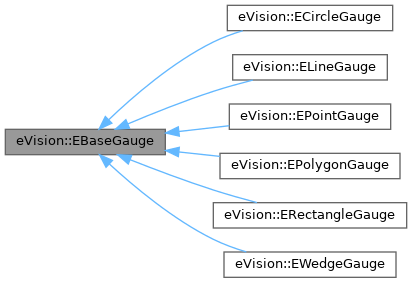
EasyGauge base class. More...
#include <eVision/EasyGauge/EBaseGauge.h>
Public Member Functions | |
| virtual | ~EBaseGauge () throw () |
| virtual eVision::EShapeType | GetType () const =0 |
| Shape type. | |
| std::string | GetName () const |
| Name of the EBaseGauge object. | |
| void | SetName (const std::string &name) |
| Name of the EBaseGauge object. | |
| virtual void | SetNominal (const eVision::EShape &shape)=0 |
| Nominal shape of the gauge. | |
| virtual std::unique_ptr< eVision::EShape > | GetNominal () const =0 |
| Nominal shape of the gauge. | |
| void | SetEditionMode (eVision::EEditionMode mode) |
| Graphical edition mode (default: EBaseGauge::GetAvailableEditionModes). | |
| eVision::EEditionMode | GetEditionMode () const |
| Graphical edition mode (default: EBaseGauge::GetAvailableEditionModes). | |
| virtual eVision::EEditionMode | GetAvailableEditionModes () const |
| Returns all possible edition modes of the gauge. | |
| bool | GetLabeled () const |
| Whether to draw a label describing the gauge (default: no). | |
| void | SetLabeled (bool labeled) |
| Whether to draw a label describing the gauge (default: no). | |
| void | Draw (eVision::EDrawAdapter *graphicContext, eVision::EDrawingMode drawingMode, float zoomX, float zoomY, float panX, float panY) const |
| Draws a graphical representation of a shape, as defined by EDrawingMode. | |
| void | Draw (eVision::EDrawAdapter *graphicContext, eVision::EDrawingMode drawingMode, float zoomX, float zoomY, float panX) const |
| Draws a graphical representation of a shape, as defined by EDrawingMode. | |
| void | Draw (eVision::EDrawAdapter *graphicContext, eVision::EDrawingMode drawingMode, float zoomX, float zoomY) const |
| Draws a graphical representation of a shape, as defined by EDrawingMode. | |
| void | Draw (eVision::EDrawAdapter *graphicContext, eVision::EDrawingMode drawingMode, float zoomX) const |
| Draws a graphical representation of a shape, as defined by EDrawingMode. | |
| void | Draw (eVision::EDrawAdapter *graphicContext, eVision::EDrawingMode drawingMode) const |
| Draws a graphical representation of a shape, as defined by EDrawingMode. | |
| void | Draw (eVision::EDrawAdapter *graphicContext, eVision::EDrawingMode drawingMode, const eVision::EFrame &frame, float zoomX, float zoomY, float panX, float panY) const |
| Draws a graphical representation of a shape, as defined by EDrawingMode. | |
| void | Draw (eVision::EDrawAdapter *graphicContext, eVision::EDrawingMode drawingMode, const eVision::EFrame &frame, float zoomX, float zoomY, float panX) const |
| Draws a graphical representation of a shape, as defined by EDrawingMode. | |
| void | Draw (eVision::EDrawAdapter *graphicContext, eVision::EDrawingMode drawingMode, const eVision::EFrame &frame, float zoomX, float zoomY) const |
| Draws a graphical representation of a shape, as defined by EDrawingMode. | |
| void | Draw (eVision::EDrawAdapter *graphicContext, eVision::EDrawingMode drawingMode, const eVision::EFrame &frame, float zoomX) const |
| Draws a graphical representation of a shape, as defined by EDrawingMode. | |
| void | Draw (eVision::EDrawAdapter *graphicContext, eVision::EDrawingMode drawingMode, const eVision::EFrame &frame) const |
| Draws a graphical representation of a shape, as defined by EDrawingMode. | |
| eVision::EEditionMode | HitTest (int32_t x, int32_t y, float zoomX, float zoomY, float panX, float panY) |
| Checks if there is a handle under the cursor and returns the corresponding edition mode. | |
| eVision::EEditionMode | HitTest (int32_t x, int32_t y, float zoomX, float zoomY, float panX) |
| Checks if there is a handle under the cursor and returns the corresponding edition mode. | |
| eVision::EEditionMode | HitTest (int32_t x, int32_t y, float zoomX, float zoomY) |
| Checks if there is a handle under the cursor and returns the corresponding edition mode. | |
| eVision::EEditionMode | HitTest (int32_t x, int32_t y, float zoomX) |
| Checks if there is a handle under the cursor and returns the corresponding edition mode. | |
| eVision::EEditionMode | HitTest (int32_t x, int32_t y) |
| Checks if there is a handle under the cursor and returns the corresponding edition mode. | |
| eVision::EEditionMode | HitTest (int32_t x, int32_t y, const eVision::EFrame &frame, float zoomX, float zoomY, float panX, float panY) |
| Checks if there is a handle under the cursor and returns the corresponding edition mode. | |
| eVision::EEditionMode | HitTest (int32_t x, int32_t y, const eVision::EFrame &frame, float zoomX, float zoomY, float panX) |
| Checks if there is a handle under the cursor and returns the corresponding edition mode. | |
| eVision::EEditionMode | HitTest (int32_t x, int32_t y, const eVision::EFrame &frame, float zoomX, float zoomY) |
| Checks if there is a handle under the cursor and returns the corresponding edition mode. | |
| eVision::EEditionMode | HitTest (int32_t x, int32_t y, const eVision::EFrame &frame, float zoomX) |
| Checks if there is a handle under the cursor and returns the corresponding edition mode. | |
| eVision::EEditionMode | HitTest (int32_t x, int32_t y, const eVision::EFrame &frame) |
| Checks if there is a handle under the cursor and returns the corresponding edition mode. | |
| void | Drag (int32_t x, int32_t y, float zoomX, float zoomY, float panX, float panY) |
| Moves a handle to a new position and updates the position parameters of the shape. | |
| void | Drag (int32_t x, int32_t y, float zoomX, float zoomY, float panX) |
| Moves a handle to a new position and updates the position parameters of the shape. | |
| void | Drag (int32_t x, int32_t y, float zoomX, float zoomY) |
| Moves a handle to a new position and updates the position parameters of the shape. | |
| void | Drag (int32_t x, int32_t y, float zoomX) |
| Moves a handle to a new position and updates the position parameters of the shape. | |
| void | Drag (int32_t x, int32_t y, const eVision::EFrame &frame, float zoomX, float zoomY, float panX, float panY) |
| Moves a handle to a new position and updates the position parameters of the shape. | |
| void | Drag (int32_t x, int32_t y, const eVision::EFrame &frame, float zoomX, float zoomY, float panX) |
| Moves a handle to a new position and updates the position parameters of the shape. | |
| void | Drag (int32_t x, int32_t y, const eVision::EFrame &frame, float zoomX, float zoomY) |
| Moves a handle to a new position and updates the position parameters of the shape. | |
| void | Drag (int32_t x, int32_t y, const eVision::EFrame &frame, float zoomX) |
| Moves a handle to a new position and updates the position parameters of the shape. | |
| void | Save (const std::string &path) |
| Saves a gauge.The given ESerializer must have been created for writing. | |
| void | Save (eVision::ESerializer *serializer) |
| Saves a gauge.The given ESerializer must have been created for writing. | |
| void | Load (const std::string &path) |
| Loads a gauge.The given ESerializer must have been created for reading. | |
| void | Load (eVision::ESerializer *serializer) |
| Loads a gauge.The given ESerializer must have been created for reading. | |
| bool | HasProperty (const std::string &aProperty) const |
| Returns whether a EBaseGauge has a property named aProperty. | |
| std::string | GetProperty (const std::string &aProperty) const |
| Gets the value of property aProperty. Throws an exception if no such property exists. | |
| void | SetProperty (const std::string &aProperty, const std::string &aValue) |
| Sets the value of property aProperty to aValue for this EBaseGauge. | |
| void | RemoveProperty (const std::string &aProperty) |
| Removes the property name aProperty from the EBaseGauge. | |
| bool | HasValidPolarityProperty () const |
| Returns whether the EBaseGauge has a valid polarity property. | |
| virtual void | SetTolerance (float tolerance)=0 |
| Half thickness of the model fitting gauge. | |
| virtual float | GetTolerance () const =0 |
| Half thickness of the model fitting gauge. | |
| virtual void | SetHVConstraint (bool bHVConstraint)=0 |
| Status of the restriction on the orientation of the point location gauge or model fitting sample paths. | |
| virtual bool | GetHVConstraint () const =0 |
| Status of the restriction on the orientation of the point location gauge or model fitting sample paths. | |
| virtual void | SetTransitionType (eVision::ETransitionType eTransitionType)=0 |
| Transition type. | |
| virtual eVision::ETransitionType | GetTransitionType () const =0 |
| Transition type. | |
| virtual void | SetTransitionChoice (eVision::ETransitionChoice eTransitionChoice)=0 |
| Transition choice. | |
| virtual eVision::ETransitionChoice | GetTransitionChoice () const =0 |
| Transition choice. | |
| virtual void | SetTransitionIndex (uint32_t un32TransitionIndex)=0 |
| Index (from 0 on) of the transition to be retained when the transition choice parameter is set to ETransitionChoice::ETransitionChoice_NthFromBegin or ETransitionChoice::ETransitionChoice_NthFromEnd. | |
| virtual uint32_t | GetTransitionIndex () const =0 |
| Index (from 0 on) of the transition to be retained when the transition choice parameter is set to ETransitionChoice::ETransitionChoice_NthFromBegin or ETransitionChoice::ETransitionChoice_NthFromEnd. | |
| virtual void | SetThreshold (uint32_t un32Threshold)=0 |
| Threshold level used to delimit significant peaks in the data profile. | |
| virtual uint32_t | GetThreshold () const =0 |
| Threshold level used to delimit significant peaks in the data profile. | |
| virtual void | SetMinAmplitude (uint32_t un32MinAmplitude)=0 |
| Offset added to the Threshold when a peak is to be detected. | |
| virtual uint32_t | GetMinAmplitude () const =0 |
| Offset added to the Threshold when a peak is to be detected. | |
| virtual void | SetMinArea (uint32_t un32MinArea)=0 |
| Minimum area value. | |
| virtual uint32_t | GetMinArea () const =0 |
| Minimum area value. | |
| virtual uint32_t | GetThickness () const =0 |
| Number of parallel segments used to extract the data profile. | |
| virtual void | SetThickness (uint32_t un32Thickness)=0 |
| Number of parallel segments used to extract the data profile. | |
| virtual uint32_t | GetSmoothing () const =0 |
| Number of pixels used for the low-pass filtering operation. | |
| virtual void | SetSmoothing (uint32_t un32Smoothing)=0 |
| Number of pixels used for the low-pass filtering operation. | |
| virtual bool | GetRectangularSamplingArea () const =0 |
| Flag indicating whether the sampling area remains a rectangle when rotated, instead of becoming a parallelogram. | |
| virtual void | SetRectangularSamplingArea (bool bRectangularSamplingArea)=0 |
| Flag indicating whether the sampling area remains a rectangle when rotated, instead of becoming a parallelogram. | |
| float | GetSamplingStep () const |
| Approximate distance between sampled points during a model fitting operation. | |
| void | SetSamplingStep (float f32SamplingStep) |
| Approximate distance between sampled points during a model fitting operation. | |
| virtual uint32_t | GetNumSamples () const =0 |
| Number of sampled points during the model fitting operation. | |
| float | GetFilteringThreshold () const |
| Relative filtering threshold, that is the fraction of the average distance between the sampled points and the fitted model above which a point is filtered out. | |
| void | SetFilteringThreshold (float f32FilteringThreshold) |
| Relative filtering threshold, that is the fraction of the average distance between the sampled points and the fitted model above which a point is filtered out. | |
| uint32_t | GetNumFilteringPasses () const |
| Number of filtering passes for a model fitting operation. | |
| void | SetNumFilteringPasses (uint32_t un32NumFilteringPasses) |
| Number of filtering passes for a model fitting operation. | |
| uint32_t | GetNumValidSamples () const |
| Number of valid sample points remaining after a model fitting operation. | |
| eVision::ESamplePoint | GetSample (uint32_t index) const |
| Retrieves sampled points used during the model fitting operation. | |
| bool | HasSamples () const |
| Whether the samples are available or not. | |
| void | SetSamplePointIndex (uint32_t index) |
| Sampled. | |
| uint32_t | GetSamplePointIndex () const |
| Sampled. | |
| float | GetAverageDistance () const |
| Average distance between the sampled points and the fitted model. | |
| void | SetMinNumFitSamples (const std::vector< int32_t > &sides) |
| Sets/Gets the minimum number of samples required for fitting the shape. | |
| std::vector< int32_t > | GetMinNumFitSamples () const |
| Sets/Gets the minimum number of samples required for fitting the shape. | |
| uint32_t | AddSkipRange (const eVision::EIntegerRange &range) |
| Adds an item to the set of skip ranges and returns the index of the newly added range. | |
| uint32_t | GetNumSkipRanges () const |
| Number of skip ranges in the gauge after a call to EBaseGauge::AddSkipRange. | |
| eVision::EIntegerRange | GetSkipRange (uint32_t index) const |
| Allows to retrieve the start and end values of the skip range corresponding to the given index, if it is valid (i.e. if it has previously been created by a call to the EBaseGauge::AddSkipRange method). | |
| void | RemoveSkipRange (const uint32_t index) |
| After a call to EBaseGauge::AddSkipRange, removes the skip range with the given index. | |
| void | RemoveAllSkipRanges () |
| Removes all the skip ranges previously created by a call to EBaseGauge::AddSkipRange. | |
| std::unique_ptr< eVision::EShape > | Measure (const eVision::EROIBW8 &sourceImage, const eVision::EFrame &frame) |
| Performs the gauge measurement. | |
| std::unique_ptr< eVision::EShape > | Measure (const eVision::EROIBW8 &sourceImage) |
| Performs the gauge measurement. | |
| std::unique_ptr< eVision::EShape > | Measure (const eVision::EROIBW8 &sourceImage, const eVision::ERegion ®ion, const eVision::EFrame &frame) |
| Performs the gauge measurement. | |
| std::unique_ptr< eVision::EShape > | Measure (const eVision::EROIBW8 &sourceImage, const eVision::ERegion ®ion) |
| Performs the gauge measurement. | |
| void | MeasureWithoutFitting (const eVision::EROIBW8 &sourceImage, const eVision::EFrame &frame) |
| Triggers the point location without line fitting operation. | |
| void | MeasureWithoutFitting (const eVision::EROIBW8 &sourceImage) |
| Triggers the point location without line fitting operation. | |
| void | MeasureWithoutFitting (const eVision::EROIBW8 &sourceImage, const eVision::ERegion ®ion, const eVision::EFrame &frame) |
| Triggers the point location without line fitting operation. | |
| void | MeasureWithoutFitting (const eVision::EROIBW8 &sourceImage, const eVision::ERegion ®ion) |
| Triggers the point location without line fitting operation. | |
| bool | IsFound () const |
| Flag indicating whether a measured shape has been found. | |
| virtual std::unique_ptr< eVision::EShape > | GetMeasured () const =0 |
| Copy of the measured shape. | |
| virtual eVision::ESamplePath | MeasureSamplePath (const eVision::EROIBW8 &sourceImage, uint32_t pathIndex, const eVision::EFrame &frame) const |
| Measures the specified sample path. | |
| virtual eVision::ESamplePath | MeasureSamplePath (const eVision::EROIBW8 &sourceImage, uint32_t pathIndex) const |
| Measures the specified sample path. | |
| virtual eVision::ESamplePath | MeasureSamplePath (const eVision::EROIBW8 &sourceImage, uint32_t pathIndex, const eVision::ERegion ®ion, const eVision::EFrame &frame) const |
| Measures the specified sample path. | |
| virtual eVision::ESamplePath | MeasureSamplePath (const eVision::EROIBW8 &sourceImage, uint32_t pathIndex, const eVision::ERegion ®ion) const |
| Measures the specified sample path. | |
| EBaseGauge (CppWrapperInternal::InternalConstructor) | |
Static Public Member Functions | |
| static std::unique_ptr< eVision::EBaseGauge > | Make (const std::string &path) |
| Creates a gauge of the correct type. | |
Public Attributes | |
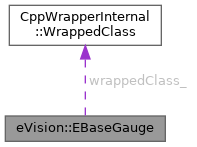
| CppWrapperInternal::WrappedClass | wrappedClass_ |
EasyGauge base class.
License(s): EasyGauge
|
virtual | ||||||||||||
| eVision::EBaseGauge::EBaseGauge | ( | CppWrapperInternal::InternalConstructor | ) |
| uint32_t eVision::EBaseGauge::AddSkipRange | ( | const eVision::EIntegerRange & | range | ) |
Adds an item to the set of skip ranges and returns the index of the newly added range.
| range | The skip range. |
The samples indices between start and end (including the boundaries) will be discarded during the measurement process.
This method allows to define skip ranges in an EBaseGauge. This means that, at measure time, samples belonging to these ranges will not be taken into account.
A sample may belong to more than one skip range; to be discarded, a sample has to pertain to at least one range. Moreover, the skip ranges are allowed to overlap one another.
The range is allowed to be reversed (i.e. end is not required to be greater than start).
Also, start and end are not required to reference valid indices at the time of the call (i.e. the range may lie outside the current return value for EBaseGauge::GetNumSamples).
| void eVision::EBaseGauge::Drag | ( | int32_t | x, |
| int32_t | y, | ||
| const eVision::EFrame & | frame, | ||
| float | zoomX ) |
Moves a handle to a new position and updates the position parameters of the shape.
| x | Current cursor coordinates. |
| y | Current cursor coordinates. |
| frame | Frame of reference in which the gauge is located. |
| zoomX | Horizontal zoom factor. By default, true scale is used. |
| void eVision::EBaseGauge::Drag | ( | int32_t | x, |
| int32_t | y, | ||
| const eVision::EFrame & | frame, | ||
| float | zoomX, | ||
| float | zoomY ) |
Moves a handle to a new position and updates the position parameters of the shape.
| x | Current cursor coordinates. |
| y | Current cursor coordinates. |
| frame | Frame of reference in which the gauge is located. |
| zoomX | Horizontal zoom factor. By default, true scale is used. |
| zoomY | Vertical zoom factor. By default, true scale is used. |
| void eVision::EBaseGauge::Drag | ( | int32_t | x, |
| int32_t | y, | ||
| const eVision::EFrame & | frame, | ||
| float | zoomX, | ||
| float | zoomY, | ||
| float | panX ) |
Moves a handle to a new position and updates the position parameters of the shape.
| x | Current cursor coordinates. |
| y | Current cursor coordinates. |
| frame | Frame of reference in which the gauge is located. |
| zoomX | Horizontal zoom factor. By default, true scale is used. |
| zoomY | Vertical zoom factor. By default, true scale is used. |
| panX | Horizontal pan offset. By default, no pan is added. |
| void eVision::EBaseGauge::Drag | ( | int32_t | x, |
| int32_t | y, | ||
| const eVision::EFrame & | frame, | ||
| float | zoomX, | ||
| float | zoomY, | ||
| float | panX, | ||
| float | panY ) |
Moves a handle to a new position and updates the position parameters of the shape.
| x | Current cursor coordinates. |
| y | Current cursor coordinates. |
| frame | Frame of reference in which the gauge is located. |
| zoomX | Horizontal zoom factor. By default, true scale is used. |
| zoomY | Vertical zoom factor. By default, true scale is used. |
| panX | Horizontal pan offset. By default, no pan is added. |
| panY | Vertical pan offset. By default, no pan is added. |
| void eVision::EBaseGauge::Drag | ( | int32_t | x, |
| int32_t | y, | ||
| float | zoomX ) |
Moves a handle to a new position and updates the position parameters of the shape.
| x | Current cursor coordinates. |
| y | Current cursor coordinates. |
| zoomX | Horizontal zoom factor. By default, true scale is used. |
| void eVision::EBaseGauge::Drag | ( | int32_t | x, |
| int32_t | y, | ||
| float | zoomX, | ||
| float | zoomY ) |
Moves a handle to a new position and updates the position parameters of the shape.
| x | Current cursor coordinates. |
| y | Current cursor coordinates. |
| zoomX | Horizontal zoom factor. By default, true scale is used. |
| zoomY | Vertical zoom factor. By default, true scale is used. |
| void eVision::EBaseGauge::Drag | ( | int32_t | x, |
| int32_t | y, | ||
| float | zoomX, | ||
| float | zoomY, | ||
| float | panX ) |
Moves a handle to a new position and updates the position parameters of the shape.
| x | Current cursor coordinates. |
| y | Current cursor coordinates. |
| zoomX | Horizontal zoom factor. By default, true scale is used. |
| zoomY | Vertical zoom factor. By default, true scale is used. |
| panX | Horizontal pan offset. By default, no pan is added. |
| void eVision::EBaseGauge::Drag | ( | int32_t | x, |
| int32_t | y, | ||
| float | zoomX, | ||
| float | zoomY, | ||
| float | panX, | ||
| float | panY ) |
Moves a handle to a new position and updates the position parameters of the shape.
| x | Current cursor coordinates. |
| y | Current cursor coordinates. |
| zoomX | Horizontal zoom factor. By default, true scale is used. |
| zoomY | Vertical zoom factor. By default, true scale is used. |
| panX | Horizontal pan offset. By default, no pan is added. |
| panY | Vertical pan offset. By default, no pan is added. |
| void eVision::EBaseGauge::Draw | ( | eVision::EDrawAdapter * | graphicContext, |
| eVision::EDrawingMode | drawingMode ) const |
Draws a graphical representation of a shape, as defined by EDrawingMode.
| graphicContext | Handle of the device context on which to draw. |
| drawingMode | Indicates how the point location or model fitting gauge must be displayed, as defined by EDrawingMode. |
| void eVision::EBaseGauge::Draw | ( | eVision::EDrawAdapter * | graphicContext, |
| eVision::EDrawingMode | drawingMode, | ||
| const eVision::EFrame & | frame ) const |
Draws a graphical representation of a shape, as defined by EDrawingMode.
| graphicContext | Handle of the device context on which to draw. |
| drawingMode | Indicates how the point location or model fitting gauge must be displayed, as defined by EDrawingMode. |
| frame | Frame of reference in which the gauge is located. |
| void eVision::EBaseGauge::Draw | ( | eVision::EDrawAdapter * | graphicContext, |
| eVision::EDrawingMode | drawingMode, | ||
| const eVision::EFrame & | frame, | ||
| float | zoomX ) const |
Draws a graphical representation of a shape, as defined by EDrawingMode.
| graphicContext | Handle of the device context on which to draw. |
| drawingMode | Indicates how the point location or model fitting gauge must be displayed, as defined by EDrawingMode. |
| frame | Frame of reference in which the gauge is located. |
| zoomX | Horizontal zoom factor. By default, true scale is used. |
| void eVision::EBaseGauge::Draw | ( | eVision::EDrawAdapter * | graphicContext, |
| eVision::EDrawingMode | drawingMode, | ||
| const eVision::EFrame & | frame, | ||
| float | zoomX, | ||
| float | zoomY ) const |
Draws a graphical representation of a shape, as defined by EDrawingMode.
| graphicContext | Handle of the device context on which to draw. |
| drawingMode | Indicates how the point location or model fitting gauge must be displayed, as defined by EDrawingMode. |
| frame | Frame of reference in which the gauge is located. |
| zoomX | Horizontal zoom factor. By default, true scale is used. |
| zoomY | Vertical zoom factor. By default, true scale is used. |
| void eVision::EBaseGauge::Draw | ( | eVision::EDrawAdapter * | graphicContext, |
| eVision::EDrawingMode | drawingMode, | ||
| const eVision::EFrame & | frame, | ||
| float | zoomX, | ||
| float | zoomY, | ||
| float | panX ) const |
Draws a graphical representation of a shape, as defined by EDrawingMode.
| graphicContext | Handle of the device context on which to draw. |
| drawingMode | Indicates how the point location or model fitting gauge must be displayed, as defined by EDrawingMode. |
| frame | Frame of reference in which the gauge is located. |
| zoomX | Horizontal zoom factor. By default, true scale is used. |
| zoomY | Vertical zoom factor. By default, true scale is used. |
| panX | Horizontal pan offset. By default, no pan is added. |
| void eVision::EBaseGauge::Draw | ( | eVision::EDrawAdapter * | graphicContext, |
| eVision::EDrawingMode | drawingMode, | ||
| const eVision::EFrame & | frame, | ||
| float | zoomX, | ||
| float | zoomY, | ||
| float | panX, | ||
| float | panY ) const |
Draws a graphical representation of a shape, as defined by EDrawingMode.
| graphicContext | Handle of the device context on which to draw. |
| drawingMode | Indicates how the point location or model fitting gauge must be displayed, as defined by EDrawingMode. |
| frame | Frame of reference in which the gauge is located. |
| zoomX | Horizontal zoom factor. By default, true scale is used. |
| zoomY | Vertical zoom factor. By default, true scale is used. |
| panX | Horizontal pan offset. By default, no pan is added. |
| panY | Vertical pan offset. By default, no pan is added. |
| void eVision::EBaseGauge::Draw | ( | eVision::EDrawAdapter * | graphicContext, |
| eVision::EDrawingMode | drawingMode, | ||
| float | zoomX ) const |
Draws a graphical representation of a shape, as defined by EDrawingMode.
| graphicContext | Handle of the device context on which to draw. |
| drawingMode | Indicates how the point location or model fitting gauge must be displayed, as defined by EDrawingMode. |
| zoomX | Horizontal zoom factor. By default, true scale is used. |
| void eVision::EBaseGauge::Draw | ( | eVision::EDrawAdapter * | graphicContext, |
| eVision::EDrawingMode | drawingMode, | ||
| float | zoomX, | ||
| float | zoomY ) const |
Draws a graphical representation of a shape, as defined by EDrawingMode.
| graphicContext | Handle of the device context on which to draw. |
| drawingMode | Indicates how the point location or model fitting gauge must be displayed, as defined by EDrawingMode. |
| zoomX | Horizontal zoom factor. By default, true scale is used. |
| zoomY | Vertical zoom factor. By default, true scale is used. |
| void eVision::EBaseGauge::Draw | ( | eVision::EDrawAdapter * | graphicContext, |
| eVision::EDrawingMode | drawingMode, | ||
| float | zoomX, | ||
| float | zoomY, | ||
| float | panX ) const |
Draws a graphical representation of a shape, as defined by EDrawingMode.
| graphicContext | Handle of the device context on which to draw. |
| drawingMode | Indicates how the point location or model fitting gauge must be displayed, as defined by EDrawingMode. |
| zoomX | Horizontal zoom factor. By default, true scale is used. |
| zoomY | Vertical zoom factor. By default, true scale is used. |
| panX | Horizontal pan offset. By default, no pan is added. |
| void eVision::EBaseGauge::Draw | ( | eVision::EDrawAdapter * | graphicContext, |
| eVision::EDrawingMode | drawingMode, | ||
| float | zoomX, | ||
| float | zoomY, | ||
| float | panX, | ||
| float | panY ) const |
Draws a graphical representation of a shape, as defined by EDrawingMode.
| graphicContext | Handle of the device context on which to draw. |
| drawingMode | Indicates how the point location or model fitting gauge must be displayed, as defined by EDrawingMode. |
| zoomX | Horizontal zoom factor. By default, true scale is used. |
| zoomY | Vertical zoom factor. By default, true scale is used. |
| panX | Horizontal pan offset. By default, no pan is added. |
| panY | Vertical pan offset. By default, no pan is added. |
|
virtual |
Returns all possible edition modes of the gauge.
Reimplemented in eVision::ECircleGauge, eVision::ELineGauge, eVision::EPointGauge, eVision::EPolygonGauge, eVision::ERectangleGauge, and eVision::EWedgeGauge.
| float eVision::EBaseGauge::GetAverageDistance | ( | ) | const |
Average distance between the sampled points and the fitted model.
Irrelevant in case of a point location operation.
| eVision::EEditionMode eVision::EBaseGauge::GetEditionMode | ( | ) | const |
Graphical edition mode (default: EBaseGauge::GetAvailableEditionModes).
This also sets the same graphical edition mode to the nominal shape.
| float eVision::EBaseGauge::GetFilteringThreshold | ( | ) | const |
Relative filtering threshold, that is the fraction of the average distance between the sampled points and the fitted model above which a point is filtered out.
Irrelevant in case of a point location operation.
During a model fitting operation, the "filtering" process can be invoked to remove outliers, i.e. points that were located significantly far away from the fitted model (so that their position is dubious).
|
pure virtual |
Status of the restriction on the orientation of the point location gauge or model fitting sample paths.
Sample paths are the point location gauges placed along the model to be fitted.
Implemented in eVision::ECircleGauge, eVision::ELineGauge, eVision::EPointGauge, eVision::EPolygonGauge, eVision::ERectangleGauge, and eVision::EWedgeGauge.
| bool eVision::EBaseGauge::GetLabeled | ( | ) | const |
Whether to draw a label describing the gauge (default: no).
|
pure virtual |
Copy of the measured shape.
Implemented in eVision::ECircleGauge, eVision::ELineGauge, eVision::EPointGauge, eVision::EPolygonGauge, eVision::ERectangleGauge, and eVision::EWedgeGauge.
|
pure virtual |
Offset added to the Threshold when a peak is to be detected.
When analyzing a derivative profile, a peak is made up of consecutive pixel values above Threshold. To detect weak [strong] transitions, lower [raise] the Threshold value.
To avoid interference of noise, an additional parameter is provided. The MinAmplitude parameter is an offset added to Threshold when a peak is to be detected.
When the pixel values of the derivative profile do not reach Threshold + MinAmplitude, the peak is not taken into account. Anyway, when a peak is taken into account, all the pixels with values above Threshold are considered (for more accuracy). Setting the MinAmplitude value to 0 merely cancels its effect.
Implemented in eVision::ECircleGauge, eVision::ELineGauge, eVision::EPointGauge, eVision::EPolygonGauge, eVision::ERectangleGauge, and eVision::EWedgeGauge.
|
pure virtual |
Minimum area value.
A transition is detected if its derivative peak reaches Threshold + MinAmplitude value, and then declared valid if the area between the peak curve and the horizontal at level Threshold reaches the MinArea value.
Implemented in eVision::ECircleGauge, eVision::ELineGauge, eVision::EPointGauge, eVision::EPolygonGauge, eVision::ERectangleGauge, and eVision::EWedgeGauge.
| std::vector< int32_t > eVision::EBaseGauge::GetMinNumFitSamples | ( | ) | const |
Sets/Gets the minimum number of samples required for fitting the shape.
In case of a ERectangleGauge, 4 values are used, one for each side of the rectangle. Value 0 is used for line and circle gauge. Values 0,1,2,3 are used for rectangle and wedge gauge in the following manner: Rectangle : Top = 0, Left = 1, Bottom = 2, Right = 3 Wedge : Outer Circle = 0, Origin Border = 1, Inner Circle = 2, End Border = 3
| std::string eVision::EBaseGauge::GetName | ( | ) | const |
Name of the EBaseGauge object.
|
pure virtual |
Nominal shape of the gauge.
Note that the gauge stores a copy of the shape and returns a copy of the shape. The gauge applies its EBaseGauge::SetEditionMode to the shape.
Implemented in eVision::ECircleGauge, eVision::ELineGauge, eVision::EPointGauge, eVision::EPolygonGauge, eVision::ERectangleGauge, and eVision::EWedgeGauge.
| uint32_t eVision::EBaseGauge::GetNumFilteringPasses | ( | ) | const |
Number of filtering passes for a model fitting operation.
Irrelevant in case of a point location operation.
During a filtering pass, the points that are too distant from the model are discarded. During a model fitting operation, the "filtering" process can be invoked to remove outliers, i.e. points that were located significantly far away from the fitted model (so that their position is dubious).
By default, (the number of filtering passes is 0), the outliers rejection process is disabled.
|
pure virtual |
Number of sampled points during the model fitting operation.
Irrelevant in case of a point location operation.
After a model fitting operation, a number of points have been fitted along the model. Among them, some are not reliable because of their Area value. Among the remaining ones, some are filtered out (NumFilteringPasses, FilteringThreshold).
Implemented in eVision::ECircleGauge, eVision::ELineGauge, eVision::EPointGauge, eVision::EPolygonGauge, eVision::ERectangleGauge, and eVision::EWedgeGauge.
| uint32_t eVision::EBaseGauge::GetNumSkipRanges | ( | ) | const |
Number of skip ranges in the gauge after a call to EBaseGauge::AddSkipRange.
| uint32_t eVision::EBaseGauge::GetNumValidSamples | ( | ) | const |
Number of valid sample points remaining after a model fitting operation.
Irrelevant in case of a point location operation.
After a model fitting operation, a number of points have been fitted along the model. Among them, some are not reliable because of their Area value. Among the remaining ones, some are filtered out (NumFilteringPasses, FilteringThreshold).
| std::string eVision::EBaseGauge::GetProperty | ( | const std::string & | aProperty | ) | const |
Gets the value of property aProperty. Throws an exception if no such property exists.
| aProperty | The name of the property. |
|
pure virtual |
Flag indicating whether the sampling area remains a rectangle when rotated, instead of becoming a parallelogram.
By default, this flag is set to true: the sampling area always remains a rectangle. Setting this property is only useful when the thickness transition parameter is greater than 1. In fact, when thickness transition parameter is equal to 1, rectangle and parallelogram reduce to the same segment.
Implemented in eVision::ECircleGauge, eVision::ELineGauge, eVision::EPointGauge, eVision::EPolygonGauge, eVision::ERectangleGauge, and eVision::EWedgeGauge.
| eVision::ESamplePoint eVision::EBaseGauge::GetSample | ( | uint32_t | index | ) | const |
Retrieves sampled points used during the model fitting operation.
| index | Index of the point between 0 and EBaseGauge::GetNumSamples |
| uint32_t eVision::EBaseGauge::GetSamplePointIndex | ( | ) | const |
Sampled.
| float eVision::EBaseGauge::GetSamplingStep | ( | ) | const |
Approximate distance between sampled points during a model fitting operation.
Irrelevant in case of a point gauge.
To fit a model, a series of point location operations are performed along the model. The point location gauges spacing is given by the sampling step.
By default, the sampling step is set to 5, which means 5 pixels when the field of view is not calibrated, and 5 physical units in case of a calibrated field of view.
Be aware that if the sampling step is too large, the number of sampled points along the model will not be sufficient to accurately locate it.
| eVision::EIntegerRange eVision::EBaseGauge::GetSkipRange | ( | uint32_t | index | ) | const |
Allows to retrieve the start and end values of the skip range corresponding to the given index, if it is valid (i.e. if it has previously been created by a call to the EBaseGauge::AddSkipRange method).
| index | Index of the skip range. |
Start is guaranteed to be smaller or equal to end.
|
pure virtual |
Number of pixels used for the low-pass filtering operation.
To reduce the effect of noise, the profile data can be low-pass filtered along the point location gauge direction.
Implemented in eVision::ECircleGauge, eVision::ELineGauge, eVision::EPointGauge, eVision::EPolygonGauge, eVision::ERectangleGauge, and eVision::EWedgeGauge.
|
pure virtual |
Number of parallel segments used to extract the data profile.
To reduce the effect of noise and/or strengthen a transition, several parallel profiles can be accumulated.
Implemented in eVision::ECircleGauge, eVision::ELineGauge, eVision::EPointGauge, eVision::EPolygonGauge, eVision::ERectangleGauge, and eVision::EWedgeGauge.
|
pure virtual |
Threshold level used to delimit significant peaks in the data profile.
When analyzing a derivative profile, a peak is made up of consecutive pixel values above Threshold. To detect weak [strong] transitions, lower [raise] the Threshold value.
To avoid interference of noise, an additional parameter is provided. The MinAmplitude parameter is an offset added to Threshold when a peak is to be detected.
When the pixel values of the derivative profile do not reach Threshold + MinAmplitude, the peak is not taken into account. Anyway, when a peak is taken into account, all the pixels with values above Threshold are considered (for more accuracy). Setting the MinAmplitude value to 0 merely cancels its effect.
Implemented in eVision::ECircleGauge, eVision::ELineGauge, eVision::EPointGauge, eVision::EPolygonGauge, eVision::ERectangleGauge, and eVision::EWedgeGauge.
|
pure virtual |
Half thickness of the model fitting gauge.
By default, the tolerance is 20 (2x10), which means 20 pixels when the field of view is not calibrated, and 20 physical units in case of a calibrated field of view.
The tolerance isn't taken into consideration for the point gauge.
Implemented in eVision::ECircleGauge, eVision::ELineGauge, eVision::EPointGauge, eVision::EPolygonGauge, eVision::ERectangleGauge, and eVision::EWedgeGauge.
|
pure virtual |
Transition choice.
Several peaks may be detected along a point location gauge. This parameter helps to select the desired transition.
In case of ETransitionChoice::ETransitionChoice_NthFromBegin or ETransitionChoice::ETransitionChoice_NthFromEnd transition choice, set EBaseGauge::SetTransitionIndex to specify the desired transition.
By default, the selected transition corresponds to the one with the largest amplitude (ETransitionChoice::ETransitionChoice_LargestAmplitude).
Implemented in eVision::ECircleGauge, eVision::ELineGauge, eVision::EPointGauge, eVision::EPolygonGauge, eVision::ERectangleGauge, and eVision::EWedgeGauge.
|
pure virtual |
Index (from 0 on) of the transition to be retained when the transition choice parameter is set to ETransitionChoice::ETransitionChoice_NthFromBegin or ETransitionChoice::ETransitionChoice_NthFromEnd.
Several peaks may be detected along a point location gauge. This parameter helps to select the desired transition.
By default, the first transition is retained (the index value is 0).
Implemented in eVision::ECircleGauge, eVision::ELineGauge, eVision::EPointGauge, eVision::EPolygonGauge, eVision::ERectangleGauge, and eVision::EWedgeGauge.
|
pure virtual |
Transition type.
The type of transition tells whether it crosses increasing or decreasing gray-level values. This helps discriminate between nearby edges of an object.
By default, the searched transition type is indifferently a black to white or a white to black transition (ETransitionType::ETransitionType_BwOrWb).
Implemented in eVision::ECircleGauge, eVision::ELineGauge, eVision::EPointGauge, eVision::EPolygonGauge, eVision::ERectangleGauge, and eVision::EWedgeGauge.
|
pure virtual |
Shape type.
Implemented in eVision::ECircleGauge, eVision::ELineGauge, eVision::EPointGauge, eVision::EPolygonGauge, eVision::ERectangleGauge, and eVision::EWedgeGauge.
| bool eVision::EBaseGauge::HasProperty | ( | const std::string & | aProperty | ) | const |
Returns whether a EBaseGauge has a property named aProperty.
| aProperty | The name of the property. |
| bool eVision::EBaseGauge::HasSamples | ( | ) | const |
Whether the samples are available or not.
The samples are available after a call to EBaseGauge::Measure, even if the shape was not found.
| bool eVision::EBaseGauge::HasValidPolarityProperty | ( | ) | const |
Returns whether the EBaseGauge has a valid polarity property.
I.e. if it has a property named "polarity" whose value is either "inverted" or "direct".
The "polarity" property is mostly used to define the orientation of the gradient in a shape of a EVectorModel.
| eVision::EEditionMode eVision::EBaseGauge::HitTest | ( | int32_t | x, |
| int32_t | y ) |
Checks if there is a handle under the cursor and returns the corresponding edition mode.
| x | Cursor current X coordinate. |
| y | Cursor current Y coordinate. |
| eVision::EEditionMode eVision::EBaseGauge::HitTest | ( | int32_t | x, |
| int32_t | y, | ||
| const eVision::EFrame & | frame ) |
Checks if there is a handle under the cursor and returns the corresponding edition mode.
| x | Cursor current X coordinate. |
| y | Cursor current Y coordinate. |
| frame | Frame of reference in which the gauge is located. |
| eVision::EEditionMode eVision::EBaseGauge::HitTest | ( | int32_t | x, |
| int32_t | y, | ||
| const eVision::EFrame & | frame, | ||
| float | zoomX ) |
Checks if there is a handle under the cursor and returns the corresponding edition mode.
| x | Cursor current X coordinate. |
| y | Cursor current Y coordinate. |
| frame | Frame of reference in which the gauge is located. |
| zoomX | Horizontal zoom factor. By default, true scale is used. |
| eVision::EEditionMode eVision::EBaseGauge::HitTest | ( | int32_t | x, |
| int32_t | y, | ||
| const eVision::EFrame & | frame, | ||
| float | zoomX, | ||
| float | zoomY ) |
Checks if there is a handle under the cursor and returns the corresponding edition mode.
| x | Cursor current X coordinate. |
| y | Cursor current Y coordinate. |
| frame | Frame of reference in which the gauge is located. |
| zoomX | Horizontal zoom factor. By default, true scale is used. |
| zoomY | Vertical zoom factor. By default, true scale is used. |
| eVision::EEditionMode eVision::EBaseGauge::HitTest | ( | int32_t | x, |
| int32_t | y, | ||
| const eVision::EFrame & | frame, | ||
| float | zoomX, | ||
| float | zoomY, | ||
| float | panX ) |
Checks if there is a handle under the cursor and returns the corresponding edition mode.
| x | Cursor current X coordinate. |
| y | Cursor current Y coordinate. |
| frame | Frame of reference in which the gauge is located. |
| zoomX | Horizontal zoom factor. By default, true scale is used. |
| zoomY | Vertical zoom factor. By default, true scale is used. |
| panX | Horizontal pan offset. By default, no pan is added. |
| eVision::EEditionMode eVision::EBaseGauge::HitTest | ( | int32_t | x, |
| int32_t | y, | ||
| const eVision::EFrame & | frame, | ||
| float | zoomX, | ||
| float | zoomY, | ||
| float | panX, | ||
| float | panY ) |
Checks if there is a handle under the cursor and returns the corresponding edition mode.
| x | Cursor current X coordinate. |
| y | Cursor current Y coordinate. |
| frame | Frame of reference in which the gauge is located. |
| zoomX | Horizontal zoom factor. By default, true scale is used. |
| zoomY | Vertical zoom factor. By default, true scale is used. |
| panX | Horizontal pan offset. By default, no pan is added. |
| panY | Vertical pan offset. By default, no pan is added. |
| eVision::EEditionMode eVision::EBaseGauge::HitTest | ( | int32_t | x, |
| int32_t | y, | ||
| float | zoomX ) |
Checks if there is a handle under the cursor and returns the corresponding edition mode.
| x | Cursor current X coordinate. |
| y | Cursor current Y coordinate. |
| zoomX | Horizontal zoom factor. By default, true scale is used. |
| eVision::EEditionMode eVision::EBaseGauge::HitTest | ( | int32_t | x, |
| int32_t | y, | ||
| float | zoomX, | ||
| float | zoomY ) |
Checks if there is a handle under the cursor and returns the corresponding edition mode.
| x | Cursor current X coordinate. |
| y | Cursor current Y coordinate. |
| zoomX | Horizontal zoom factor. By default, true scale is used. |
| zoomY | Vertical zoom factor. By default, true scale is used. |
| eVision::EEditionMode eVision::EBaseGauge::HitTest | ( | int32_t | x, |
| int32_t | y, | ||
| float | zoomX, | ||
| float | zoomY, | ||
| float | panX ) |
Checks if there is a handle under the cursor and returns the corresponding edition mode.
| x | Cursor current X coordinate. |
| y | Cursor current Y coordinate. |
| zoomX | Horizontal zoom factor. By default, true scale is used. |
| zoomY | Vertical zoom factor. By default, true scale is used. |
| panX | Horizontal pan offset. By default, no pan is added. |
| eVision::EEditionMode eVision::EBaseGauge::HitTest | ( | int32_t | x, |
| int32_t | y, | ||
| float | zoomX, | ||
| float | zoomY, | ||
| float | panX, | ||
| float | panY ) |
Checks if there is a handle under the cursor and returns the corresponding edition mode.
| x | Cursor current X coordinate. |
| y | Cursor current Y coordinate. |
| zoomX | Horizontal zoom factor. By default, true scale is used. |
| zoomY | Vertical zoom factor. By default, true scale is used. |
| panX | Horizontal pan offset. By default, no pan is added. |
| panY | Vertical pan offset. By default, no pan is added. |
| bool eVision::EBaseGauge::IsFound | ( | ) | const |
| void eVision::EBaseGauge::Load | ( | const std::string & | path | ) |
Loads a gauge.The given ESerializer must have been created for reading.
| path | The file path. |
| void eVision::EBaseGauge::Load | ( | eVision::ESerializer * | serializer | ) |
Loads a gauge.The given ESerializer must have been created for reading.
| serializer | Pointer to the ESerializer created for reading. |
|
static |
Creates a gauge of the correct type.
| path | File path |
| std::unique_ptr< eVision::EShape > eVision::EBaseGauge::Measure | ( | const eVision::EROIBW8 & | sourceImage | ) |
Performs the gauge measurement.
For a point gauge, it locates the points along the defined path. For other gauges, it performs the model fitting operation.
| sourceImage | Source image. |
| std::unique_ptr< eVision::EShape > eVision::EBaseGauge::Measure | ( | const eVision::EROIBW8 & | sourceImage, |
| const eVision::EFrame & | frame ) |
Performs the gauge measurement.
For a point gauge, it locates the points along the defined path. For other gauges, it performs the model fitting operation.
| sourceImage | Source image. |
| frame | Frame of reference |
| std::unique_ptr< eVision::EShape > eVision::EBaseGauge::Measure | ( | const eVision::EROIBW8 & | sourceImage, |
| const eVision::ERegion & | region ) |
Performs the gauge measurement.
For a point gauge, it locates the points along the defined path. For other gauges, it performs the model fitting operation.
| sourceImage | Source image. |
| region | Region to use with the source image. |
| std::unique_ptr< eVision::EShape > eVision::EBaseGauge::Measure | ( | const eVision::EROIBW8 & | sourceImage, |
| const eVision::ERegion & | region, | ||
| const eVision::EFrame & | frame ) |
Performs the gauge measurement.
For a point gauge, it locates the points along the defined path. For other gauges, it performs the model fitting operation.
| sourceImage | Source image. |
| region | Region to use with the source image. |
| frame | Frame of reference |
|
virtual |
Measures the specified sample path.
The sample path contains all the detected transitions along that path and can be used to plot the profile and derivatives of that path.
| sourceImage | Source image. |
| pathIndex | Index of the path to measure between 0 and EBaseGauge::GetNumSamples. |
|
virtual |
Measures the specified sample path.
The sample path contains all the detected transitions along that path and can be used to plot the profile and derivatives of that path.
| sourceImage | Source image. |
| pathIndex | Index of the path to measure between 0 and EBaseGauge::GetNumSamples. |
| frame | Frame of reference |
|
virtual |
Measures the specified sample path.
The sample path contains all the detected transitions along that path and can be used to plot the profile and derivatives of that path.
| sourceImage | Source image. |
| pathIndex | Index of the path to measure between 0 and EBaseGauge::GetNumSamples. |
| region | Region to use with the source image. |
|
virtual |
Measures the specified sample path.
The sample path contains all the detected transitions along that path and can be used to plot the profile and derivatives of that path.
| sourceImage | Source image. |
| pathIndex | Index of the path to measure between 0 and EBaseGauge::GetNumSamples. |
| region | Region to use with the source image. |
| frame | Frame of reference |
| void eVision::EBaseGauge::MeasureWithoutFitting | ( | const eVision::EROIBW8 & | sourceImage | ) |
Triggers the point location without line fitting operation.
| sourceImage | Source image. |
This method performs the actual measurement for each transition, but does not perform the gauge fitting. This means that individual samples will be available through the EBaseGauge::GetSample method, but the gauge position will not be changed.
Please note that the filtering will not be performed in this method, since it relies upon the fitting process. The filtering parameters will thus be unused.
For point gauge, this method is equivalent to EBaseGauge::Measure.
| void eVision::EBaseGauge::MeasureWithoutFitting | ( | const eVision::EROIBW8 & | sourceImage, |
| const eVision::EFrame & | frame ) |
Triggers the point location without line fitting operation.
| sourceImage | Source image. |
| frame | Frame of reference |
This method performs the actual measurement for each transition, but does not perform the gauge fitting. This means that individual samples will be available through the EBaseGauge::GetSample method, but the gauge position will not be changed.
Please note that the filtering will not be performed in this method, since it relies upon the fitting process. The filtering parameters will thus be unused.
For point gauge, this method is equivalent to EBaseGauge::Measure.
| void eVision::EBaseGauge::MeasureWithoutFitting | ( | const eVision::EROIBW8 & | sourceImage, |
| const eVision::ERegion & | region ) |
Triggers the point location without line fitting operation.
| sourceImage | Source image. |
| region | The region on which to measure. |
This method performs the actual measurement for each transition, but does not perform the gauge fitting. This means that individual samples will be available through the EBaseGauge::GetSample method, but the gauge position will not be changed.
Please note that the filtering will not be performed in this method, since it relies upon the fitting process. The filtering parameters will thus be unused.
For point gauge, this method is equivalent to EBaseGauge::Measure.
| void eVision::EBaseGauge::MeasureWithoutFitting | ( | const eVision::EROIBW8 & | sourceImage, |
| const eVision::ERegion & | region, | ||
| const eVision::EFrame & | frame ) |
Triggers the point location without line fitting operation.
| sourceImage | Source image. |
| region | The region on which to measure. |
| frame | Frame of reference |
This method performs the actual measurement for each transition, but does not perform the gauge fitting. This means that individual samples will be available through the EBaseGauge::GetSample method, but the gauge position will not be changed.
Please note that the filtering will not be performed in this method, since it relies upon the fitting process. The filtering parameters will thus be unused.
For point gauge, this method is equivalent to EBaseGauge::Measure.
| void eVision::EBaseGauge::RemoveAllSkipRanges | ( | ) |
Removes all the skip ranges previously created by a call to EBaseGauge::AddSkipRange.
| void eVision::EBaseGauge::RemoveProperty | ( | const std::string & | aProperty | ) |
Removes the property name aProperty from the EBaseGauge.
| aProperty | The name of the property. |
| void eVision::EBaseGauge::RemoveSkipRange | ( | const uint32_t | index | ) |
After a call to EBaseGauge::AddSkipRange, removes the skip range with the given index.
| index | Index of the skip range to remove, as returned by EBaseGauge::AddSkipRange. |
| void eVision::EBaseGauge::Save | ( | const std::string & | path | ) |
Saves a gauge.The given ESerializer must have been created for writing.
| path | The file path. |
| void eVision::EBaseGauge::Save | ( | eVision::ESerializer * | serializer | ) |
Saves a gauge.The given ESerializer must have been created for writing.
| serializer | Pointer to the ESerializer created for writing. |
| void eVision::EBaseGauge::SetEditionMode | ( | eVision::EEditionMode | mode | ) |
Graphical edition mode (default: EBaseGauge::GetAvailableEditionModes).
| mode | EEditionMode flags |
This also sets the same graphical edition mode to the nominal shape.
| void eVision::EBaseGauge::SetFilteringThreshold | ( | float | f32FilteringThreshold | ) |
Relative filtering threshold, that is the fraction of the average distance between the sampled points and the fitted model above which a point is filtered out.
Irrelevant in case of a point location operation.
During a model fitting operation, the "filtering" process can be invoked to remove outliers, i.e. points that were located significantly far away from the fitted model (so that their position is dubious).
|
pure virtual |
Status of the restriction on the orientation of the point location gauge or model fitting sample paths.
Sample paths are the point location gauges placed along the model to be fitted.
Implemented in eVision::ECircleGauge, eVision::ELineGauge, eVision::EPointGauge, eVision::EPolygonGauge, eVision::ERectangleGauge, and eVision::EWedgeGauge.
| void eVision::EBaseGauge::SetLabeled | ( | bool | labeled | ) |
Whether to draw a label describing the gauge (default: no).
|
pure virtual |
Offset added to the Threshold when a peak is to be detected.
When analyzing a derivative profile, a peak is made up of consecutive pixel values above Threshold. To detect weak [strong] transitions, lower [raise] the Threshold value.
To avoid interference of noise, an additional parameter is provided. The MinAmplitude parameter is an offset added to Threshold when a peak is to be detected.
When the pixel values of the derivative profile do not reach Threshold + MinAmplitude, the peak is not taken into account. Anyway, when a peak is taken into account, all the pixels with values above Threshold are considered (for more accuracy). Setting the MinAmplitude value to 0 merely cancels its effect.
Implemented in eVision::ECircleGauge, eVision::ELineGauge, eVision::EPointGauge, eVision::EPolygonGauge, eVision::ERectangleGauge, and eVision::EWedgeGauge.
|
pure virtual |
Minimum area value.
A transition is detected if its derivative peak reaches Threshold + MinAmplitude value, and then declared valid if the area between the peak curve and the horizontal at level Threshold reaches the MinArea value.
Implemented in eVision::ECircleGauge, eVision::ELineGauge, eVision::EPointGauge, eVision::EPolygonGauge, eVision::ERectangleGauge, and eVision::EWedgeGauge.
| void eVision::EBaseGauge::SetMinNumFitSamples | ( | const std::vector< int32_t > & | sides | ) |
Sets/Gets the minimum number of samples required for fitting the shape.
| sides | The list of the minimum number of samples to fit the shape. |
In case of a ERectangleGauge, 4 values are used, one for each side of the rectangle. Value 0 is used for line and circle gauge. Values 0,1,2,3 are used for rectangle and wedge gauge in the following manner: Rectangle : Top = 0, Left = 1, Bottom = 2, Right = 3 Wedge : Outer Circle = 0, Origin Border = 1, Inner Circle = 2, End Border = 3
| void eVision::EBaseGauge::SetName | ( | const std::string & | name | ) |
Name of the EBaseGauge object.
|
pure virtual |
Nominal shape of the gauge.
| shape | New nominal shape |
Note that the gauge stores a copy of the shape and returns a copy of the shape. The gauge applies its EBaseGauge::SetEditionMode to the shape.
Implemented in eVision::ECircleGauge, eVision::ELineGauge, eVision::EPointGauge, eVision::EPolygonGauge, eVision::ERectangleGauge, and eVision::EWedgeGauge.
| void eVision::EBaseGauge::SetNumFilteringPasses | ( | uint32_t | un32NumFilteringPasses | ) |
Number of filtering passes for a model fitting operation.
Irrelevant in case of a point location operation.
During a filtering pass, the points that are too distant from the model are discarded. During a model fitting operation, the "filtering" process can be invoked to remove outliers, i.e. points that were located significantly far away from the fitted model (so that their position is dubious).
By default, (the number of filtering passes is 0), the outliers rejection process is disabled.
| void eVision::EBaseGauge::SetProperty | ( | const std::string & | aProperty, |
| const std::string & | aValue ) |
Sets the value of property aProperty to aValue for this EBaseGauge.
| aProperty | The name of the property. |
| aValue | The value of the property. |
You may use a shape property to define the orientation of the gradient in a shape of a EVectorModel. This is done by setting a property named "polarity" to "inverted" or "direct".
Additionally, you may set any property to any value for your own needs.
|
pure virtual |
Flag indicating whether the sampling area remains a rectangle when rotated, instead of becoming a parallelogram.
By default, this flag is set to true: the sampling area always remains a rectangle. Setting this property is only useful when the thickness transition parameter is greater than 1. In fact, when thickness transition parameter is equal to 1, rectangle and parallelogram reduce to the same segment.
Implemented in eVision::ECircleGauge, eVision::ELineGauge, eVision::EPointGauge, eVision::EPolygonGauge, eVision::ERectangleGauge, and eVision::EWedgeGauge.
| void eVision::EBaseGauge::SetSamplePointIndex | ( | uint32_t | index | ) |
Sampled.
| void eVision::EBaseGauge::SetSamplingStep | ( | float | f32SamplingStep | ) |
Approximate distance between sampled points during a model fitting operation.
Irrelevant in case of a point gauge.
To fit a model, a series of point location operations are performed along the model. The point location gauges spacing is given by the sampling step.
By default, the sampling step is set to 5, which means 5 pixels when the field of view is not calibrated, and 5 physical units in case of a calibrated field of view.
Be aware that if the sampling step is too large, the number of sampled points along the model will not be sufficient to accurately locate it.
|
pure virtual |
Number of pixels used for the low-pass filtering operation.
To reduce the effect of noise, the profile data can be low-pass filtered along the point location gauge direction.
Implemented in eVision::ECircleGauge, eVision::ELineGauge, eVision::EPointGauge, eVision::EPolygonGauge, eVision::ERectangleGauge, and eVision::EWedgeGauge.
|
pure virtual |
Number of parallel segments used to extract the data profile.
To reduce the effect of noise and/or strengthen a transition, several parallel profiles can be accumulated.
Implemented in eVision::ECircleGauge, eVision::ELineGauge, eVision::EPointGauge, eVision::EPolygonGauge, eVision::ERectangleGauge, and eVision::EWedgeGauge.
|
pure virtual |
Threshold level used to delimit significant peaks in the data profile.
When analyzing a derivative profile, a peak is made up of consecutive pixel values above Threshold. To detect weak [strong] transitions, lower [raise] the Threshold value.
To avoid interference of noise, an additional parameter is provided. The MinAmplitude parameter is an offset added to Threshold when a peak is to be detected.
When the pixel values of the derivative profile do not reach Threshold + MinAmplitude, the peak is not taken into account. Anyway, when a peak is taken into account, all the pixels with values above Threshold are considered (for more accuracy). Setting the MinAmplitude value to 0 merely cancels its effect.
Implemented in eVision::ECircleGauge, eVision::ELineGauge, eVision::EPointGauge, eVision::EPolygonGauge, eVision::ERectangleGauge, and eVision::EWedgeGauge.
|
pure virtual |
Half thickness of the model fitting gauge.
By default, the tolerance is 20 (2x10), which means 20 pixels when the field of view is not calibrated, and 20 physical units in case of a calibrated field of view.
The tolerance isn't taken into consideration for the point gauge.
Implemented in eVision::ECircleGauge, eVision::ELineGauge, eVision::EPointGauge, eVision::EPolygonGauge, eVision::ERectangleGauge, and eVision::EWedgeGauge.
|
pure virtual |
Transition choice.
Several peaks may be detected along a point location gauge. This parameter helps to select the desired transition.
In case of ETransitionChoice::ETransitionChoice_NthFromBegin or ETransitionChoice::ETransitionChoice_NthFromEnd transition choice, set EBaseGauge::SetTransitionIndex to specify the desired transition.
By default, the selected transition corresponds to the one with the largest amplitude (ETransitionChoice::ETransitionChoice_LargestAmplitude).
Implemented in eVision::ECircleGauge, eVision::ELineGauge, eVision::EPointGauge, eVision::EPolygonGauge, eVision::ERectangleGauge, and eVision::EWedgeGauge.
|
pure virtual |
Index (from 0 on) of the transition to be retained when the transition choice parameter is set to ETransitionChoice::ETransitionChoice_NthFromBegin or ETransitionChoice::ETransitionChoice_NthFromEnd.
Several peaks may be detected along a point location gauge. This parameter helps to select the desired transition.
By default, the first transition is retained (the index value is 0).
Implemented in eVision::ECircleGauge, eVision::ELineGauge, eVision::EPointGauge, eVision::EPolygonGauge, eVision::ERectangleGauge, and eVision::EWedgeGauge.
|
pure virtual |
Transition type.
The type of transition tells whether it crosses increasing or decreasing gray-level values. This helps discriminate between nearby edges of an object.
By default, the searched transition type is indifferently a black to white or a white to black transition (ETransitionType::ETransitionType_BwOrWb).
Implemented in eVision::ECircleGauge, eVision::ELineGauge, eVision::EPointGauge, eVision::EPolygonGauge, eVision::ERectangleGauge, and eVision::EWedgeGauge.
| CppWrapperInternal::WrappedClass eVision::EBaseGauge::wrappedClass_ |
 1.17.0