 |
eVision C++ API 26.10.0-beta.2.dev
|
|
eVision C++ API 26.10.0-beta.2.dev
|
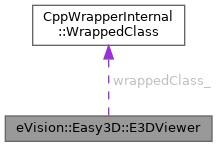
Manages a viewer window for EPointCloud. More...
#include <eVision/Easy3D/E3DViewer.h>
Public Member Functions | |
| E3DViewer (int orgX, int orgY, int width, int height, void *parent) | |
| Creates an E3DViewer object. | |
| E3DViewer (int orgX, int orgY, int width, int height) | |
| Creates an E3DViewer object. | |
| E3DViewer (eVision::Easy3D::EUIAPI uiApi, int orgX, int orgY, int width, int height, void *parent) | |
| Creates an E3DViewer object. | |
| E3DViewer (eVision::Easy3D::EUIAPI uiApi, int orgX, int orgY, int width, int height) | |
| Creates an E3DViewer object. | |
| E3DViewer (eVision::Easy3D::EUIAPI uiApi) | |
| Creates an E3DViewer object. | |
| E3DViewer () | |
| Creates an E3DViewer object. | |
| virtual | ~E3DViewer () throw () |
| void | InitRendering () |
| Initializes the rendering state, must be called one time before the first E3DViewer::Show. | |
| bool | IsInitialized () const |
| Indicates if 3DViewer has already been initialized. | |
| void | Terminate () |
| Closes and frees allocated resources. Must be called when the object should be destroyed. | |
| void | SetFontPath (const std::string &path) |
| Configure the TrueType font used to display text on the 3D Viewer. | |
| std::string | GetFontPath () const |
| Configure the TrueType font used to display text on the 3D Viewer. | |
| void | SetBackgroundColor (eVision::ERGBColor backgroundColor) |
| Sets/Gets the 3D viewer background color. | |
| eVision::ERGBColor | GetBackgroundColor () const |
| Sets/Gets the 3D viewer background color. | |
| void | AddRenderSource (const std::string &name, const eVision::Easy3D::EPointCloud &source) |
| Adds a new Render Source. The given render source (point cloud, mesh, ZMap, sphere, box, plane or line) is added to the current display. | |
| void | AddRenderSource (const std::string &name, const eVision::Easy3D::EMesh &source) |
| Adds a new Render Source. The given render source (point cloud, mesh, ZMap, sphere, box, plane or line) is added to the current display. | |
| void | AddRenderSource (const std::string &name, const eVision::Easy3D::EZMap *source) |
| Adds a new Render Source. The given render source (point cloud, mesh, ZMap, sphere, box, plane or line) is added to the current display. | |
| void | AddRenderSource (const std::string &name, const eVision::Easy3D::E3DSphere &sphere, eVision::EC24 color, uint8_t opacity) |
| Adds a new Render Source. The given render source (point cloud, mesh, ZMap, sphere, box, plane or line) is added to the current display. | |
| void | AddRenderSource (const std::string &name, const eVision::Easy3D::E3DSphere &sphere, eVision::EC24 color) |
| Adds a new Render Source. The given render source (point cloud, mesh, ZMap, sphere, box, plane or line) is added to the current display. | |
| void | AddRenderSource (const std::string &name, const eVision::Easy3D::E3DSphere &sphere) |
| Adds a new Render Source. The given render source (point cloud, mesh, ZMap, sphere, box, plane or line) is added to the current display. | |
| void | AddRenderSource (const std::string &name, const eVision::Easy3D::E3DBox &box, eVision::EC24 color, uint8_t opacity) |
| Adds a new Render Source. The given render source (point cloud, mesh, ZMap, sphere, box, plane or line) is added to the current display. | |
| void | AddRenderSource (const std::string &name, const eVision::Easy3D::E3DBox &box, eVision::EC24 color) |
| Adds a new Render Source. The given render source (point cloud, mesh, ZMap, sphere, box, plane or line) is added to the current display. | |
| void | AddRenderSource (const std::string &name, const eVision::Easy3D::E3DBox &box) |
| Adds a new Render Source. The given render source (point cloud, mesh, ZMap, sphere, box, plane or line) is added to the current display. | |
| void | AddRenderSource (const std::string &name, const eVision::Easy3D::E3DLine &line, eVision::EC24 color) |
| Adds a new Render Source. The given render source (point cloud, mesh, ZMap, sphere, box, plane or line) is added to the current display. | |
| void | AddRenderSource (const std::string &name, const eVision::Easy3D::E3DLine &line) |
| Adds a new Render Source. The given render source (point cloud, mesh, ZMap, sphere, box, plane or line) is added to the current display. | |
| void | AddRenderSource (const std::string &name, const eVision::Easy3D::E3DPlane &plane, eVision::EC24 color, uint8_t opacity) |
| Adds a new Render Source. The given render source (point cloud, mesh, ZMap, sphere, box, plane or line) is added to the current display. | |
| void | AddRenderSource (const std::string &name, const eVision::Easy3D::E3DPlane &plane, eVision::EC24 color) |
| Adds a new Render Source. The given render source (point cloud, mesh, ZMap, sphere, box, plane or line) is added to the current display. | |
| void | AddRenderSource (const std::string &name, const eVision::Easy3D::E3DPlane &plane) |
| Adds a new Render Source. The given render source (point cloud, mesh, ZMap, sphere, box, plane or line) is added to the current display. | |
| void | SetRenderSource (const std::string &name, const eVision::Easy3D::EPointCloud &source) |
| Changes the content of a render source with a new point cloud, mesh or ZMap. | |
| void | SetRenderSource (const std::string &name, const eVision::Easy3D::EMesh &source) |
| Changes the content of a render source with a new point cloud, mesh or ZMap. | |
| void | SetRenderSource (const std::string &name, const eVision::Easy3D::EZMap *source) |
| Changes the content of a render source with a new point cloud, mesh or ZMap. | |
| void | SetRenderSource (const std::string &name, const eVision::Easy3D::E3DSphere &sphere, eVision::EC24 color, uint8_t opacity) |
| Changes the content of a render source with a new point cloud, mesh or ZMap. | |
| void | SetRenderSource (const std::string &name, const eVision::Easy3D::E3DSphere &sphere, eVision::EC24 color) |
| Changes the content of a render source with a new point cloud, mesh or ZMap. | |
| void | SetRenderSource (const std::string &name, const eVision::Easy3D::E3DSphere &sphere) |
| Changes the content of a render source with a new point cloud, mesh or ZMap. | |
| void | SetRenderSource (const std::string &name, const eVision::Easy3D::E3DBox &box, eVision::EC24 color, uint8_t opacity) |
| Changes the content of a render source with a new point cloud, mesh or ZMap. | |
| void | SetRenderSource (const std::string &name, const eVision::Easy3D::E3DBox &box, eVision::EC24 color) |
| Changes the content of a render source with a new point cloud, mesh or ZMap. | |
| void | SetRenderSource (const std::string &name, const eVision::Easy3D::E3DBox &box) |
| Changes the content of a render source with a new point cloud, mesh or ZMap. | |
| void | SetRenderSource (const std::string &name, const eVision::Easy3D::E3DLine &line, eVision::EC24 color) |
| Changes the content of a render source with a new point cloud, mesh or ZMap. | |
| void | SetRenderSource (const std::string &name, const eVision::Easy3D::E3DLine &line) |
| Changes the content of a render source with a new point cloud, mesh or ZMap. | |
| void | SetRenderSource (const std::string &name, const eVision::Easy3D::E3DPlane &plane, eVision::EC24 color, uint8_t opacity) |
| Changes the content of a render source with a new point cloud, mesh or ZMap. | |
| void | SetRenderSource (const std::string &name, const eVision::Easy3D::E3DPlane &plane, eVision::EC24 color) |
| Changes the content of a render source with a new point cloud, mesh or ZMap. | |
| void | SetRenderSource (const std::string &name, const eVision::Easy3D::E3DPlane &plane) |
| Changes the content of a render source with a new point cloud, mesh or ZMap. | |
| void | RemoveRenderSource (const std::string &name) |
| Removes the given render source. | |
| void | RemoveAllRenderSources () |
| Removes all render sources. The E3DViewer display will be empty. | |
| bool | HasRenderSource (const std::string &name) const |
| Is the given render source name exists ? | |
| int | GetNumRenderSources () const |
| Returns the number of render sources. | |
| std::string | GetRenderSourceName (int index) const |
| Returns the name of the ith render source. | |
| void | HideRenderSource (const std::string &name) |
| Hides the given render source. | |
| void | ShowRenderSource (const std::string &name) |
| Shows the given render source. | |
| bool | IsRenderSourceVisible (const std::string &name) const |
| Returns true if the render source is currently visible. | |
| bool | IsShapeRenderSource (const std::string &name) const |
| Returns true if the render source is a shape. | |
| void | SetRenderSourceColorMode (const std::string &name, eVision::Easy3D::ESourceColorMode colorMode) |
| Sets the Source Color Mode. The Source Color Mode defines how the colors of the point cloud or mesh are chosen. See ESourceColorMode. | |
| eVision::Easy3D::ESourceColorMode | GetRenderSourceColorMode (const std::string &name) const |
| Gets the Source Color Mode. The Source Color Mode defines how the colors of the point cloud or mesh are chosen. See ESourceColorMode. | |
| void | SetRenderSourceConstantColor (const std::string &name, eVision::EC24 color) |
| Sets the constant color used to display a point cloud or a mesh, when ESourceColorMode is set to ESourceColorMode::ESourceColorMode_Constant. | |
| eVision::EC24 | GetRenderSourceConstantColor (const std::string &name) const |
| Gets the constant color used to display a point cloud or a mesh, when ESourceColorMode is set to ESourceColorMode::ESourceColorMode_Constant. | |
| void | SetRenderSourceOpacity (const std::string &name, uint8_t opacity) |
| Sets the opacity used to display the render source. Only compatible with ESourceColorMode::ESourceColorMode_Constant. | |
| uint8_t | GetRenderSourceOpacity (const std::string &name) const |
| Gets the opacity used to display the render source. Only compatible with ESourceColorMode::ESourceColorMode_Constant. | |
| void | SetRenderSourcePointSize (const std::string &name, int size) |
| Sets the point size used to display the point clouds. | |
| int | GetRenderSourcePointSize (const std::string &name) const |
| Gets the point size used to display the point clouds. | |
| void | SetRenderSourceWireFrame (const std::string &name, bool state) |
| Sets the wireframe mode used to render a mesh. | |
| bool | GetRenderSourceWireFrame (const std::string &name) const |
| Gets the wireframe mode used to render a mesh. | |
| void | SetRenderSourceWireFrameColor (const std::string &name, eVision::EC24 color) |
| Sets the wireframe color. | |
| eVision::EC24 | GetRenderSourceWireFrameColor (const std::string &name) const |
| Gets the wireframe color. | |
| void | ConfigureRenderSource (const eVision::Easy3D::EZMap *sourceObject, bool keepCurrentView) |
| Sets a unique 3D source to be rendered. It replaces the current object. | |
| void | ConfigureRenderSource (const eVision::Easy3D::EZMap *sourceObject) |
| Sets a unique 3D source to be rendered. It replaces the current object. | |
| void | ConfigureRenderSource (const eVision::Easy3D::EPointCloud &sourceObject, bool keepCurrentView) |
| Sets a unique 3D source to be rendered. It replaces the current object. | |
| void | ConfigureRenderSource (const eVision::Easy3D::EPointCloud &sourceObject) |
| Sets a unique 3D source to be rendered. It replaces the current object. | |
| void | ConfigureRenderSource (const eVision::Easy3D::EMesh &sourceObject, bool keepCurrentView) |
| Sets a unique 3D source to be rendered. It replaces the current object. | |
| void | ConfigureRenderSource (const eVision::Easy3D::EMesh &sourceObject) |
| Sets a unique 3D source to be rendered. It replaces the current object. | |
| void | ConfigureRenderSource (const eVision::Easy3D::EZMap8 &sourceObject, bool keepCurrentView) |
| Sets a unique 3D source to be rendered. It replaces the current object. | |
| void | ConfigureRenderSource (const eVision::Easy3D::EZMap8 &sourceObject) |
| Sets a unique 3D source to be rendered. It replaces the current object. | |
| void | ConfigureRenderSource (const eVision::Easy3D::EZMap16 &sourceObject, bool keepCurrentView) |
| Sets a unique 3D source to be rendered. It replaces the current object. | |
| void | ConfigureRenderSource (const eVision::Easy3D::EZMap16 &sourceObject) |
| Sets a unique 3D source to be rendered. It replaces the current object. | |
| void | ConfigureRenderSource (const eVision::Easy3D::EZMap32f &sourceObject, bool keepCurrentView) |
| Sets a unique 3D source to be rendered. It replaces the current object. | |
| void | ConfigureRenderSource (const eVision::Easy3D::EZMap32f &sourceObject) |
| Sets a unique 3D source to be rendered. It replaces the current object. | |
| void | ClearRenderSource () |
| Clears the 3D data, nothing will be displayed. | |
| void | GenerateColors (eVision::Easy3D::EColorRampMode mode) |
| Choose the current color ramp mode. Colors are calculated from point coordinates or attributes, several mappings are exposed in EColorRampMode. | |
| void | SetColorRampMode (eVision::Easy3D::EColorRampMode mode) |
| Set/Gets the current color ramp mode. | |
| eVision::Easy3D::EColorRampMode | GetColorRampMode () const |
| Set/Gets the current color ramp mode. | |
| void | ShowColorRampLegend () |
| Enables the display of a color ramp legend. | |
| void | HideColorRampLegend () |
| Disables the display of a color ramp legend. | |
| bool | IsColorRampLegendVisible () const |
| Whether the color ramp legend is visible or not. | |
| void | SetColorRampGraduationColor (eVision::ERGBColor color) |
| Sets/Gets the graduation color. | |
| eVision::ERGBColor | GetColorRampGraduationColor () const |
| Sets/Gets the graduation color. | |
| void | SetColorRampLocation (const eVision::EPoint &botLeft, const eVision::EPoint &topRight) |
| Sets the location of the color ramp. | |
| void | SetColorRampLocation (float xmin, float xmax, float ymin, float ymax) |
| Sets the location of the color ramp. | |
| void | GetColorRampLocation (eVision::EPoint &botLeft, eVision::EPoint &topRight) const |
| Gets the location of the color ramp. | |
| void | GetColorRampLocation (float &xmin, float &xmax, float &ymin, float &ymax) const |
| Gets the location of the color ramp. | |
| void | SetEnableSmartColorRamp (bool state) |
| Sets/Gets the state of the smart generation of color. If the smart generation of color is active, then the outliers inside the pointcloud will not be taken into account in the color ramp. | |
| bool | GetEnableSmartColorRamp () const |
| Sets/Gets the state of the smart generation of color. If the smart generation of color is active, then the outliers inside the pointcloud will not be taken into account in the color ramp. | |
| void | DisableFixColorRampBounds () |
| Disables the fix color ramp bounds. | |
| bool | GetEnableFixColorRampBounds () const |
| Gets the state of the fix color ramp bounds. | |
| void | SetFixColorRampBounds (const eVision::EFloatRange &range) |
| Gets/Sets the bounds of the color ramp. | |
| eVision::EFloatRange | GetFixColorRampBounds () const |
| Gets/Sets the bounds of the color ramp. | |
| void | SetFixColorRampBounds (float min, float max) |
| Sets the bounds of the color ramp. | |
| void | GetFixColorRampBounds (float &min, float &max) const |
| Gets the bounds of the color ramp. | |
| void | LockRotationInitialPosition (int x, int y) |
| Starts a rotation transformation of the view point using the (x,y) coordinate. Usually (x,y) is the mouse cursor coordinate when a button is pressed. | |
| void | UpdateRotationPosition (int x, int y) |
| Updates a rotation transformation of the view point using the (x,y) coordinate. Usually (x,y) is the mouse cursor coordinate when the mouse moves. | |
| void | LockRotationFinalPosition (int x, int y) |
| Finalizes a rotation transformation of the view point using the (x,y) coordinate. Usually (x,y) is the mouse cursor coordinate when a button is released. | |
| void | LockTranslationInitialPosition (int x, int y) |
| Starts a translation transformation of the view point using the (x,y) coordinate. Usually (x,y) is the mouse cursor coordinate when a button is pressed. | |
| void | UpdateTranslationPosition (int x, int y) |
| Updates a translation transformation of the view point using the (x,y) coordinate. Usually (x,y) is the mouse cursor coordinate when a button is pressed. | |
| void | LockTranslationFinalPosition (int x, int y) |
| Finalizes a rotation transformation of the view point using the (x,y) coordinate. Usually (x,y) is the mouse cursor coordinate when a button is released. | |
| void | UpdateViewDistance (float delta) |
| Applies a delta factor to the view distance. Usually this control is mapped on the mouse wheel. | |
| void | ResetView (eVision::Easy3D::EViewDirection viewDirection) |
| Resets the view point to a view that frame the object. | |
| void | ResetView () |
| Resets the view point to a view that frame the object. | |
| void | SetViewTarget (const eVision::Easy3D::E3DPoint &target) |
| Gets/Sets view target position (by default, the camera position is 'look at center of the point cloud'). | |
| eVision::Easy3D::E3DPoint | GetViewTarget () const |
| Gets/Sets view target position (by default, the camera position is 'look at center of the point cloud'). | |
| void | SetViewTarget (float targetX, float targetY, float targetZ) |
| Sets view target position (by default, the camera position is 'look at center of the point cloud'). | |
| void | GetViewTarget (float &targetX, float &targetY, float &targetZ) const |
| Gets view target position (by default, the camera position is 'look at center of the point cloud'). | |
| void | SetViewAngle (const eVision::Easy3D::E3DPoint &angle) |
| Gets/Sets view angles. | |
| eVision::Easy3D::E3DPoint | GetViewAngle () const |
| Gets/Sets view angles. | |
| void | SetViewAngle (float angleX, float angleY) |
| Sets view angles. | |
| void | SetViewAngle (float angleX, float angleY, float angleZ) |
| Sets view angles. | |
| void | GetViewAngle (float &angleX, float &angleY, float &angleZ) const |
| Gets view angles. | |
| void | SetRotationMatrix (const eVision::Easy3D::E3DTransformMatrix &matrix) |
| Sets the view rotation matrix. | |
| void | GetRotationMatrix (eVision::Easy3D::E3DTransformMatrix &matrix) const |
| Gets the view rotation matrix. | |
| void | SetViewDistance (float distance) |
| Sets/Gets view distance. | |
| float | GetViewDistance () const |
| Sets/Gets view distance. | |
| void | SetPosition (int orgX, int orgY, int width, int height, void *hWndInsertAfter) |
| Sets the position of the 3D viewer window. | |
| void | SetPosition (int orgX, int orgY, int width, int height) |
| Sets the position of the 3D viewer window. | |
| void | Resize (int width, int height) |
| Update the size of the 3D viewer window. | |
| void | SetPointSize (int size) |
| Displays size of the points, in pixels. | |
| int | GetPointSize () const |
| Displays size of the points, in pixels. | |
| void | IncPointSize () |
| Increases the displayed point size. | |
| void | DecPointSize () |
| Decreases the displayed point size. | |
| void | SetRenderDecimationLevel (int decimationLevel) |
| Sets or Gets the point cloud decimation level used during the rendering. | |
| int | GetRenderDecimationLevel () const |
| Sets or Gets the point cloud decimation level used during the rendering. | |
| void | SetWireframeMode (bool state) |
| Enables or disables the display of wireframe triangles. | |
| bool | GetWireframeMode () const |
| Enables or disables the display of wireframe triangles. | |
| void | ToggleWireframeMode () |
| Toggles the display of wireframe triangles. | |
| void | SetRenderAxis (bool state) |
| Enables or disables the display of the axis. | |
| bool | GetRenderAxis () const |
| Enables or disables the display of the axis. | |
| void | ToggleRenderAxis () |
| Toggles the display of the axis. | |
| void | SetAxisOrigin (eVision::Easy3D::EAxisOriginMode mode) |
| Sets and Gets the axis origin mode. | |
| eVision::Easy3D::EAxisOriginMode | GetAxisOrigin () const |
| Sets and Gets the axis origin mode. | |
| void | SetRenderGrid (bool state) |
| Enables or disables the display of Grid. | |
| bool | GetRenderGrid () const |
| Enables or disables the display of Grid. | |
| void | SetRenderGridStep (float value) |
| Sets/Gets the same grid step for each axis. | |
| float | GetRenderGridStep () const |
| Sets/Gets the same grid step for each axis. | |
| void | SetRenderAxisConfiguration (const eVision::Easy3D::E3DAxisDisplay &axis) |
| Sets/Gets the axis configuration. | |
| eVision::Easy3D::E3DAxisDisplay & | GetRenderAxisConfiguration () |
| Sets/Gets the axis configuration. | |
| eVision::Easy3D::E3DPoint | GetAutoRotate () const |
| Retrieves, enables and configures the auto rotate display. | |
| void | SetAutoRotate (const eVision::Easy3D::E3DPoint &rotationSpeeds) |
| Retrieves, enables and configures the auto rotate display. | |
| void | SetAutoRotate (float vx, float vy, float vz) |
| Enables and configures the auto rotate display. | |
| void | GetAutoRotate (float &vx, float &vy, float &vz) const |
| Gets the auto rotate speeds. | |
| void | StopAutoRotate () |
| Stops the display automatic rotation. | |
| bool | IsAutoRotate () const |
| Returns true if the auto rotation is active. | |
| int | AddTextLabel (const eVision::Easy3D::TextLabel &label) |
| Adds a text label linked to an E3DPoint. | |
| int | AddTextLabel (const eVision::Easy3D::E3DPoint &anchor, float posX, float posY, eVision::EC24 color, float size, const std::string &text, bool showAnchor, eVision::EC24A backgroundcolor, eVision::Easy3D::ETextLabelAlignment alignment) |
| Adds a text label linked to an E3DPoint. | |
| int | AddTextLabel (const eVision::Easy3D::E3DPoint &anchor, float posX, float posY, eVision::EC24 color, float size, const std::string &text, bool showAnchor, eVision::EC24A backgroundcolor) |
| Adds a text label linked to an E3DPoint. | |
| int | AddTextLabel (const eVision::Easy3D::E3DPoint &anchor, float posX, float posY, eVision::EC24 color, float size, const std::string &text, bool showAnchor) |
| Adds a text label linked to an E3DPoint. | |
| int | AddTextLabel (const eVision::Easy3D::E3DPoint &anchor, float posX, float posY, eVision::EC24 color, float size, const std::string &text) |
| Adds a text label linked to an E3DPoint. | |
| int | AddTextLabel (const eVision::Easy3D::E3DPoint &anchor, eVision::EC24 color, float size, const std::string &text, bool fixLabelPosition, bool showAnchor, eVision::EC24A backgroundcolor, eVision::Easy3D::ETextLabelAlignment alignment) |
| Adds a text label linked to an E3DPoint. | |
| int | AddTextLabel (const eVision::Easy3D::E3DPoint &anchor, eVision::EC24 color, float size, const std::string &text, bool fixLabelPosition, bool showAnchor, eVision::EC24A backgroundcolor) |
| Adds a text label linked to an E3DPoint. | |
| int | AddTextLabel (const eVision::Easy3D::E3DPoint &anchor, eVision::EC24 color, float size, const std::string &text, bool fixLabelPosition, bool showAnchor) |
| Adds a text label linked to an E3DPoint. | |
| int | AddTextLabel (const eVision::Easy3D::E3DPoint &anchor, eVision::EC24 color, float size, const std::string &text, bool fixLabelPosition) |
| Adds a text label linked to an E3DPoint. | |
| int | AddTextLabel (const eVision::Easy3D::E3DPoint &anchor, eVision::EC24 color, float size, const std::string &text) |
| Adds a text label linked to an E3DPoint. | |
| int | AddTextLabel (float posX, float posY, eVision::EC24 color, float size, const std::string &text, eVision::EC24A backgroundcolor, eVision::Easy3D::ETextLabelAlignment alignment) |
| Adds a text label linked to an E3DPoint. | |
| int | AddTextLabel (float posX, float posY, eVision::EC24 color, float size, const std::string &text, eVision::EC24A backgroundcolor) |
| Adds a text label linked to an E3DPoint. | |
| int | AddTextLabel (float posX, float posY, eVision::EC24 color, float size, const std::string &text) |
| Adds a text label linked to an E3DPoint. | |
| void | EditTextLabel (int id, const eVision::Easy3D::TextLabel &label) |
| Edits a text label. | |
| void | EditTextLabel (int id, float posX, float posY, eVision::EC24 color, float size, const std::string &text, bool showAnchor, eVision::EC24 backgroundcolor, eVision::Easy3D::ETextLabelAlignment alignment) |
| Edits a text label. | |
| void | EditTextLabel (int id, float posX, float posY, eVision::EC24 color, float size, const std::string &text, bool showAnchor, eVision::EC24 backgroundcolor) |
| Edits a text label. | |
| void | EditTextLabel (int id, float posX, float posY, eVision::EC24 color, float size, const std::string &text, bool showAnchor) |
| Edits a text label. | |
| void | EditTextLabel (int id, float posX, float posY, eVision::EC24 color, float size, const std::string &text) |
| Edits a text label. | |
| void | EditTextLabel (int id, eVision::EC24 color, float size, const std::string &text, bool fixLabelPosition, bool showAnchor, eVision::EC24 backgroundcolor, eVision::Easy3D::ETextLabelAlignment alignment) |
| Edits a text label. | |
| void | EditTextLabel (int id, eVision::EC24 color, float size, const std::string &text, bool fixLabelPosition, bool showAnchor, eVision::EC24 backgroundcolor) |
| Edits a text label. | |
| void | EditTextLabel (int id, eVision::EC24 color, float size, const std::string &text, bool fixLabelPosition, bool showAnchor) |
| Edits a text label. | |
| void | EditTextLabel (int id, eVision::EC24 color, float size, const std::string &text, bool fixLabelPosition) |
| Edits a text label. | |
| void | EditTextLabel (int id, eVision::EC24 color, float size, const std::string &text) |
| Edits a text label. | |
| eVision::Easy3D::TextLabel | GetTextLabel (int id) const |
| Gets the text label information. | |
| void | GetTextLabel (int id, eVision::Easy3D::E3DPoint &anchor, float &posX, float &posY, eVision::EC24 &color, float &size, std::string &text, bool &fixLabelPosition, bool &showAnchor, eVision::EC24A &backgroundcolor) const |
| Gets the text label information. | |
| void | GetTextLabel (int id, eVision::Easy3D::E3DPoint &anchor, float &posX, float &posY, eVision::EC24 &color, float &size, std::string &text, bool &fixLabelPosition, bool &showAnchor) const |
| Gets the text label information. | |
| void | RemoveTextLabel (int id) |
| Removes a text label. | |
| void | ClearTextLabels () |
| Removes all text labels. | |
| void | Show () |
| Shows the viewer window, refresh the display. | |
| void | SetFocus () |
| The viewer window takes the focus. | |
| void | SetFieldOfView (float fieldOfView) |
| Sets/Gets the field of view. | |
| float | GetFieldOfView () const |
| Sets/Gets the field of view. | |
| void | SetProjectionType (eVision::Easy3D::EProjectionType projectionType) |
| Sets/Gets the projection type. | |
| eVision::Easy3D::EProjectionType | GetProjectionType () const |
| Sets/Gets the projection type. | |
| bool | IsEDLShadingSupported () const |
| Indicates whether Eye-Dome-Lighting shading mode is supported. | |
| void | SetEnableEDLShading (bool state) |
| Gets/Sets if Eye-Dome-Lighting shading mode is enabled. In this mode, every pixel is shaded by how much closer its neighbor pixels are to the camera. | |
| bool | GetEnableEDLShading () const |
| Gets/Sets if Eye-Dome-Lighting shading mode is enabled. In this mode, every pixel is shaded by how much closer its neighbor pixels are to the camera. | |
| void | SetEDLShadingFactor (float factor) |
| Gets/Sets how strong Eye-Dome-Lighting shading is. In this mode, every pixel is shaded by how much closer its neighbor pixels are to the camera. | |
| float | GetEDLShadingFactor () const |
| Gets/Sets how strong Eye-Dome-Lighting shading is. In this mode, every pixel is shaded by how much closer its neighbor pixels are to the camera. | |
| void | Register3DObjects (const std::vector< eVision::Easy3D::E3DObject > &objects) |
| Sets the list of E3DObject from which their features can be rendered. | |
| void | Add3DObjects (const std::vector< eVision::Easy3D::E3DObject > &objects) |
| Add the given E3DObject to the list of rendered E3DObject. | |
| bool | Has3DObjects () const |
| Return true if at least one 3D object is registered. | |
| int32_t | GetNum3DObjects () const |
| Return the number of 3D objects registered. | |
| void | RemoveCurrent3DObjects () |
| Removes all E3DObject currently registered. | |
| void | ShowFeatureForAll3DObjects (eVision::Easy3D::E3DObjectFeature feature) |
| Sets the E3DObjectFeature of all the registered E3DObject to be rendered. | |
| void | HideFeatureForAll3DObjects (eVision::Easy3D::E3DObjectFeature feature) |
| Sets the E3DObjectFeature of all the registered E3DObject to be not rendered. | |
| void | ShowFeatureFor3DObject (int idx, eVision::Easy3D::E3DObjectFeature feature) |
| Sets the E3DObjectFeature of the registered E3DObject at the specified location idx to be rendered. If the feature wasn't computed in the corresponding E3DObject, this has no effect. | |
| void | HideFeatureFor3DObject (int idx, eVision::Easy3D::E3DObjectFeature feature) |
| Sets the E3DObjectFeature of the registered E3DObject at the specified location idx to be not rendered. If the feature wasn't computed in the corresponding E3DObject, this has no effect. | |
| bool | IsFeatureVisibleFor3DObject (int idx, eVision::Easy3D::E3DObjectFeature feature) |
| Whether the E3DObjectFeature of the registered E3DObject si rendered or not. If the feature wasn't computed in the corresponding E3DObject, the visibility of the feature has no effect. | |
| void | SetFeatureStyleForAll3DObjects (const eVision::Easy3D::ERenderStyle &style, eVision::Easy3D::E3DObjectFeature feature) |
| Sets how the E3DObjectFeature of all the registered E3DObject should be rendered. If the feature wasn't computed in the corresponding E3DObject, this has no effect. | |
| void | SetFeatureStyleFor3DObject (int idx, const eVision::Easy3D::ERenderStyle &style, eVision::Easy3D::E3DObjectFeature feature) |
| Sets how the E3DObjectFeature of the registered E3DObject at the specified location idx should be rendered. If the feature wasn't computed in the corresponding E3DObject, this has no effect. | |
| eVision::Easy3D::ERenderStyle | GetFeatureStyleFor3DObject (int idx, eVision::Easy3D::E3DObjectFeature feature) |
| Gets how the E3DObjectFeature of the registered E3DObject at the specified location idx should be rendered. If the feature wasn't computed in the corresponding E3DObject, its feature style has no effect. | |
| void | SetPickingDisplay (bool state) |
| Enables or disables the display of the picked point. | |
| bool | GetPickingDisplay () const |
| Enables or disables the display of the picked point. | |
| void | SetPickingLabelSize (float size) |
| Sets or gets the size of the picked point label. | |
| float | GetPickingLabelSize () const |
| Sets or gets the size of the picked point label. | |
| void | SetPickingLabelColor (eVision::EC24 color) |
| Sets or gets the color of the picked point label. | |
| eVision::EC24 | GetPickingLabelColor () const |
| Sets or gets the color of the picked point label. | |
| void | SetPickingLabelFixed (bool state) |
| Sets or gets the state to fix or not the label. | |
| bool | GetPickingLabelFixed () const |
| Sets or gets the state to fix or not the label. | |
| void | SetPickingDistanceThreshold (float thresh) |
| Sets or gets the distance threshold for the picking. | |
| float | GetPickingDistanceThreshold () const |
| Sets or gets the distance threshold for the picking. | |
| eVision::Easy3D::E3DPoint | Pick3DPoint (int x, int y) |
| Returns and displays the picked E3DPoint in the EPointCloud. | |
| eVision::Easy3D::E3DPoint | GetLastPickedPoint () const |
| Returns the last picked E3DPoint if there is one. Otherwise, it throws an EException. | |
| void | ResetPicking () |
| Resets the last picked point and disable the coordinate display. | |
| void | SetPickedPointCallBack (void *pickedPointCallBack, void *context, bool callCallBackWhenPointNotFound) |
| Sets a callback function that will be called when a new E3DPoint is picked. | |
| void | SetPickedPointCallBack (void *pickedPointCallBack, void *context) |
| Sets a callback function that will be called when a new E3DPoint is picked. | |
| void | SetPickedPointCallBack (void *pickedPointCallBack) |
| Sets a callback function that will be called when a new E3DPoint is picked. | |
| E3DViewer (CppWrapperInternal::InternalConstructor) | |
Public Attributes | |
| CppWrapperInternal::WrappedClass | wrappedClass_ |
Manages a viewer window for EPointCloud.
Call to E3DViewer::Terminate is mandatory after usage to ensure all resources used by this class are properly released.
License(s): Easy3D
| eVision::Easy3D::E3DViewer::E3DViewer | ( | int | orgX, |
| int | orgY, | ||
| int | width, | ||
| int | height, | ||
| void * | parent ) |
Creates an E3DViewer object.
| orgX | X coordinate of the top left corner of the viewer window (only if uiApi is EUIAPI_Win32). |
| orgY | Y coordinate of the top left corner of the viewer window (only if uiApi is EUIAPI_Win32). |
| width | Width of the viewer window (only if uiApi is EUIAPI_Win32). |
| height | Height of the viewer window (only if uiApi is EUIAPI_Win32). |
| parent | Handle of the parent window of the viewer. If NULL, the viewer is built as a independent floating window (only if uiApi is EUIAPI_Win32). |
The origin point (orgX, orgY) defines the offset of the top left corner of the viewer from the top left corner of its parent window client area. If the window has no parent, it defines the offset from the top left corner of the screen. If the parent window is too small to contain the viewer, the viewer will be cropped accordingly.
When the parent application that use E3DViewer is a Qt application, call the constructor with EUIAPI_Qt.
| eVision::Easy3D::E3DViewer::E3DViewer | ( | int | orgX, |
| int | orgY, | ||
| int | width, | ||
| int | height ) |
Creates an E3DViewer object.
| orgX | X coordinate of the top left corner of the viewer window (only if uiApi is EUIAPI_Win32). |
| orgY | Y coordinate of the top left corner of the viewer window (only if uiApi is EUIAPI_Win32). |
| width | Width of the viewer window (only if uiApi is EUIAPI_Win32). |
| height | Height of the viewer window (only if uiApi is EUIAPI_Win32). |
The origin point (orgX, orgY) defines the offset of the top left corner of the viewer from the top left corner of its parent window client area. If the window has no parent, it defines the offset from the top left corner of the screen. If the parent window is too small to contain the viewer, the viewer will be cropped accordingly.
When the parent application that use E3DViewer is a Qt application, call the constructor with EUIAPI_Qt.
| eVision::Easy3D::E3DViewer::E3DViewer | ( | eVision::Easy3D::EUIAPI | uiApi, |
| int | orgX, | ||
| int | orgY, | ||
| int | width, | ||
| int | height, | ||
| void * | parent ) |
Creates an E3DViewer object.
| uiApi | The User Interface API used by the parent application. See EUIAPI. |
| orgX | X coordinate of the top left corner of the viewer window (only if uiApi is EUIAPI_Win32). |
| orgY | Y coordinate of the top left corner of the viewer window (only if uiApi is EUIAPI_Win32). |
| width | Width of the viewer window (only if uiApi is EUIAPI_Win32). |
| height | Height of the viewer window (only if uiApi is EUIAPI_Win32). |
| parent | Handle of the parent window of the viewer. If NULL, the viewer is built as a independent floating window (only if uiApi is EUIAPI_Win32). |
The origin point (orgX, orgY) defines the offset of the top left corner of the viewer from the top left corner of its parent window client area. If the window has no parent, it defines the offset from the top left corner of the screen. If the parent window is too small to contain the viewer, the viewer will be cropped accordingly.
When the parent application that use E3DViewer is a Qt application, call the constructor with EUIAPI_Qt.
| eVision::Easy3D::E3DViewer::E3DViewer | ( | eVision::Easy3D::EUIAPI | uiApi, |
| int | orgX, | ||
| int | orgY, | ||
| int | width, | ||
| int | height ) |
Creates an E3DViewer object.
| uiApi | The User Interface API used by the parent application. See EUIAPI. |
| orgX | X coordinate of the top left corner of the viewer window (only if uiApi is EUIAPI_Win32). |
| orgY | Y coordinate of the top left corner of the viewer window (only if uiApi is EUIAPI_Win32). |
| width | Width of the viewer window (only if uiApi is EUIAPI_Win32). |
| height | Height of the viewer window (only if uiApi is EUIAPI_Win32). |
The origin point (orgX, orgY) defines the offset of the top left corner of the viewer from the top left corner of its parent window client area. If the window has no parent, it defines the offset from the top left corner of the screen. If the parent window is too small to contain the viewer, the viewer will be cropped accordingly.
When the parent application that use E3DViewer is a Qt application, call the constructor with EUIAPI_Qt.
| eVision::Easy3D::E3DViewer::E3DViewer | ( | eVision::Easy3D::EUIAPI | uiApi | ) |
Creates an E3DViewer object.
| uiApi | The User Interface API used by the parent application. See EUIAPI. |
The origin point (orgX, orgY) defines the offset of the top left corner of the viewer from the top left corner of its parent window client area. If the window has no parent, it defines the offset from the top left corner of the screen. If the parent window is too small to contain the viewer, the viewer will be cropped accordingly.
When the parent application that use E3DViewer is a Qt application, call the constructor with EUIAPI_Qt.
| eVision::Easy3D::E3DViewer::E3DViewer | ( | ) |
Creates an E3DViewer object.
The origin point (orgX, orgY) defines the offset of the top left corner of the viewer from the top left corner of its parent window client area. If the window has no parent, it defines the offset from the top left corner of the screen. If the parent window is too small to contain the viewer, the viewer will be cropped accordingly.
When the parent application that use E3DViewer is a Qt application, call the constructor with EUIAPI_Qt.
|
virtual | ||||||||||||
| eVision::Easy3D::E3DViewer::E3DViewer | ( | CppWrapperInternal::InternalConstructor | ) |
| void eVision::Easy3D::E3DViewer::Add3DObjects | ( | const std::vector< eVision::Easy3D::E3DObject > & | objects | ) |
Add the given E3DObject to the list of rendered E3DObject.
| objects | List of E3DObject |
The features that need to be visualize are set with show methods. The registered features have a default style. Previously set styles are ignored. Objects in which E3DObjectFeature::E3DObjectFeature_BoundingBox was not computed are ignored.
| void eVision::Easy3D::E3DViewer::AddRenderSource | ( | const std::string & | name, |
| const eVision::Easy3D::E3DBox & | box ) |
Adds a new Render Source. The given render source (point cloud, mesh, ZMap, sphere, box, plane or line) is added to the current display.
| name | A name for the render source, to be used to access and configure the render source. |
| box | An E3DBox to be added as render source. |
| void eVision::Easy3D::E3DViewer::AddRenderSource | ( | const std::string & | name, |
| const eVision::Easy3D::E3DBox & | box, | ||
| eVision::EC24 | color ) |
Adds a new Render Source. The given render source (point cloud, mesh, ZMap, sphere, box, plane or line) is added to the current display.
| void eVision::Easy3D::E3DViewer::AddRenderSource | ( | const std::string & | name, |
| const eVision::Easy3D::E3DBox & | box, | ||
| eVision::EC24 | color, | ||
| uint8_t | opacity ) |
Adds a new Render Source. The given render source (point cloud, mesh, ZMap, sphere, box, plane or line) is added to the current display.
| void eVision::Easy3D::E3DViewer::AddRenderSource | ( | const std::string & | name, |
| const eVision::Easy3D::E3DLine & | line ) |
Adds a new Render Source. The given render source (point cloud, mesh, ZMap, sphere, box, plane or line) is added to the current display.
| name | A name for the render source, to be used to access and configure the render source. |
| line | An E3DLine to be added as render source. |
| void eVision::Easy3D::E3DViewer::AddRenderSource | ( | const std::string & | name, |
| const eVision::Easy3D::E3DLine & | line, | ||
| eVision::EC24 | color ) |
Adds a new Render Source. The given render source (point cloud, mesh, ZMap, sphere, box, plane or line) is added to the current display.
| void eVision::Easy3D::E3DViewer::AddRenderSource | ( | const std::string & | name, |
| const eVision::Easy3D::E3DPlane & | plane ) |
Adds a new Render Source. The given render source (point cloud, mesh, ZMap, sphere, box, plane or line) is added to the current display.
| name | A name for the render source, to be used to access and configure the render source. |
| plane | An E3DPlane to be added as render source. |
| void eVision::Easy3D::E3DViewer::AddRenderSource | ( | const std::string & | name, |
| const eVision::Easy3D::E3DPlane & | plane, | ||
| eVision::EC24 | color ) |
Adds a new Render Source. The given render source (point cloud, mesh, ZMap, sphere, box, plane or line) is added to the current display.
| void eVision::Easy3D::E3DViewer::AddRenderSource | ( | const std::string & | name, |
| const eVision::Easy3D::E3DPlane & | plane, | ||
| eVision::EC24 | color, | ||
| uint8_t | opacity ) |
Adds a new Render Source. The given render source (point cloud, mesh, ZMap, sphere, box, plane or line) is added to the current display.
| void eVision::Easy3D::E3DViewer::AddRenderSource | ( | const std::string & | name, |
| const eVision::Easy3D::E3DSphere & | sphere ) |
Adds a new Render Source. The given render source (point cloud, mesh, ZMap, sphere, box, plane or line) is added to the current display.
| name | A name for the render source, to be used to access and configure the render source. |
| sphere | An E3DSphere to be added as render source. |
| void eVision::Easy3D::E3DViewer::AddRenderSource | ( | const std::string & | name, |
| const eVision::Easy3D::E3DSphere & | sphere, | ||
| eVision::EC24 | color ) |
Adds a new Render Source. The given render source (point cloud, mesh, ZMap, sphere, box, plane or line) is added to the current display.
| void eVision::Easy3D::E3DViewer::AddRenderSource | ( | const std::string & | name, |
| const eVision::Easy3D::E3DSphere & | sphere, | ||
| eVision::EC24 | color, | ||
| uint8_t | opacity ) |
Adds a new Render Source. The given render source (point cloud, mesh, ZMap, sphere, box, plane or line) is added to the current display.
| void eVision::Easy3D::E3DViewer::AddRenderSource | ( | const std::string & | name, |
| const eVision::Easy3D::EMesh & | source ) |
Adds a new Render Source. The given render source (point cloud, mesh, ZMap, sphere, box, plane or line) is added to the current display.
| name | A name for the render source, to be used to access and configure the render source. |
| source | An EPointCloud, EMesh or EZMap to be added as render source. |
| void eVision::Easy3D::E3DViewer::AddRenderSource | ( | const std::string & | name, |
| const eVision::Easy3D::EPointCloud & | source ) |
Adds a new Render Source. The given render source (point cloud, mesh, ZMap, sphere, box, plane or line) is added to the current display.
| name | A name for the render source, to be used to access and configure the render source. |
| source | An EPointCloud, EMesh or EZMap to be added as render source. |
| void eVision::Easy3D::E3DViewer::AddRenderSource | ( | const std::string & | name, |
| const eVision::Easy3D::EZMap * | source ) |
Adds a new Render Source. The given render source (point cloud, mesh, ZMap, sphere, box, plane or line) is added to the current display.
| name | A name for the render source, to be used to access and configure the render source. |
| source | An EPointCloud, EMesh or EZMap to be added as render source. |
| int eVision::Easy3D::E3DViewer::AddTextLabel | ( | const eVision::Easy3D::E3DPoint & | anchor, |
| eVision::EC24 | color, | ||
| float | size, | ||
| const std::string & | text ) |
Adds a text label linked to an E3DPoint.
| anchor | The E3DPoint linked to the text label. |
| color | The color of the text label. |
| size | The size of the text font. Value between 0 et 1. |
| text | The text of the text label. |
See also E3DViewer::EditTextLabel. and E3DViewer::GetTextLabel.
Use the overload taking an TextLabel instead.
Deprecated in version 23.12. Scheduled to be removed in version 27.6.
| int eVision::Easy3D::E3DViewer::AddTextLabel | ( | const eVision::Easy3D::E3DPoint & | anchor, |
| eVision::EC24 | color, | ||
| float | size, | ||
| const std::string & | text, | ||
| bool | fixLabelPosition ) |
Adds a text label linked to an E3DPoint.
| anchor | The E3DPoint linked to the text label. |
| color | The color of the text label. |
| size | The size of the text font. Value between 0 et 1. |
| text | The text of the text label. |
| fixLabelPosition | If set to true, the label stays fixed when the view changes (default: false). |
See also E3DViewer::EditTextLabel. and E3DViewer::GetTextLabel.
Use the overload taking an TextLabel instead.
Deprecated in version 23.12. Scheduled to be removed in version 27.6.
| int eVision::Easy3D::E3DViewer::AddTextLabel | ( | const eVision::Easy3D::E3DPoint & | anchor, |
| eVision::EC24 | color, | ||
| float | size, | ||
| const std::string & | text, | ||
| bool | fixLabelPosition, | ||
| bool | showAnchor ) |
Adds a text label linked to an E3DPoint.
| anchor | The E3DPoint linked to the text label. |
| color | The color of the text label. |
| size | The size of the text font. Value between 0 et 1. |
| text | The text of the text label. |
| fixLabelPosition | If set to true, the label stays fixed when the view changes (default: false). |
| showAnchor | If set to true, a line is drawn between the anchor and the label (default: true). |
See also E3DViewer::EditTextLabel. and E3DViewer::GetTextLabel.
Use the overload taking an TextLabel instead.
Deprecated in version 23.12. Scheduled to be removed in version 27.6.
| int eVision::Easy3D::E3DViewer::AddTextLabel | ( | const eVision::Easy3D::E3DPoint & | anchor, |
| eVision::EC24 | color, | ||
| float | size, | ||
| const std::string & | text, | ||
| bool | fixLabelPosition, | ||
| bool | showAnchor, | ||
| eVision::EC24A | backgroundcolor ) |
Adds a text label linked to an E3DPoint.
| anchor | The E3DPoint linked to the text label. |
| color | The color of the text label. |
| size | The size of the text font. Value between 0 et 1. |
| text | The text of the text label. |
| fixLabelPosition | If set to true, the label stays fixed when the view changes (default: false). |
| showAnchor | If set to true, a line is drawn between the anchor and the label (default: true). |
| backgroundcolor | If specified, the background of the label is set to this color (default: black). |
See also E3DViewer::EditTextLabel. and E3DViewer::GetTextLabel.
Use the overload taking an TextLabel instead.
Deprecated in version 23.12. Scheduled to be removed in version 27.6.
| int eVision::Easy3D::E3DViewer::AddTextLabel | ( | const eVision::Easy3D::E3DPoint & | anchor, |
| eVision::EC24 | color, | ||
| float | size, | ||
| const std::string & | text, | ||
| bool | fixLabelPosition, | ||
| bool | showAnchor, | ||
| eVision::EC24A | backgroundcolor, | ||
| eVision::Easy3D::ETextLabelAlignment | alignment ) |
Adds a text label linked to an E3DPoint.
| anchor | The E3DPoint linked to the text label. |
| color | The color of the text label. |
| size | The size of the text font. Value between 0 et 1. |
| text | The text of the text label. |
| fixLabelPosition | If set to true, the label stays fixed when the view changes (default: false). |
| showAnchor | If set to true, a line is drawn between the anchor and the label (default: true). |
| backgroundcolor | If specified, the background of the label is set to this color (default: black). |
| alignment | The ETextLabelAlignment used to align the text. |
See also E3DViewer::EditTextLabel. and E3DViewer::GetTextLabel.
Use the overload taking an TextLabel instead.
Deprecated in version 23.12. Scheduled to be removed in version 27.6.
| int eVision::Easy3D::E3DViewer::AddTextLabel | ( | const eVision::Easy3D::E3DPoint & | anchor, |
| float | posX, | ||
| float | posY, | ||
| eVision::EC24 | color, | ||
| float | size, | ||
| const std::string & | text ) |
Adds a text label linked to an E3DPoint.
| anchor | The E3DPoint linked to the text label. |
| posX | The x coordinate of the text box. Value between -1 (left) and 1 (right). |
| posY | The y coordinate of the text box. Value between -1 (bottom) and 1 (top). |
| color | The color of the text label. |
| size | The size of the text font. Value between 0 et 1. |
| text | The text of the text label. |
See also E3DViewer::EditTextLabel. and E3DViewer::GetTextLabel.
Use the overload taking an TextLabel instead.
Deprecated in version 23.12. Scheduled to be removed in version 27.6.
| int eVision::Easy3D::E3DViewer::AddTextLabel | ( | const eVision::Easy3D::E3DPoint & | anchor, |
| float | posX, | ||
| float | posY, | ||
| eVision::EC24 | color, | ||
| float | size, | ||
| const std::string & | text, | ||
| bool | showAnchor ) |
Adds a text label linked to an E3DPoint.
| anchor | The E3DPoint linked to the text label. |
| posX | The x coordinate of the text box. Value between -1 (left) and 1 (right). |
| posY | The y coordinate of the text box. Value between -1 (bottom) and 1 (top). |
| color | The color of the text label. |
| size | The size of the text font. Value between 0 et 1. |
| text | The text of the text label. |
| showAnchor | If set to true, a line is drawn between the anchor and the label (default: true). |
See also E3DViewer::EditTextLabel. and E3DViewer::GetTextLabel.
Use the overload taking an TextLabel instead.
Deprecated in version 23.12. Scheduled to be removed in version 27.6.
| int eVision::Easy3D::E3DViewer::AddTextLabel | ( | const eVision::Easy3D::E3DPoint & | anchor, |
| float | posX, | ||
| float | posY, | ||
| eVision::EC24 | color, | ||
| float | size, | ||
| const std::string & | text, | ||
| bool | showAnchor, | ||
| eVision::EC24A | backgroundcolor ) |
Adds a text label linked to an E3DPoint.
| anchor | The E3DPoint linked to the text label. |
| posX | The x coordinate of the text box. Value between -1 (left) and 1 (right). |
| posY | The y coordinate of the text box. Value between -1 (bottom) and 1 (top). |
| color | The color of the text label. |
| size | The size of the text font. Value between 0 et 1. |
| text | The text of the text label. |
| showAnchor | If set to true, a line is drawn between the anchor and the label (default: true). |
| backgroundcolor | If specified, the background of the label is set to this color (default: black). |
See also E3DViewer::EditTextLabel. and E3DViewer::GetTextLabel.
Use the overload taking an TextLabel instead.
Deprecated in version 23.12. Scheduled to be removed in version 27.6.
| int eVision::Easy3D::E3DViewer::AddTextLabel | ( | const eVision::Easy3D::E3DPoint & | anchor, |
| float | posX, | ||
| float | posY, | ||
| eVision::EC24 | color, | ||
| float | size, | ||
| const std::string & | text, | ||
| bool | showAnchor, | ||
| eVision::EC24A | backgroundcolor, | ||
| eVision::Easy3D::ETextLabelAlignment | alignment ) |
Adds a text label linked to an E3DPoint.
| anchor | The E3DPoint linked to the text label. |
| posX | The x coordinate of the text box. Value between -1 (left) and 1 (right). |
| posY | The y coordinate of the text box. Value between -1 (bottom) and 1 (top). |
| color | The color of the text label. |
| size | The size of the text font. Value between 0 et 1. |
| text | The text of the text label. |
| showAnchor | If set to true, a line is drawn between the anchor and the label (default: true). |
| backgroundcolor | If specified, the background of the label is set to this color (default: black). |
| alignment | The ETextLabelAlignment used to align the text. |
See also E3DViewer::EditTextLabel. and E3DViewer::GetTextLabel.
Use the overload taking an TextLabel instead.
Deprecated in version 23.12. Scheduled to be removed in version 27.6.
| int eVision::Easy3D::E3DViewer::AddTextLabel | ( | const eVision::Easy3D::TextLabel & | label | ) |
Adds a text label linked to an E3DPoint.
| label | The label to add. |
See also E3DViewer::EditTextLabel. and E3DViewer::GetTextLabel.
| int eVision::Easy3D::E3DViewer::AddTextLabel | ( | float | posX, |
| float | posY, | ||
| eVision::EC24 | color, | ||
| float | size, | ||
| const std::string & | text ) |
Adds a text label linked to an E3DPoint.
| posX | The x coordinate of the text box. Value between -1 (left) and 1 (right). |
| posY | The y coordinate of the text box. Value between -1 (bottom) and 1 (top). |
| color | The color of the text label. |
| size | The size of the text font. Value between 0 et 1. |
| text | The text of the text label. |
See also E3DViewer::EditTextLabel. and E3DViewer::GetTextLabel.
Use the overload taking an TextLabel instead.
Deprecated in version 23.12. Scheduled to be removed in version 27.6.
| int eVision::Easy3D::E3DViewer::AddTextLabel | ( | float | posX, |
| float | posY, | ||
| eVision::EC24 | color, | ||
| float | size, | ||
| const std::string & | text, | ||
| eVision::EC24A | backgroundcolor ) |
Adds a text label linked to an E3DPoint.
| posX | The x coordinate of the text box. Value between -1 (left) and 1 (right). |
| posY | The y coordinate of the text box. Value between -1 (bottom) and 1 (top). |
| color | The color of the text label. |
| size | The size of the text font. Value between 0 et 1. |
| text | The text of the text label. |
| backgroundcolor | If specified, the background of the label is set to this color (default: black). |
See also E3DViewer::EditTextLabel. and E3DViewer::GetTextLabel.
Use the overload taking an TextLabel instead.
Deprecated in version 23.12. Scheduled to be removed in version 27.6.
| int eVision::Easy3D::E3DViewer::AddTextLabel | ( | float | posX, |
| float | posY, | ||
| eVision::EC24 | color, | ||
| float | size, | ||
| const std::string & | text, | ||
| eVision::EC24A | backgroundcolor, | ||
| eVision::Easy3D::ETextLabelAlignment | alignment ) |
Adds a text label linked to an E3DPoint.
| posX | The x coordinate of the text box. Value between -1 (left) and 1 (right). |
| posY | The y coordinate of the text box. Value between -1 (bottom) and 1 (top). |
| color | The color of the text label. |
| size | The size of the text font. Value between 0 et 1. |
| text | The text of the text label. |
| backgroundcolor | If specified, the background of the label is set to this color (default: black). |
| alignment | The ETextLabelAlignment used to align the text. |
See also E3DViewer::EditTextLabel. and E3DViewer::GetTextLabel.
Use the overload taking an TextLabel instead.
Deprecated in version 23.12. Scheduled to be removed in version 27.6.
| void eVision::Easy3D::E3DViewer::ClearRenderSource | ( | ) |
Clears the 3D data, nothing will be displayed.
See also E3DViewer::ConfigureRenderSource
| void eVision::Easy3D::E3DViewer::ClearTextLabels | ( | ) |
Removes all text labels.
| void eVision::Easy3D::E3DViewer::ConfigureRenderSource | ( | const eVision::Easy3D::EMesh & | sourceObject | ) |
Sets a unique 3D source to be rendered. It replaces the current object.
| sourceObject | A 3D source (EPointCloud, EMesh, EZMap) to render. |
For display performance purposes, the object geometry is copied into the viewer.
Subsequent modifications on the object will thus not be visible until a new call to E3DViewer::ConfigureRenderSource has been made.
The initial viewing position looks at the object center.
| void eVision::Easy3D::E3DViewer::ConfigureRenderSource | ( | const eVision::Easy3D::EMesh & | sourceObject, |
| bool | keepCurrentView ) |
Sets a unique 3D source to be rendered. It replaces the current object.
| sourceObject | A 3D source (EPointCloud, EMesh, EZMap) to render. |
| keepCurrentView | An optional boolean, use true to keep the current view or false to reset the view and center the new object. |
The default value resets the view.
For display performance purposes, the object geometry is copied into the viewer.
Subsequent modifications on the object will thus not be visible until a new call to E3DViewer::ConfigureRenderSource has been made.
The initial viewing position looks at the object center.
| void eVision::Easy3D::E3DViewer::ConfigureRenderSource | ( | const eVision::Easy3D::EPointCloud & | sourceObject | ) |
Sets a unique 3D source to be rendered. It replaces the current object.
| sourceObject | A 3D source (EPointCloud, EMesh, EZMap) to render. |
For display performance purposes, the object geometry is copied into the viewer.
Subsequent modifications on the object will thus not be visible until a new call to E3DViewer::ConfigureRenderSource has been made.
The initial viewing position looks at the object center.
| void eVision::Easy3D::E3DViewer::ConfigureRenderSource | ( | const eVision::Easy3D::EPointCloud & | sourceObject, |
| bool | keepCurrentView ) |
Sets a unique 3D source to be rendered. It replaces the current object.
| sourceObject | A 3D source (EPointCloud, EMesh, EZMap) to render. |
| keepCurrentView | An optional boolean, use true to keep the current view or false to reset the view and center the new object. |
The default value resets the view.
For display performance purposes, the object geometry is copied into the viewer.
Subsequent modifications on the object will thus not be visible until a new call to E3DViewer::ConfigureRenderSource has been made.
The initial viewing position looks at the object center.
| void eVision::Easy3D::E3DViewer::ConfigureRenderSource | ( | const eVision::Easy3D::EZMap * | sourceObject | ) |
Sets a unique 3D source to be rendered. It replaces the current object.
| sourceObject | A 3D source (EPointCloud, EMesh, EZMap) to render. |
For display performance purposes, the object geometry is copied into the viewer.
Subsequent modifications on the object will thus not be visible until a new call to E3DViewer::ConfigureRenderSource has been made.
The initial viewing position looks at the object center.
| void eVision::Easy3D::E3DViewer::ConfigureRenderSource | ( | const eVision::Easy3D::EZMap * | sourceObject, |
| bool | keepCurrentView ) |
Sets a unique 3D source to be rendered. It replaces the current object.
| sourceObject | A 3D source (EPointCloud, EMesh, EZMap) to render. |
| keepCurrentView | An optional boolean, use true to keep the current view or false to reset the view and center the new object. |
The default value resets the view.
For display performance purposes, the object geometry is copied into the viewer.
Subsequent modifications on the object will thus not be visible until a new call to E3DViewer::ConfigureRenderSource has been made.
The initial viewing position looks at the object center.
| void eVision::Easy3D::E3DViewer::ConfigureRenderSource | ( | const eVision::Easy3D::EZMap16 & | sourceObject | ) |
Sets a unique 3D source to be rendered. It replaces the current object.
| sourceObject | A 3D source (EPointCloud, EMesh, EZMap) to render. |
For display performance purposes, the object geometry is copied into the viewer.
Subsequent modifications on the object will thus not be visible until a new call to E3DViewer::ConfigureRenderSource has been made.
The initial viewing position looks at the object center.
| void eVision::Easy3D::E3DViewer::ConfigureRenderSource | ( | const eVision::Easy3D::EZMap16 & | sourceObject, |
| bool | keepCurrentView ) |
Sets a unique 3D source to be rendered. It replaces the current object.
| sourceObject | A 3D source (EPointCloud, EMesh, EZMap) to render. |
| keepCurrentView | An optional boolean, use true to keep the current view or false to reset the view and center the new object. |
The default value resets the view.
For display performance purposes, the object geometry is copied into the viewer.
Subsequent modifications on the object will thus not be visible until a new call to E3DViewer::ConfigureRenderSource has been made.
The initial viewing position looks at the object center.
| void eVision::Easy3D::E3DViewer::ConfigureRenderSource | ( | const eVision::Easy3D::EZMap32f & | sourceObject | ) |
Sets a unique 3D source to be rendered. It replaces the current object.
| sourceObject | A 3D source (EPointCloud, EMesh, EZMap) to render. |
For display performance purposes, the object geometry is copied into the viewer.
Subsequent modifications on the object will thus not be visible until a new call to E3DViewer::ConfigureRenderSource has been made.
The initial viewing position looks at the object center.
| void eVision::Easy3D::E3DViewer::ConfigureRenderSource | ( | const eVision::Easy3D::EZMap32f & | sourceObject, |
| bool | keepCurrentView ) |
Sets a unique 3D source to be rendered. It replaces the current object.
| sourceObject | A 3D source (EPointCloud, EMesh, EZMap) to render. |
| keepCurrentView | An optional boolean, use true to keep the current view or false to reset the view and center the new object. |
The default value resets the view.
For display performance purposes, the object geometry is copied into the viewer.
Subsequent modifications on the object will thus not be visible until a new call to E3DViewer::ConfigureRenderSource has been made.
The initial viewing position looks at the object center.
| void eVision::Easy3D::E3DViewer::ConfigureRenderSource | ( | const eVision::Easy3D::EZMap8 & | sourceObject | ) |
Sets a unique 3D source to be rendered. It replaces the current object.
| sourceObject | A 3D source (EPointCloud, EMesh, EZMap) to render. |
For display performance purposes, the object geometry is copied into the viewer.
Subsequent modifications on the object will thus not be visible until a new call to E3DViewer::ConfigureRenderSource has been made.
The initial viewing position looks at the object center.
| void eVision::Easy3D::E3DViewer::ConfigureRenderSource | ( | const eVision::Easy3D::EZMap8 & | sourceObject, |
| bool | keepCurrentView ) |
Sets a unique 3D source to be rendered. It replaces the current object.
| sourceObject | A 3D source (EPointCloud, EMesh, EZMap) to render. |
| keepCurrentView | An optional boolean, use true to keep the current view or false to reset the view and center the new object. |
The default value resets the view.
For display performance purposes, the object geometry is copied into the viewer.
Subsequent modifications on the object will thus not be visible until a new call to E3DViewer::ConfigureRenderSource has been made.
The initial viewing position looks at the object center.
| void eVision::Easy3D::E3DViewer::DecPointSize | ( | ) |
Decreases the displayed point size.
| void eVision::Easy3D::E3DViewer::DisableFixColorRampBounds | ( | ) |
Disables the fix color ramp bounds.
See also E3DViewer::SetFixColorRampBounds
| void eVision::Easy3D::E3DViewer::EditTextLabel | ( | int | id, |
| const eVision::Easy3D::TextLabel & | label ) |
Edits a text label.
| id | The id of the text label to edit. |
| label | The new value of the label. |
See also E3DViewer::AddTextLabel and E3DViewer::GetTextLabel.
If you want to modify only a subset of the fields of a TextLabel, please call E3DViewer::GetTextLabel, modify the TextLabel and then pass it to E3DViewer::EditTextLabel.
| void eVision::Easy3D::E3DViewer::EditTextLabel | ( | int | id, |
| eVision::EC24 | color, | ||
| float | size, | ||
| const std::string & | text ) |
Edits a text label.
| id | The id of the text label to edit. |
| color | The color of the text label. |
| size | The size of the text font. Value between 0 et 1. |
| text | The text of the text label. |
See also E3DViewer::AddTextLabel and E3DViewer::GetTextLabel.
If you want to modify only a subset of the fields of a TextLabel, please call E3DViewer::GetTextLabel, modify the TextLabel and then pass it to E3DViewer::EditTextLabel.
Use the overload taking an TextLabel instead.
Deprecated in version 23.12. Scheduled to be removed in version 27.6.
| void eVision::Easy3D::E3DViewer::EditTextLabel | ( | int | id, |
| eVision::EC24 | color, | ||
| float | size, | ||
| const std::string & | text, | ||
| bool | fixLabelPosition ) |
Edits a text label.
| id | The id of the text label to edit. |
| color | The color of the text label. |
| size | The size of the text font. Value between 0 et 1. |
| text | The text of the text label. |
| fixLabelPosition | If set to true, the label stays fixed when the view changes (default: false). |
See also E3DViewer::AddTextLabel and E3DViewer::GetTextLabel.
If you want to modify only a subset of the fields of a TextLabel, please call E3DViewer::GetTextLabel, modify the TextLabel and then pass it to E3DViewer::EditTextLabel.
Use the overload taking an TextLabel instead.
Deprecated in version 23.12. Scheduled to be removed in version 27.6.
| void eVision::Easy3D::E3DViewer::EditTextLabel | ( | int | id, |
| eVision::EC24 | color, | ||
| float | size, | ||
| const std::string & | text, | ||
| bool | fixLabelPosition, | ||
| bool | showAnchor ) |
Edits a text label.
| id | The id of the text label to edit. |
| color | The color of the text label. |
| size | The size of the text font. Value between 0 et 1. |
| text | The text of the text label. |
| fixLabelPosition | If set to true, the label stays fixed when the view changes (default: false). |
| showAnchor | If set to true, a line is drawn between the anchor and the label (default: true). |
See also E3DViewer::AddTextLabel and E3DViewer::GetTextLabel.
If you want to modify only a subset of the fields of a TextLabel, please call E3DViewer::GetTextLabel, modify the TextLabel and then pass it to E3DViewer::EditTextLabel.
Use the overload taking an TextLabel instead.
Deprecated in version 23.12. Scheduled to be removed in version 27.6.
| void eVision::Easy3D::E3DViewer::EditTextLabel | ( | int | id, |
| eVision::EC24 | color, | ||
| float | size, | ||
| const std::string & | text, | ||
| bool | fixLabelPosition, | ||
| bool | showAnchor, | ||
| eVision::EC24 | backgroundcolor ) |
Edits a text label.
| id | The id of the text label to edit. |
| color | The color of the text label. |
| size | The size of the text font. Value between 0 et 1. |
| text | The text of the text label. |
| fixLabelPosition | If set to true, the label stays fixed when the view changes (default: false). |
| showAnchor | If set to true, a line is drawn between the anchor and the label (default: true). |
| backgroundcolor | If specified, the background of the label is set to this color (default: black). |
See also E3DViewer::AddTextLabel and E3DViewer::GetTextLabel.
If you want to modify only a subset of the fields of a TextLabel, please call E3DViewer::GetTextLabel, modify the TextLabel and then pass it to E3DViewer::EditTextLabel.
Use the overload taking an TextLabel instead.
Deprecated in version 23.12. Scheduled to be removed in version 27.6.
| void eVision::Easy3D::E3DViewer::EditTextLabel | ( | int | id, |
| eVision::EC24 | color, | ||
| float | size, | ||
| const std::string & | text, | ||
| bool | fixLabelPosition, | ||
| bool | showAnchor, | ||
| eVision::EC24 | backgroundcolor, | ||
| eVision::Easy3D::ETextLabelAlignment | alignment ) |
Edits a text label.
| id | The id of the text label to edit. |
| color | The color of the text label. |
| size | The size of the text font. Value between 0 et 1. |
| text | The text of the text label. |
| fixLabelPosition | If set to true, the label stays fixed when the view changes (default: false). |
| showAnchor | If set to true, a line is drawn between the anchor and the label (default: true). |
| backgroundcolor | If specified, the background of the label is set to this color (default: black). |
| alignment | The ETextLabelAlignment used to align the text. |
See also E3DViewer::AddTextLabel and E3DViewer::GetTextLabel.
If you want to modify only a subset of the fields of a TextLabel, please call E3DViewer::GetTextLabel, modify the TextLabel and then pass it to E3DViewer::EditTextLabel.
Use the overload taking an TextLabel instead.
Deprecated in version 23.12. Scheduled to be removed in version 27.6.
| void eVision::Easy3D::E3DViewer::EditTextLabel | ( | int | id, |
| float | posX, | ||
| float | posY, | ||
| eVision::EC24 | color, | ||
| float | size, | ||
| const std::string & | text ) |
Edits a text label.
| id | The id of the text label to edit. |
| posX | The x coordinate of the text box. Value between -1 (left) and 1 (right). |
| posY | The y coordinate of the text box. Value between -1 (bottom) and 1 (top). |
| color | The color of the text label. |
| size | The size of the text font. Value between 0 et 1. |
| text | The text of the text label. |
See also E3DViewer::AddTextLabel and E3DViewer::GetTextLabel.
If you want to modify only a subset of the fields of a TextLabel, please call E3DViewer::GetTextLabel, modify the TextLabel and then pass it to E3DViewer::EditTextLabel.
Use the overload taking an TextLabel instead.
Deprecated in version 23.12. Scheduled to be removed in version 27.6.
| void eVision::Easy3D::E3DViewer::EditTextLabel | ( | int | id, |
| float | posX, | ||
| float | posY, | ||
| eVision::EC24 | color, | ||
| float | size, | ||
| const std::string & | text, | ||
| bool | showAnchor ) |
Edits a text label.
| id | The id of the text label to edit. |
| posX | The x coordinate of the text box. Value between -1 (left) and 1 (right). |
| posY | The y coordinate of the text box. Value between -1 (bottom) and 1 (top). |
| color | The color of the text label. |
| size | The size of the text font. Value between 0 et 1. |
| text | The text of the text label. |
| showAnchor | If set to true, a line is drawn between the anchor and the label (default: true). |
See also E3DViewer::AddTextLabel and E3DViewer::GetTextLabel.
If you want to modify only a subset of the fields of a TextLabel, please call E3DViewer::GetTextLabel, modify the TextLabel and then pass it to E3DViewer::EditTextLabel.
Use the overload taking an TextLabel instead.
Deprecated in version 23.12. Scheduled to be removed in version 27.6.
| void eVision::Easy3D::E3DViewer::EditTextLabel | ( | int | id, |
| float | posX, | ||
| float | posY, | ||
| eVision::EC24 | color, | ||
| float | size, | ||
| const std::string & | text, | ||
| bool | showAnchor, | ||
| eVision::EC24 | backgroundcolor ) |
Edits a text label.
| id | The id of the text label to edit. |
| posX | The x coordinate of the text box. Value between -1 (left) and 1 (right). |
| posY | The y coordinate of the text box. Value between -1 (bottom) and 1 (top). |
| color | The color of the text label. |
| size | The size of the text font. Value between 0 et 1. |
| text | The text of the text label. |
| showAnchor | If set to true, a line is drawn between the anchor and the label (default: true). |
| backgroundcolor | If specified, the background of the label is set to this color (default: black). |
See also E3DViewer::AddTextLabel and E3DViewer::GetTextLabel.
If you want to modify only a subset of the fields of a TextLabel, please call E3DViewer::GetTextLabel, modify the TextLabel and then pass it to E3DViewer::EditTextLabel.
Use the overload taking an TextLabel instead.
Deprecated in version 23.12. Scheduled to be removed in version 27.6.
| void eVision::Easy3D::E3DViewer::EditTextLabel | ( | int | id, |
| float | posX, | ||
| float | posY, | ||
| eVision::EC24 | color, | ||
| float | size, | ||
| const std::string & | text, | ||
| bool | showAnchor, | ||
| eVision::EC24 | backgroundcolor, | ||
| eVision::Easy3D::ETextLabelAlignment | alignment ) |
Edits a text label.
| id | The id of the text label to edit. |
| posX | The x coordinate of the text box. Value between -1 (left) and 1 (right). |
| posY | The y coordinate of the text box. Value between -1 (bottom) and 1 (top). |
| color | The color of the text label. |
| size | The size of the text font. Value between 0 et 1. |
| text | The text of the text label. |
| showAnchor | If set to true, a line is drawn between the anchor and the label (default: true). |
| backgroundcolor | If specified, the background of the label is set to this color (default: black). |
| alignment | The ETextLabelAlignment used to align the text. |
See also E3DViewer::AddTextLabel and E3DViewer::GetTextLabel.
If you want to modify only a subset of the fields of a TextLabel, please call E3DViewer::GetTextLabel, modify the TextLabel and then pass it to E3DViewer::EditTextLabel.
Use the overload taking an TextLabel instead.
Deprecated in version 23.12. Scheduled to be removed in version 27.6.
| void eVision::Easy3D::E3DViewer::GenerateColors | ( | eVision::Easy3D::EColorRampMode | mode | ) |
Choose the current color ramp mode. Colors are calculated from point coordinates or attributes, several mappings are exposed in EColorRampMode.
| mode | The color ramp mode from EColorRampMode. |
Use E3DViewer::SetColorRampMode.
Deprecated in version 23.12. Scheduled to be removed in version 27.6.
| eVision::Easy3D::E3DPoint eVision::Easy3D::E3DViewer::GetAutoRotate | ( | ) | const |
Retrieves, enables and configures the auto rotate display.
| void eVision::Easy3D::E3DViewer::GetAutoRotate | ( | float & | vx, |
| float & | vy, | ||
| float & | vz ) const |
Gets the auto rotate speeds.
| vx | Rotation speed around axis X. |
| vy | Rotation speed around axis Y. |
| vz | Rotation speed around axis Z. |
Use E3DViewer::GetAutoRotate instead.
Deprecated in version 24.6. Scheduled to be removed in version 27.6.
| eVision::Easy3D::EAxisOriginMode eVision::Easy3D::E3DViewer::GetAxisOrigin | ( | ) | const |
Sets and Gets the axis origin mode.
The default mode is EAxisOriginMode::EAxisOriginMode_BoundingBoxOrigin.
| eVision::ERGBColor eVision::Easy3D::E3DViewer::GetBackgroundColor | ( | ) | const |
Sets/Gets the 3D viewer background color.
| eVision::ERGBColor eVision::Easy3D::E3DViewer::GetColorRampGraduationColor | ( | ) | const |
Sets/Gets the graduation color.
The default color is white.
| void eVision::Easy3D::E3DViewer::GetColorRampLocation | ( | eVision::EPoint & | botLeft, |
| eVision::EPoint & | topRight ) const |
Gets the location of the color ramp.
| botLeft | The left most and bottom most point of the color ramp. |
| topRight | The right most and top most point of the color ramp. |
| void eVision::Easy3D::E3DViewer::GetColorRampLocation | ( | float & | xmin, |
| float & | xmax, | ||
| float & | ymin, | ||
| float & | ymax ) const |
Gets the location of the color ramp.
| xmin | The left most coordinate of the color ramp. |
| xmax | The right most coordinate of the color ramp. |
| ymin | The bottom most coordinate of the color ramp. |
| ymax | The top most coordinate of the color ramp. |
Use the overload taking EPoint as arguments instead.
Deprecated in version 24.6. Scheduled to be removed in version 27.6.
| eVision::Easy3D::EColorRampMode eVision::Easy3D::E3DViewer::GetColorRampMode | ( | ) | const |
Set/Gets the current color ramp mode.
| float eVision::Easy3D::E3DViewer::GetEDLShadingFactor | ( | ) | const |
Gets/Sets how strong Eye-Dome-Lighting shading is. In this mode, every pixel is shaded by how much closer its neighbor pixels are to the camera.
Factor value ranges between 0 and 1. 0 means no shading, 1 means the strongest shading.
| bool eVision::Easy3D::E3DViewer::GetEnableEDLShading | ( | ) | const |
Gets/Sets if Eye-Dome-Lighting shading mode is enabled. In this mode, every pixel is shaded by how much closer its neighbor pixels are to the camera.
Enabling Eye-Dome-Lighting shading has no effect when E3DViewer::IsEDLShadingSupported is equal to false.
| bool eVision::Easy3D::E3DViewer::GetEnableFixColorRampBounds | ( | ) | const |
Gets the state of the fix color ramp bounds.
To enable fix color ramp bounds, use E3DViewer::SetFixColorRampBounds.
| bool eVision::Easy3D::E3DViewer::GetEnableSmartColorRamp | ( | ) | const |
Sets/Gets the state of the smart generation of color. If the smart generation of color is active, then the outliers inside the pointcloud will not be taken into account in the color ramp.
Default: true. When set to true, fix color ramp bounds are disabled (see also E3DViewer::DisableFixColorRampBounds).
| eVision::Easy3D::ERenderStyle eVision::Easy3D::E3DViewer::GetFeatureStyleFor3DObject | ( | int | idx, |
| eVision::Easy3D::E3DObjectFeature | feature ) |
Gets how the E3DObjectFeature of the registered E3DObject at the specified location idx should be rendered. If the feature wasn't computed in the corresponding E3DObject, its feature style has no effect.
| idx | the position in the list of registered E3DObject |
| feature | the feature |
| float eVision::Easy3D::E3DViewer::GetFieldOfView | ( | ) | const |
Sets/Gets the field of view.
If the projection type is EProjectionType_Orthographic, the field of view is not taken into account. See also E3DViewer::SetProjectionType. For the angle unit see Easy::SetAngleUnit.
| eVision::EFloatRange eVision::Easy3D::E3DViewer::GetFixColorRampBounds | ( | ) | const |
Gets/Sets the bounds of the color ramp.
This function also sets to false E3DViewer::SetEnableSmartColorRamp. See also E3DViewer::DisableFixColorRampBounds
| void eVision::Easy3D::E3DViewer::GetFixColorRampBounds | ( | float & | min, |
| float & | max ) const |
Gets the bounds of the color ramp.
| min | Where the lowest value of the color ramp will be stored. |
| max | Where the highest value of the color ramp will be stored. |
See also E3DViewer::DisableFixColorRampBounds
Use E3DViewer::SetFixColorRampBounds instead.
Deprecated in version 24.6. Scheduled to be removed in version 27.6.
| std::string eVision::Easy3D::E3DViewer::GetFontPath | ( | ) | const |
Configure the TrueType font used to display text on the 3D Viewer.
Setup a font file must be done before the E3DViewer::InitRendering method is called.
By default, the TTF file is:
| eVision::Easy3D::E3DPoint eVision::Easy3D::E3DViewer::GetLastPickedPoint | ( | ) | const |
Returns the last picked E3DPoint if there is one. Otherwise, it throws an EException.
| int32_t eVision::Easy3D::E3DViewer::GetNum3DObjects | ( | ) | const |
Return the number of 3D objects registered.
See also E3DViewer::Register3DObjects.
| int eVision::Easy3D::E3DViewer::GetNumRenderSources | ( | ) | const |
Returns the number of render sources.
See also E3DViewer::GetRenderSourceName.
| bool eVision::Easy3D::E3DViewer::GetPickingDisplay | ( | ) | const |
Enables or disables the display of the picked point.
See also E3DViewer::SetPickingLabelSize, E3DViewer::SetPickingLabelFixed and E3DViewer::SetPickingLabelColor.
| float eVision::Easy3D::E3DViewer::GetPickingDistanceThreshold | ( | ) | const |
Sets or gets the distance threshold for the picking.
See also E3DViewer::Pick3DPoint.
| eVision::EC24 eVision::Easy3D::E3DViewer::GetPickingLabelColor | ( | ) | const |
Sets or gets the color of the picked point label.
See also E3DViewer::SetPickingDisplay, E3DViewer::SetPickingLabelFixed and E3DViewer::SetPickingLabelSize.
| bool eVision::Easy3D::E3DViewer::GetPickingLabelFixed | ( | ) | const |
Sets or gets the state to fix or not the label.
Default state is false.
See also E3DViewer::SetPickingDisplay, E3DViewer::SetPickingLabelSize and E3DViewer::SetPickingLabelColor.
| float eVision::Easy3D::E3DViewer::GetPickingLabelSize | ( | ) | const |
Sets or gets the size of the picked point label.
Default value for size is 0.05.
See also E3DViewer::SetPickingDisplay, E3DViewer::SetPickingLabelFixed and E3DViewer::SetPickingLabelColor.
| int eVision::Easy3D::E3DViewer::GetPointSize | ( | ) | const |
Displays size of the points, in pixels.
The size of the point (range value is 1 to 5 pixels, and 2 by default).
This value is used only to draw an EPointCloud, not for an EMesh.
| eVision::Easy3D::EProjectionType eVision::Easy3D::E3DViewer::GetProjectionType | ( | ) | const |
Sets/Gets the projection type.
If the projection type is EProjectionType_Perspective, then the field of view can be set with the method E3DViewer::SetFieldOfView.
| bool eVision::Easy3D::E3DViewer::GetRenderAxis | ( | ) | const |
Enables or disables the display of the axis.
The default state is true.
| eVision::Easy3D::E3DAxisDisplay & eVision::Easy3D::E3DViewer::GetRenderAxisConfiguration | ( | ) |
Sets/Gets the axis configuration.
| int eVision::Easy3D::E3DViewer::GetRenderDecimationLevel | ( | ) | const |
Sets or Gets the point cloud decimation level used during the rendering.
The viewer will only render one point every [Decimation Level] points (1 by default, and need to be > 0).
This decimation depends on the order of the points in the EPointCloud.
Irrespectively from this parameter, the viewer decimates the rendered point clouds if it detects lags in its display.
| bool eVision::Easy3D::E3DViewer::GetRenderGrid | ( | ) | const |
Enables or disables the display of Grid.
Display Grid with true (true by default).
| float eVision::Easy3D::E3DViewer::GetRenderGridStep | ( | ) | const |
Sets/Gets the same grid step for each axis.
The unit of the grid step value is the same as the one from the EPointCloud. If value is equal to 0, then the step is auto computed and if the value is smaller than 0, then there is no step on the axis.
Default value is the size of each axis divided by ten.
For the Get function, if the step is not the same for each axis, then the mean is returned.
| eVision::Easy3D::ESourceColorMode eVision::Easy3D::E3DViewer::GetRenderSourceColorMode | ( | const std::string & | name | ) | const |
Gets the Source Color Mode. The Source Color Mode defines how the colors of the point cloud or mesh are chosen. See ESourceColorMode.
| name | The name of the render source to be considered. |
See also E3DViewer::GetRenderSourceConstantColor and E3DViewer::GenerateColors.
| eVision::EC24 eVision::Easy3D::E3DViewer::GetRenderSourceConstantColor | ( | const std::string & | name | ) | const |
Gets the constant color used to display a point cloud or a mesh, when ESourceColorMode is set to ESourceColorMode::ESourceColorMode_Constant.
| name | The name of the render source to be considered. |
See also E3DViewer::GetRenderSourceColorMode.
| std::string eVision::Easy3D::E3DViewer::GetRenderSourceName | ( | int | index | ) | const |
Returns the name of the ith render source.
| index | The index of the render source to consider. |
The number of render sources is given by E3DViewer::GetNumRenderSources.
| uint8_t eVision::Easy3D::E3DViewer::GetRenderSourceOpacity | ( | const std::string & | name | ) | const |
Gets the opacity used to display the render source. Only compatible with ESourceColorMode::ESourceColorMode_Constant.
| name | The name of the render source to be considered. |
| int eVision::Easy3D::E3DViewer::GetRenderSourcePointSize | ( | const std::string & | name | ) | const |
Gets the point size used to display the point clouds.
| name | The name of the render source to be considered. |
| bool eVision::Easy3D::E3DViewer::GetRenderSourceWireFrame | ( | const std::string & | name | ) | const |
Gets the wireframe mode used to render a mesh.
| name | The name of the render source to be considered. |
| eVision::EC24 eVision::Easy3D::E3DViewer::GetRenderSourceWireFrameColor | ( | const std::string & | name | ) | const |
Gets the wireframe color.
| name | The name of the render source to be considered. |
| void eVision::Easy3D::E3DViewer::GetRotationMatrix | ( | eVision::Easy3D::E3DTransformMatrix & | matrix | ) | const |
Gets the view rotation matrix.
| matrix | A matrix representing the view orientation. |
| eVision::Easy3D::TextLabel eVision::Easy3D::E3DViewer::GetTextLabel | ( | int | id | ) | const |
Gets the text label information.
| id | The id of the text label. |
See also E3DViewer::AddTextLabel and E3DViewer::EditTextLabel.
| void eVision::Easy3D::E3DViewer::GetTextLabel | ( | int | id, |
| eVision::Easy3D::E3DPoint & | anchor, | ||
| float & | posX, | ||
| float & | posY, | ||
| eVision::EC24 & | color, | ||
| float & | size, | ||
| std::string & | text, | ||
| bool & | fixLabelPosition, | ||
| bool & | showAnchor ) const |
Gets the text label information.
| id | The id of the text label. |
| anchor | The E3DPoint linked to the text label. |
| posX | The x coordinate of the text box. Value between -1 (left) and 1 (right). |
| posY | The y coordinate of the text box. Value between -1 (bottom) and 1 (top). |
| color | The color of the text label. |
| size | The size of the text font. Value between 0 et 1. |
| text | The text of the text label. |
| fixLabelPosition | If set to true, the label stays fixed when the view changes (default: false). |
| showAnchor | If set to true, a line is drawn between the anchor and the label. |
See also E3DViewer::AddTextLabel and E3DViewer::EditTextLabel.
Use the overload taking an TextLabel instead.
Deprecated in version 23.12. Scheduled to be removed in version 27.6.
| void eVision::Easy3D::E3DViewer::GetTextLabel | ( | int | id, |
| eVision::Easy3D::E3DPoint & | anchor, | ||
| float & | posX, | ||
| float & | posY, | ||
| eVision::EC24 & | color, | ||
| float & | size, | ||
| std::string & | text, | ||
| bool & | fixLabelPosition, | ||
| bool & | showAnchor, | ||
| eVision::EC24A & | backgroundcolor ) const |
Gets the text label information.
| id | The id of the text label. |
| anchor | The E3DPoint linked to the text label. |
| posX | The x coordinate of the text box. Value between -1 (left) and 1 (right). |
| posY | The y coordinate of the text box. Value between -1 (bottom) and 1 (top). |
| color | The color of the text label. |
| size | The size of the text font. Value between 0 et 1. |
| text | The text of the text label. |
| fixLabelPosition | If set to true, the label stays fixed when the view changes (default: false). |
| showAnchor | If set to true, a line is drawn between the anchor and the label. |
| backgroundcolor | The background color of the label. |
See also E3DViewer::AddTextLabel and E3DViewer::EditTextLabel.
Use the overload taking an TextLabel instead.
Deprecated in version 23.12. Scheduled to be removed in version 27.6.
| eVision::Easy3D::E3DPoint eVision::Easy3D::E3DViewer::GetViewAngle | ( | ) | const |
Gets/Sets view angles.
| void eVision::Easy3D::E3DViewer::GetViewAngle | ( | float & | angleX, |
| float & | angleY, | ||
| float & | angleZ ) const |
Gets view angles.
| angleX | Rotation around the X axis. |
| angleY | Rotation around the Y axis. |
| angleZ | Rotation around the Z axis. |
Use E3DViewer::SetViewAngle instead.
Deprecated in version 24.6. Scheduled to be removed in version 27.6.
| float eVision::Easy3D::E3DViewer::GetViewDistance | ( | ) | const |
Sets/Gets view distance.
Distance between the point of the view and the object.
| eVision::Easy3D::E3DPoint eVision::Easy3D::E3DViewer::GetViewTarget | ( | ) | const |
Gets/Sets view target position (by default, the camera position is 'look at center of the point cloud').
| void eVision::Easy3D::E3DViewer::GetViewTarget | ( | float & | targetX, |
| float & | targetY, | ||
| float & | targetZ ) const |
Gets view target position (by default, the camera position is 'look at center of the point cloud').
| targetX | X axis target position. |
| targetY | Y axis target position. |
| targetZ | Z axis target position. |
Use E3DViewer::SetViewTarget instead.
Deprecated in version 24.6. Scheduled to be removed in version 27.6.
| bool eVision::Easy3D::E3DViewer::GetWireframeMode | ( | ) | const |
Enables or disables the display of wireframe triangles.
Display wireframe triangles with true (false by default).
| bool eVision::Easy3D::E3DViewer::Has3DObjects | ( | ) | const |
Return true if at least one 3D object is registered.
See also E3DViewer::Register3DObjects.
| bool eVision::Easy3D::E3DViewer::HasRenderSource | ( | const std::string & | name | ) | const |
Is the given render source name exists ?
| name | The name of the render source to be checked. |
| void eVision::Easy3D::E3DViewer::HideColorRampLegend | ( | ) |
Disables the display of a color ramp legend.
See also E3DViewer::ShowColorRampLegend.
| void eVision::Easy3D::E3DViewer::HideFeatureFor3DObject | ( | int | idx, |
| eVision::Easy3D::E3DObjectFeature | feature ) |
Sets the E3DObjectFeature of the registered E3DObject at the specified location idx to be not rendered. If the feature wasn't computed in the corresponding E3DObject, this has no effect.
| idx | the position in the list of registered E3DObject |
| feature | the feature |
| void eVision::Easy3D::E3DViewer::HideFeatureForAll3DObjects | ( | eVision::Easy3D::E3DObjectFeature | feature | ) |
Sets the E3DObjectFeature of all the registered E3DObject to be not rendered.
| feature | the feature |
| void eVision::Easy3D::E3DViewer::HideRenderSource | ( | const std::string & | name | ) |
Hides the given render source.
| name | The name of the render source. |
See also E3DViewer::ShowRenderSource.
| void eVision::Easy3D::E3DViewer::IncPointSize | ( | ) |
Increases the displayed point size.
| void eVision::Easy3D::E3DViewer::InitRendering | ( | ) |
Initializes the rendering state, must be called one time before the first E3DViewer::Show.
| bool eVision::Easy3D::E3DViewer::IsAutoRotate | ( | ) | const |
Returns true if the auto rotation is active.
| bool eVision::Easy3D::E3DViewer::IsColorRampLegendVisible | ( | ) | const |
Whether the color ramp legend is visible or not.
See also E3DViewer::ShowColorRampLegend and E3DViewer::HideColorRampLegend.
| bool eVision::Easy3D::E3DViewer::IsEDLShadingSupported | ( | ) | const |
Indicates whether Eye-Dome-Lighting shading mode is supported.
Support of Eye-Dome-Lighting shading is detected when E3DViewer::InitRendering is called. Before, this method will always return false.
| bool eVision::Easy3D::E3DViewer::IsFeatureVisibleFor3DObject | ( | int | idx, |
| eVision::Easy3D::E3DObjectFeature | feature ) |
Whether the E3DObjectFeature of the registered E3DObject si rendered or not. If the feature wasn't computed in the corresponding E3DObject, the visibility of the feature has no effect.
| idx | the position in the list of registered E3DObject |
| feature | the feature |
| bool eVision::Easy3D::E3DViewer::IsInitialized | ( | ) | const |
Indicates if 3DViewer has already been initialized.
| bool eVision::Easy3D::E3DViewer::IsRenderSourceVisible | ( | const std::string & | name | ) | const |
Returns true if the render source is currently visible.
| name | The name of the render source to be queried. |
See also E3DViewer::ShowRenderSource and E3DViewer::HideRenderSource.
| bool eVision::Easy3D::E3DViewer::IsShapeRenderSource | ( | const std::string & | name | ) | const |
Returns true if the render source is a shape.
| name | The name of the render source to be queried. |
| void eVision::Easy3D::E3DViewer::LockRotationFinalPosition | ( | int | x, |
| int | y ) |
Finalizes a rotation transformation of the view point using the (x,y) coordinate. Usually (x,y) is the mouse cursor coordinate when a button is released.
| x | X coordinate. |
| y | Y coordinate. |
See also E3DViewer::LockRotationInitialPosition and E3DViewer::UpdateRotationPosition.
| void eVision::Easy3D::E3DViewer::LockRotationInitialPosition | ( | int | x, |
| int | y ) |
Starts a rotation transformation of the view point using the (x,y) coordinate. Usually (x,y) is the mouse cursor coordinate when a button is pressed.
| x | X coordinate. |
| y | Y coordinate. |
See also E3DViewer::UpdateRotationPosition and E3DViewer::LockRotationFinalPosition.
| void eVision::Easy3D::E3DViewer::LockTranslationFinalPosition | ( | int | x, |
| int | y ) |
Finalizes a rotation transformation of the view point using the (x,y) coordinate. Usually (x,y) is the mouse cursor coordinate when a button is released.
| x | X coordinate. |
| y | Y coordinate. |
See also E3DViewer::LockTranslationInitialPosition and E3DViewer::UpdateTranslationPosition.
| void eVision::Easy3D::E3DViewer::LockTranslationInitialPosition | ( | int | x, |
| int | y ) |
Starts a translation transformation of the view point using the (x,y) coordinate. Usually (x,y) is the mouse cursor coordinate when a button is pressed.
| x | X coordinate. |
| y | Y coordinate. |
See also E3DViewer::UpdateTranslationPosition and E3DViewer::LockTranslationFinalPosition.
| eVision::Easy3D::E3DPoint eVision::Easy3D::E3DViewer::Pick3DPoint | ( | int | x, |
| int | y ) |
Returns and displays the picked E3DPoint in the EPointCloud.
| x | The X pixel coordinate in the 3DViewer windows |
| y | The Y pixel coordinate in the 3DViewer windows |
If there is no point close enough to the picking ray, an EException is thrown (see also E3DViewer::SetPickingDistanceThreshold). If a callback function is configured (see E3DViewer::SetPickedPointCallBack), then no EException is thrown when there is no point found.
| void eVision::Easy3D::E3DViewer::Register3DObjects | ( | const std::vector< eVision::Easy3D::E3DObject > & | objects | ) |
Sets the list of E3DObject from which their features can be rendered.
| objects | List of E3DObject |
The features that need to be visualize are set with show methods. The registered features have a default style. Previously set styles are ignored. Removes the currently registered E3DObject. Objects in which E3DObjectFeature::E3DObjectFeature_BoundingBox was not computed are ignored.
| void eVision::Easy3D::E3DViewer::RemoveAllRenderSources | ( | ) |
Removes all render sources. The E3DViewer display will be empty.
| void eVision::Easy3D::E3DViewer::RemoveCurrent3DObjects | ( | ) |
Removes all E3DObject currently registered.
| void eVision::Easy3D::E3DViewer::RemoveRenderSource | ( | const std::string & | name | ) |
Removes the given render source.
| name | The name of the render source to be changed. |
| void eVision::Easy3D::E3DViewer::RemoveTextLabel | ( | int | id | ) |
| void eVision::Easy3D::E3DViewer::ResetPicking | ( | ) |
Resets the last picked point and disable the coordinate display.
| void eVision::Easy3D::E3DViewer::ResetView | ( | ) |
Resets the view point to a view that frame the object.
The default view direction is from positive Z.
| void eVision::Easy3D::E3DViewer::ResetView | ( | eVision::Easy3D::EViewDirection | viewDirection | ) |
Resets the view point to a view that frame the object.
| viewDirection | The view direction from EViewDirection (optional) |
The default view direction is from positive Z.
| void eVision::Easy3D::E3DViewer::Resize | ( | int | width, |
| int | height ) |
Update the size of the 3D viewer window.
| width | Width of the viewer window. |
| height | Height of the viewer window. |
| void eVision::Easy3D::E3DViewer::SetAutoRotate | ( | const eVision::Easy3D::E3DPoint & | rotationSpeeds | ) |
Retrieves, enables and configures the auto rotate display.
| rotationSpeeds | Rotation speed around axes X, Y and Z. |
| void eVision::Easy3D::E3DViewer::SetAutoRotate | ( | float | vx, |
| float | vy, | ||
| float | vz ) |
Enables and configures the auto rotate display.
| vx | Rotation speed around axis X. |
| vy | Rotation speed around axis Y. |
| vz | Rotation speed around axis Z. |
Use E3DViewer::GetAutoRotate instead.
Deprecated in version 24.6. Scheduled to be removed in version 27.6.
| void eVision::Easy3D::E3DViewer::SetAxisOrigin | ( | eVision::Easy3D::EAxisOriginMode | mode | ) |
Sets and Gets the axis origin mode.
| mode | The axis origin mode from EAxisOriginMode. |
The default mode is EAxisOriginMode::EAxisOriginMode_BoundingBoxOrigin.
| void eVision::Easy3D::E3DViewer::SetBackgroundColor | ( | eVision::ERGBColor | backgroundColor | ) |
Sets/Gets the 3D viewer background color.
| backgroundColor | The color of the background. |
| void eVision::Easy3D::E3DViewer::SetColorRampGraduationColor | ( | eVision::ERGBColor | color | ) |
Sets/Gets the graduation color.
| color | The color of the graduation. |
The default color is white.
| void eVision::Easy3D::E3DViewer::SetColorRampLocation | ( | const eVision::EPoint & | botLeft, |
| const eVision::EPoint & | topRight ) |
Sets the location of the color ramp.
| botLeft | The left most and bottom most point of the color ramp. |
| topRight | The right most and top most point of the color ramp. |
By default, the color ramp is located at the right of the window. The color ramp is always vertical. The value should be between 0 (left/bottom) and 100 (right/top) and corresponds to the % of the window.
| void eVision::Easy3D::E3DViewer::SetColorRampLocation | ( | float | xmin, |
| float | xmax, | ||
| float | ymin, | ||
| float | ymax ) |
Sets the location of the color ramp.
| xmin | The left most coordinate of the color ramp. |
| xmax | The right most coordinate of the color ramp. |
| ymin | The bottom most coordinate of the color ramp. |
| ymax | The top most coordinate of the color ramp. |
By default, the color ramp is located at the right of the window. The color ramp is always vertical. The value should be between 0 (left/bottom) and 100 (right/top) and corresponds to the % of the window.
Use the overload taking EPoint as arguments instead.
Deprecated in version 24.6. Scheduled to be removed in version 27.6.
| void eVision::Easy3D::E3DViewer::SetColorRampMode | ( | eVision::Easy3D::EColorRampMode | mode | ) |
Set/Gets the current color ramp mode.
| mode | The color ramp mode from EColorRampMode. |
| void eVision::Easy3D::E3DViewer::SetEDLShadingFactor | ( | float | factor | ) |
Gets/Sets how strong Eye-Dome-Lighting shading is. In this mode, every pixel is shaded by how much closer its neighbor pixels are to the camera.
| factor | The Eye-Dome-Lighting shadowing factor. |
Factor value ranges between 0 and 1. 0 means no shading, 1 means the strongest shading.
| void eVision::Easy3D::E3DViewer::SetEnableEDLShading | ( | bool | state | ) |
Gets/Sets if Eye-Dome-Lighting shading mode is enabled. In this mode, every pixel is shaded by how much closer its neighbor pixels are to the camera.
| state | Set to true to enable Eye-Dome-Lighting shading mode. |
Enabling Eye-Dome-Lighting shading has no effect when E3DViewer::IsEDLShadingSupported is equal to false.
| void eVision::Easy3D::E3DViewer::SetEnableSmartColorRamp | ( | bool | state | ) |
Sets/Gets the state of the smart generation of color. If the smart generation of color is active, then the outliers inside the pointcloud will not be taken into account in the color ramp.
| state | Set to true to enable the smart color generation. |
Default: true. When set to true, fix color ramp bounds are disabled (see also E3DViewer::DisableFixColorRampBounds).
| void eVision::Easy3D::E3DViewer::SetFeatureStyleFor3DObject | ( | int | idx, |
| const eVision::Easy3D::ERenderStyle & | style, | ||
| eVision::Easy3D::E3DObjectFeature | feature ) |
Sets how the E3DObjectFeature of the registered E3DObject at the specified location idx should be rendered. If the feature wasn't computed in the corresponding E3DObject, this has no effect.
| idx | the index of the E3DObject |
| style | the style |
| feature | the feature |
| void eVision::Easy3D::E3DViewer::SetFeatureStyleForAll3DObjects | ( | const eVision::Easy3D::ERenderStyle & | style, |
| eVision::Easy3D::E3DObjectFeature | feature ) |
Sets how the E3DObjectFeature of all the registered E3DObject should be rendered. If the feature wasn't computed in the corresponding E3DObject, this has no effect.
| style | the style |
| feature | the feature |
| void eVision::Easy3D::E3DViewer::SetFieldOfView | ( | float | fieldOfView | ) |
Sets/Gets the field of view.
| fieldOfView | The field of view. |
If the projection type is EProjectionType_Orthographic, the field of view is not taken into account. See also E3DViewer::SetProjectionType. For the angle unit see Easy::SetAngleUnit.
| void eVision::Easy3D::E3DViewer::SetFixColorRampBounds | ( | const eVision::EFloatRange & | range | ) |
Gets/Sets the bounds of the color ramp.
| range | The lowest and highest value of the color ramp. |
This function also sets to false E3DViewer::SetEnableSmartColorRamp. See also E3DViewer::DisableFixColorRampBounds
| void eVision::Easy3D::E3DViewer::SetFixColorRampBounds | ( | float | min, |
| float | max ) |
Sets the bounds of the color ramp.
| min | The lowest value of the color ramp. |
| max | The highest value of the color ramp. |
This function also sets to false E3DViewer::SetEnableSmartColorRamp. See also E3DViewer::DisableFixColorRampBounds
Use E3DViewer::SetFixColorRampBounds instead.
Deprecated in version 24.6. Scheduled to be removed in version 27.6.
| void eVision::Easy3D::E3DViewer::SetFocus | ( | ) |
The viewer window takes the focus.
| void eVision::Easy3D::E3DViewer::SetFontPath | ( | const std::string & | path | ) |
Configure the TrueType font used to display text on the 3D Viewer.
| path | Path to the TTF file. |
Setup a font file must be done before the E3DViewer::InitRendering method is called.
By default, the TTF file is:
| void eVision::Easy3D::E3DViewer::SetPickedPointCallBack | ( | void * | pickedPointCallBack | ) |
Sets a callback function that will be called when a new E3DPoint is picked.
| pickedPointCallBack | A pointer to a function that will be called when a new E3DPoint is picked. |
The function pointer should be of type: void CallBackFunction(void* context, bool pickedPointFound, float pX, float pY, float pZ, int x, int y)
To obtain an IntPtr of the function, use: using System.Runtime.InteropServices;, delegate void CallBackDelegate(IntPtr context, bool pointFound, float pX, float pY, float pZ, int x, int y); void MyCallBackFunction(IntPtr context, bool pointFound, float pX, float pY, float pZ, int x, int y) {...} Marshal.GetFunctionPointerForDelegate(new CallBackDelegate(MyCallBackFunction)). net
| void eVision::Easy3D::E3DViewer::SetPickedPointCallBack | ( | void * | pickedPointCallBack, |
| void * | context ) |
Sets a callback function that will be called when a new E3DPoint is picked.
| pickedPointCallBack | A pointer to a function that will be called when a new E3DPoint is picked. |
| context | Some context information that will be given in argument to the callback pickedPointCallBack function. |
The function pointer should be of type: void CallBackFunction(void* context, bool pickedPointFound, float pX, float pY, float pZ, int x, int y)
To obtain an IntPtr of the function, use: using System.Runtime.InteropServices;, delegate void CallBackDelegate(IntPtr context, bool pointFound, float pX, float pY, float pZ, int x, int y); void MyCallBackFunction(IntPtr context, bool pointFound, float pX, float pY, float pZ, int x, int y) {...} Marshal.GetFunctionPointerForDelegate(new CallBackDelegate(MyCallBackFunction)). net
| void eVision::Easy3D::E3DViewer::SetPickedPointCallBack | ( | void * | pickedPointCallBack, |
| void * | context, | ||
| bool | callCallBackWhenPointNotFound ) |
Sets a callback function that will be called when a new E3DPoint is picked.
| pickedPointCallBack | A pointer to a function that will be called when a new E3DPoint is picked. |
| context | Some context information that will be given in argument to the callback pickedPointCallBack function. |
| callCallBackWhenPointNotFound | Set to true to call the callback function even if there is not point picked. Default: false. |
The function pointer should be of type: void CallBackFunction(void* context, bool pickedPointFound, float pX, float pY, float pZ, int x, int y)
To obtain an IntPtr of the function, use: using System.Runtime.InteropServices;, delegate void CallBackDelegate(IntPtr context, bool pointFound, float pX, float pY, float pZ, int x, int y); void MyCallBackFunction(IntPtr context, bool pointFound, float pX, float pY, float pZ, int x, int y) {...} Marshal.GetFunctionPointerForDelegate(new CallBackDelegate(MyCallBackFunction)). net
| void eVision::Easy3D::E3DViewer::SetPickingDisplay | ( | bool | state | ) |
Enables or disables the display of the picked point.
See also E3DViewer::SetPickingLabelSize, E3DViewer::SetPickingLabelFixed and E3DViewer::SetPickingLabelColor.
| void eVision::Easy3D::E3DViewer::SetPickingDistanceThreshold | ( | float | thresh | ) |
Sets or gets the distance threshold for the picking.
See also E3DViewer::Pick3DPoint.
| void eVision::Easy3D::E3DViewer::SetPickingLabelColor | ( | eVision::EC24 | color | ) |
Sets or gets the color of the picked point label.
See also E3DViewer::SetPickingDisplay, E3DViewer::SetPickingLabelFixed and E3DViewer::SetPickingLabelSize.
| void eVision::Easy3D::E3DViewer::SetPickingLabelFixed | ( | bool | state | ) |
Sets or gets the state to fix or not the label.
Default state is false.
See also E3DViewer::SetPickingDisplay, E3DViewer::SetPickingLabelSize and E3DViewer::SetPickingLabelColor.
| void eVision::Easy3D::E3DViewer::SetPickingLabelSize | ( | float | size | ) |
Sets or gets the size of the picked point label.
Default value for size is 0.05.
See also E3DViewer::SetPickingDisplay, E3DViewer::SetPickingLabelFixed and E3DViewer::SetPickingLabelColor.
| void eVision::Easy3D::E3DViewer::SetPointSize | ( | int | size | ) |
Displays size of the points, in pixels.
The size of the point (range value is 1 to 5 pixels, and 2 by default).
This value is used only to draw an EPointCloud, not for an EMesh.
| void eVision::Easy3D::E3DViewer::SetPosition | ( | int | orgX, |
| int | orgY, | ||
| int | width, | ||
| int | height ) |
Sets the position of the 3D viewer window.
| orgX | X coordinate of the top left corner of the viewer window. |
| orgY | Y coordinate of the top left corner of the viewer window. |
| width | Width of the viewer window. |
| height | Height of the viewer window. |
| void eVision::Easy3D::E3DViewer::SetPosition | ( | int | orgX, |
| int | orgY, | ||
| int | width, | ||
| int | height, | ||
| void * | hWndInsertAfter ) |
Sets the position of the 3D viewer window.
| orgX | X coordinate of the top left corner of the viewer window. |
| orgY | Y coordinate of the top left corner of the viewer window. |
| width | Width of the viewer window. |
| height | Height of the viewer window. |
| hWndInsertAfter | A handle to the window to precede the positioned window in the Z order. Only useful with EUIAPI::EUIAPI_Win32. see SetWindowPos |
| void eVision::Easy3D::E3DViewer::SetProjectionType | ( | eVision::Easy3D::EProjectionType | projectionType | ) |
Sets/Gets the projection type.
| projectionType | The type of projection. |
If the projection type is EProjectionType_Perspective, then the field of view can be set with the method E3DViewer::SetFieldOfView.
| void eVision::Easy3D::E3DViewer::SetRenderAxis | ( | bool | state | ) |
Enables or disables the display of the axis.
| state | Set to true to enable the display of the axis. |
The default state is true.
| void eVision::Easy3D::E3DViewer::SetRenderAxisConfiguration | ( | const eVision::Easy3D::E3DAxisDisplay & | axis | ) |
Sets/Gets the axis configuration.
| void eVision::Easy3D::E3DViewer::SetRenderDecimationLevel | ( | int | decimationLevel | ) |
Sets or Gets the point cloud decimation level used during the rendering.
The viewer will only render one point every [Decimation Level] points (1 by default, and need to be > 0).
This decimation depends on the order of the points in the EPointCloud.
Irrespectively from this parameter, the viewer decimates the rendered point clouds if it detects lags in its display.
| void eVision::Easy3D::E3DViewer::SetRenderGrid | ( | bool | state | ) |
Enables or disables the display of Grid.
Display Grid with true (true by default).
| void eVision::Easy3D::E3DViewer::SetRenderGridStep | ( | float | value | ) |
Sets/Gets the same grid step for each axis.
The unit of the grid step value is the same as the one from the EPointCloud. If value is equal to 0, then the step is auto computed and if the value is smaller than 0, then there is no step on the axis.
Default value is the size of each axis divided by ten.
For the Get function, if the step is not the same for each axis, then the mean is returned.
| void eVision::Easy3D::E3DViewer::SetRenderSource | ( | const std::string & | name, |
| const eVision::Easy3D::E3DBox & | box ) |
Changes the content of a render source with a new point cloud, mesh or ZMap.
| name | The name of the render source to be changed. |
| box | An E3DBox to replace the existing render source. |
| void eVision::Easy3D::E3DViewer::SetRenderSource | ( | const std::string & | name, |
| const eVision::Easy3D::E3DBox & | box, | ||
| eVision::EC24 | color ) |
| void eVision::Easy3D::E3DViewer::SetRenderSource | ( | const std::string & | name, |
| const eVision::Easy3D::E3DBox & | box, | ||
| eVision::EC24 | color, | ||
| uint8_t | opacity ) |
Changes the content of a render source with a new point cloud, mesh or ZMap.
| void eVision::Easy3D::E3DViewer::SetRenderSource | ( | const std::string & | name, |
| const eVision::Easy3D::E3DLine & | line ) |
Changes the content of a render source with a new point cloud, mesh or ZMap.
| name | The name of the render source to be changed. |
| line | An E3DLine to replace the existing render source. |
| void eVision::Easy3D::E3DViewer::SetRenderSource | ( | const std::string & | name, |
| const eVision::Easy3D::E3DLine & | line, | ||
| eVision::EC24 | color ) |
| void eVision::Easy3D::E3DViewer::SetRenderSource | ( | const std::string & | name, |
| const eVision::Easy3D::E3DPlane & | plane ) |
Changes the content of a render source with a new point cloud, mesh or ZMap.
| name | The name of the render source to be changed. |
| plane | An E3DPlane to replace the existing render source. |
| void eVision::Easy3D::E3DViewer::SetRenderSource | ( | const std::string & | name, |
| const eVision::Easy3D::E3DPlane & | plane, | ||
| eVision::EC24 | color ) |
| void eVision::Easy3D::E3DViewer::SetRenderSource | ( | const std::string & | name, |
| const eVision::Easy3D::E3DPlane & | plane, | ||
| eVision::EC24 | color, | ||
| uint8_t | opacity ) |
Changes the content of a render source with a new point cloud, mesh or ZMap.
| void eVision::Easy3D::E3DViewer::SetRenderSource | ( | const std::string & | name, |
| const eVision::Easy3D::E3DSphere & | sphere ) |
Changes the content of a render source with a new point cloud, mesh or ZMap.
| name | The name of the render source to be changed. |
| sphere | An E3DSphere to replace the existing render source. |
| void eVision::Easy3D::E3DViewer::SetRenderSource | ( | const std::string & | name, |
| const eVision::Easy3D::E3DSphere & | sphere, | ||
| eVision::EC24 | color ) |
| void eVision::Easy3D::E3DViewer::SetRenderSource | ( | const std::string & | name, |
| const eVision::Easy3D::E3DSphere & | sphere, | ||
| eVision::EC24 | color, | ||
| uint8_t | opacity ) |
Changes the content of a render source with a new point cloud, mesh or ZMap.
| void eVision::Easy3D::E3DViewer::SetRenderSource | ( | const std::string & | name, |
| const eVision::Easy3D::EMesh & | source ) |
Changes the content of a render source with a new point cloud, mesh or ZMap.
| name | The name of the render source to be changed. |
| source | An EPointCloud, an EMesh or an EZMap to replace the existing render source. |
| void eVision::Easy3D::E3DViewer::SetRenderSource | ( | const std::string & | name, |
| const eVision::Easy3D::EPointCloud & | source ) |
Changes the content of a render source with a new point cloud, mesh or ZMap.
| name | The name of the render source to be changed. |
| source | An EPointCloud, an EMesh or an EZMap to replace the existing render source. |
| void eVision::Easy3D::E3DViewer::SetRenderSource | ( | const std::string & | name, |
| const eVision::Easy3D::EZMap * | source ) |
Changes the content of a render source with a new point cloud, mesh or ZMap.
| name | The name of the render source to be changed. |
| source | An EPointCloud, an EMesh or an EZMap to replace the existing render source. |
| void eVision::Easy3D::E3DViewer::SetRenderSourceColorMode | ( | const std::string & | name, |
| eVision::Easy3D::ESourceColorMode | colorMode ) |
Sets the Source Color Mode. The Source Color Mode defines how the colors of the point cloud or mesh are chosen. See ESourceColorMode.
| name | The name of the render source to be considered. |
| colorMode | The source color mode. |
See also E3DViewer::SetRenderSourceConstantColor and E3DViewer::GenerateColors.
| void eVision::Easy3D::E3DViewer::SetRenderSourceConstantColor | ( | const std::string & | name, |
| eVision::EC24 | color ) |
Sets the constant color used to display a point cloud or a mesh, when ESourceColorMode is set to ESourceColorMode::ESourceColorMode_Constant.
| name | The name of the render source to be considered. |
| color | The color. |
See also E3DViewer::SetRenderSourceColorMode.
| void eVision::Easy3D::E3DViewer::SetRenderSourceOpacity | ( | const std::string & | name, |
| uint8_t | opacity ) |
Sets the opacity used to display the render source. Only compatible with ESourceColorMode::ESourceColorMode_Constant.
| name | The name of the render source to be considered. |
| opacity | The opacity between fully transparent (0) and fully opaque (255). |
| void eVision::Easy3D::E3DViewer::SetRenderSourcePointSize | ( | const std::string & | name, |
| int | size ) |
Sets the point size used to display the point clouds.
| name | The name of the render source to be considered. |
| size | The number of pixels used to render a point. |
| void eVision::Easy3D::E3DViewer::SetRenderSourceWireFrame | ( | const std::string & | name, |
| bool | state ) |
Sets the wireframe mode used to render a mesh.
| name | The name of the render source to be considered. |
| state | Enable or disable the wireframe rendering mode. |
| void eVision::Easy3D::E3DViewer::SetRenderSourceWireFrameColor | ( | const std::string & | name, |
| eVision::EC24 | color ) |
Sets the wireframe color.
| name | The name of the render source to be considered. |
| color | Color of the wireframe. |
| void eVision::Easy3D::E3DViewer::SetRotationMatrix | ( | const eVision::Easy3D::E3DTransformMatrix & | matrix | ) |
Sets the view rotation matrix.
| matrix | A matrix representing the view orientation. |
| void eVision::Easy3D::E3DViewer::SetViewAngle | ( | const eVision::Easy3D::E3DPoint & | angle | ) |
Gets/Sets view angles.
| angle | Rotation around the X, Y and Z axis. |
| void eVision::Easy3D::E3DViewer::SetViewAngle | ( | float | angleX, |
| float | angleY ) |
Sets view angles.
| angleX | Rotation around the X axis. |
| angleY | Rotation around the Y axis. |
| void eVision::Easy3D::E3DViewer::SetViewAngle | ( | float | angleX, |
| float | angleY, | ||
| float | angleZ ) |
Sets view angles.
| angleX | Rotation around the X axis. |
| angleY | Rotation around the Y axis. |
| angleZ | Rotation around the Z axis. Default: 0 |
Use E3DViewer::SetViewAngle instead.
Deprecated in version 24.6. Scheduled to be removed in version 27.6.
| void eVision::Easy3D::E3DViewer::SetViewDistance | ( | float | distance | ) |
Sets/Gets view distance.
Distance between the point of the view and the object.
| void eVision::Easy3D::E3DViewer::SetViewTarget | ( | const eVision::Easy3D::E3DPoint & | target | ) |
Gets/Sets view target position (by default, the camera position is 'look at center of the point cloud').
| target | X, Y and Z axis target position. |
| void eVision::Easy3D::E3DViewer::SetViewTarget | ( | float | targetX, |
| float | targetY, | ||
| float | targetZ ) |
Sets view target position (by default, the camera position is 'look at center of the point cloud').
| targetX | X axis target position. |
| targetY | Y axis target position. |
| targetZ | Z axis target position. |
Use E3DViewer::SetViewTarget instead.
Deprecated in version 24.6. Scheduled to be removed in version 27.6.
| void eVision::Easy3D::E3DViewer::SetWireframeMode | ( | bool | state | ) |
Enables or disables the display of wireframe triangles.
Display wireframe triangles with true (false by default).
| void eVision::Easy3D::E3DViewer::Show | ( | ) |
Shows the viewer window, refresh the display.
| void eVision::Easy3D::E3DViewer::ShowColorRampLegend | ( | ) |
Enables the display of a color ramp legend.
See also E3DViewer::HideColorRampLegend, E3DViewer::SetColorRampLocation, E3DViewer::SetColorRampGraduationColor.
| void eVision::Easy3D::E3DViewer::ShowFeatureFor3DObject | ( | int | idx, |
| eVision::Easy3D::E3DObjectFeature | feature ) |
Sets the E3DObjectFeature of the registered E3DObject at the specified location idx to be rendered. If the feature wasn't computed in the corresponding E3DObject, this has no effect.
| idx | the position in the list of registered E3DObject |
| feature | the feature |
| void eVision::Easy3D::E3DViewer::ShowFeatureForAll3DObjects | ( | eVision::Easy3D::E3DObjectFeature | feature | ) |
Sets the E3DObjectFeature of all the registered E3DObject to be rendered.
| feature | the feature |
| void eVision::Easy3D::E3DViewer::ShowRenderSource | ( | const std::string & | name | ) |
Shows the given render source.
| name | The name of the render source. |
See also E3DViewer::HideRenderSource.
| void eVision::Easy3D::E3DViewer::StopAutoRotate | ( | ) |
Stops the display automatic rotation.
| void eVision::Easy3D::E3DViewer::Terminate | ( | ) |
Closes and frees allocated resources. Must be called when the object should be destroyed.
This method is always called implicitly during the destruction of the object. It is still recommended to call it explicitly in programming languages other than C++ to ensure the underlying resources are correctly released.
| void eVision::Easy3D::E3DViewer::ToggleRenderAxis | ( | ) |
Toggles the display of the axis.
| void eVision::Easy3D::E3DViewer::ToggleWireframeMode | ( | ) |
Toggles the display of wireframe triangles.
| void eVision::Easy3D::E3DViewer::UpdateRotationPosition | ( | int | x, |
| int | y ) |
Updates a rotation transformation of the view point using the (x,y) coordinate. Usually (x,y) is the mouse cursor coordinate when the mouse moves.
| x | X coordinate. |
| y | Y coordinate. |
See also E3DViewer::LockRotationInitialPosition and E3DViewer::LockRotationFinalPosition.
| void eVision::Easy3D::E3DViewer::UpdateTranslationPosition | ( | int | x, |
| int | y ) |
Updates a translation transformation of the view point using the (x,y) coordinate. Usually (x,y) is the mouse cursor coordinate when a button is pressed.
| x | X coordinate. |
| y | Y coordinate. |
See also E3DViewer::LockTranslationInitialPosition and E3DViewer::LockTranslationFinalPosition.
| void eVision::Easy3D::E3DViewer::UpdateViewDistance | ( | float | delta | ) |
Applies a delta factor to the view distance. Usually this control is mapped on the mouse wheel.
| delta | The factor to change the view distance: move the view point closer to the object when delta is lower than 1 and further to the object when delta is larger than 1. |
| CppWrapperInternal::WrappedClass eVision::Easy3D::E3DViewer::wrappedClass_ |
 1.17.0