Inspecting Fuses
The code of this application and the images used are available in your public document folder (C:\Users\Public\Documents\Allied Vision\eVision 26.10):
Application objective
This application demonstrates how to inspect and check if a given type of fuse is blown or not.
The inspection is based on images featuring a type of fuse commonly used in the automotive industry.
Note
To run this program, you need the EasyFind and EasyGauge licenses.
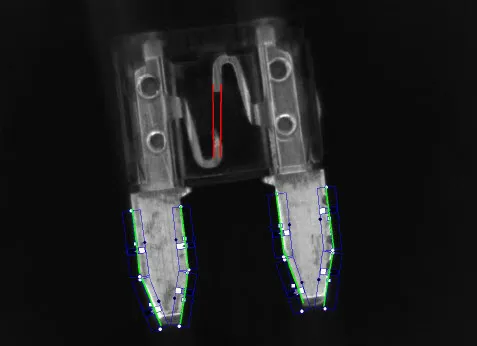
The inspection mainly consists in finding the position of the fuse and positioning the measurement tools accordingly.
Creating an EasyFind model file
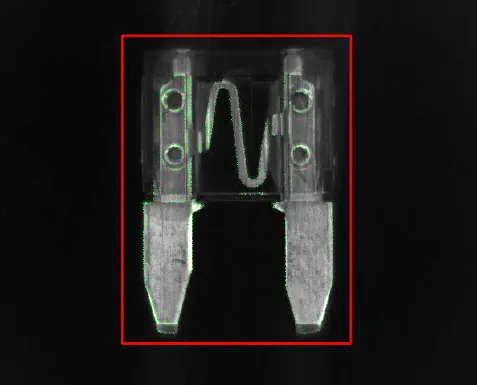
Using eVision Studio, create and learn an EasyFind model, as illustrated:
Set a ROI (region of interest) to define the pattern (the red rectangle in the illustration).
As the orientation of the fuse may vary, set a rotation tolerance of +/- 45°.
Save the EasyFind model file.
Note
You will then load this EasyFind model file at the start-up of your application.
Creating an EasyGauge model file
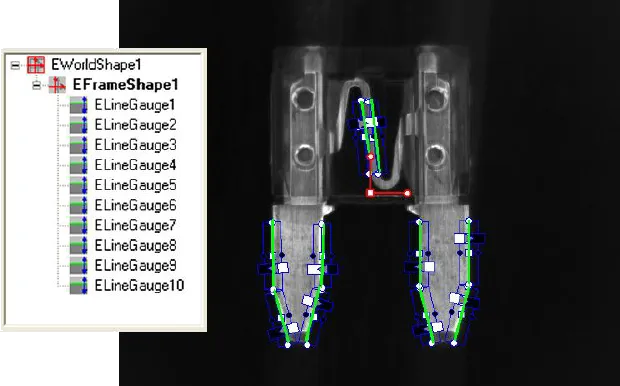
Using eVision Studio, measure the fuse leads with ELineGauge tools:
Create an
EFrameShapewith a center corresponding to the center of the pattern defined previously.Attach the 10
ELineGaugetools to theEFrameShapeas illustrated.Enable the outliers filtering mechanism for all the
ELineGauges.
Note
You will then load this EasyGauge model file at the start-up of your application.
Inspecting the fuse
To detect a fuse and check that it appears in the field of view, the application performs a geometrical pattern matching operation.
If a fuse is found, the application retrieves its center position and its orientation.
Note
If no fuse is found in the image, the inspection stops.
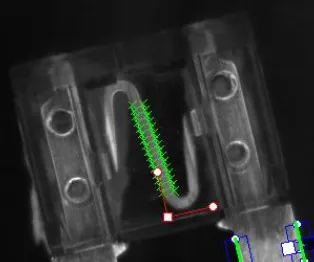
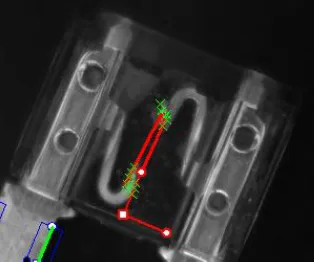
Before triggering the measurement, the
EFrameShapeand itsELineGaugetools are accurately placed according to the position and the orientation of the fuse found at the first step.The application uses 2 of the
ELineGaugetools to determine whether the fuse is blown or not:
The application records the number of valid transitions along each
ELineGauge.If this number is below a given threshold, the fuse is considered as blown.