Gauge Definitions
Point Gauge
You can select the most relevant transition points along a line segment probe that crosses one or several objects edges. Crosswise and lengthwise filtering can be activated for noise reduction.
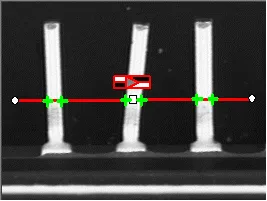
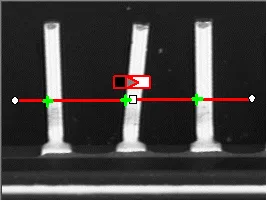
Point location. Contrast-based selection
Usage
Define and position the gauge, then fit the points with
EPointGauge::Measure.NET Python.Use the methods
EPointGauge::GetNumMeasuredPoints.NET Python andEPointGauge::GetMeasuredPoint.NET Python to access the results.
Line Gauge
The placement of a ELineGauge .NET Python is defined by its ELineShape::GetCenter .NET Python, its ELineShape::GetLength .NET Python and its ELineShape::GetAngle .NET Python with respect to the X-axis. To constrain the line slope value, set ELineShape::GetAngle .NET Python and ELineGauge::GetKnownAngle .NET Python.
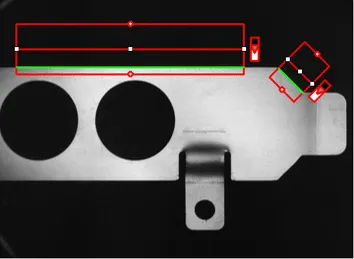
Line fitting
Usage
Define and position the gauge, then use
ELineGauge::Measure.NET Python to fit the lines.The method
EShape::GetFound.NET Python returnsTRUEif a suitable line is found.To obtain the
ELine.NET Python, set theEShape::GetActualShape.NET Python property toTRUEto return the fitted line (TRUEvalue) (instead of the nominal line positionFALSEvalue, default).
Alternatively,
ELineGauge::GetMeasuredLine.NET Python provides the results as anELine.NET Python object.
Rectangle Gauge
The placement of a ERectangleGauge .NET Python is defined by its nominal position (given by the coordinates of its ERectangleShape::GetCenter .NET Python), its ERectangleShape::SetSize .NET Python and its ERectangleShape::GetAngle .NET Python.
Each side of a rectangle can have its own transition detection parameters, and can be set to active or inactive with the ERectangleGauge::GetActiveEdges .NET Python property. When a side is active:
Setting the value of a parameter only applies to the currently active sides1.
Getting the value of a parameter yields a result only when the value of this property is the same for all active sides.
Only active sides are used for measurement and model fitting.
These rules allow to set different parameters for different sides, and measure parallel sides or a corner point instead of the whole rectangle. The four sides are denoted by letters “x”, “y”, “XX” and “YY” respectively.
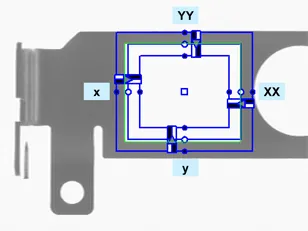
Naming conventions for the sides of a rectangle gauge
Usage
Define and position the gauge, then use
ELineGauge::Measure.NET Python to fit the lines.The method
EShape::GetFound.NET Python returnsTRUEif a suitable rectangle is found.To obtain the
ERectangleShape.NET Python, setEShape::GetActualShape.NET Python toTRUEto return the fitted line (TRUEvalue) (default isFALSE).
Alternatively,
ERectangleGauge::GetMeasuredRectangle.NET Python provides the results as anERectangle.NET Python object.For instance, you can accurately locate the four corners (landmarks) of a rectangle using a rectangle fitting gauge.
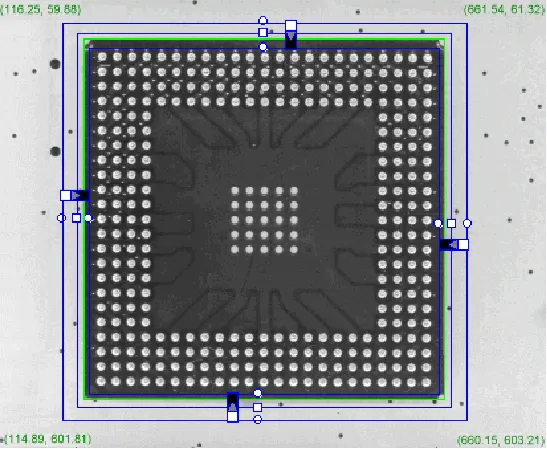
Locating a rectangle’s corners
Circle Gauge
The placement of a ECircleGauge .NET Python is defined by its nominal position (given by the coordinates of its ECircleShape::GetCenter .NET Python), its nominal ECircleShape::GetDiameter .NET Python (or ECircleShape::GetRadius .NET Python), the angular position from where it extends and its angular ECircleShape::GetAmplitude .NET Python.
The Set member can distinguish between a full circle and an arc (the arc amplitude must be specified).
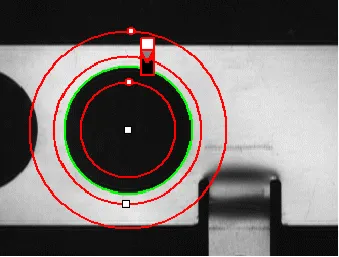
Circle fitting
Usage
Once the gauge has been defined and positioned, use
ECircleGauge::Measure.NET Python to trigger the circle fitting operation.The method
EShape::GetFound.NET Python returnsTRUEif a suitable rectangle is found.To obtain the measurement results, set the
EShape::GetActualShape.NET Python mode toTRUE. TheEShape::GetActualShape.NET Python mode determines whether an inquiry returns the fitted circle (TRUEvalue) or the nominal circle position (FALSEvalue, default).The requested information is then retrieved by means of the
ECircleShape.NET Python.
Alternatively,
ECircleGauge::GetMeasuredCircle.NET Python provides the results as anECircle.NET Python object.
Wedge Gauge
The placement of a EWedgeGauge .NET Python is defined by its nominal position (given by the coordinates of its EWedgeShape::GetCenter .NET Python), its nominal EWedgeShape::GetInnerRadius .NET Python and EWedgeShape::GetOuterRadius .NET Python (EWedgeShape::GetInnerDiameter .NET Python and EWedgeShape::GetOuterDiameter .NET Python), its EWedgeShape::GetBreadth .NET Python (difference between radii), the EWedgeShape::GetAngle .NET Python from where it extends and its EWedgeShape::GetAmplitude .NET Python.
The Set member can distinguish between a full ring, a sector of a ring and a disk.
Each side of a wedge can have its own transition detection parameters and can be set to active or inactive with the EWedgeGauge::GetActiveEdges .NET Python property. When a side is active, this means that:
Setting the value of a parameter only applies to the currently active sides;
Getting the value of a parameter yields a result only when the value of this parameter is the same for all active sides;
Only active sides are used for measurement and model fitting.
So different sides can have different parameters, and you can measure parallel arcs or oblique sides, or a corner point, instead of the whole wedge. The four sides are denoted by letters “a”, “r”, “AA” and “RR” respectively.
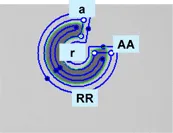
Naming conventions for the sides of a wedge gauge
Usage
Define and position the gauge, then use
ELineGauge::Measure.NET Python to fit the lines.The method
EShape::GetFound.NET Python returnsTRUEif a suitable rectangle is found.To obtain the
EWedgeShape.NET Python, set theEShape::GetActualShape.NET Python property toTRUEto return the fitted line (instead of the nominal line positionFALSE, default).
Alternatively,
EWedgeGauge::GetMeasuredWedge.NET Python provides the results as anEWedge.NET Python object.
Polygon Gauge
A polygon is defined as a list of connected vertices, forming a closed or an open shape.
EPolygonGauge.NET Python computes several transition points along each edge of the polygon, like with a line gauge. Then from these transition points, a measured polygon is computed with a strategy depending on the measurement mode.
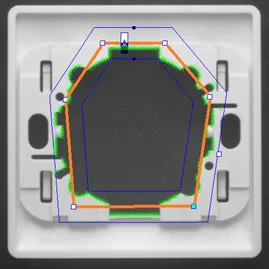
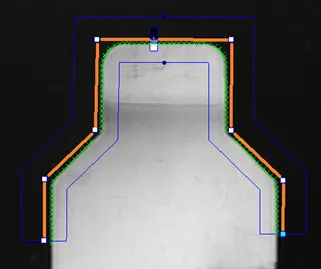
In orange, the closed or open polygon gauge and, in green, the measured transition points
The position of the vertices of the polygon are defined in the local
EFrame.NET Python of the polygon.An
EFrame.NET Python is a coordinate system, with a position, an orientation and a scale.The class
EPolygon.NET Python stores the vertices and other attributes.The class
EPolygonShape.NET Python handles the hierarchy of the shapes and the drawing methods.The class
EPolygonGauge.NET Python is the main class for the measurement process.

Class dependency of the class EPolygonGauge
To setup the polygon geometry, use the following methods:
EPolygon.SetCenter(derived fromEPoint::SetCenter.NET Python),EPolygon.SetAngle(derived fromEFrame::SetAngle.NET Python) andEPolygon.SetScale(derived fromEFrame::SetScale.NET Python) to change theEFrame.NET Python reference coordinate system.EPolygon::SetIsClosed.NET Python to choose between close or open polygon configuration.EPolygon::AppendVertex.NET Python to add a new vertex to the polygon.EPolygon::SetVertex.NET Python to change the position (x, y) of a vertex.EPolygon::InsertVertex.NET Python to insert a vertex before the given index.EPolygon::RemoveVertex.NET Python to remove a vertex at the given index.EPolygonShape::AddVertexAtDisplayPosition.NET Python to insert a vertex depending on a display coordinate (typically a mouse click). This is useful for the graphical edition of a polygon.EPolygonShape::RemoveVertexAtDisplayPosition.NET Python to remove the closest vertex to a display coordinate.
Note
EPolygonGauge .NET Python has 3 measurement modes EPolygonMeasurementMode .NET Python.
The typical use cases are:
For
EPolygonMeasurementMode_Global.NET Python: the precise positioning of parts.For
EPolygonMeasurementMode_Edge.NET Python: the verification of specific shapes defined by angles and lengths.For
EPolygonMeasurementMode_Point.NET Python: the measure of complex object contours.
Use the method
EPolygonGauge::SetMeasurementMode.NET Python to select the measurement mode:
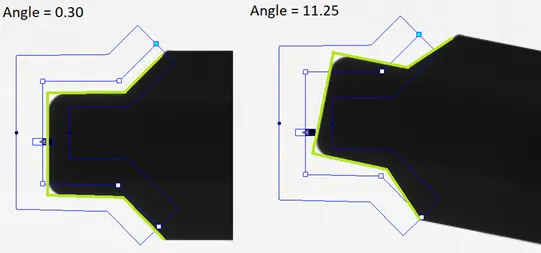
Illustration of the Global measurement mode:
the measured polygon is a translation and a rotation of the input polygon
By default, the global transformation is rigid:
Only the translation and the rotation are optimized to match the contour of the object.
If scaling is required, you must explicitly enable it with the method
EPolygonGauge::SetEnableScaling.NET Python.The global measurement doesn’t change the polygon vertex positions, it only adjusts the polygon frame.
EPolygonMeasurementMode_Edge.NET Python: Each polygon edge is measured individually.A polygon composed by the union of these fitted edges is generated.
The number of edges of the measured polygon is the same as the input polygon.
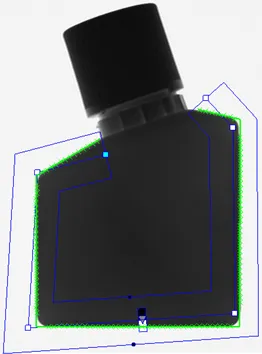
The input polygon (blue) and the fitted polygon (green)
EPolygonMeasurementMode_Point.NET Python: All transition points on the object contour are used to build a new polygon, with an optimized number of edges.The resulting polygon is simplified using a filtering threshold to reduce the number of edges while keeping the shape of the object.
The resulting number of edges depends on the geometry of the contour of the object and on the filtering threshold.
Set the filtering threshold with
EPolygonGauge::SetFilteringThreshold.NET Python.
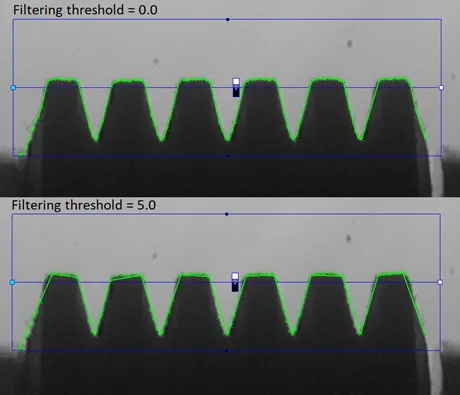
A polygon gauge with a single edge produces a measured polygon that follows the contour of the object. Depending on the filtering threshold, the number of vertices is reduced.
Other parameters of the class
EPolygonGauge.NET Python.The class
EPolygonGauge.NET Python inherits other common EasyGauge parameters:EPolygonGauge::SetNumFilteringPasses.NET Python sets the number of filtering passes, then removes outliers before the line fitting operation. This parameter is only available inGlobaletEdgemeasurement modes.EPolygonGauge::SetMinNumFitSamples.NET Python sets the minimum number of samples required for the fitting on each edge of the polygon. The measure fails if the minimum is not achieved.EPolygonGauge::SetTransitionType.NET Python sets the transition type (ETransitionType.NET Python): white to black, black to white or both.EPolygonGauge::SetTransitionChoice.NET Python selects which peak is used when there are several transitions.EPolygonGauge::SetSamplingStep.NET Python gives the distance, in pixels, between two sample points.
Usage
Sets the parameters of the gauge, then use
EPolygonGauge::Measure.NET Python to fit the polygon.The method
EShape::GetFound.NET Python returnsTRUEif a suitable polygon is found.To obtain the polygon geometry, use the method
EPolygonGauge::GetMeasuredPolygon.NET Python.