Base Web
Support |
|
|---|---|
Required licenses |
EasyImage |
Recommended images |
— (uses a camera) |
Location |
|

Purpose
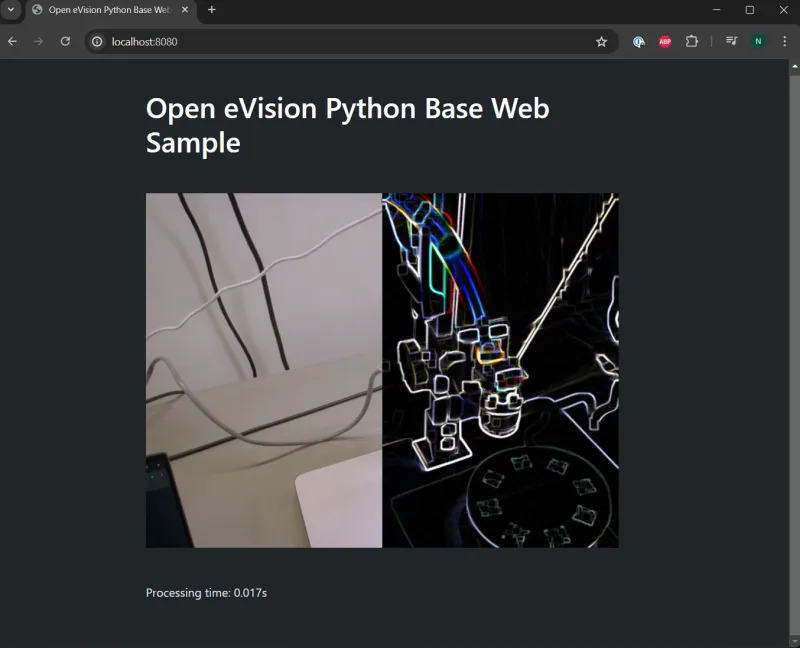
This sample program demonstrates how to:
Make image acquisition in a web server.
Perform image processing using eVision.
Broadcast the images using HTTP to any remote client connecting to the server through a web browser.
Code highlights
This sample uses multiple technologies to achieve its goal:
The Python version of OpenCV is used to acquire images from a camera. (OpenCV has no specific value other than its simplicity in this sample and may be replaced with any other library able to acquire images through a camera.)
Note
See the file video_reader.py.
eVision is used to perform the image processing.
Note
See the file video_processing.py.
On the backend side, the following Python libraries are used:
Python-socket-io: This library allows push notifications to be sent to the frontend application, in this case it is used to send images and other data for each frame.
aiohttp: This library allows to create a small web server that can be used with socket-io with sufficient performances for a small demonstration.
Note
See the file app.py.
On the frontend side, the following JavaScript libraries are used:
socket-io (JavaScript version): This library is used to communicate with the web server also using an implementation of socket-io to received the images and other data for each frame.
boostrap: This CSS library is used for cosmetic purposes to ease the display of the interface.
Note
See the file app.html.