Encoding an Image
The image encoder (EImageEncoder .NET Python) clasifies the pixels of an image into several layers with a segmenter and build blobs for the selected layers. The result is stored in a coded image (ECodedImage2 .NET Python) which contains the lists of blobs for each layer, stored as coded elements (ECodedElement .NET Python). The pixels that are part of the blobs are stored using list of runs. A run is a sequence of adjacent pixels from the same row.
To encode an image:
Create a new
EImageEncoder.NET Python object.Set the layers to encode.
Set the connexity of the encoder.
Create a new
ECodedImage2.NET Python object.
Image Segmenters
The image segmenters are responsible for classifying the pixels of the image into several layers. The segmenters are part of the image encoder .NET Python object:
Use
SetSegmentationMethod.NET Python to set the segmenter.Use the appropriate getter to access a segmenter and modify its parameters
Grayscale Single Threshold (default)
The grayscale single threshold segmenter is applicable to BW8 .NET Python and BW16 .NET Python grayscale images and produces coded images with two layers:
The black layer (usually Layer 0) contains unmasked pixels with a gray value below the Threshold value.
The white layer (usually Layer 1) contains the remaining unmasked pixels, i.e. unmasked pixels having a gray value greater or equal to the Threshold value.
To use this segmenter:
Set the segmentation method to
ESegmentationMethod_GrayscaleSingleThreshold.NET PythonAccess and modify the parameters of the segmenter with
GetGrayscaleSingleThresholdSegmenter.NET Python.
EasyObject provides 5 thresholding methods .NET Python:
Absolute (integer value): represents the first gray value of the white layer. Use the method
EGrayscaleSingleThresholdSegmenter::SetAbsoluteThreshold.NET Python.Relative (%): represents the fraction of image pixels that belong to the Black layer, it is a user-defined float value in range 0 to 1. Use the method
EGrayscaleSingleThresholdSegmenter::SetRelativeThreshold.NET Python.Minimum Residue (default): The threshold is an automatically computed value such that the quadratic difference between the source and thresholded image is minimized.
Maximum Entropy: automatically computed value such that the entropy (i.e. the amount of information) of the resulting thresholded image is maximized.
IsoData: automatically computed value that lies halfway between the average dark gray value (gray levels below the threshold) and average light gray values (gray levels above the threshold).
Use EGrayscaleSingleThresholdSegmenter::SetMode .NET Python to select the thresholding method.
Grayscale Single Threshold with a minimum residue thresholding method is the default. Only objects whose pixels have a value that is above this threshold are encoded.
Grayscale Double Threshold
The grayscale double threshold segmenter is applicable to BW8 .NET Python and BW16 .NET Python grayscale images and produces coded images with three layers:
The black layer (usually Layer 0) contains unmasked pixels having a gray value below the Low Threshold value.
The white layer (usually Layer 2) contains unmasked pixels having a gray value above or equal the High Threshold value.
The neutral layer (usually Layer 1) contains the remaining unmasked pixels.
To use this segmenter:
Set the segmentation method to
ESegmentationMethod_GrayscaleDoubleThreshold.NET PythonAccess and modify the parameters of the segmenter with
GetGrayscaleDoubleThresholdSegmenter.NET Python.
This segmenter has two user-defined integer parameters:
The
low threshold.NET PythonThe
high threshold.NET Python
Color Single Threshold
The color single threshold segmenter is applicable to C24 .NET Python color images and produces coded images with two layers:
The white layer (usually Layer 1) contains unmasked pixels that belong to the cube of the color space defined by the threshold point and the white point (255,255,255).
The black layer(usually Layer 0) contains the remaining unmasked pixels.
To use this segmenter:
Set the segmentation method to
ESegmentationMethod_ColorSingleThreshold.NET PythonAccess and modify the parameters of the segmenter with
GetColorSingleThresholdSegmenter.NET Python.
This segmenter has one user-defined parameter:
The
color threshold.NET Python is a set of three user-defined integer values designating a color in the color space.
Color Range Threshold
The color range threshold segmenter is applicable to C24 .NET Python color images and produces coded images with two layers:
The white layer (usually Layer 1) contains unmasked pixels that belong to the cube of the color space defined by the
Low Thresholdpoint and theHigh Thresholdpoint.The black layer (usually Layer 0) contains the remaining unmasked pixels.
To use this segmenter:
Set the segmentation method to
ESegmentationMethod_ColorRangeThreshold.NET PythonAccess and modify the parameters of the segmenter with
GetColorRangeThresholdSegmenter.NET Python.
This segmenter has two user-defined parameters:
The
low threshold.NET PythonThe
high threshold.NET Python.
Reference Image
The reference image segmenter does pixel-by-pixel thresholding based on the corresponding value in a reference image.
The reference image segmenter is applicable to BW8 and BW16 grayscale images and C24 color images. It produces coded images with two layers:
The white layer (usually Layer 1) contains unmasked pixels that
have a gray value greater or equal to the gray value of the respective pixel in the reference image for grayscale images;
belong to the cube of the color space defined by the threshold point and the white point (255,255,255) for color images.
The black layer (usually Layer 0) contains the remaining unmasked pixels.
To use this segmenter:
Set the segmentation method to
ESegmentationMethod_ReferenceImage.NET PythonAccess and modify the parameters of the segmenter with
GetReferenceImageSegmenter.NET Python.
This segmenter has a user-defined parameter:
The reference image. The reference image must be in the respective eVision image type. For example, use
SetReferenceImageBW8.NET Python for aBW8image.
Image Range
The image range segmenter does pixel-by-pixel double thresholding based on the corresponding values in a low image and high image.
The reference image segmenter is applicable to BW8 and BW16 grayscale images and C24 color images. It produces coded images with two layers:
The white layer (usually Layer 1) contains unmasked pixels whose values are inside the corresponding unmasked pixels in the
low imageandhigh image.The black layer (usually Layer 0) contains the remaining unmasked pixels.
To use this segmenter:
Set the segmentation method to
ESegmentationMethod_ImageRange.NET PythonAccess and modify the parameters of the segmenter with
GetImageRangeSegmenter.NET Python.
This segmenter has two user-defined parameters:
The low image. The low image must be in the respective eVision image type. For example, use
SetLowImageBW8.NET Python for aBW8image.The high image. The high image must be in the respective eVision image type. For example, use
SetLowImageBW8.NET Python for aBW8image.
Preparing High and Low Reference Images
The following cases need a segmentation using pixel-by-pixel thresholding which gives an allowed range of values for each pixel:
When the background is not uniform enough.
When the illumination is not uniform across the image.
When only differences between the image and a reference image (ideal) are to be enhanced.
To prepare high and low reference images for these cases, you can start from an image of the scene without defects and add security margins before comparison.
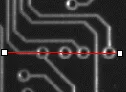
Source image
Gray-level tolerance must be provided for noise and illumination variations.
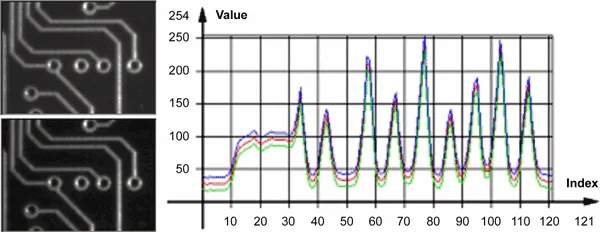
Gray-level tolerance margins
The image may have a slight shift in some direction which can be corrected by enlarging the light and dark areas using dilate and erode morphological operations. This geometric tolerance margin is roughly as large as the morphological filter size.
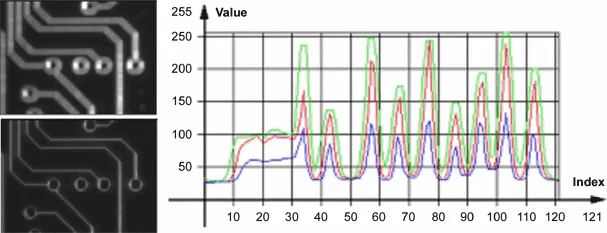
Geometric tolerance margins
Combining both kinds of tolerance margins gives the best results.
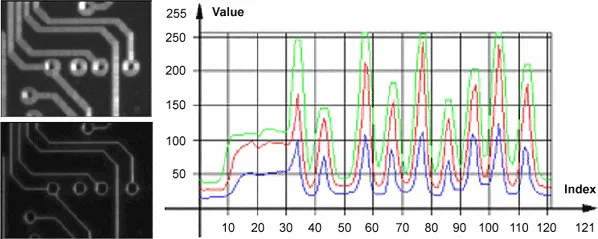
Combined margins
Labeled Image
The labeled image segmenter is applicable to BW8 and BW16 grayscale images and produces coded images with a number of layers equal to the maximum number of gray values: 256 for BW8 images or 65536 for BW16 images. The layer \(n\) contains all the unmasked pixels having a gray value equal to \(n\).
To use this segmenter:
Set the segmentation method to
ESegmentationMethod_LabeledImage.NET PythonAccess and modify the parameters of the segmenter with
GetLabeledImageSegmenter.NET Python.
This segmenter has two parameters to retrict the range of encoded layers:
The
minimum layer.NET Python.The
maximum layer.NET Python.
By default, all layers are encoded.
Selecting the Layers to Encode
The segmentation methods determine which layer(s) to encode by default, and do not encode pixels from the other layers.
Enabling and Disabling Layer Encoding for each Layer Individually
The following tables list, for each layer, the Set/Get function and the default enable/disable value.
Two-layer segmenters
Layer |
Set LayerEncoded function |
Get LayerEncoded function |
Default value |
|---|---|---|---|
Black layer |
|
||
White layer |
|
Three-layer segmenters
Layer |
Set LayerEncoded function name |
Get LayerEncoded function name |
Default value |
|---|---|---|---|
Black layer |
|
||
White layer |
|
||
Neutral layer |
|
Labeled image segmenter: use the
minimum layer.NET Python andmaximum layer.NET Python properties.
Manually Assigning a Layer Index to each Layer Individually
The layer index can be used to select or sort the blobs. The following tables list, for each layer, the Set/Get function and the default value.
Two-layer segmenters
Layer |
Set LayerEncoded function name |
Get LayerEncoded function name |
Default value |
|---|---|---|---|
Black layer |
0 |
||
White layer |
1 |
Three-layer segmenters
Layer |
Set LayerEncoded function name |
Get LayerEncoded function name |
Default value |
|---|---|---|---|
Black layer |
0 |
||
Neutral layer |
1 |
||
White layer |
2 |
Labeled image segmenter: it is not possible to change the layer indexes.
Connexity
Since blobs are contiguous group of neighboring pixels, the way we define how two pixels are considered neighbors is important. Pixels can touch each other along an edge or by a corner:
In
four connexity.NET Python only pixels touching by an edge are considered neighbors.In
eight connexity.NET Python (the default) pixels touching by a corner are also considered neighbors.
Use SetEncodingConnexity .NET Python to set the encoding connexity.
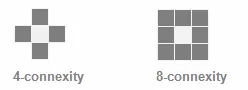
Connexity.
Normal vs. Continuous Mode
In normal mode (default behavior), the image encoder does not track blobs across several successive images. EasyObject works with one image, without keeping blobs in memory. All the blobs are returned as objects.
In continuous mode
EasyObject can process an image whose height is unknown or infinite (e.g. coming from a line-scan camera). The image is split into several chunks that are fed into an image encoder. Objects that straddle several successive image chunks can be detected.
The image encoder encodes only the objects that contain no run touching the last row of the source image. Objects that touch the inferior border of the image are not written in the coded image because they are expected to continue in subsequent image chunks, but they are kept in memory and are processed when subsequent images are analyzed.
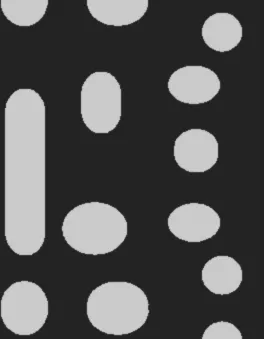 An image whose height was initially unknown.
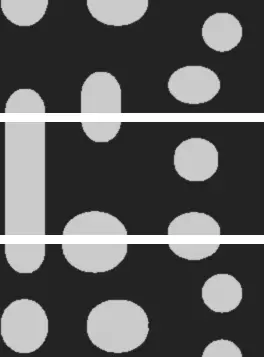 The three chunks of the image that will be encoded with the continuous mode (right).
To use continuous mode
Enable the continuous mode with
EImageEncoder::SetContinuousModeEnabled.NET PythonEncode successive image chunks with
EImageEncoder::Encode.NET Python using the same coded image with each chunk.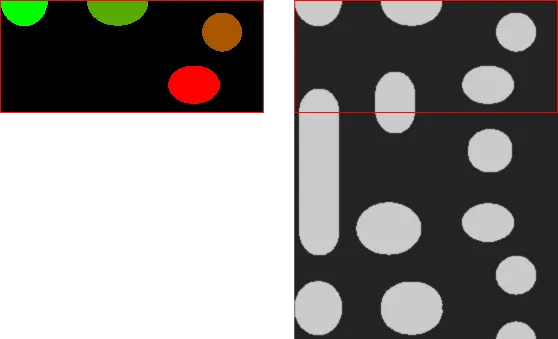
Chunk 1 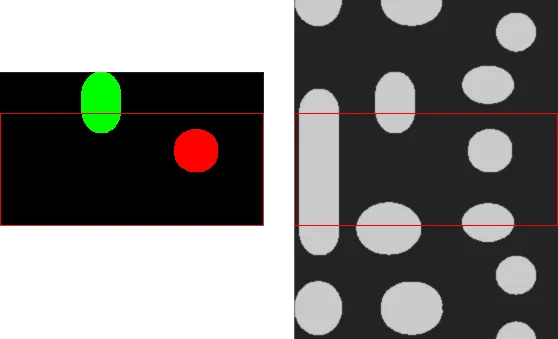
Chunk 2 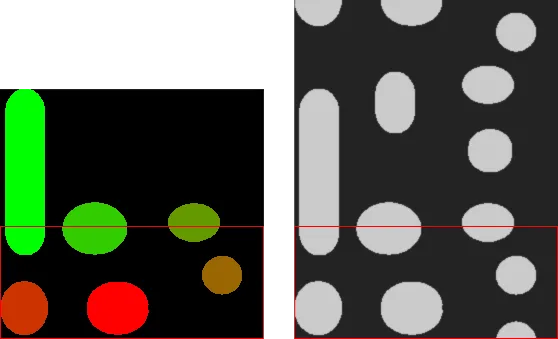
Chunk 3 After processing all chunks, use
EImageEncoder::FlushContinuousMode.NET Python to encode the remaining objects.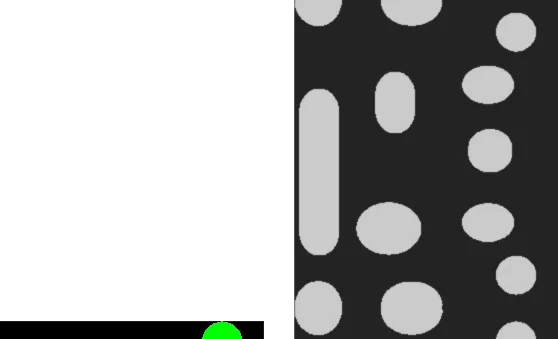
Result of the flush
See also
See the code snippets showing how to use the continuous mode.