Objects, Holes and their Features
Objects and holes are both represented by the class ECodedElement .NET Python, so they are managed in the same way and share the same functions. Use IsObject .NET Python or IsHole .NET Python to determine the type of the coded element.
Holes Construction
A hole is a set of connected pixels that is entirely surrounded by a parent object. A hole has no child. Objects inside a hole are considered to be separate objects.
To get the holes of a specific object, use GetHoles .NET Python.
With an object selection, you can also add the holes of all the objects of a coded image using EObjectSelection::AddHoles .NET Python and add the holes of all the objects of the selection using EObjectSelection::AddHolesOfSelectedObjects .NET Python.
 Raw image
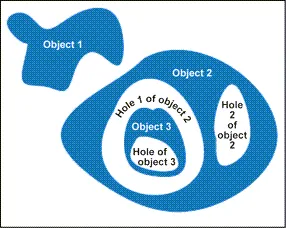 Encoding the white layer (3 objects and 3 holes)
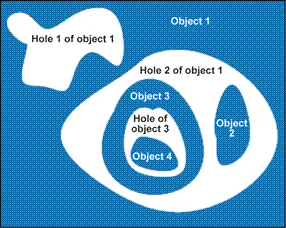 Encoding the black layer (4 objects and 3 holes)
See also
See the code snippets showing how to extract the holes from the objects.
Features
EasyObject can compute various features for each object and use these features for filtering or sorting.
There are two main categories of features:
Cacheable features that will be computed only once on the first invocation. These features corresponds to methods prefixed with
Getin C++ or properties in C# and Python.Non-cacheable features that will be reevaluated at every invocation. These features corresponds to method prefixed with
Compute.Note that these features usually requires an additional parameter or are slower to compute.
Most features will be expressed in the frame of reference used when encoding the image. However, some features are computed at the pixel level. In the tables below, the frame of reference is indicated in the corresponding column:
Frame means that the result is expressed with regard to the frame that was used when encoding the image.
Pixel means that local pixel coordinates are used, irrespective of the frame.
Gravity Center
Feature |
Method |
Data type |
|
|---|---|---|---|
Gravity center |
|
frame |
|
Weighted gravity center |
frame |
Gravity center
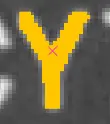
The gravity center is the average of the coordinates, expressed in a frame of reference, of all the pixel of the blob:
The weighted gravity center requires an input image and is the average of the coordinates, expressed in a frame of reference, of all the pixel of the blob, weighted by the corresponding pixel value of the given image:
Size and Extent
A Feret box is a rectangle with the minimum surface rotated at a specified angle that contains all the pixels center points of an object.
Bounding box is the Feret box at 0°.
Minimum enclosing rectangle is the Feret box with the minimum surface across all the possible angles.
Width of a Feret box rectangle is the length of the rectangle side that exhibits the smallest angle with the X-axis. This is NOT necessarily the smallest side!
The height of a Feret box rectangle is the length of the other side of the rectangle.
Use
ComputeFeretBox.NET Python to compute a Feret box with an arbitrary angle.The angle is measured clockwise from the X axis to the width side of the rectangle as shown in the image below:
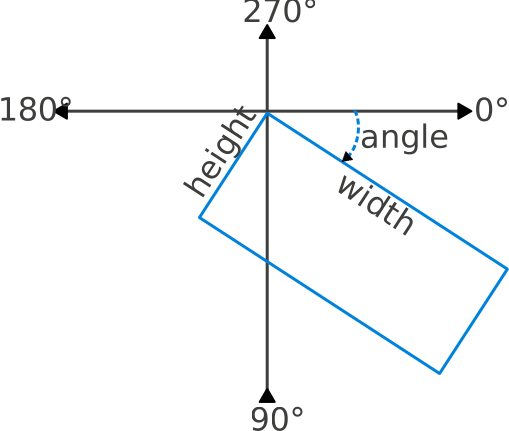
Feret box angle.
Miscellaneous
Feature |
Method |
Data type |
|
|---|---|---|---|
Starting point of the object contour |
|
pixel |
|
Path of the object contour |
pixel |
||
Pixel gray-level value |
n.a. |
Note
The object perimeter in pixels can be measured indirectly by tracing the object contour with contouring methods and counting the pixels.
Moments and Ellipse of Inertia
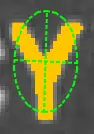
Ellipse of inertia
Feature |
Method |
Data type |
|
|---|---|---|---|
Eccentricity of the ellipse of inertia |
|
frame |
|
Moments |
|
|
frame |
Ellipse |
|
|
frame |
Centered moments of inertia |
|
|
frame |
Given \(N\) is the number of pixels of the blob, \(x_i\) and \(y_i\) the x and y coordinates of the \(i\)-th pixel of the blob, expressed in the frame of reference used to encode the image, the raw moment .NET Python of order \((p, q)\) is:
The central moment .NET Python of order \((p, q)\) is:
where \(\bar{x}\) and \(\bar{y}\) are the averages of all the \(x_i\) and \(y_i\).
The normalized central moment .NET Python of order \((p, q)\) is:
The centered moments of inertia \(\sigma_x\), \(\sigma_y\), and \(\sigma_{xy}\) are defined as:
They can be grouped into the tensor of inertia:
\(\sigma_{xx}\) and \(\sigma_{yy}\) are the largest and smallest eigenvalues of this matrix and are also called the first and second centered principal axis of inertia:
The width (\(w\)), height (\(h\)), and angle (\(\theta\)) of the ellipse of inertia are:
The eccentricity, or object elongation, is:
Note
The moments of inertia \(\sigma_x\), \(\sigma_y\), and \(\sigma_{xy}\) are also commonly noted as \(I_x\), \(I_y\), and \(I_{xy}\).
The moments of inertia around the X or Y axis are also the variance of the Y and X coordinates of the blobs respectively.
Convex Hull
The convex hull .NET Python hull of a shape is the convex polygon of minimum area that completely surrounds an object. The convex hull can be used to characterize the object footprint, as well as to observe concavities.
Given that the number of vertices of the convex hull is variable, they are stored in a EPathVector .NET Python container.
The convex hull is computed in pixel coordinates.
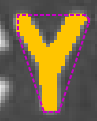
Convex hull.
Graphic Representation
The objects can be drawn onto the source image by means of ECodedImage2::Draw .NET Python. The following features also have a graphical representation that can be drawn by the means of ECodedImage2::DrawFeature .NET Python.
Objects |
Graphic |
|---|---|
Bounding box |

|
Contour |

|
Convex hull |

|
Ellipse |

|
Feret box |

|
Feret box with an angle of 22° |

|
Feret box with an angle of 45° |

|
Feret box with an angle of 68° |

|
Gravity center |

|
Minimum enclosing rectangle |

|
Weighted gravity center |

|
Runs
For the sake of computational efficiency, the objects are described as lists of runs. A run is a sequence of adjacent pixels that share homogeneous properties (such as being above a given threshold). These runs are merged in objects by the image encoder.
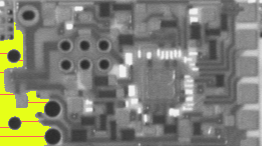
A single object (in yellow) with eight highlighted runs (in red).
EasyObject can work at object level, and at run level which allows faster processing in critical cases. This is useful to compute custom features on objects then list all runs belonging to a given object. Use ECodedElement::GetRunsIterator .NET Python to get an EObjectRunsIterator .NET Python iterator object.
See also
See the code snippets showing how to loop over the runs of an object.