Purpose and Principles
Purpose
Based on an innovative feature-point technology, EasyFind is a matching tool designed to rapidly locate one or more instances of a pattern in an image. With an adjustable accuracy up to sub-pixel level, it reports very precise information about the instances found, such as their location, rotation angle, scale and matching score.
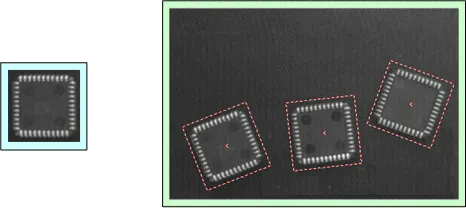
Example of a pattern (left) and 3 found instances (right)
Fast Processing and Improved Robustness:
EasyFind is based on a new feature-point technology. Instead of comparing the pattern to the sample image pixel-wise, it carefully selects relevant feature points in the pattern. This method allows EasyFind to match only the areas that convey valuable information, resulting in faster processing and much improved robustness.
EasyFind supports learn regions, a feature that allows the creation of complex pattern shapes.
EasyFind supports learning multiple patterns, a feature that allows the creation of patterns robust to differences in illumination or deformations.
Training on vector patterns:
In this mode, the learning is done on collections of 2D geometrical shapes rather than on rasterized patterns. The learning model is constructed using the class
EVectorModel.NET Python either by loading it from adxffile or, programmatically, by usingEShape.NET Python objects.This extension is well-suited to find objects with a known geometry.
Note
In practice, you can assume an accuracy of 1/15th pixel in position and 1/15th of a degree in rotation.
Note
Compared to EasyMatch, EasyFind is computationally fast, robust against noise, occlusion, blurring, missing parts and illumination variations but only supports grayscale images while EasyMatch also supports color images.
Principle
EasyFind uses edge feature points to find instances in a search field:
An edge feature point is an abrupt change of gray level between two pixels.
It indicates that there is an edge at this location in the search field.
To start the
EPatternFinder::Find.NET Python function, EasyFind needs either a pattern image on which it computes the edge feature points or directly a geometrically-defined feature model.
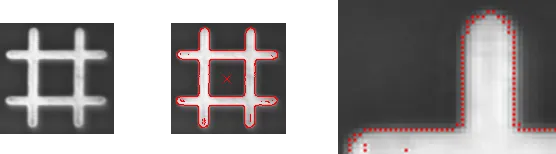
An image pattern and the computed edge feature points
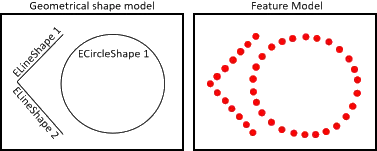
A vector model and the computed edge feature points
To use this tool:
The patterns must be well contrasted with sharp edges.
They should be substantially different from the rest of the expected search fields.
They can be scaled or rotated.
EasyFind is very robust regarding:
Blurring
Noise
Occlusion
Illumination variation


Pattern (leftmost) - Rotation (left) - Occlusion (right) - Blurring (rightmost)