Point Cloud
A point cloud is a set of 3D points (x, y and z coordinates) representing the scanned object in the world metric space.
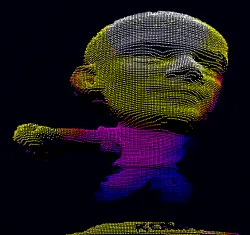
Point cloud representation in a 3D viewer.
In addition to the calibration process included in Easy3D, point clouds can be produced using various 3D acquisition techniques, like stereo reconstruction or time of flight cameras.
Mapping Attributes
In addition to the \((x, y, z)\) coordinates, you can store other components in an
EPointCloud.NET Python such as normals, colors, intensities, textures, indexes, confidences, distances, curvatures and other custom attributes.When you use additional components, a mapping exists between each 3D point and an attribute and the different operations performed on the point cloud conserve this mapping.
To add components to an
EPointCloud.NET Python, use the methodsEPointCloud::FillAttributeBuffer.NET orEPointCloud::AddCustomAttributeBuffer.NET.To retrieve the attribute, use the method
EPointCloud::GetAttributeBuffer.NET Python.To allocate the attribute, use the methods
EPointCloud::AllocateAttributeBuffer.NET andEPointCloud::AllocateCustomAttributeBuffer.NET.You can also save and load these attributes from point cloud files.
Several file formats are supported, but we recommend the formats
PCDandPLYfor handling additional components.
These methods are showcased in the following code snippets:
Normals and Curvatures
Use the function EPointCloud::ComputeNormalsAndCurvatures .NET Python to compute the normals and, optionally, the curvatures of all of the points in the point cloud:
The normals are stored in the
Normalattribute buffer.The curvatures are stored in the
Curvatureattribute buffer.
Coordinate Transformations
Transforms allow you to reposition the point cloud inside the 3D space.
eVision provides you with the following basic transformations:
Rotation around the X, Y or Z axis
Translation along the X, Y and/or Z axis
Scaling, around the origin, and either isotropic (the same in all directions) or anisotropic (different along the different axis)
It also provides you with projection transformations, both orthographic and perspective:
An orthographic projection transforms a volume of space in the shape of a rectangular parallelepiped (and the points it contains) into the canonical view (a cubic space of size 2 and centered on the origin).
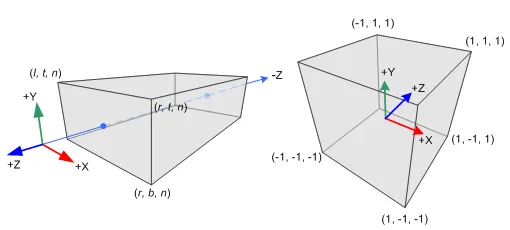
Orthographic projection. The left parallelogram is transformed into a unit cube centered on the origin.
A perspective projection transforms a volume of space in the shape of a frustum (basically a truncated pyramid) into the canonical view. This projection allows you to simulate the perspective effect given by an eye or a camera.
Use the class
E3DTransformMatrix.NET Python to create the geometric transformations. The classEAffineTransformer.NET Python applies a transformation defined by aE3DTransformMatrix.NET Python to a point cloud.
Reducing a Point Cloud
Cropping
Cropping allows you to exclude points from the point cloud based on geometrical considerations.
eVision provides the following cropping functions:
ESimpleCropper.NET Python: simple cropping on the X, Y and/or Z coordinates (aligned rectangle 3D region)ERectangularCropper.NET Python: cropping the points outside (or inside) an oriented rectangular parallelepipedESphericalCropper.NET Python: cropping the points outside (or inside) a sphere.EPlaneCropper.NET Python: cropping the points depending on their position with respect to a plane
These classes produce a new point cloud with the selected points.
Decimation
eVision offers 2 capabilities to decimate an
EPointCloud.NET Python:ERandomDecimator.NET Python decimates the cloud by copying a specified number of points, randomly selected, to a new point cloud.EGridDecimator.NET Python splits the space using a grid of given size; the new cloud is created by averaging the points of every grid together, resulting in a regularly sampled cloud.
To use
ERandomDecimator.NET Python, specify the number of points to keep as a parameter of the constructor.#include <eVision/Easy3D/ERandomDecimator.h>
using namespace eVision::Easy3D;

EPointCloud pc;
pc.Load("");

// Explicitly decimate the point cloud to keep 5000 points
ERandomDecimator decimator(5000);
EPointCloud pcDecimated;

decimator.Decimate(pc, pcDecimated);
using eVision.Easy3D;
EPointCloud pc = new EPointCloud();
pc.Load("");

// Explicitly decimate the point cloud to keep 5000 points
ERandomDecimator decimator = new ERandomDecimator(5000);
EPointCloud pcDecimated = new EPointCloud();

decimator.Decimate(pc, pcDecimated);
from eVision import Easy3D
pc = Easy3D.EPointCloud()
pc.Load("")

# Explicitly decimate the point cloud to keep 5000 points
decimator = Easy3D.ERandomDecimator(5000)
pc_decimated = Easy3D.EPointCloud()

decimator.Decimate(pc, pc_decimated)
To use
EGridDecimator.NET Python, specify the cell size, either as aE3DPoint.NET Python or as a float if the cell is cubic.#include <eVision/Easy3D/EGridDecimator.h>
using namespace eVision;
using namespace eVision::Easy3D;
EPointCloud pc;
pc.Load("");

// Explicitly decimate the point cloud to keep
// one point in every cube of 10*10*10
EGridDecimator decimator(10.f);
EPointCloud pcDecimated;

decimator.Decimate(pc, pcDecimated);
using eVision.Easy3D;
EPointCloud pc = new EPointCloud();
pc.Load("");

// Explicitly decimate the point cloud to keep
// one point in every cube of 10*10*10
EGridDecimator decimator = new EGridDecimator(10.0F);
EPointCloud pcDecimated = new EPointCloud();

decimator.Decimate(pc, pcDecimated);
pcDecimated.SavePCD("");
from eVision import Easy3D
pc = Easy3D.EPointCloud()
pc.Load("")

# Explicitly decimate the point cloud to keep
# one point in every cube of 10*10*10
decimator = Easy3D.EGridDecimator(10.)
pc_decimated = Easy3D.EPointCloud()

decimator.Decimate(pc, pc_decimated)
pc_decimated.SavePCD("")
Filtering Out Noise
The EPointCloudFilter .NET Python class filters a point cloud in the same way EFilters::RemoveNoise .NET Python filters a depth map or ZMap.
A criterion based on the neighborhood of each point is computed. The points that have a criterion score above the threshold are removed.
Select between the following criterions:
The average distance of the point from its neighborhood. It may remove some points at the borders of a noiseless surface.
The standard derivation within the point neighborhood. It is more likely to remove noiseless points that are close to noisy points.
You can set the size of the neighborhood.
The threshold is defined as: \(\overline{\text{criterion over the cloud}} + \sigma(\text{criterion over the cloud}) \times \text{factor provided by the user}\)
The default value for the factor is 1, as it is a good value in most cases.
You can replace the noisy points by the average of their neighborhood instead of removing them.
Managing Planes
E3DPlane
A plane can be represented as an E3DPlane .NET Python object.
This plane is characterized by:
Its normal which is a vector of norm 1, perpendicular to the plane.
Its signed distance from the origin, which is the smallest distance from the origin to the plane. The signed distance is positive when the vector binding the origin to the closest point on the plane has the same direction as the normal and is negative when it has the opposite direction.
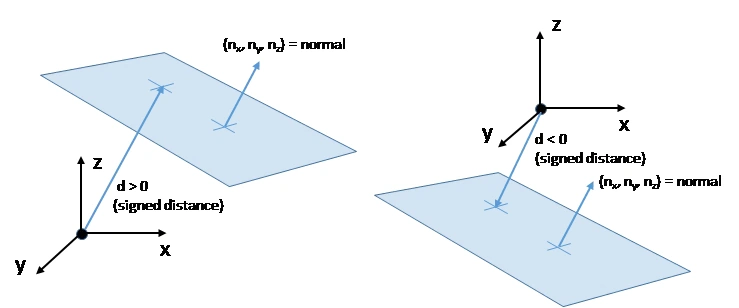
Representation of an E3DPlane and its distance to the origin. The distance is positive when the vector stemming from the origin towards the plane has the same direction as the plane’s normal, and is negative otherwise.
Once a plane is defined, you can measure the signed distance between this plane and any point in the space using the method E3DPoint::DistanceTo .NET Python.
A positive distance means that the vector connecting the plane to the point has the same direction as the normal.
A negative distance means that the vector has the opposite direction.
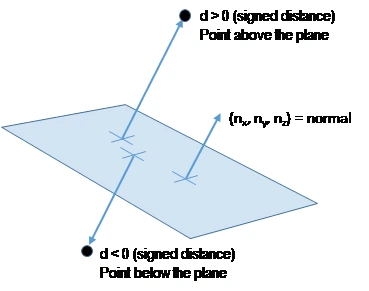
Representation of an E3DPlane and its distance to an E3DPoint. The distance is positive when the vector stemming from the E3DPlane towards the point has the same direction as the plane’s normal, and is negative otherwise.
EPlaneFinder
You can search for a plane in a point cloud using the object EPlaneFinder .NET Python object.
The main parameters of this object are:
The maximum distance between the searched plane and a point that belongs to this plane.
The expected ratio between the numbers of inliers and the total number of points in the point cloud.
An inlier is a point that belongs to a plane (closer than this maximum distance).
An outlier is a point that is not an inlier.
The picture below illustrates how points of the space are classified as inliers (in green) and outliers (in red) according to their distance to the searched plane.
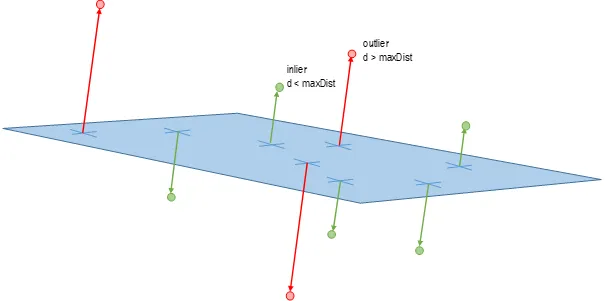
Representation of inlier and outlier points relative to a found E3DPlane.
An
EPlaneFinder.NET Python object produces aE3DPlane.NET Python object.The algorithm searches for a plane containing as many inliers as possible.
This plane is the biggest plane if the samples are evenly distributed.
The maximum distance between the plane and the inliers is a mandatory parameter.
It should include the deviation due to the noise.
It should also take the warpage into account.
The parameter that specifies the ratio of inliers with respect to the total number of points has a default value of 0.3. This means that we estimate that about 30% of the points belong to the plane.
This parameter is not as critical as the maximum distance.
It affects the maximum time that the algorithm spends to search a plane and its robustness.
For more fine-grained control, you can specify the ratio of inliers as a range.
The min of the range is the minimum ratio of inliers for a plane to be considered as valid.
The algorithm stops searching for a plane when it finds one with the max of the range inliers.
The bigger the min of the range and the smaller the max, the faster the algorithm is.
Specifyng the range as a single value \(x\) is equivalent to setting a range of \([x/2, x]\).
You can specify the expected normal vector to the searched plane.
Specify also an angular tolerance with respect to this direction.
The algorithm only searches for a plane that satisfies the condition.
Setting this condition may speed up the plane search.
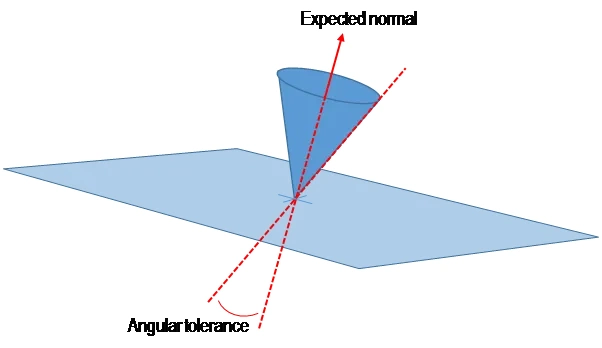
Representation of the expected normal vector and angular tolerance when searching for an E3DPlane.
You can specify 1 or 2 points contained in the searched plane.
These points are not specified as inliers (points closer to the plane than its maximum distance) but as points exactly contained in the main plane.
They may not be exactly in the final plane after the final fitting step detailed below.
The algorithm only searches for a plane that satisfies the condition.
Setting this condition may speed up the plane search.
Once the main plane is found, a fit is done on all the inliers points and the result is returned (see EPlaneFitter .NET Python below).
Decimation
By default, the EPlaneFinder .NET Python decimates the input point cloud to accelerate the search.
The default decimator reduces the input point cloud to 10,000 points.
You can disable this decimation.
You can change the number of points the cloud is reduced to.
You can decimate a point cloud explicitly.
Use an
ERandomDecimator.NET Python object.Use the decimated point cloud as input for the
EPlaneFinder.NET Python.Disable the default decimator.
EPlaneFitter
The EPlaneFitter .NET Python operator computes a fit on all the points of a point cloud and returns a E3DPlane .NET Python object. The “average” plane, that minimizes the orthogonal distance of the points to the plane, is returned.
Aligning
EPrincipalAxisExtractor
The EPrincipalAxisExtractor .NET Python computes the “principal axis” of an object from a point cloud (EPointCloud .NET Python) and returns a E3DTransformMatrix .NET Python containing a solid transformation that defines a new orthogonal basis.
This new orthogonal basis has the following characteristics:
The center is the center of gravity of the point cloud.
The axes are oriented along the “principal axis” of the object. This is the result of the “PCA” calculation (principal axis analysis).
The directions of the axes are selected so that the new basis is as close as possible of the basis defined by the reference transformation.
The next figure illustrates the orientation of the principal axes of an object.
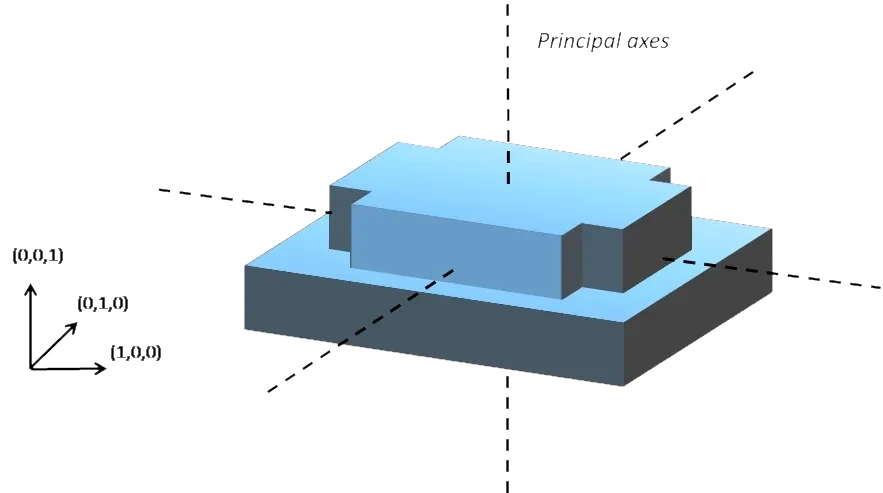
Axes found using PCA on an EPointCloud object. The principal axes are represented as well as the original orhtogonal basis.
The principal axes extraction is done using the EPrincipalAxisExtractor::Extract .NET Python method that takes a EPointCloud .NET Python as input and returns an E3DTransformMatrix .NET Python. Optionally, you can pass 3 other output parameters by reference to retrieve the value of the standard deviation along the 3 principal axes.
You can use the returned E3DTransformMatrix .NET Python object to transform the 3D coordinates of a point. For example, apply the transformation matrix to the origin \((0, 0, 0)\) to return the center of gravity of the object.
Specification of a Reference Transformation
The reference transformation is an optional parameter of the EPrincipalAxisExtractor .NET Python object. It defines a reference basis used to select an orthogonal basis out of the principal axes. The selected basis will be the closest to the reference basis.
Hint
If no reference transformation was supplied, the default reference basis is \(((1, 0, 0), (0, 1, 0), (0, 0, 1))\), that corresponds to the identity transformation. On the figure below, the default reference basis determines the direction of the axes \(e_x\), \(e_y\) and \(e_z\).
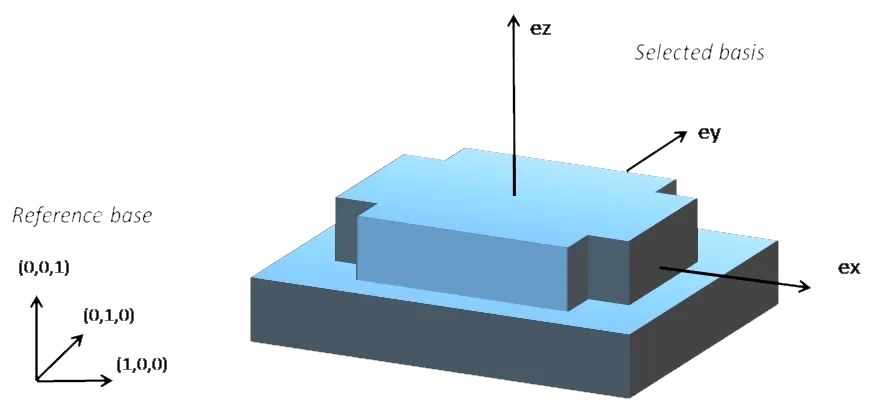
New orthogonal basis found using PCA on an EPointCloud object. The new axes of the new basis are represented as ex, ey and ez.
EFeaturesAligner
A EFeaturesAligner .NET Python object finds the best transformation that maps a list of points to another list of points.
The first list of points is called the “model”. It is stored in the object
EFeaturesAligner.NET Python.The second list of points is called “measured points”. It is passed as a parameter to the
EFeaturesAligner::Compute.NET Python method. If successful, the result of this method is aE3DTransformMatrix.NET Python object.By default, the 2 lists should form matching pairs. In other words, the first point of the first list matches the first point of the second list, the second point of the first list matches the second point of the second list, and so on…
To align unordered points, set the parameter
EAlignmentType.NET Python toEAlignmentType_Unordered.NET Python.The
EFeaturesAligner.NET Python is slower with unordered points but it should be fast enough until around 10 points.
In unordered mode, you can add some constraints on the transformation to obtain. Let
(ex, ey, ez)be the orthogonal basis (seeE3DTransformMatrix::GetOrthoBasis.NET Python) of the transformation, you can specify the allowed range for the angle betweenexand the x-axis with the methodEFeaturesAligner::SetXAngleRange.NET Python (equivalent methods exist for y and z).This allows to constrain the angle between the corresponding axes of the model and measured referentials.
These methods are useful when several possible transformations between the points exist because of symmetries.
With the EParticleDetectionParameters::Polarity .NET Python parameter, you can define which transformation is returned. It can be either:
The one that moves one point from the first list (the model) to the second list of points (the measured points) if the polarity parameter is set to
EAlignmentPolarity_ModelToMeasured.NET Python (default).The one that moves a point from the second list (the measured points) to the first list (the model) if the polarity parameter is set to
EAlignmentPolarity_MeasuredToModel.NET Python.
The figure below illustrates the computation of the alignment transformation. In this example a model is aligned to an object using the coordinates of their corners.
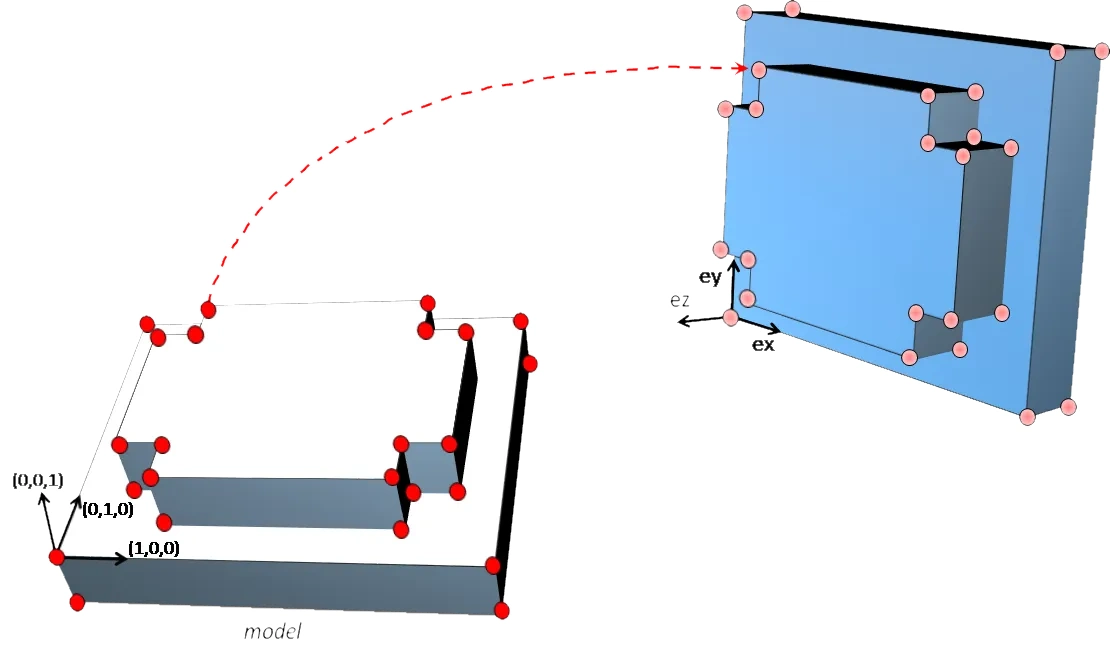
Alignment of a scanned model on a reference model.
Once the transformation is computed, use the method E3DTransformMatrix::GetOrthoBasis .NET Python of the E3DTransformMatrix .NET Python object to get the basis \((e_x, e_y, e_z)\) and the center point \(t\) that defines the new basis.
Hint
If you need to transform a point cloud or a list of points, it is more efficient to use the EAffineTransformer::ApplyTransform .NET Python method of an EAffineTransformer .NET Python object.
Using Spheres
E3DSphere
Use an object E3DSphere .NET Python to represent a sphere characterized by:
Once a sphere is defined, use the method E3DPoint::DistanceTo .NET Python to measure the distance between the sphere and any point in the space, defined as the distance to the nearest point of the sphere.
ESphereFitter
The operator ESphereFitter .NET Python computes a fit on all the points of a point cloud and returns the object E3DSphere .NET Python that minimizes the distance between the point cloud and the sphere (calculated according to the least squares).