Glossary
- Aggregation
A process merging adjacent runs to build a coded element.
- Bayer Filter
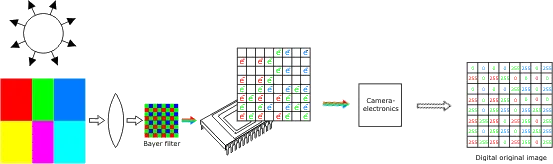
The Bayer filter is a special color image encoding format that allows to capture color information from a single sensor.
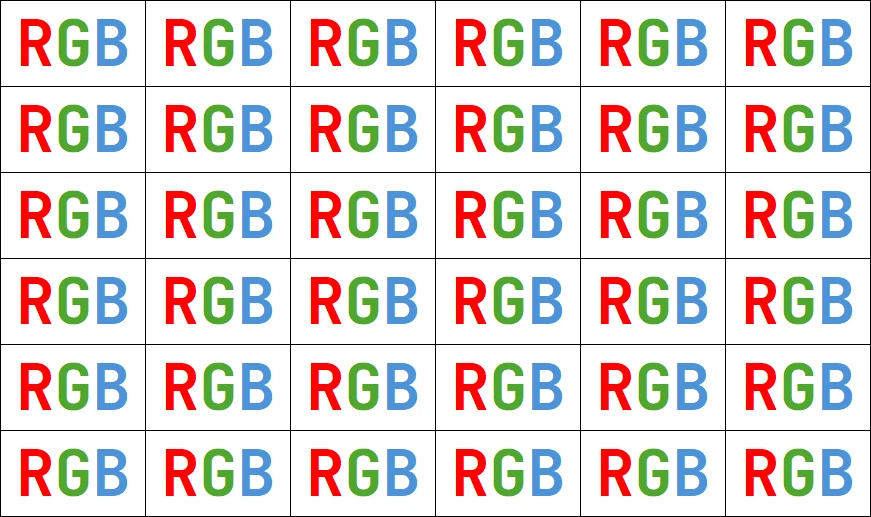
To capture color information with only one sensor, a color filter with a specific layout is placed in front of the sensor, so that part of the pixels receive green light only, while others receive red or blue only. 50 % of the total number of pixels are green, 25 % are red, 25 % are blue. (More pixels are dedicated to green than to red and blue, because the human eye is more sensitive to that color.)
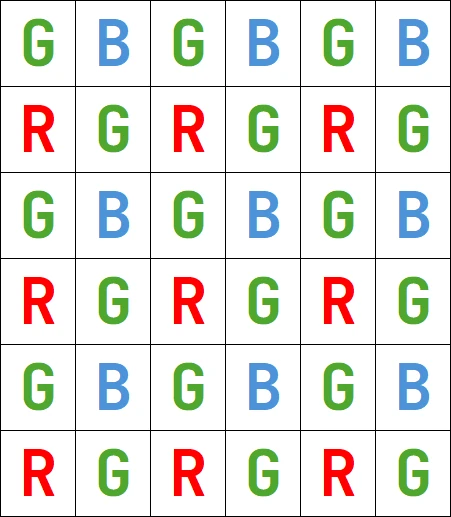
An image encoded after the Bayer pattern has the same format as a gray-level image, and conveys three times less color data. The true horizontal and vertical resolutions are smaller than those of a true color image. To supply missing component values and obtain a full-color image, various algorithms can be used. The complete red, green, and blue values for each point can be interpolated by mere duplication (nearest neighbor technique) or by linear interpolation.
- Bilevel Image
In a bilevel image, pixel value 0 is considered as black, and any other value is considered as white.
- Binarization
The process of classifying the pixels in an image as belonging to the object of interest (foreground pixels), or not (background pixels). This is a basic technique of image segmentation.
- Binary Black and White Color System
One bit of information per pixel (
BW1). 0 stands for black (background). 1 stands for white (foreground).- Blob
Synonym of object.
- Coded Element
An object or a hole.
- Continuous Tone Black and White Color System
Usually, one byte of information per pixel (
BW8). 0 stands for black (background). 255 stands for white (foreground).Notice that eVision also support images with 16 bits per pixel.
- Device Context (Windows API)
Under Windows, when using the standard drawing functions (GDI), a device context is associated to the window. The device context maintains the current drawing attributes, such as pen and brush specifications.
In a Windows API application, the device context is referred to by means of a device context handle (HDC). This value must be passed to the eVision drawing functions.
In an MFC application, the device context is encapsulated in the CDC class. Member function
CDC.GetSafeHdcprovides the corresponding device context handle.In an OWL application, the device context is encapsulated in the TDC class. The typecast member function
TDC.HDCprovides the corresponding device context handle.In a VCL application, the device context handle can be obtained form the form canvas by using syntax
Form.Canvas.Handle.- Diagnostics
Tolerances.
- Dual Morphological Operator
The dual of an operator has the same effect, provided the white and black colors are exchanged.
For instance, eroding a light object is equivalent to dilating a dark one.
- Edge Detection (Image Processing)
The process of finding boundaries of objects (or part of them) in an image.
- Feature
Geometrical property of a coded element.
- Feret’s diameter
In microscopy, Feret’s diameter is the measured distance between parallel lines that are tangent to an object’s profile and perpendicular to the ocular scale.
Generally, Feret’s diameter is the greatest distance possible between any two points along the boundary of a region of interest.
The Feret bounding box is defined as the rectangle of minimum width that completely surrounds an object.
By contrast with the limit rectangles that are given for a fixed angle, the Feret box corresponds to the angle that minimizes the width.
The Feret width is thus the smallest object dimension between two parallel lines.
The Feret height is the other dimension of the Feret rectangle, i.e. the dimension measured in the perpendicular direction; it is not the largest dimension of the object.
Except in accidental cases, the limit center, gravity center and centroid do not coincide (even though they are in general very close to each other).
Formula for gravity center \(\bar{X}\) (\(N\) = area):
\[ \bar{X} = \frac{1}{N}\sum_i X_i \]Formula for centroid \(\hat{X}\) (\(P_i\) = pixel value):
\[ \hat{X} = \frac{\sum_i P_i X_i}{\sum_i P_i} \]- GDI
Graphics Device Interface (Windows).
- Histogram Stretching
Redistribution of the gray-level values of an image, in order to exploit better the available dynamic range, and improve contrast.
- Hole
In EasyObject, a hole is a maximally-sized area of adjacent connected pixels belonging to the layer background that is completely surrounded by an object.
- ISH
The ISH color system is often called HSI. Based on the RGB system. Very similar to LSH and VSH.
Specifies the colors as a combination of Intensity (achromatic perception, average of the RGB components), Saturation (degree of purity) and Hue (position along the sequence red/yellow/green/cyan/blue/magenta).
- Landmark
Feature point in an image that can be accurately located directly or indirectly (center of a shape, intersection of edges, …). When an image must be realigned with respect to another one, landmarks can be matched together.
- Layer Background
For a layer, the pixels that are not set in the underlying binary image.
- Layer Foreground
For a layer, the pixels that are set in the underlying binary image.
- Layer
A binary image constructed by a segmentation process.
- L*a*b*
The CIE L*a*b* color system is similar to the L*u*v* system..
Specifies a luminance and two chrominance components. These parameters are related by a non-linear transform to the CIE XYZ coordinates, so that they represent the colors in a uniform way: two colors separated by the same distance anywhere in the gamut have the same visual contrast.
- L*u*v*
The CIE L*u*v* color system is similar to the L*a*b* system.
Specifies a luminance and two chrominance components. These parameters are related by a non-linear transform to the CIE XYZ coordinates, so that they represent the colors in a uniform way: two colors separated by the same distance anywhere in the gamut have the same visual contrast.
- LCH
The CIE LCH color system is derived from the L*a*b* system.
Specifies the colors as a combination of Luminance (achromatic perception, the L of L*a*b*), Chroma (degree of purity), and Hue (position along a colored sequence). The Chroma and Hue correspond to the a*b* coordinates expressed in polar form.
- LSH
The LSH color system is often called HLS. Based on the RGB system. Very similar to ISH and VSH.
Specifies the colors as a combination of Lightness (achromatic perception, half sum of the minimum and maximum of the RGB components), Saturation (degree of purity) and Hue (position along the sequence red/yellow/green/cyan/blue/magenta).
- MFC
Microsoft Foundation Classes.
- Object
In a general content, the term object should be understood with the meaning of a class instance.
In EasyObject, an object is a maximally-sized area of adjacent connected pixels belonging to the layer foreground.
- OWL
Object Windows Library (Borland/CodeGear).
- Pattern Matching (Image Processing)
The process of locating a specific pattern (small image) in an image in order to measure an object’s position.
- Preparing the model
Calibration.
- Quantized Color
A quantized color is a triple of integer values representing discrete color components. All component values are defined in the [0..255] interval and stored as unsigned bytes (also see Color System Variants). An
EImageC24.NET Python image is an array of such quantized colors.- Relative Thresholding
Thresholding in such a way that a known fraction of the image pixels lie above the threshold.
- RGB
The RGB true color system specifies an additive mixture of red, green and blue components. Usually, three bytes of information per pixel (
EC24.NET Python).- Run
Maximally-sized area of adjacent pixels on the same row belonging to the background or to the foreground of a layer.
- Segmentation (Image Processing)
The process of decomposing an image into areas corresponding to objects (or parts of them).
- Thresholding
A simple segmentation method based on comparisons of the value of individual pixels with a threshold value.
Thresholding transforms a gray-scale image into a binary image by classifying the pixel values.
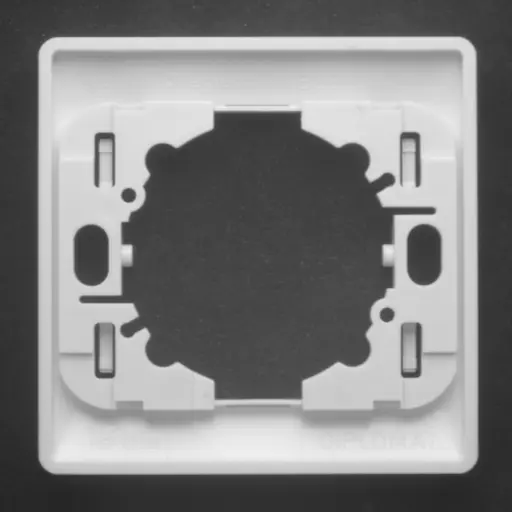
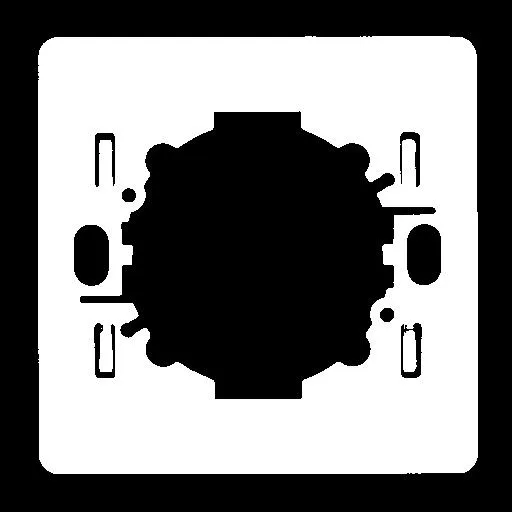
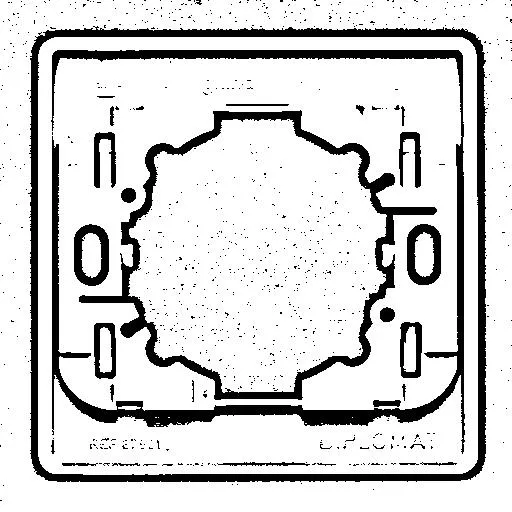
Thresholding of a switch
BW8 and BW16 images have 2 threshold operations:
EasyImage::Threshold.NET Python uses a single-threshold to classify the source image pixels into two classes and create a binary or a bi-level gray-scale image of the same type. Both automatic and manual threshold modes are available.EasyImage::DoubleThreshold.NET Python uses a double-threshold to classify the source image pixels into three classes and create a tri-level gray-scale image of the same type. There are no automatic threshold modes.
C24 images use
EasyImage::Threshold.NET Python that uses a range threshold to classify source image pixels into two classes according to their color and create a bi-level gray-scale BW8 image. There are no automatic threshold modes.- Unquantized Color
An unquantized color is a triple of 32 bits floating point values representing continuous color components. All component values are defined in the [0..1] interval, with the following exceptions:
YUV: U and V in range [-0.5..+0.5]
YIQ: I and Q in range [-0.5..+0.5]
L*a*b*: L* in range [0..100[, a* and b* in range [-128..+128]
LCH: L in range [0..100[, C in range [0..256[
L*u*v*: L* in range [0..100[, u* and v* in range [-128..+128]
The hues are computed in revolutions rather than degrees and thus contained in the [0..1] interval as well.
- VCL
Visual Classes Library (Borland/CodeGear).
- VSH
The VSH color system is often called HSV. Based on the RGB system. Very similar to ISH and LSH.
Specifies the colors as a combination of Value (achromatic perception, maximum of the RGB components), Saturation (degree of purity) and Hue (position along the sequence red/yellow/green/cyan/blue/magenta).
- XYZ
The CIE XYZ color system is the standard colorimetric system defined by the “Commission Internationale de l’Eclairage” in 1931.
Specifies an additive mixture of three color primaries called X, Y and Z. The spectral composition of these primaries is tabulated by the standard. Since negative intensities are involved, the primaries cannot be physically implemented. Anyway, the XYZ system is very useful because of its absolute device independence and its ability to cover the whole gamut of the visible spectrum.
Reduced xyz coordinates (X, Y and Z over their sum) are sometimes used.
- YCbCr
The CCIR/ITU-R YCbCr color system is a digital component video standard defined by the ITU-R BT. 601 recommendation (formerly CCIR 601).
It is similar to the YUV color system.
It specifies 1 luminance and 2 chrominance components. These parameters are related by a linear transform to the RGB coordinates.
The luminance carries the black and white information.
The Cb and Cr chrominance carry the chromatic information. Like the YUV color system, they are often down-sampled without loss of visual quality (YUV 4:4:4 to YUV 4:2:2).
- YIQ
The YIQ color system is used by the NTSC color TV system. It was defined in the original 1953 color NTSC specification.
It is similar to the YUV color system.
It specifies 1 luminance and 2 chrominance components (Inphase and Quadrature). These parameters are related by a linear transform to the RGB coordinates.
The luminance carries the black and white information.
The I and Q chrominance carry the chromatic information, roughly corresponding to the orange-blue contrast and purple-green contrast respectively. They are often down-sampled without loss of visual quality. They are dephased by 33° with respect to the YUV U and V components.
- YSH
The YSH color system is derived from the YUV color system.
Specifies the colors as a combination of Luminance (achromatic perception, the Y of YUV), Saturation (degree of purity), and Hue (position along a colored sequence). The Saturation and Hue correspond to the UV coordinates expressed in polar form.
- YUV
The YUV color system is the PAL analogue color TV standard, derived from the ITU-R BT.470 recommendation (formerly CCIR 470).
It is similar to the YCbCr color system (digital component video) and the YIQ color system (NTSC).
It specifies 1 luminance and 2 chrominance components. These parameters are related by a linear transform to the RGB coordinates.
The luminance carries the black and white information.
The U and V chrominance carry the chromatic information. They are often down-sampled without loss of visual quality (YUV 4:4:4 to YUV 4:2:2). They are proportional to the Cb and Cr components of the YCbCr color system (B-Y and R-Y respectively).
- Zooming and Panning (Display)
Zooming allows you to enlarge or shrink an image or drawing (the scale factor being respectively smaller or larger than unity). Two separate positive scale factors named
ZoomXandZoomYcan be specified. When they are unequal, anisotropic zooming results (circles become ellipses). SettingZoomYto 0 always has the same effect as settingZoomY = ZoomX. The origin point(0,0)remains fixed.Panning allows you to translate an image or drawing. Two translation components named
PanXandPanYcan be specified. They are counted as positive leftwards and downwards respectively.The panning factors are applied first, before zooming. The zooming/panning transform corresponds to equations:
\[X^\prime = ZoomX (X + PanX)\]\[Y^\prime = ZoomY (Y + PanY)\]