EasyOCR - Reading Texts
Workflow
The EasyOCR optical character recognition library reads short texts (such as serial numbers, part numbers and dates).
It uses font files (pre-defined OCR-A, OCR-B and Semi-standard fonts, or other learned fonts) with a template matching algorithm that can recognize even badly printed, broken or connected characters of any size.
There are 4 steps to recognizing characters:
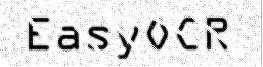
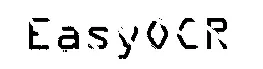
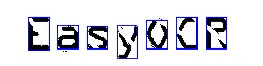
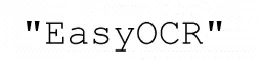
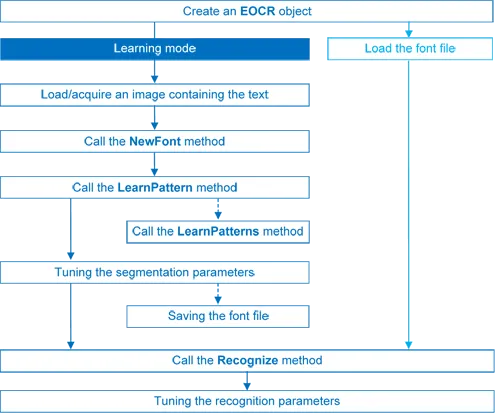
Workflow of EasyOCR.
Learning Process
You can learn characters to create a font file if required. Characters are presented one by one to EasyOCR, which analyzes them and builds a database of characters called a font. Each character has a numeric code (usually its ASCII code) and belongs to a character class (which may be used in the recognition process).
Font files are created as follows:
EOCR::NewFont.NET Python clears the current font.EOCR::LearnPattern.NET Python orEOCR::LearnPatterns.NET Python adds the patterns from the source image to the font. Patterns are ordered by their index value, as assigned by theEOCR::FindAllChars.NET Python process. The patterns in a font are stored as a small array of pixels, by default 5 pixels wide and 9 pixels high. This can be changed when callingEOCR::NewFont.NET Python.EOCR::RemovePattern.NET Python removes unwanted patterns (optional).EOCR::Save.NET Python writes the contents of the font to a disk file with parameter values:EOCR::SetNoiseArea.NET Python,EOCR::SetMaxCharWidth.NET Python,EOCR::SetMaxCharHeight.NET Python,EOCR::SetMinCharWidth.NET Python,EOCR::SetMinCharHeight.NET Python,EOCR::SetCharSpacing.NET Python,EOCR::SetTextColor.NET Python.
Segmenting
EasyOCR analyzes the blobs to locate the characters and their bounding box, using one of two segmentation modes (
EOCR::SetSegmentationMode.NET Python):keep objects mode: one blob corresponds to one character.
repaste objects mode: the blobs are grouped into characters of a nominal size. This is useful when characters are broken or made up of several parts. When a blob is too large to be considered a single character, it can be split automatically using
EOCR::SetCutLargeChars.NET Python.
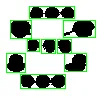
Character segmentation using the keep objects mode. 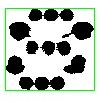
Character segmentation using the repaste objects mode. Filters remove very large and very small unwanted features.
EasyOCR processes the character image to normalize the size to fit within a bounding box, extracts relevant features, and stores them in the font file. The patterns in a font are stored as arrays of pixels defined by
EOCR::GetPatternWidth.NET Python andEOCR::GetPatternHeight.NET Python (by default 5 pixels wide and 9 pixels high).
Segmentation Parameters
Segmentation parameters must be the same during learning and recognition. Good segmentation improves recognition.
The
EOCR::SetThreshold.NET Python parameter helps separate the text from the background. Too high a value thickens black characters on a white background and may cause merging; too small a value makes parts disappear. If the lighting conditions are very variable, automatic thresholding is a good choice.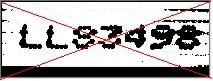
Threshold value is too high. 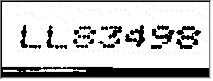
Threshold value is correct. 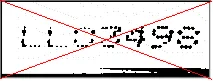
Threshold value is too low. EOCR::SetNoiseArea.NET Python: Blob areas smaller than this value are discarded. Make sure small character features are preserved (i.e., the dot over aniletter).EOCR::SetMaxCharWidth.NET Python,EOCR::SetMaxCharHeight.NET Python: Maximum character size. If a blob does not fit in a rectangle with these dimensions, it is discarded or split into several parts using vertical cutting lines. If several blobs fit in a rectangle with these dimensions, they are grouped together.EOCR::SetMinCharWidth.NET Python,EOCR::SetMinCharHeight.NET Python: Minimum character size. If a blob or a group of blobs fits in a rectangle with these dimensions, it is discarded.EOCR::SetCharSpacing.NET Python: The width of the smallest gap between adjacent letters. If it is larger thanEOCR::SetMaxCharWidth.NET Python it has no effect. If the gap between two characters is wider than this, they are treated as different characters. This prevents thin characters from being incorrectly grouped together.EOCR::SetRemoveBorder.NET Python: Blobs near image/ROI edges cannot normally be exploited for character recognition. By default, they are discarded.
Recognition
The characters are compared to a set of patterns, called a font. A character is recognized by finding the best match between a character and a pattern in the font. After the character has been located, it is normalized in size (stretched to fit in a predefined rectangle) for matching. The normalized character is compared to each normalized template in the font database and the best matches are returned.
EOCR::Load.NET Python: reads a pre-recorded font from a disk file.EOCR::BuildObjects.NET Python: The image is segmented into objects or blobs (connected components) which help find the characters. This step can be bypassed if the exact position of the characters is known. If the character isolation process is bypassed, you must specify the known locations of the characters:EOCR::AddChar.NET Python andEOCR::EmptyChars.NET Python.EOCR::FindAllChars.NET Python: selects the objects considered as characters and sorts them from top to bottom then left to right.EOCR::ReadText.NET Python: performs the matching and filters characters if the marking structure is fixed or a character set filter was provided.Character recognition: The characters are compared to a set of patterns, called a font. The character is stretched to fit in a predefined rectangle and compared to each normalized template in the font database.
A character set filter can improve recognition reliability and run time by restricting the range of characters to be compared. For instance, if a marking always consists of two uppercase letters followed by five digits, the last of which is always even, it is possible to assign each character a class (maximum 32 classes) then set the character filter to allow the following classes at recognition time: two uppercase letters, four even or odd digits, one even digit.
Steps 2 to 4 can be repeated at will to process other images or ROIs. The EOCR::Recognize .NET Python method can be used as well.
Additional information, such as the geometric position of the detected characters, can be obtained using: EOCR::CharGetOrgX .NET Python, EOCR::CharGetOrgY .NET Python, EOCR::CharGetWidth .NET Python, EOCR::CharGetHeight .NET Python, …
EOCR::SetCompareAspectRatio .NET Python makes character and font comparison sensitive to the difference between narrow and wide characters. It improves recognition when characters look like each other after size normalization.
Recognition Parameters
EOCR::SetMaxCharWidth.NET Python,EOCR::SetMaxCharHeight.NET Python: if a blob does not fit within a rectangle with these dimensions, it is not considered as a possible character (too large) and is discarded. Furthermore, if several blobs fit in a rectangle with these dimensions, they are grouped together, forming a single character. The outer rectangle size should be chosen such that it can contain the largest character from the font, enlarged by a small safety margin.EOCR::SetMinCharWidth.NET Python,EOCR::SetMinCharHeight.NET Python: if a blob or a group of blobs fits in a rectangle with these dimensions, it is not considered as a possible character (too small) and is discarded. The inner rectangle size should be chosen such that it is contained in the smallest character from the font, shrunk by a small safety margin.EOCR::SetRemoveNarrowOrFlat.NET Python: Small characters are discarded if they are narrow or flat. By default, they are discarded when they are both narrow and flat.EOCR::SetCharSpacing.NET Python: if two blobs are separated by a vertical gap wider than this value, they are considered to belong to different characters. This feature is useful to avoid the grouping of thin characters that would fit in the outer rectangle. Its value should be set to the width of the smallest gap between adjacent letters. If it is set to a large value (larger thanEOCR::SetMaxCharWidth.NET Python), it has no effect.EOCR::SetCutLargeChars.NET Python: when a blob or grouping of blobs is larger thanEOCR::SetMaxCharWidth.NET Python, it is discarded. When enabled, the blob is split into as many parts as necessary to fit and the amount of white space to be inserted between the split blobs is set byEOCR::SetRelativeSpacing.NET Python. This is an attempt to separate touching characters.EOCR::SetRelativeSpacing.NET Python: when theEOCR::SetCutLargeChars.NET Python mode is enabled, setting this value allows specifying the amount of white space that should be inserted between the split parts of the blobs.
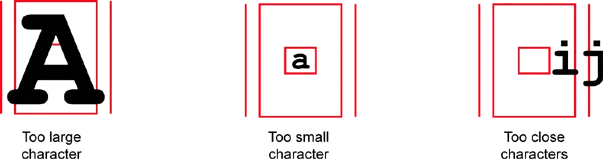
Recognition settings are invalid.
Advanced Tuning
These recognition parameters can be tuned to optimize recognition:
EOCR::SetCompareAspectRatio.NET Python: when this setting is on, it is less tolerant of size and takes into account the measured aspect ratio. Using this mode improves the recognition when characters look similar after size normalization as it enforces the difference between narrow and wide characters.Filtering the characters (in the
EOCR::ReadText.NET Python method) can be used if the marking structure is fixed.When objects are larger than the
EOCR::SetMaxCharWidth.NET Python property, they can be split into as many parts as needed, using vertical cutting lines.EOCR::SetSegmentationMode.NET Python defines how characters are isolated:Keep objects mode: a character is a blob; no attempt is made to group blobs, thus damaged characters cannot be handled and small features such as accents and dots may be discarded by the minimum character size criterion.
Repaste objects mode: blobs are grouped to form distinct characters if they fit in the maximum character size and are not separated by a vertical gap, thus preserving accents and dots.
By default, EasyOCR considers two characters to be on different lines if their baselines differ by more than approximately 30% of the character height. Use the property
EOCR::SetLineSpacingMode.NET Python to change that behavior.
See Also
Easy to understand, ready to copy code snippets.
Sample reading image using EasyOCR