Arbitrarily Shaped ROI (ERegion)
See also
Example: Inspecting Pads Using Regions / code snippets: ERegion
Regions or arbitrarily shaped ROI
In some cases, most often to decrease the processing time or to single-out the object you want to analyze, you do not want to process the whole image but only a part of it.
You can define and use regions of interest (ROI) to restrict the area processed with your vision tool.
In eVision:
Creating regions
eVision offers multiple ways to create regions, depending on the shape you need:
The ERegion .NET Python is the base class for all regions and the most versatile. It encodes a region using a Run-Length Encoded (RLE) representation.
The RLE representation of a region is made of runs (horizontal, 1-pixel high slices).
The runs are stored in the form of their ordinate, starting abscissa and length.
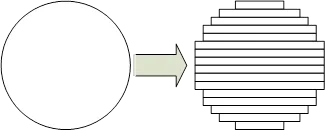
Run-Length Encoding of a circle-shaped region
To create a region, either:
Use one of the geometry-based region classes.
Use the result of another tool, such as EasyFind, EasyMatch or EasyObject.
Combine or modify other regions.
Use a mask image.
Directly provide the list of runs.
Geometry-based regions
Geometry based regions are specialized classes of regions that are encompassed in simple geometries. eVision currently provides classes based on a rectangle, a circle, an ellipse or a polygon.
Use these classes to setup geometric regions and modify them with translation, rotation and scaling. The transformation operators return new regions, leaving the source object unchanged.
-
The contour of an
ERectangleRegion.NET Python class is a rectangle.Define it using its center, width, height and angle.
Alternatively, use an
ERectangle.NET Python instance, such as one returned by anERectangleGauge.NET Python instance.
Rectangle region separating a bar code from the background
-
The contour of an
ECircleRegion.NET Python class is a circle.Define it using its center and radius or 3 non-aligned points.
Alternatively, use an
ECircle.NET Python instance, such as one returned by anECircleGauge.NET Python instance.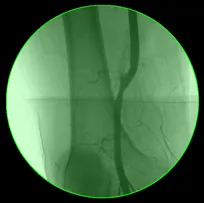
Circle region encompassing the useful part of an X-Ray image
-
The contour of an
EEllipseRegion.NET Python class is an ellipse.Define it using its center, long and short radius and angle.
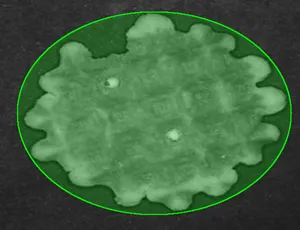
Ellipse region encompassing a waffle
-
The contour of an
EPolygonRegion.NET Python class is a polygon.It is constructed using the list of its vertices.
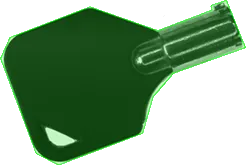
Polygon region encompassing a key
Using the result of other tools
The ERegion .NET Python class provides a set of specialized constructors to create regions from the results of another tool.
In a tool chain, these constructors restrict the processing of a tool to the area issued from the previous tool.

eVision provides constructors for the following tools:
EasyFind:
EFoundPattern.NET PythonEasyMatch:
EMatchPosition.NET PythonEasyObject:
ECodedElement.NET Python
Combining regions
Use the following operations to create a new region by combining existing regions:
Union
The
ERegion::Union.NET Python method returns the region that is the addition of the two regions passed as arguments.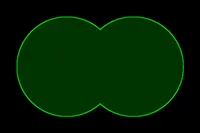
Union of 2 circles
Intersection
The
ERegion::Intersection.NET Python method returns the region that is the intersection of the two regions passed as argument.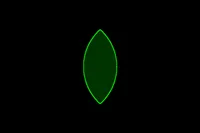
Intersection of 2 circles
Subtraction
The
ERegion::Subtraction.NET Python method returns the first region passed as argument after removing the second one.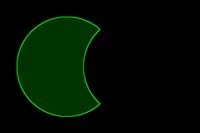
Subtraction of 2 circles
Morphological operations on regions
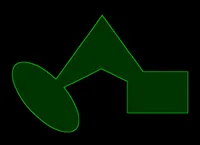
The initial arbitrary region used to illustrate the different morphological operations
Grow
The
ERegion::Grow.NET Python method returns a region that is the dilation of the region by a disk with a radius equals to the argument.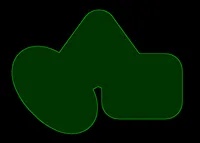
Grow of the arbitrary region
Shrink
The
ERegion::Shrink.NET Python method returns a region that is the erosion of the region by a disk with a radius equals to the argument.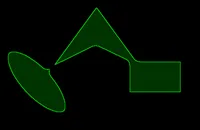
Shrink of the arbitrary region
Contour
The
ERegion::Contour.NET Python method returns a region that is the contour of the region.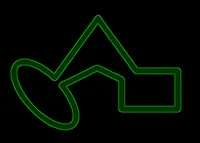
Contour of the arbitrary region
Free-hand drawing a region
The
ERegionFreeHandPainter.NET Python class provides the methods that allow you to create a region by hand, using the mouse or any other user input method.The
RegionFreeHandsample, available both in C++ and C#, shows how to use this class to draw a region on an image.
Using regions
The tools supporting regions provide methods that follow one of these conventions:
Method(const EImage& source, const ERegion& region)Method(const EImage& source, const ERegion& region, EImage& destination)
Note
The source, the region and the destination must be compatible. It means that the region must at least partly fit in the source, and that source and destination must have the same size.
Note
The process is applied only to the pixels inside the ERegion.
Preparing the region
eVision automatically prepares the regions when it applies them to an image, but this preparation can take some time.
If you do not want your first call to a method to take longer than the next ones, you can prepare the region in advance by using the appropriate
ERegion::Prepare.NET Python method.To manually prepare the regions, adapt the internal RLE description to your images.
Drawing regions
The ERegion .NET Python classes provide several methods to display the regions:
ERegion::Draw.NET Python draws the region area, in a semi-transparent way, in the provided device context.ERegion::DrawContour.NET Python draws the region contour in the provided device context.ERegion::ToImage.NET Python renders the region as a mask into the provided destination image.You can configure the foreground and the background colors.
If you initialized your image with a width and a height, eVision renders the region inside those bounds.
If not, eVision resizes the image to contain the whole region.
Use
ERegion::ToImage.NET Python to create masks for the eVision functions that support them.
ERegions and EROIs
The older
EROIclasses of eVision are compatible with the new regions.Some tools allow the usage of regions with source and/or destinations that are
ERoiinstead ofEImagefollow one of these conventions:Method(const ERoi& source, const ERegion& region)Method(const ERoi& source, const ERegion& region, ERoi& destination)
Tip
In that case, the coordinates used for the region are relative to the reduced ROI space instead of the whole image space .