Learn a Pattern
Select an image containing the pattern/ROI to be searched for and call
EMatcher::LearnPattern.NET Python.Pass an arbitrary shaped region of interest (
ERegion.NET Python) to ignore the pixels outside of this region.
Warning
For historical reasons, masking part of the pattern with ERegion does not work properly when some pixels in the pattern have a grayscale value of 0 (these pixels are handled as if they were outside of the ERegion).
The resulting
EMatcher.NET Python object can be saved throughEMatcher::Save.NET Python for later use.
Learning Workflow
        flowchart TD
    A[Create an EMatcher object]

    A --> B{Is a model file available?}

    %% Left branch: No model file
    B -->|No model file is available| C[Load/acquire an image containing a pattern]
    C --> D{Pattern location?}
    D -->|The pattern is the whole image| F[Tune the learning parameters]
    D -->|The pattern can be isolated in an ROI| E[Create an ROI and set its parameters]
    E --> F

    F --> G[Call the LearnPattern method]
    G --> H[Save as a model file for later use]
    H --> I[Tune the matching parameters]

    %% Right branch: Model file available
    B -->|A model file is available| J[Load an available model file]
    J --> I

    I --> K[Setup is done]
Ideal Patterns to Learn
EasyMatch works best when the patterns:
Represent the object to be located. They should:
Keep the same appearance whatever the lighting conditions.
Remain at a fixed location with respect to the part.
Be rigid and not change shape.
Exhibit good contrast in small and large scale. They should be distinctly visible from a distance, and on a reduced image.
Not be invariant under the degrees of freedom to be measured. For instance, a pattern of black and white horizontal stripes cannot detect horizontal translation; a cog wheel cannot help measure large rotations.
Have a neutral background. If objects around the pattern in the ROI may change, this area should be neutralized by means of an
ERegion.NET Python.Have contrasted margin around the objects so that foreground and background intensities are seen.
Learn Multiple Models from Different Images
With EasyMatch, you can also learn multiple models at once.
Note
This is useful when different instances of the model look very different, for example because of perspective, illumination or mechanical deformations.

Pins appearing different due to perspective
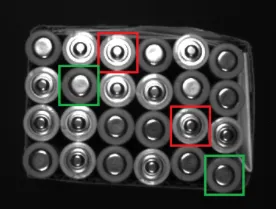
Top and bottom faces of batteries appearing different due to illumination
To learn multiple patterns:
Call the function
EMatcher::LearnPatterns.NET Python with several images instead of the functionEMatcher::LearnPattern.NET Python with a single image.Call the function
EMatcher::Match.NET Python to search the patterns in the image.
Note
Using multiple threads with Easy::SetMaxNumberOfProcessingThreads .NET Python results in large speed gains as the process is parallelized over the learned patterns.
Pyramid Creation
EasyMatch is faster than simple pattern matching because it uses image pyramids. This concept is important to understand the parameters below.
The learned pattern and inspected image are downscaled a certain number of times
The coarsest reduction (Level 4 on the image below) is used to find intial match candidates
Moving from coarsest to finest reduction (Level 0 on the image below), the position of the candidates is iteratively refined
Parameters can be tuned to minimize processing time, but EasyMatch still takes longer than EasyFind as the entire selected area is searched.
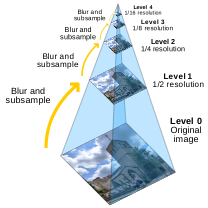
Illustration of an image pyramid by Cmglee - Own work, CC BY-SA 3.0, Link
Learning Parameters
Filtering Mode
When creating the pyramid, filtering is used before each downsizing of the image.
By default, a uniform kernel is used.
EMatcher::SetFilteringMode.NET Python allows to use a low-pass kernel instead. The low-pass kernel works better if the image has sharp gray-level transitions.
Min Reduced Area
The pattern is downsized in the pyramid as long as the coarsest reduction gets a size (i.e. an area in pixels) greater than or equal to EMatcher::SetMinReducedArea .NET Python:
The bigger the value, the faster the matching process. However, if set too high, it decreases the matching process reliability.
The value of
MinReducedAreais computed automatically ifAdvancedLearning.NET Python is enabled (default behavior).Explicitly setting
MinReducedAreadisablesAdvancedLearning. AMinReducedAreaof 64 is usually a good compromise.
Advanced Learning
If the pattern is defined as an ROI, EMatcher::SetAdvancedLearning .NET Python uses the entire image to optimize learning parameters such as MinReducedArea:
AdvancedLearningis enabled by default, as it leads to better results in case of tiled or periodic images.If
EMatcher::SetMinReducedArea.NET Python is used explicitly,AdvancedLearningis disabled.Please note that as
EMatcher::SetAdvancedLearning.NET Python changes the size of the pyramid, it can have a significant impact on matching duration.
Learn Timeout
EMatcher::LearnPattern .NET Python possesses a timeout:
Use
EMatcher::SetLearnTimeOut.NET Python to add a time limit to the methodsEMatcher::LearnPattern.NET Python andEMatcher::LearnPatterns.NET Python.If the timeout is reached, an exception is thrown and the processing stops.
Note
This timeout mechanism is used to prevent the application from freezing while tuning parameters. This is especially useful in eVision Studio. Note that this does not correspond to the behavior of code reader timeouts, which aim to prevent long processing times in production settings.