ECodeReader - Unified Interface
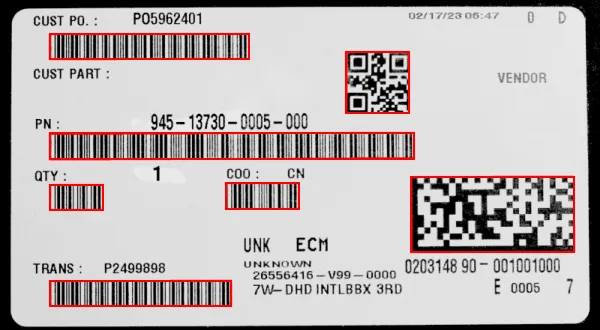
The 3 supported codes in a single image
Purpose of ECodeReader
ECodeReader integrates the functionality of EasyBarCode, EasyMatrixCode and EasyQRCode in a single unified interface.
In a single ECodeReader::Read .NET Python operation, ECodeReader locates and decodes the 3 kinds of codes supported by eVision, namely bar codes, QR codes and data matrix codes.
For more information about these codes and the associated support, please refer to the EasyBarCode, EasyMatrixCode and EasyQRCode user guides.
Reading a Set of Codes
You can read the codes in an image automatically as follows:
Create an
ECodeReader.NET Python object.Call the
ECodeReader::Read.NET Python method to return a vector ofECode.NET Python.Each instance contains, among others, the
string.NET Python embedded in the code.
#include <eVision/EasyID/ECodeReader.h>
using namespace eVision;

// Image constructor
EImageBW8 srcImage;

// Bar code reader constructor
ECodeReader reader;

// Set the max number of codes of each type to find
reader.SetMaxNumCodesPerType(2);

// Read the barcodes in the source image
std::vector<ECode> results = reader.Read(srcImage);

// Get decoded string
std::string decodedString = results[0].GetDecodedString();
using eVision;
// Image constructor
EImageBW8 srcImage = new EImageBW8();

// Bar code reader constructor
ECodeReader reader = new ECodeReader();

// Set the max number of codes of each type to find
reader.MaxNumCodesPerType = 2;

// Read the bar codes in the source image
ECode[] results = reader.Read(srcImage);

// Get decoded string
string decodedString = results[0].DecodedString;
import eVision

# Image constructor
srcImage = eVision.EImageBW8()

# Bar code reader constructor
reader = eVision.ECodeReader()

# Set the max number of codes of each type to find
reader.MaxNumCodesPerType = 2

# Read the bar codes in the source image
results = reader.Read(srcImage)

# Get decoded string
decodedString = results[0].DecodedString
Read Parameters
By default,
ECodeReader.NET Python searches for all supported types of code in the image.Use the property
ECodeReader::GetEnabledCodeTypes.NET Python if you want to disable (or enable) specific code types.
Warning
If one of the supported types of code is not present in the image, it is recommended to disable that type. Otherwise the corresponding reader runs and may slow the whole process.
Use
ECodeReader::SetTimeOut.NET Python to set a time-out to theECodeReader::Read.NET Python process.The time-out is set for each of the underlying code readers that run in parallel. And so it also limits the total
ECodeReader::Read.NET Python processing time.
Use the property
ECodeReader::GetMaxNumCodesPerType.NET Python to set the maximum number of codes to search for each type.Use the following properties to set the settings specific to one of the supported types of code:
ECodeReader::GetBarCodeReader.NET Python retrieves the underlyingEBarCodeReader.NET Python instance.See also
For more information about the relevant settings, refer to the documentation of EasyBarCode.
ECodeReader::GetMatrixCodeReader.NET Python retrieves the underlyingEMatrixCodeReader.NET Python instance.See also
For more information about the relevant settings, refer to the documentation of EasyMatrixCode.
ECodeReader::GetQRCodeReader.NET Python retrieves the underlyingEQRCodeReader.NET Python instance.See also
For more information about the relevant settings, refer to the documentation of EasyQRCode.
Code Specific Results
The ECodeReader::Read .NET Python method returns a vector of ECode .NET Python, from these:
Use the property
ECode::GetDecodedString.NET Python to retrieve the contents of the code.Use the property
ECode::GetIsGS1.NET Python to query whether the code uses the GS1 standard.Use the method
ECode::DrawPosition.NET Python to draw the position of the code.Use the property
ECode::GetCodeType.NET Python if you need to know the specific type of the code.Use the following properties to retrieve the information specific to a given type of code from an
ECode.NET Python instance:ECode::GetBarCode.NET Python returns anEBarCode.NET Python object.See also
For more information, refer to the documentation of EBarCode.
ECode::GetMatrixCode.NET Python returns aEMatrixCode.NET Python object.See also
For more information, refer to the documentation of EMatrixCode.
ECode::GetQRCode.NET Python returns anEQRCode.NET Python object.See also
For more information, refer to the documentation of EQRCode.
Multithreading
ECodeReader always parallelizes the location and the decoding of the different types of code.
Easy::SetMaxNumberOfProcessingThreads.NET Python has no effect on this behavior.However,
Easy::SetMaxNumberOfProcessingThreads.NET Python has the intended effect on the underlying code readers and speeds up the whole process.
Reading Using a Grid
If the codes in the images are arranged in a regular grid-like fashion:
Use the dedicated method overloads
ECodeReader::Read.NET Python that returnECodeGrid.NET Python objects to improve the reliability and the speed of the reading.Use the methods
EGrid::SetEnableCell.NET Python,EGrid::SetEnableRow.NET Python,EGrid::SetEnableColumn.NET Python orEGrid::SetEnableAll.NET Python to disable the processing of cells that you know do not contain any code.Use the method
ECodeGrid::GetResults.NET Python of the returnedECodeGrid.NET Python object to retrieve the codes read in each cell of the defined grid.
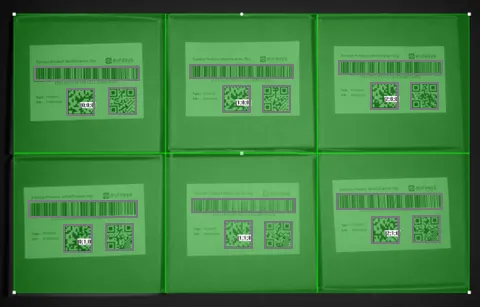
Reading of codes arranged in a grid
Quick Links
Code snippets for ECodeReader.
All the code symbologies read by the text and code reading libraries.
Assess the printing quality of your bar, data matrix and QR codes.