EasyLocateMultiThreadInference
Support |
|
|---|---|
Required licenses |
EasyLocate |
Recommended images |
In the Deep Learning Additional Resources, the images from the folder |
Location |
|

Note
In C++, the sample
EasySegmentSupervisedMultiThreadInferenceillustrates a multithread inference for EasySegment Supervised.In Qt, the sample
EasyLocateMultiThreadInferenceillustrates a multithread inference for EasyLocate.
Purpose
This sample program demonstrates how to:
Perform a multithread inference with EasyLocate.
Implement external and internal multithreading.
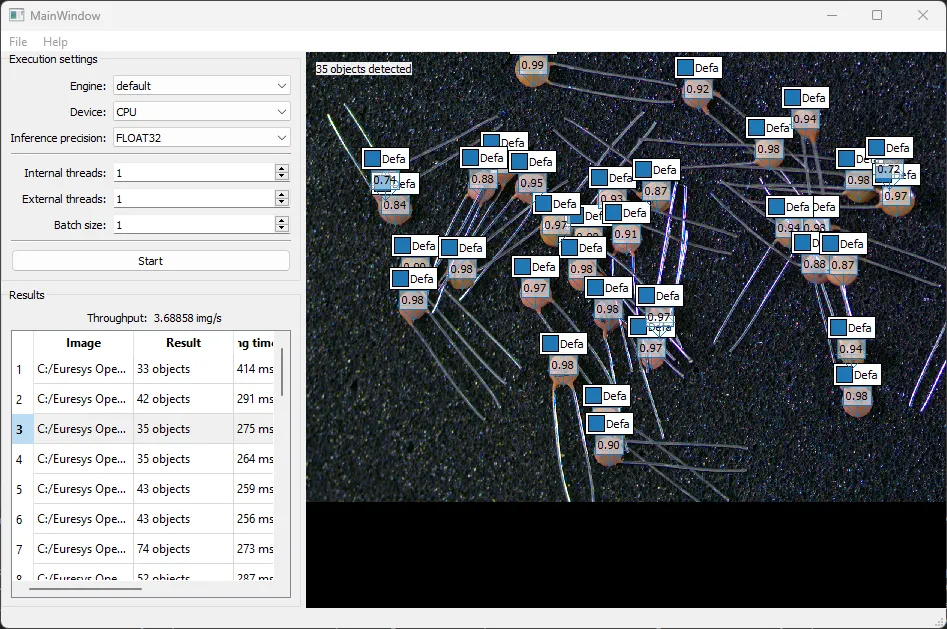
Code highlights
Launch one acquisition thread running the
AcquisitionThread.// Acquisition thread creation acquisitionThread_.reset(new AcquisitionThread(queue_.get(), images_)); connect(acquisitionThread_.get(), &AcquisitionThread::error, this, &MainWindow::showError); acquisitionThread_->start();
The
AcquisitionThreadpushes the images into a custom image queue type namedImageQueue.ImageInfo imageInfo; imageInfo.ImageId = i; EImageC24* img = new EImageC24(); img->Load(images_[i].toStdString()); imageInfo.Image.reset(img); imageInfo.Timestamp = std::chrono::steady_clock::now(); queue_->addImage(imageInfo);
The program launches
NumExternalThreadsProcessingThread.// Processing threads creation ProcessingThread::ExecutionParameters parameters; parameters.NumInternalThreads = ui->internalThreads->value(); parameters.BatchSize = ui->batchSize->value(); parameters.Engine = ui->engines->currentText().toStdString(); parameters.Device = ui->devices->currentText().toStdString(); parameters.InferencePrecision = ui->precision->currentText().toStdString(); parameters.ToolFilename = toolFilename_.toStdString(); processingThreads_.clear(); numResults_ = 0; numThreadFinished_ = 0; for (int i = 0; i < ui->externalThreads->value(); i++) { processingThreads_.emplace_back(new ProcessingThread(queue_.get(), parameters)); ... processingThreads_.back()->start(); }
The class
ProcessingThreaduses Qt signals and slots to pass the result to the methodprocessResultof the main window.
The connection between the signal resultsReady and the slot processResult is made at the thread creation.
```c++
connect(processingThreads_.back().get(), &ProcessingThread::resultsReady, this, &MainWindow::processResult);
```
When the
ProcessingThreadcompletes the processing of an image, it emits a signal with the result.std::vector<ELocatorResult> results = locator->Apply(imgs); for (int i = 0; i < imageInfo.size(); i++) { ImageResult result; result.ImageId = imageInfo[i].ImageId; result.Time = timing; result.Timestamp = imageInfo[i].Timestamp; result.Result.reset(new ELocatorResult(results[i])); imageResults.push_back(result); } // Pass the result to another thread emit resultsReady(imageResults);
The methods
processResultupdate the UI and save the result for display.void MainWindow::processResult(const QList<ImageResult>& results) { // Display the results for (const auto& result: results) { int numObjects = result.Result->GetNumDetectedObjects(); ui->imageList->item(result.ImageId, 1)->setText(QString("%1 objects").arg(numObjects)); ui->imageList->item(result.ImageId, 2)->setText(QString("%1 ms").arg(result.Time)); ui->imageList->item(result.ImageId, 3)->setText(QString("%1 ms").arg(result.Time / results.size())); results_[result.ImageId] = result; numResults_ += 1; } ... }