EasyQRCode - Reading QR Codes
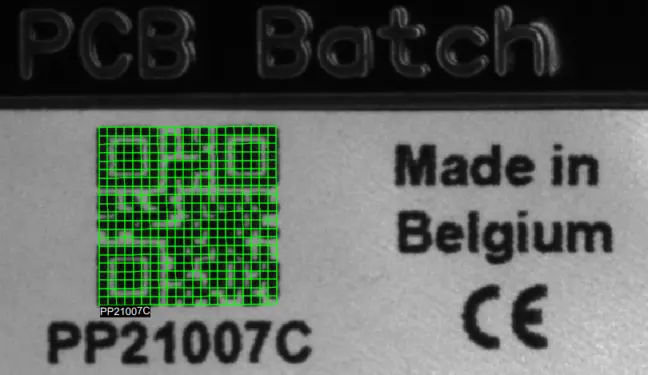
A QR code read by EasyQRCode
Purpose of the EasyQRCode library
The EasyQRCode library allows reading QR codes in an image:
The reading is fast and robust.
Several codes can be read in the same image.
The processing can be limited to an
ERegionin the image.Specific support is provided for codes arranged in a grid.
The QR codes can be graded according to the ISO 15415 or ISO 29158 standards.
Reading a QR Code
You can read the QR code in an image automatically as follows:
Create an
EQRCodeReader.NET Python object.Call the
EQRCodeReader::Read.NET Python method to return a vector ofEQRCode.NET Python.Each instance contains, among others, the
decoded string.NET Python embedded in the QR code.
#include <eVision/EasyQRCode/EQRCodeReader.h>
using namespace eVision;

// Image constructor
EImageBW8 srcImage;

// QR code reader constructor
EQRCodeReader reader;

// ...

// Read
std::vector<EQRCode> qrCodes = reader.Read(srcImage);

// Retrieve the decoded string in best guess mode from the first QR Code
std::string decoded_string = qrCodes[0].GetDecodedString(EByteInterpretationMode_Auto);
using eVision;
// Image constructor
EImageBW8 srcImage = new EImageBW8();

// QR code reader constructor
EQRCodeReader reader = new EQRCodeReader();

// ...

// Read
EQRCode[] qrCodes = reader.Read(srcImage);

// Retrieve the decoded string in best guess mode from the first QR Code
string decoded_string = qrCodes[0].GetDecodedString(EByteInterpretationMode.Auto);
import eVision
# Image constructor
src_image = eVision.EImageBW8()

# QR code reader constructor
reader = eVision.EQRCodeReader()

# ...

# Detect QRCodes in src_image
qr_codes = reader.Read(src_image)

# Retrieve the decoded string in best guess mode from the first QR Code
decoded_string = qr_codes[0].GetDecodedString(eVision.EByteInterpretationMode.Auto)
Contents
Specifications of the QR codes and EasyQRCode.
How to use EasyQRCode.
Quick Links
List of all Classes, Structs and Enumerations of the EasyQRCode library.
Code snippets for the EasyQRCode library.
All the code symbologies read by the text and code reading libraries.
Assess the printing quality of your bar, data matrix and QR codes.
Read bar, data matrix and QR codes using a unified interface.
See also
The QR code reading sample of eVision Studio shows how to use the EasyQRCode library to read barcodes.