Learn a Pattern from Image(s)
EasyFind can extract its feature points from an image using
EPatternFinder::Learn.NET Python.The most common usage is to take a picture of the object of interest and to learn the ROI around that object in your picture.
Use an
ERegionto specify your pattern more precisely if the ROI contains unwanted features from the background.
Learn Multiple Patterns from different images
With EasyFind, you can also learn multiple patterns at once.
Note
This is useful when different instances of the pattern look very different, for example because of perspective, illumination or mechanical deformations.

Pins appearing different due to perspective
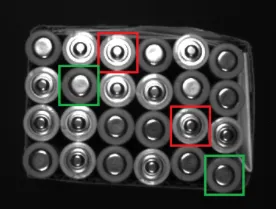
Top and bottom faces of batteries appearing different due to illumination
To learn multiple patterns:
Call the function
EPatternFinder::LearnPatterns.NET Python with several images instead of the functionEPatternFinder::Learn.NET Python with a single image.When you call
EPatternFinder::Find.NET Python, the patterns are searched in the image in parallel.
Note
The setting Easy::SetMaxNumberOfProcessingThreads .NET Python is thus especially interesting here.
Learning Parameters
Note
These parameter settings are saved together with your pattern when calling EPatternFinder::Save() .NET Python.
Pattern type
Use the parameter EPatternFinder::SetPatternType .NET Python to set the pattern type as Consistent Edges (default) or Thin Structures.
EasyFind supports 2 pattern types:
Use
Consistent Edgeswhen:Your pattern is well contrasted with sharp edges.
Your pattern is substantially different from the rest of the expected search fields.
Use
Thin Structureswhen:The edges of your pattern are consistent between thin elements and regions.
The contrast is the same for each thin element.

Examples of Thin Structures
Light Balance
Use the parameter EPatternFinder::SetLightBalance .NET Python to adjust the gray-level threshold of the EPatternFinder so that it fits the useful parts of the pattern.
Timeout
EPatternFinder::Learn .NET Python possesses a timeout:
Use
EPatternFinder::SetLearnTimeOut.NET Python to add a time limit to the methodsEPatternFinder::Learn.NET Python andEPatternFinder::LearnPatterns.NET Python.If the timeout is reached, an exception is thrown and the processing stops.
Note
This timeout mechanism is used to prevent the application from freezing while tuning parameters. This is especially useful in eVision Studio. Note that this does not correspond to the behavior of code reader timeouts, which aim to prevent long processing times in production settings.
Advanced
Thin Structure Mode
If the Pattern Type is Thin Structure, use the parameter EPatternFinder::SetThinStructureMode .NET Python to adjust the gray-level threshold of the model so that it fits the useful parts of the pattern:
EThinStructureMode_Auto.NET Python: EasyFind chooses automatically the best contrast for thin elements.EThinStructureMode_Dark.NET Python: EasyFind selects thin elements darker than their neighborhood.EThinStructureMode_Bright.NET Python: EasyFind selects thin elements brighter than their neighborhood.
Number of Feature Points and Reduction Strength
Note
More feature points lead to a finer matching and a better positioning accuracy but also to a longer processing time.
Use the parameters
EPatternFinder::SetMinFeaturePoints.NET Python andEPatternFinder::SetMaxFeaturePoints.NET Python to adjust the number of feature points used to match the patterns.By default, this number is computed automatically (between
8and1024).
Use the parameter
EPatternFinder::SetReductionMode.NET Python to select the reduction mode:EReductionMode_Auto.NET Python (default): the reduction strength is computed automatically.EReductionMode_Manual.NET Python: use the parameterEPatternFinder::SetReductionStrength.NET Python to set the reduction strength from more accuracy (0.0) to more speed (1.0).