Managing the Dataset Splits
It is important to split the dataset into 3 sets:
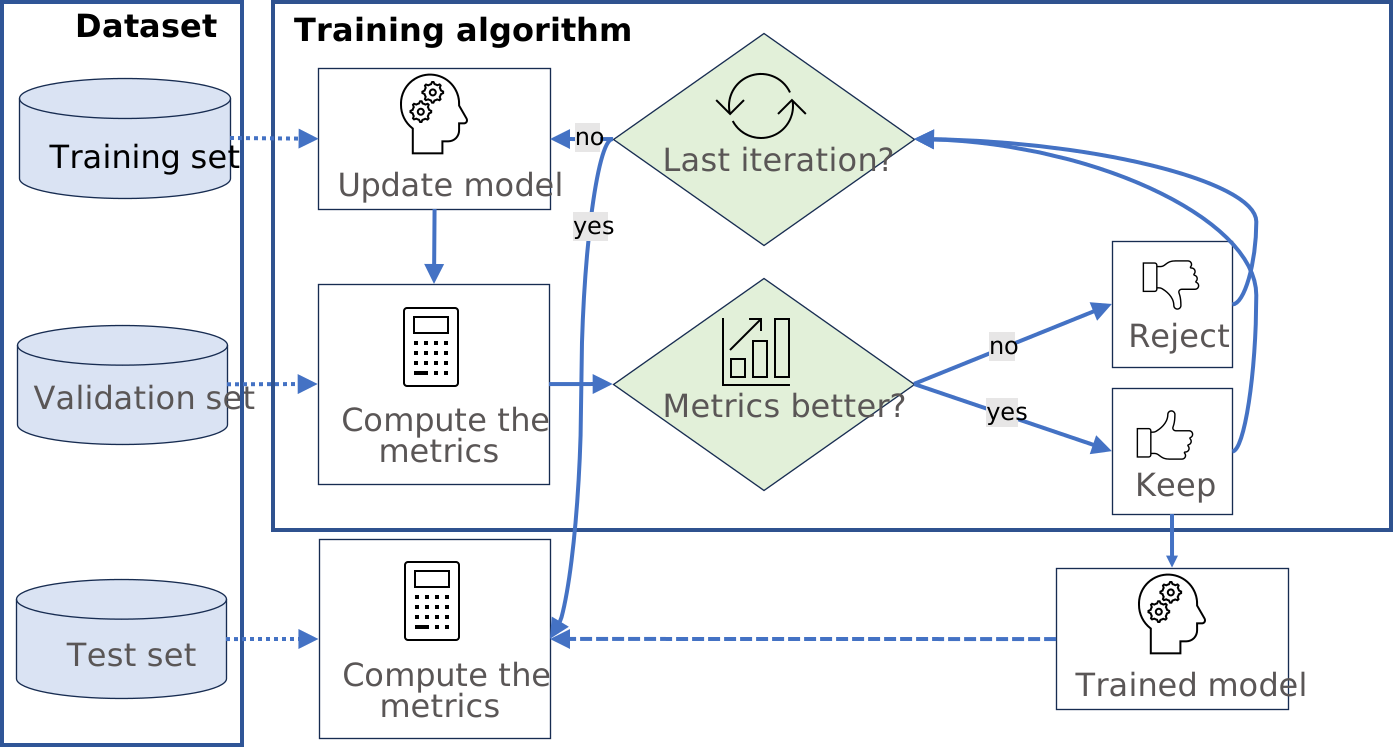
The training set contains the images that are used during training to update and optimize the deep learning model.
The validation set contains the images that are used during training to select the model that gives the best performance.
The test set contains images that are not used during training and that are used to evaluate the final performance of your classifier.
The following picture shows how and when each set is used.
Warning
These sets MAY NOT contain:
Images of the other sets.
Images of an object for which there are other images in other sets.
Why is it Important?
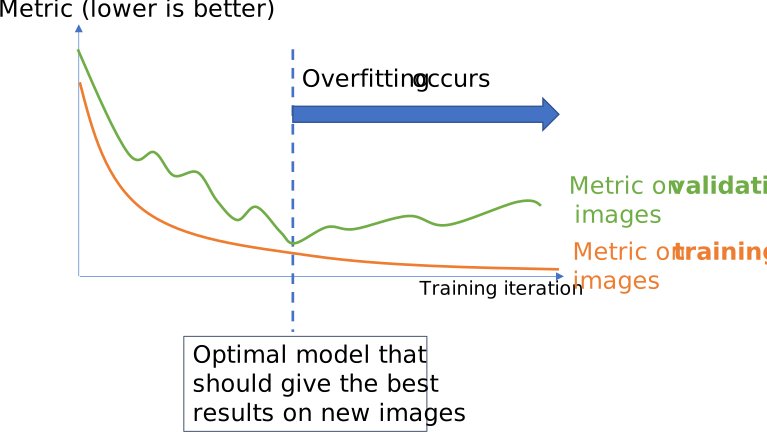
Deep learning techniques can suffer from overfitting; this means that the trained tool is too focused on the specific images present in the training set and it is not able to learn a general model of your data. For example, an overfitted model can learn to recognize the exact images present in the training set and not the underlying defects that you want to detect. Such tools perform poorly in production.
The validation set is used during training to prevent and know when overfitting occurs. This keeps the tool in a state that gives the best performance on the validation set. Without the validation set, it is impossible to know if a tool that performs well on its training set can also perform well in production.
Thus, a tool that gives high performance on the training set but much lower performance on the validation set has overfitted.
The training algorithm is designed to avoid overfitting by keeping the model at the iteration that gives the highest performance on the validation set.
To minimize overfitting and increase the performances:
You can add more images to your dataset.
Or, in some cases, you can use data augmentation.
The test set is important to compute a statistically robust measure of the performance of the tool. Indeed, at the end of the training, the performance measured on the validation set are optimistic compared to what you will get in production because we selected during training the model that had the highest performance on these images.
Splitting the Dataset in Deep Learning Studio
In Deep Learning Studio, open the Dataset split tab:
To create new dataset splits, click on
New.A new split is created randomly according to the specified proportion or number of images.
The default proportion of images is 70% of training images, 20% of validation images and 10% of test images.
Images without a proper annotation must be in the test set.
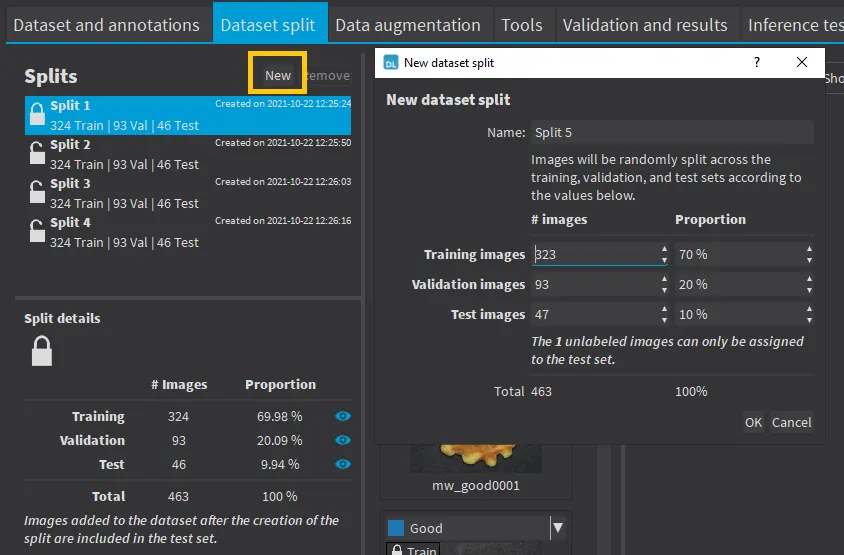
Creating a new dataset split.
The dataset splits can be locked
 or unlocked
  . A dataset split is locked when it was used to train a tool. When a dataset split is locked:
You cannot move images out of the training or validation sets.
You can only move images from the test set to either the training set or the validation set.
Select a dataset split to display the set of the images.
Use the icons
 or
or  to filter the image list according to the set type.
If an image is unlocked
, you can move it to another split by clicking on its split or by right-clicking on the image and selecting the set.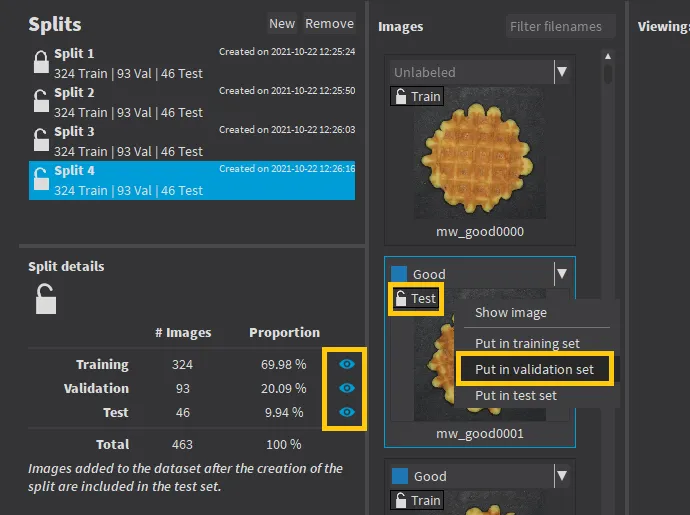
Manually changing the split of an image.
Double-click on a split to change its name.
Note
Images added to the dataset after you have created a split are automatically assigned to the test set of that split.
Hint
We recommend to experiment with several different splits to see how the training behaves with different training sets.
Splitting the Dataset in the API
Create directly
EDataset.NET Python objects for your training, validation and test sets.Randomly split an
EDataset.NET Python dataset into a training set and a validation set with the methods:For EasyClassify and EasySegment Unsupervised:
EDataset::SplitDataset.NET PythonFor EasySegment Supervised:
EDataset::SplitDatasetForSegmentation.NET PythonFor Easylocate:
EDataset::SplitDatasetForLocator.NET Python
Or randomly split an
EDataset.NET Python dataset usingEDataset::GetSplit.NET Python to get aEDatasetSplit.NET Python object.Use
EDataset::ExtractSplit.NET Python with theEDatasetSplit.NET Python object to get aEDataset.NET Python object containing only the images of a given type