EasyClassifyMultiThreadInference
Support |
|
|---|---|
Required licenses |
EasyClassify |
Recommended images |
In the Deep Learning Additional Resources, the images from the folder |
Location |
|

Note
In C++, the sample
EasySegmentSupervisedMultiThreadInferenceillustrates a multithread inference for EasySegment Supervised.In Qt, the sample
EasyLocateMultiThreadInferenceillustrates a multithread inference for EasyLocate.
Purpose
This sample program demonstrates how to:
Perform a multithread inference with EasyClassify.
Implement external and internal multithreading.
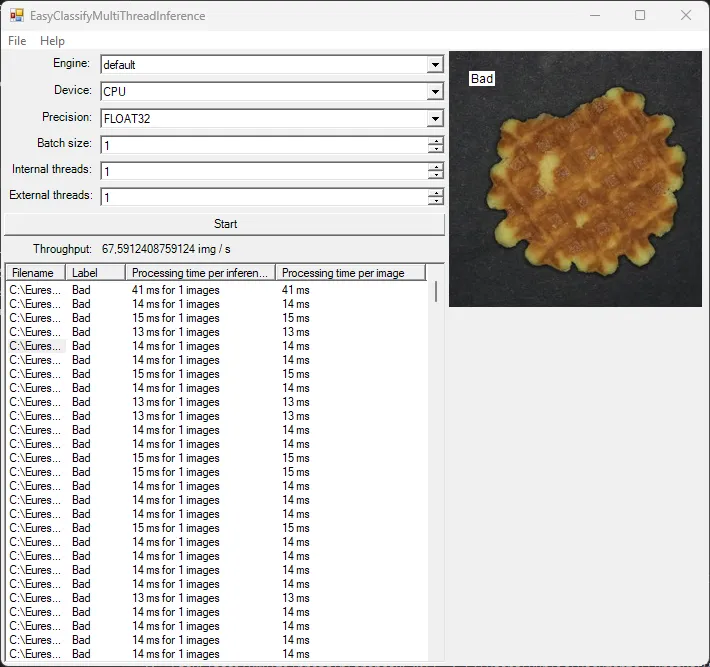
Code highlights
Launch one acquisition thread running the function
ImageLoop.ThreadParameters param = new ThreadParameters(this, engine.SelectedItem.ToString(), device.SelectedItem.ToString(), precision.SelectedItem.ToString(), (int)internalThreads.Value, (int)batchSize.Value); acquisitionThread = new Thread(ImageLoop); acquisitionThread.Start(param);
The function
ImageLooppushes the images into an image queue.ImageBatch batch = new ImageBatch(numImagesPerInference); for (int j = 0; j < numImagesPerInference; j++) { batch.Images[j] = new EImageC24(); batch.Images[j].Load(mainForm.m_images[i + j]); batch.ImagesId[j] = i + j; } // Adds the batch of images to the queue and signals the processing threads about the new data. lock (mainForm.locker) { queue.Enqueue(batch); Monitor.PulseAll(mainForm.locker); }
The
NumExternalThreadsprocessing threads are created and run the functionClassificationLoop.// Create the external threads processingThreads = new Thread[((int)externalThreads.Value)]; for (int i = 0; i < externalThreads.Value; i++) { processingThreads[i] = new Thread(ClassificationLoop); processingThreads[i].Start(param); }
The function
ClassificationLoopinvokes a delegate to pass the computed result to the main UI thread.// Invoke the delegate with the results for updating the user interface. mainForm.Invoke(mainForm.m_classificationFinishedDelegate, batch.ImagesId, result, stopWatch.ElapsedMilliseconds);
5.The delegate calls the method ClassificationFinished that updates the UI to display the result and the processing time for each image.
```c++
public void ClassificationFinished(int[] imagesId, EClassificationResult[] results, long processingTime)
{
  try
  {
    for (int i = 0; i < imagesId.Length; i++)
    {
      m_detectedClasses[imagesId[i]] = results[i].BestLabel;
      m_processingTime[imagesId[i]] = processingTime;
      m_processed += 1;
      listView1.Items[imagesId[i]].SubItems[1].Text = results[i].BestLabel;
      listView1.Items[imagesId[i]].SubItems[2].Text = String.Format("{0} ms for {1} images", processingTime, imagesId.Length);
      listView1.Items[imagesId[i]].SubItems[3].Text = String.Format("{0} ms", processingTime / imagesId.Length);
    }
    ...
  }
}
```