Using EasyQRCode
This document details all the capabilities of EasyQRCode beyond calling EQRCodeReader::Read() .NET Python on an image.
Note
The method EQRCodeReader::Read .NET Python supports multithreading.
The multithreading splits the load between the detection methods (such as EQRDetectionMethod_AdaptiveThreshold .NET Python and EQRDetectionMethod_Gradient .NET Python) and decodes multiple candidates in parallel. This is useful when there are several codes in the image.
Contents of the EQRCode Object
The QR code reader uses the gravity center .NET Python of the QR code geometries .NET Python to sort the QR code candidates in line then columns order starting from the top left corner of the image.
The QR code reader decodes the QR candidates and returns a vector of EQRCode .NET Python, each one containing:
The model .NET Python, version .NET Python and level .NET Python of the QR code.
A geometry .NET Python object, containing the information related to the position of the QR code, see below.
The decoded string .NET Python and decoded data .NET Python of the QR code. See more details here.
The
ISO 15415.NET Python orISO 29158.NET Python grading results of the QR code (ifEQRCodeReader::SetComputeGrading.NET Python istrue).Methods to draw the QR code
position.NET Python,grid.NET Python,errors.NET Python anddecoded string.NET Python on the source image.The amount of unused error correction .NET Python.
Close to 1, very few errors were corrected when decoding the data and the decoding is highly reliable.
Close to 0, many errors were corrected when decoding the data and the decoding is reliable, but the QR code quality is poor.
-1, error correction failed and the decoding was not performed.
QR Code Geometry
A QR code geometry .NET Python is a set of points:
It contains the coordinates of the corners .NET Python of the QR code as an
EQuadrangle.NET Python. The corners are ordered as following: bottom left, top left, top right, bottom right.It contains the coordinates of the finder pattern centers .NET Python (bottom left, top left, top right).
For a Micro QR code symbol, the coordinates for a single finder pattern center .NET Python are returned.
EasyQRCode uses a float coordinate system and the origin (0.0, 0.0) is the top left corner of the top left pixel of the image.
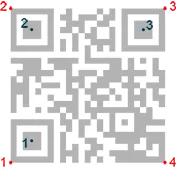
QR code geometry
Retrieve and Interpret the Read Data
Retrieving the Decoded Data
To retrieve the decoded data, you can (in growing complexity order):
Method 1
Use the method EQRCode::GetDecodedString .NET Python of an object EQRCode .NET Python.
Call this method to get an UTF-8 formatted string that contains the concatenated data of the QR code.
Optionally, give an
EByteInterpretationMode.NET Python as argument.For the
GS1QR codes:Use
EQRCode::GetDecodedString.NET Python to get the machine-readable code (for ex.:]Q31118011215190101).Use
EGs1Translator::GetHumanReadableCode.NET Python to get the human-readable version (for ex.:(11)180112(15)190101).
Method 2
Use the method EQRCodeDecodedStreamPart::GetDecodedString .NET Python of the objects EQRCodeDecodedStreamPart .NET Python.
Call this method on a part to get an UTF-8 formatted string that contains the data of this part.
Optionally, give an
EByteInterpretationMode.NET Python as argument.Concatenate the decoded string of each part.
Method 3
Use the method EQRCodeDecodedStreamPart::GetDecodedData .NET Python of the objects EQRCodeDecodedStreamPart .NET Python.
Interpret the Read Data
The QR code data can be encoded in either alphanumeric, numeric or byte modes. If a QR code contains bytes, the interpretation mode of these bytes can be embedded in the QR code through the ECI protocol or you must specify or know it.
The Interpretation Mode
Use the dedicated EByteInterpretationMode .NET Python for this purpose:
EByteInterpretationMode_Hexadecimal.NET PythonConverts all bytes to their hexadecimal values (2 characters per byte).
The escape character
0xEFBFBDsurrounds the converted byte parts.This mode overrides the ECI table indicator if it is present.
EByteInterpretationMode_UTF8.NET PythonConverts all bytes to UTF-8 if possible.
The method
EQRCode::GetDecodedStream.NET Python throws anEException.NET Python if the data are not UTF-8 compatible.
EByteInterpretationMode_Auto.NET PythonConverts all bytes in the best possible way following the ECI protocol.
The Decoded Data
The decoded string .NET Python returns the concatenated data of the QR code in UTF-8 format:
If bytes are present in the QR code data without ECI, specify the
EByteInterpretationMode.NET Python when you call the methodEQRCode::GetDecodedStream.NET Python.If bytes are present in the QR code data with ECI encoding, use the corresponding byte interpretation table (currently, only table ECI 26: UTF-8 is available).
The hexadecimal byte interpretation mode .NET Python does not throw an exception and returns all bytes parts present in the data in their hexadecimal form (2 characters per byte) surrounded by the
0xEFBFBDescape character.
The decoded stream .NET Python class consists of:
A coding mode (
basic,ECI,FNC1/GS1orFNC1/AIM).An application indicator (if the coding mode is
FNC1/AIM, otherwise0).
The decoded data .NET Python:
Is accessible from each part of the decoded stream.
Is interpreted according to its encoding (numeric, alphanumeric, byte or Kanji) and the ECI table indicator .NET Python (if the coding mode is
ECI, otherwise-1).Can be the raw bit stream (the bit data after unmasking and error correction, but before decoding as a vector of bytes).
Can be the corresponding decoded string .NET Python (specify a byte interpretation mode .NET Python if the encoding is byte without ECI coding mode or if the ECI table is not supported).
See also
See the code snippet Retrieving the Decoded Data (Advanced).
Compute the Code Print Quality
When
EQRCodeReader::SetComputeGrading.NET Python is set totrue:EasyQRCode computes the print quality indicators as defined by ISO 15415 and ISO/IEC TR 29158 (formerly known as AIM DPM-1-2006) during the
EQRCodeReader::Read.NET Python operation.Use the methods
EQRCode::GetIso15415GradingParameters.NET Python andEQRCode::GetIso29158GradingParameters.NET Python to retrieve the grades.
Note
The print quality is not yet available for Micro QR code models.
Grade computing:
For more accurate results, the modules should be at least 10 pixels in width.
EasyQRCode requires a 1-module quiet zone for grading.
EasyQRCode evaluates the Fixed Pattern Damage .NET Python with a 4-module quiet zone around the finder patterns.
If this condition is not met, the
Fixed Pattern Parameter Gradeis returned as-1.This result affects the overall symbol grade.
The Version Additional Parameter .NET Python is returned as
-1when it is not applicable.In this case, this result is ignored in the overall symbol grade.
The implementation follows closely the standard but the grades also depend on the decoding algorithm.
The results may slightly differ according to the eVision version.
Note
Our implementation of ISO 29158, a complement to ISO 15415, includes only those parameters that are unique or redefined in ISO 29158.
For parameters common to both standards, please refer to the corresponding ISO 15415 struct fields.
See also
For more information on the code grading, see Code Grading.
Read QR Codes Placed on a Grid
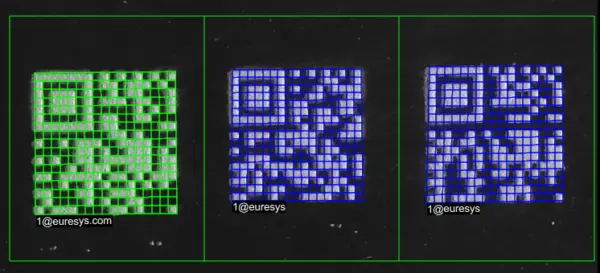
Reading Micro QR codes arranged in a grid
If the codes in the images are arranged in a regular grid-like fashion:
Use the dedicated method
EQRCodeReader::Read.NET Python overloads that take anEGrid.NET Python object to improve the reliability and the speed of the reading.Use the methods
EGrid::SetEnableCell.NET Python,EGrid::SetEnableRow.NET Python,EGrid::SetEnableColumn.NET Python orEGrid::SetEnableAll.NET Python to disable the processing of cells that you know do not contain any code.Use the method
EQRCodeGrid::GetResults.NET Python to retrieve the codes read in each cell of the defined grid.
See also
For an example, see Reading a Grid of QR Codes.
Reading Parameters
Maximum Number of Expected Codes
Use the parameter
EQRCodeReader::SetMaxNumCodes.NET Python to set the maximum number of codes that EasyQRCode returns.
Searched Models and Versions
Note
By default, EasyQRCode searches for QR codes of model 1 and 2 and all versions.
You can shorten the process by specifying the QR code model(s) and a range of versions (from 1 to 40) to search for.
By default, EasyQRCode does not search for Micro QR code symbols.
Use the parameter
EQRCodeReader::SetSearchedModels.NET Python to select the QR code models that EasyQRCode searches and returns. The available models are:Model 1
Model 2 or 2005
Micro QR code
Use the parameters
EQRCodeReader::SetMinimumVersion.NET Python andEQRCodeReader::SetMaximumVersion.NET Python to set the range of versions that EasyQRCode uses to find patterns.
Compute Grading
Use the parameter
EQRCodeReader::SetComputeGrading.NET Python to compute the QR code grading together with the code reading.See also
See Compute the Code Print Quality for more details on the code grading and the display of the results.
Show Unreliable Codes
An “unreliable code” is an object that EasyQRCode detects as a code but that it cannot read or decode.
By default, these unreliable codes are filtered out.
Use the parameter
EQRCodeReader::SetFilterOutUnreliablyDecodedQRCodes.NET Python to return and display the unreliable QR codes.
Timeout
If you have a defined time constraint:
Use
EQRCodeReader::SetTimeOut.NET Python to define a timeout for theEQRCodeReader.NET Python object. This timeout limits the amount of time available to theEQRCodeReader::Read.NET Python method and forces it to return early if needed.
Advanced Parameters
Detection Method
EasyQRCode can detect finder patterns using different methods:
EQRDetectionMethod_AdaptiveThreshold.NET Python: based on adaptive thresholding of the image.EQRDetectionMethod_Gradient.NET Python: based on gradients in the image.Legacy gradient-based detection algorithms (developed for eVision 1.2.2):
EQRDetectionMethod_PerspectiveLegacy.NET Python: improved perspective mode.EQRDetectionMethod_GradientLegacy.NET Python: basic perspective mode.
Use the parameter
EQRCodeReader::SetDetectionMethod.NET Python to select the detection method(s) that EasyQRCode uses to find patterns.
Minimum Isotropy
The isotropy of a QR code represents its rectangular deformation. It is the short side divided by the long side, whether the rectangle is vertical or horizontal.
A perfectly square QR code has an isotropy of 1.
EasyQRCode can detect rectangle QR codes with an isotropy down to 0.5.
You can adjust the minimum isotropy between 0 to 1 (the default is 0.75).
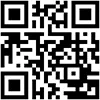
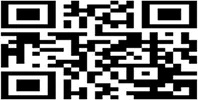
QR codes: isotropy = 1 (left), 0.5 horizontal (center) and 0.5 vertical (right)
Use the parameter
EQRCodeReader::SetMinimumIsotropy.NET Python to set the minimum isotropy of detected codes.
Minimum Score
EasyQRCode searches for the QR code finder pattern:

The QR code finder pattern
A perfect match returns a pattern finder score of 1.
Less accurate matches return lower scores.
You can adjust the minimum score between 0 to 1 (the default is 0.7).
Use the parameter
EQRCodeReader::SetMinimumScore.NET Python to set the minimum score for an instance to be accepted and returned.
Cell Polarity Confidence Threshold
The cell polarity confidence reflects the confidence in the cell digitization result, on a scale from 0 to 1. When the cell confidence is under the threshold, an additional processing is attempted to improve its polarity detection:
Increasing the threshold can improve the reading of overprinted or underprinted QR codes.
A high threshold can affect the speed and increase the probability of false positive changes.
You can adjust the threshold between 0 to 1 (the default is 0.2).
Use the parameter
EQRCodeReader::SetCellPolarityConfidenceThreshold.NET Python to set the minimum cell polarity confidence threshold.
Scan Precision
Use the parameter
EQRCodeReader::SetScanPrecision.NET Python to select the precision used to scan the search field:Fine: recommended for small QR codesCoarse: recommended for large images with medium to large QR codesAutomatic: the QR code reader determines the scan precision automatically
Foreground Detection Threshold
The foreground detection threshold is the minimum number of grayscale-values that a pixel should deviate from its local background to be considered as part of the foreground. A small threshold value may help to locate codes in low contrast images. (The default value is
10.)Use the parameter
EQRCodeReader::SetForegroundDetectionThreshold.NET Python to set the minimum foreground detection threshold.The default parameter for this value usually works well. It is thus unlikely that you have to modify it.
Adaptive Threshold Half Kernel Size
The
EQRDetectionMethod_AdaptiveThreshold.NET Python detection method is based on thresholding pixels with respect to the average of their neighborhood.Use the parameter
EQRCodeReader::SetAdaptiveThresholdHalfKernelSize.NET Python to set the half of the size of that neighborhood. Its default value is50(i.e. a101 x 101square neighborhood).This default value of
50usually works well. If that’s not the case, try to set this to a value in the range of2to4times the module size.
Note
Before eVision 26.10, that parameter was computed from the image size. Set EQRCodeReader::SetComputeAdaptiveThresholdHalfKernelSizeFromImage .NET Python to true to get the previous behavior.