Pixel Containers and Files
Pixel Container Definition
Image Objects
The eVision image objects contain image data that represents rectangular images.
Each image object has a data buffer, accessible via a pointer, where pixel values are stored contiguously, row by row.
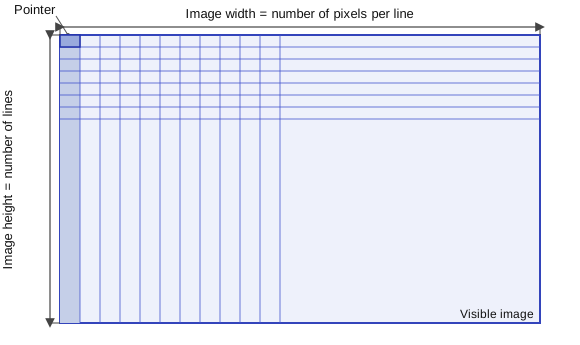
Image Main Parameters
The rectangular array of pixels of an eVision image object is characterized by the EBaseROI .NET Python parameters:
The
EBaseROI::GetWidth.NET Python is the number of pixels per row of the image.The
EBaseROI::GetHeight.NET Python is the number of rows of the image.The
EBaseROI::SetSize.NET Python allow to set both theEBaseROI::GetWidth.NET Python andEBaseROI::GetHeight.NET Python.The
EBaseROI::GetBitsPerPixel.NET Python is the number of storage bits per pixel.The
EBaseROI::GetRowPitch.NET Python is the number of bytes between two vertically adjacent pixels. It is always bigger thanWidth × (BitsPerPixel / 8).
Warning
The maximum size for the row pitch and the height are 2,147,483,647 (2³¹-1).\
The maximum size for the width is the maximum size for the row pitch divided by the number of storage bytes per pixel (
8 × BitsPerPixel).
The
EPlaneCropper::GetPlane.NET Python contains the number of color components.For gray-level images:
EPlaneCropper::GetPlane.NET Python = 1For color images:
EPlaneCropper::GetPlane.NET Python = 3
Classes
The image and ROI classes derive from the abstract class EBaseROI .NET Python and inherit all its properties.
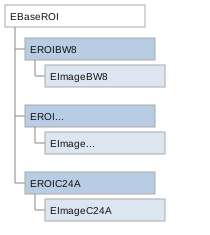
EBaseROI inheritance.
See also
For the enumeration of the available types, see EImageType .NET Python Enum.
eVision supports the following image types according to their pixel types.
eVision |
Genicam PNFC |
Definition |
Class |
|---|---|---|---|
BW8 |
Mono8 |
8-bit grayscale image (each pixel is stored in 1 byte). |
|
BW16 |
Mono16 |
16-bit grayscale image (each pixel is stored in 2 bytes). |
|
BW32 |
Mono32 |
32-bit grayscale image (each pixel is stored in 4 bytes). |
|
BW32f |
x |
Gray-level pixel value, coded as a 32-bit floating-point number (each pixel is stored in 4 bytes). |
|
C24 |
RGB8 |
24-bit color image (each pixel is stored in 3 bytes). Compatible with Microsoft® Windows RGB24 color images. |
|
C24A |
RGBa8 |
32-bit color image (each pixel is stored in 4 bytes). Compatible with Microsoft® Windows RGB32 color images. |
|
C48 |
RGB16 |
48-bit color image (each pixel is stored in 6 bytes). Compatible with Microsoft® Windows RGB48 color images. |
Note
Easy::GetBestMatchingImageType .NET Python returns the best matching image type for a given file on disk.
Depth Maps
A depth map represents a 3D object using a 2D grayscale image in which each pixel represents a 3D point.
The pixel coordinates are the X and Y coordinates of the point.
The gray value of the pixel is a representation of the Z coordinate of the point.
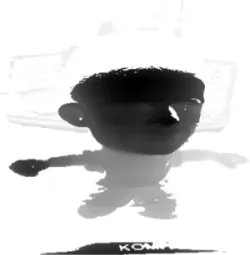
Basic Depth map concept.
eVision |
Genicam PNFC |
Definition |
Class |
|---|---|---|---|
EDepth8 |
Coord3D_C8 |
8-bit depth map (each pixel is stored in 1 byte as an integer) |
|
EDepth16 |
Coord3D_C16 |
16-bit depth map (each pixel is stored in 2 bytes as a fixed point) |
|
EDepth32f |
Coord3D_C32f |
32-bit depth map (each pixel is stored in 4 bytes as a float) |
Note
8 and 16-bit depth map values are stored in buffers compatible with the 2D eVision images.
Point Clouds
A point cloud is an unstructured set of 3D points representing discrete positions on the surface of an object.
The point clouds are produced by various 3D scanning techniques, such as laser triangulation, time of flight or structured lighting.
For details, see, for example, en.wikipedia.org/wiki/Point_cloud.
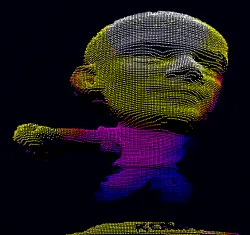
Basic Point cloud concept.
eVision |
Genicam PNFC |
Definition |
Class |
|---|---|---|---|
Point Cloud |
Coord3D_ABC32 |
Set of points coordinates (each coordinate is stored in 4 bytes as a float) |
Supported Image File Types
See also
For the enumeration of the available types, see EImageFileType .NET Python Enum.
Type |
Description |
|---|---|
BMP |
Uncompressed image data format (Windows Bitmap Format). |
JPEG |
A lossy data compression standard issued by the Joint Photographic Expert Group registered as ISO/IEC 10918-1. The compression irretrievably loses quality. |
JFIF |
JPEG File Interchange Format. |
JPEG-2000 |
A data compression standard issued by the Joint Photographic Expert Group registered as ISO/IEC 15444-1 and ISO/IEC 15444-2. eVision supports only lossy compression format, file format and code stream variants.
|
PNG |
Lossless data compression method (Portable Network Graphics). |
Serialized |
The Euresys proprietary image file format obtained from the serialization of eVision image objects. |
TIFF |
The Tag Image File Format is currently controlled by Adobe Systems and uses the LibTIFF third-party library to process images written for the 5.0 or 6.0 TIFF specification.
|
Warning
Some image file types may contain EXIF metadata indicating the orientation or cropping of the image. These metadata are not taken into consideration when opening an image.
Color Types
eVision supports the following color systems:
Type |
Description |
|---|---|
Intensity, Saturation, Hue |
|
CIE Lightness, a*, b* |
|
Lightness, Chroma, Hue |
|
Lightness, Saturation, Hue |
|
CIE Lightness, u*, v* |
|
NTSC/PAL/SMPTE Red, Green, Blue |
|
Value, Saturation, Hue |
|
CIE XYZ |
|
CCIR Luma, Inphase, Quadrature |
|
CCIR Luma, Saturation, Hue |
|
CCIR Luma, U Chroma, V Chroma |
Pixel and File Types Compatibility
For the compatible combinations in the following table, the image integrity is preserved with no data loss (except from JPEG and JPEG2000 with lossy compression).
The other combinations are not supported and an exception occurs if you use them.
Type |
BMP |
JPEG |
JPEG2000 |
PNG |
TIFF |
Serialized |
|---|---|---|---|---|---|---|
BW8 |
✓ |
✓ |
✓ |
✓ |
✓ |
✓ |
BW16 |
– |
– |
✓ |
✓ |
✓ ¹ |
✓ |
BW32 |
– |
– |
– |
– |
✓ ¹ |
✓ |
BW32f |
– |
– |
– |
– |
– |
✓ |
C24 |
✓ |
✓ |
✓ |
✓ |
✓ |
✓ |
C24A |
✓ |
– |
– |
✓ |
– |
✓ |
C48 |
– |
– |
– |
✓ |
✓ ¹ |
✓ |
Depth8 |
✓ |
✓ |
✓ |
✓ |
✓ |
✓ |
Depth16 |
– |
– |
✓ |
✓ |
✓ ¹ |
✓ |
Depth32f |
– |
– |
– |
– |
– |
✓ |
✓ ¹ : BW16 and BW32 are not supported by Baseline TIFF readers.