EasyObjectInertia
Support |
|
|---|---|
Required licenses |
EasyObject |
Recommended images |
The images |
Location |
|


Purpose
This sample program demonstrates how to:
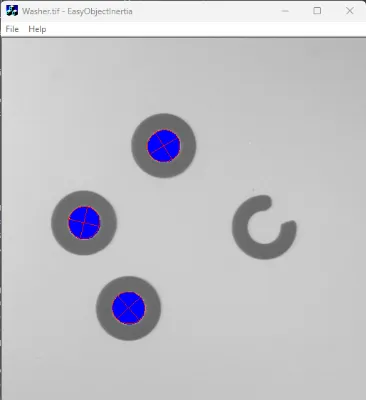
Find blobs (objects or holes that have the same gray level range) in the image.
Keep only the blobs whose area is in a given range.
Code highlights
Define an image encoder to encode an image (
m_Image) into an objectECodedImage2(m_CodedImage).EImageEncoder encoder; encoder.Encode(m_Image, m_CodedImage);
Add the objects to an object selection object (
EObjectSelection m_Selection).// Select all the objects from the coded image m_Selection.Clear(); m_Selection.AddObjects(m_CodedImage);
Filter the selection of objects by removing all objects whose area is outside the range [50, 10 000].
// Remove objects too small or too large
m_Selection.RemoveUsingUnsignedIntegerFeature(EFeature_Area, 50, 10000, EDoubleThresholdMode_Outside);
Draw the selected objects and their ellipse of inertia with their diagonals.
// Draw all the selected objects
CodedImage.Draw(drawAdapter, selection);

// Draw the ellipses of inertia with their diagonals, using a red pen
const ERGBColor redPen(255, 0, 0);
CodedImage.DrawFeature(drawAdapter, redPen, EDrawableFeature_Ellipse, selection, 1.0f, 1.0f, 0.0f, 0.0f, true);