EasyObject - Analyzing Blobs
EasyObject is the blob analysis library of eVision. A blob is a grouping of neighboring pixels of the same gray level range. The pixels from a blob are connected: there exists a path between any couple of pixels from the blob that is entirely within the blob. This is also called connected-componenent analysis.
EasyObject can be used on BW8 .NET Python, BW16 .NET Python and C24 .NET Python images and its processing can be restricted to ROIs and to complex regions.
Process and Workflow
        ---
title: Basic workflow of EasyObject
---
flowchart LR
    Image["Image"]

    subgraph Encoder["Image encoder (EImageEncoder)"]
        direction TB
        Segment --> Blobs["Build blobs"]
    end

    Image --> Encoder

    Encoder --> CodedImage["Coded image (ECodedImage2)"]

    CodedImage -->|select| ObjectSelection["Object selection (EObjectSelection)"]

    ObjectSelection -->|sort| ObjectSelection

    ObjectSelection -->  Objects@{ shape: docs, label: "Array of blobs"}
It works by encoding an image into a coded image. The
encoder.NET Python classifies the image into several layers with image segmenters and builds the blobs from the selected layers.It can compute various features for each objects (for example its area, bounding box, etc.).
These features can be used to select, filter, or sort the blobs with
EObjectSelection.NET Python.The
object template matcher.NET Python can be used to align and match the blobs to a reference image.There are two kinds of blobs:
objects that are built directly by the encoder from the segmentation of the image
holes that are built from the objects.
Both types of blobs have the same class, named
ECodedElement.NET Python.
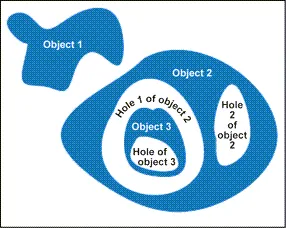
Objects and holes.
Contents
Segment and build blobs.
Build holes and computes various features.
Select and sort objects and holes.
Matching objects to a template.
Validate images using a Golden Template.
Quick Links
List of all Classes, Structs and Enumerations of the EasyObject library.
Code snippets for the EasyObject library.