Using EasyMatrixCode
This document details all the capabilities of EasyMatrixCode beyond calling EMatrixCodeReader::Read() .NET Python on an image.
Read Parameters
Tune the following parameters to optimize the performance of EasyMatrixCode.
The
EMatrixCodeReader::SetMaxNumCodes.NET Python parameter:Tells the
EMatrixCodeReader.NET Python the number of codes that can be in the image.
Warning
Be aware that setting MaxNumCodes to a value bigger than the number of codes in big images can make EasyMatrixCode slow, as it will keep trying to find codes that do not exist in the image.
The
EMatrixCodeReader::SetTimeOut.NET Python parameter:Limits the amount of time that the
EMatrixCodeReader::Read.NET Python andEMatrixCodeReader::Learn.NET Python methods may take to process a single image.Is defined in microseconds.
Is set, by default, to a value that exceeds one hour.
The
EMatrixCodeReader::SetReadMode.NET Python parameter affects the behavior of theEMatrixCodeReader::Read.NET Python method:The setting
Speed.NET Python results in the shortest processing times and theEMatrixCodeReader::Read.NET Python method stops as soon as one of the following is true:The method has found
EMatrixCodeReader::SetMaxNumCodes.NET Python codes.The method reaches the
EMatrixCodeReader::SetTimeOut.NET Python time limit.The
EMatrixCodeReader::Read.NET Python process is completely finished.
The setting
Quality.NET Python results in the best grading results and theEMatrixCodeReader::Read.NET Python method keeps trying to improve its detection until one of the following is true:The method reaches the
EMatrixCodeReader::SetTimeOut.NET Python time limit.The
EMatrixCodeReader::Read.NET Python process is completely finished.
The
EMatrixCodeReader::SetComputeGrading.NET Python parameter:Determines if the
EMatrixCodeReader::Read.NET Python method computes the grading properties of theEMatrixCode.NET Python object.Is set to
falseby default.
The
EMatrixCodeReader::SetMatrixCodeDimensionsRange.NET Python parameter:Sets the range of valid lengths in pixels that the sides of the data matrices must satisfy to be detected.
You can also use this parameter to extend the reading capability to codes relatively small compared to the input image.
This is an advanced parameter, it is harder to tune than the other ones.
After the tuning:
Use the
EMatrixCodeReader::Save.NET Python method to store the state of theEMatrixCodeReader.NET Python on the disk.Use the
EMatrixCodeReader::Load.NET Python method, at any time, to restore the saved state.
Note
The EMatrixCodeReader::Save .NET Python and EMatrixCodeReader::Load .NET Python methods also store the effects of EMatrixCodeReader::Learn .NET Python (see below).
Contents of the EMatrixCode Object
When a data matrix code is read from an image, the EMatrixCode .NET Python object contains the following information:
The
decoded string.NET Python of the data matrix.The logical
width.NET Python andheight.NET Python of the data matrix.The encoding type (
IsECC200.NET Python,IsGS1.NET Python) of the data matrix.The printing
polarity.NET Python (black on white or white on black) of the data matrix.The
ISO 15415.NET Python,ISO 29158.NET Python orSemi T10.NET Python grading results of the data matrix (ifEMatrixCodeReader::SetComputeGrading.NET Python istrue).The
reliability score.NET Python of the data matrix.Methods to draw the data matrix
position.NET Python,grid.NET Python,errors.NET Python anddecoded string.NET Python on the source image.
Using GS1 Data Matrix Codes
EasyMatrixCode is able to find and decode GS1-compliant data matrix codes.
The GS1 standard adds semantic identifiers to the contents of a data matrix code. These identifiers are interpreted in an easy and consistent way.
The structure of GS1-compliant content is as follows:
]d2[GS1]{Id1}{Value1}[GS1?]{Id2}{Value2}…
where:
]d2is the string identifying a GS1-compliant stream,[GS1]is the GS1 escape character (0x1d),[GS1?]means that the[GS1]escape character is present there if the previous application identifier has a variable size value,{Id}is an application identifier,{Value}is the value associated with that identifier.
Example:
The string:
]d2[GS1]10GR-1-GNU[GS1]11180112151901012112345
is interpreted as follows:
]d2 |
[GS1] |
10 |
GR-1-GNU |
[GS1] |
11 |
180112 |
15 |
190101 |
21 |
12345 |
Id1 |
Value1 |
Id2 |
Value2 |
Id3 |
Value3 |
Id4 |
Value4 |
The first Id is 10, this means the first value is the batch / lot number whose size is at most 20 chars.
Thus, the product has a batch / lot number of GR-1-GNU.
As batch / lot numbers are of a variable size, a separator is required after GR-1-GNU.
The second Id is 11, this means the second value is the production date which always consists of 6 digits.
The product has a production date of 180112 (12 of January 2018).
As production dates have a fixed size, no group separator is required after it.
The third Id is 15, this means the third value is the “best before date” which always consists of 6 digits.
The product has a “best before date” of 190101 (1st of January 2019).
As “best before dates” have a fixed size, no group separator is required after it.
The fourth Id is 21, this means the fourth value is the serial number whose size is at most 20 chars.
The product has a serial number of 12345.
Altough serial numbers are of variable size, 12345 is the last part of the decoded string, so there is no group separator after it.
See also
For more information, see https://www.gs1.org/
Use
EGs1Translator::GetHumanReadableCode.NET Python to get the human-readable version:(10)GR-1-GNU(11)180112(15)190101(21)12345
Computing the Print Quality
To compute the print quality indicators as defined by BC11, ISO 15415, ISO/IEC TR 29158 (formerly known as AIM DPM-1-2006) and SEMI T10-0701 standards, retrieve the grades with the EMatrixCode::GetIso15415GradingParameters .NET Python, EMatrixCode::GetIso29158GradingParameters .NET Python and EMatrixCode::GetSemiT10GradingParameters .NET Python accessors of the EMatrixCode .NET Python class.
Note
The print quality of the matrix codes is computed during the EMatrixCodeReader::Read .NET Python operation, only if the EMatrixCodeReader::SetComputeGrading .NET Python parameter is set to true.
Note
Our implementation of ISO 29158, a complement to ISO 15415, includes only those parameters that are unique or redefined in ISO 29158.
For parameters common to both standards, please refer to the corresponding ISO 15415 struct fields.
See also
For more information on the code grading, see Code Grading.
Learning a Matrix Code
To improve the processing times and to read small codes, learn a matrix code model from representative images as follows:
Load the image of the matrix code you want to learn from.
Call the
EMatrixCodeReader::Learn.NET Python method to learn from the image.Repeat with additional images if necessary.
Save the
EMatrixCodeReader.NET Python state to the disk with theEMatrixCodeReader::Save.NET Python method.
By default, the EMatrixCodeReader::Learn .NET Python method explores the full range of the EMatrixCodeReader .NET Python internal parameters to search for data matrices in any type of context.
If the learning process finds valid data matrices, the internal parameters that were necessary to find them are enabled, set and ordered in a way meant to improve both reading speed and capability in similar contexts.
The user-defined advanced parameters (
EMatrixCodeReader::SetMaxNumCodes.NET Python,EMatrixCodeReader::SetTimeOut.NET Python,EMatrixCodeReader::SetReadMode.NET Python andEMatrixCodeReader::SetComputeGrading.NET Python) are not affected by theEMatrixCodeReader::Learn.NET Python method.After setting
EMatrixCodeReader::SetMatrixCodeDimensionsRange.NET Python, a call toEMatrixCodeReader::Read.NET Python orEMatrixCodeReader::Learn.NET Python restricts the processing around that range. This can dramatically improve the speed of the process.Note
However, if you set the property after the learning, the learning is reset and must be redone.
If the
EMatrixCodeReader::Learn.NET Python method is not able to detect any code in the image, it throws an exception.Note
The internal processing structure is not affected in this situation.
If the
EMatrixCodeReader::Learn.NET Python method has been called, all the subsequent images read or learned must have the same dimensions as the one used in the first learn call, otherwise an exception is thrown.
Restoring the State of an EMatrixCodeReader
To restore a previously saved
EMatrixCodeReader.NET Python state, call theEMatrixCodeReader::Load.NET Python method.To restore the default state of an
EMatrixCodeReader.NET Python instance, call theEMatrixCodeReader::ResetLearning.NET Python method.
Reading Using a Grid
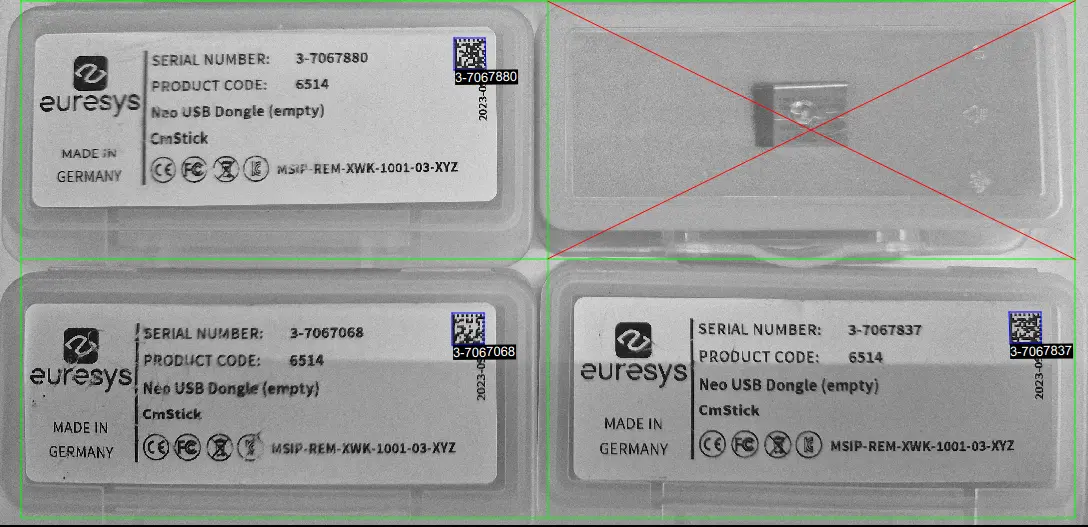
If the codes in the images are arranged in a regular grid-like fashion:
Use the dedicated method
EMatrixCodeReader::Read.NET Python overloads that returnEMatrixCodeGrid.NET Python objects to improve the reliability and the speed of the reading.Use the methods
EGrid::SetEnableCell.NET Python,EGrid::SetEnableRow.NET Python,EGrid::SetEnableColumn.NET Python orEGrid::SetEnableAll.NET Python to disable the processing of cells that you know do not contain any code.Use the method
EMatrixCodeGrid::GetResults.NET Python of the returnedEGrid.NET Python object to retrieve the codes read in each cell of the defined grid.
See also
For an example, see Reading a Grid of Matrix Codes
Returning Unreadable Codes
Some codes may have their data part so damaged that they cannot be decoded.
However, you can set
EMatrixCodeReader::SetEnableReturnUnreliableCodes.NET Python totrueto return them anyway.These codes are placed at the end of the return vector.
Calling
EMatrixCode::GetIsReliable.NET Python on them returnsfalse.
Use the usual methods to retrieve the estimated logical size as well as the position of the unreliable codes detected.
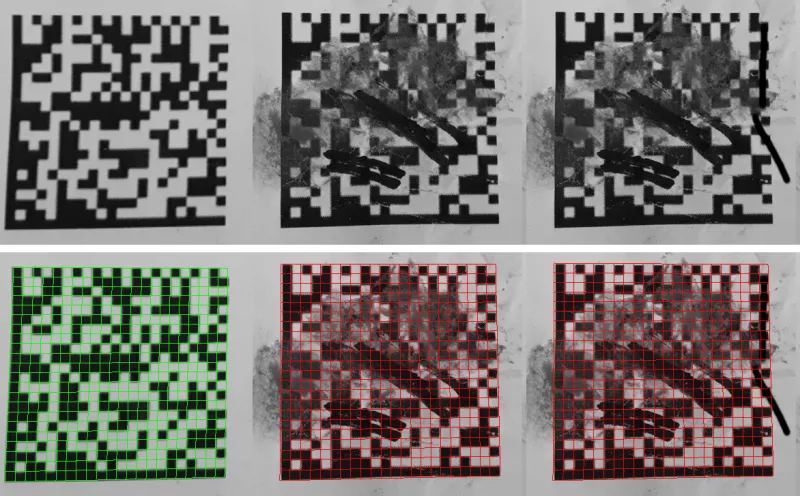
Since the data part is no longer a rejection criterion, the likelihood that a false positive code is returned increases.
To filter out these false positive detections, use the value returned by
EMatrixCode::GetReliabilityScore.NET Python as a filtering threshold. This score translates as confidence that the detected object is an actual data matrix code.
Asynchronous Processing
EasyMatrixCode supports asynchronous processing. This means that you can launch multiple processing threads in parallel, each reading the matrix codes in its own image.
From the main thread, to manually stop the EMatrixCodeReader::Read .NET Python method in any of these processing threads at any time, use the EMatrixCodeReader::StopProcess .NET Python method.
When you manually stop the EMatrixCodeReader::Read .NET Python method:
The search for matrix codes stops immediately, whether it has found matrix codes in the image or not.
To retrieve all matrix codes found before the manual stop, use the
EMatrixCodeReader::GetReadResults.NET Python accessor.