Learn a Pattern from Vectors
Learning
EasyFind detects the instances of a pattern in images.
The reference pattern is a set of all the feature points that EasyFind computes during the learning process:
EasyFind can extract these points from a bitmap representation of the pattern (see Learn the Pattern from Image(s)).
Or it can use the feature points that are directly given by geometrical shapes as described below.
To learn a pattern from geometrical shapes:
Use the class
EVectorModel.NET Python to hold a collection of shapes as a vector model.Load the
EVectorModelfrom an externaldxffile or use the eVision API to define it.that
EVectorModelobject is then input toEPatternFinder::Learn.NET Python.
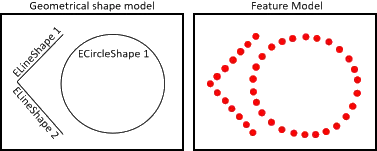
A geometrical shape model and its corresponding features
Learn a set of EShape
Note
Creating an EVectorModel from a set of EShape is not available in eVision Studio, but loading a dxf file is.
Learn a dxf file
Note
This feature is available in eVision Studio.
Alternatively, to define the geometrical shapes of your model, you can load an EVectorModel .NET Python from an external dxf file.
Once loaded, the EVectorModel .NET Python:
Holds a collection of shapes.
Holds a center position depending on the method used for the definition of the
dxf.Each shape must potentially still be oriented.
Vector Model Parameters
Scaling the Vector Model
Use the parameter
EVectorModel::SetScale.NET Python to set the scale of your vector model.The scale represents the size of the instances in the search field (in pixels) divided by their size in the
EVectorModel.NET Python.
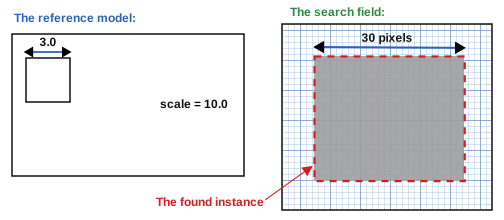
A vector model with a scale of 10 and the corresponding instance
Centering the Vector Model
Use the parameter
EVectorModel::SetCenter.NET Python to set or get the center of your vector model.The center is the anchor point in the
EVectorModel.NET Python coordinate system.After the
Find, you can retrieve its position in the search field coordinates as illustrated below.
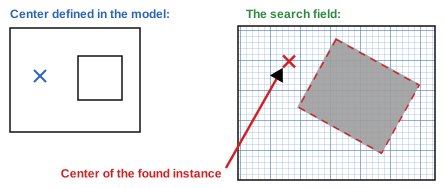
A vector model whose center is on its left and the corresponding instance
Orienting the Transitions in the Vector Model
To search for light to dark or dark to light transitions, set the polarity attribute for the vector model with the
EShape::SetProperty.NET Python method.
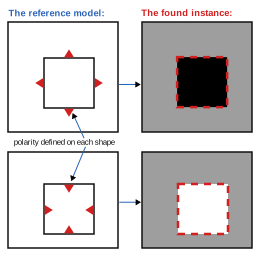
The same vector model with 2 different orientation and the corresponding instances
Code
Sets the polarity of one of the EShape composing an EVectorModel.
Legacy::EFrameShape& vectorModelRoot = vectorModel.GetRoot();
vectorModelRoot.GetDaughter(0)->SetProperty("polarity", "direct");
Euresys.Open_eVision.Legacy.EFrameShape vectorModelRoot = vectorModel.Root;
vectorModelRoot.GetDaughter(0).SetProperty("polarity", "direct");
vectorModelRoot = vectorModel.Root
vectorModelRoot.GetDaughter(0).SetProperty("polarity", "direct")
Note
We recommend tuning this graphically in eVision Studio rather than through the API. You can have a look at the sample “Find a vector pattern” specifically.