Calibration Modes and Models
The calibration establishes the relationship between real-world point coordinates and image pixels.
The real-world coordinates are defined with respect to a real-world reference plane.
The real-world coordinates are expressed as 2D points where the Z coordinates is by convention equal to 0 on the reference plane.
The object
ECameraCalibration.NET Python represents the transformation from the real-world coordinates to the image coordinates (also called the sensor coordinates).Use
ECameraCalibration::WorldToSensor.NET Python to transform from the real-world coordinates to the image coordinates.Use
ECameraCalibration::SensorToWorld.NET Python for the reverse transformation.
This object also has a method to:
Set or compute the calibration: See Computing the Calibration Model.
Perform the unwarping: See Unwarping an Image.
The property
ECameraCalibration::GetCalibrationModes.NET Python is a combination of the flagsECalibrationMode.NET Python that indicates the model used for the calibration.The
ECameraCalibration.NET Python has 4 categories of models:No calibration at all where the real-world coordinates of a point are identical to the image coordinates of this point (
ECalibrationMode_Raw.NET Python).The field-of-view calibration model where the calibration mode is the combination of the modes
ECalibrationMode_Scaled.NET Python,ECalibrationMode_Anisotropic.NET Python,ECalibrationMode_Skewed.NET Python,ECalibrationMode_Tilted.NET Python andECalibrationMode_Radial.NET Python.The advanced calibration model that is equivalent to the complete field-of-view model with more distortion coefficients (
ECalibrationMode_Advanced.NET Python).The empirical models that are based on a quadratic model (mode
ECalibrationMode_Quadratic.NET Python) or a bilinear model (ECalibrationMode_Bilinear.NET Python).
All calibration models have:
A center (
ECameraCalibration::GetCenter.NET Python) that represents the pixel coordinates of the real world point (0, 0).A sensor width (
ECameraCalibration::GetSensorWidth.NET Python) and a sensor height (ECameraCalibration::GetSensorHeight.NET Python) that correspond to the image size.
Note
When computing the calibration, pass the mode or the combination of modes that you want to test. The method selects the model that has the best precision on the calibration image.
See Computing the Calibration Model.
The field-of-view model
The field-of-view model can combine various modes to express the transformation from the real-world coordinates to the sensor coordinates.
To manually set the field-of-view model, use
ECameraCalibration::SetSensor.NET Python orECameraCalibration::SetSensorUsingResolution.NET Python. These methods have different representations of the scaling.
Scaling
You can express the scaling in 2 ways:
Using the field-of-view width and height (
ECameraCalibration::GetFieldWidth.NET Python andECameraCalibration::GetFieldHeight.NET Python): the size of the real-world reference plane if its limits correspond to the image edges (expressed in metric units).Using the X and Y resolution (
ECameraCalibration::GetXResolution.NET Python andECameraCalibration::GetYResolution.NET Python): the number of pixels corresponding to a metric unit (in pixels/metric unit)
The field-of-view width (\(w_{fov}\)) and height (\(h_{fov}\)) and the X and Y resolution (\(R_X\) and \(R_Y\)) are linked as follows:
\(w_{sensor} = w_{fov} * R_X\)
\(h_{sensor} = h_{fov} * R_Y\)
The pixel width (\(w_{pixel}\)) and height (\(h_{pixel}\)) can also be expressed using the field-of-view width and height or the X and Y resolution:
\(w_{pixel} = \frac{w_{fov}}{w_{sensor}} = \frac{1}{R_X}\)
\(h_{pixel} = \frac{h_{fov}}{h_{sensor}} = \frac{1}{R_Y}\)
By default, the model assumes an isotropic scaling and the X and Y resolution are the same.
When the model is anisotropic (
ECalibrationMode_Anisotropic.NET Python), the anisotropy is also represented by the ratio of the X and Y resolution (ECameraCalibration::GetRatio.NET Python).
Skew
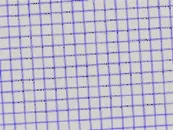
The skew angle (ECameraCalibration::GetAngle .NET Python) is the angle formed by the X axis of the real-world reference frame with the horizontal image edge.
Tilt
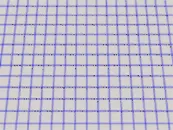
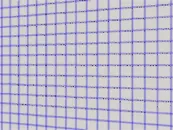
The X and Y tilt (ECameraCalibration::GetTiltXAngle .NET Python and ECameraCalibration::GetTiltYAngle .NET Python) happens when the reference frame is not perpendicular to the optical axis. They correspond to the required rotations around the real world X and Y axis that would bring the Z axis parallel to the optical axis.
Perspective strength
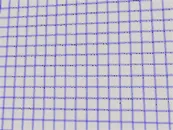
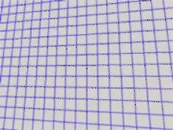
The perspective strength (ECameraCalibration::GetPerspectiveStrength .NET Python) gives a relative measure of the perspective effect.
The shorter the focal length, the larger the value.
The closer the reference plane is to the camera, the larger the value.
Distortion strength
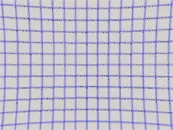
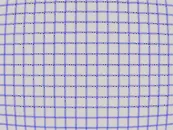
The distortion strength (ECameraCalibration::GetDistortionStrength .NET Python) gives a relative measure of radial distortion in the image corners, that is the ratio of image diagonal length with and without distortion.
Effects of the calibration modes
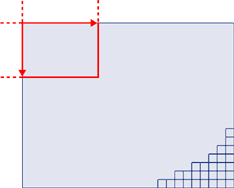
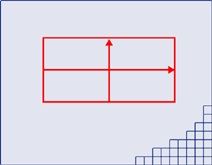
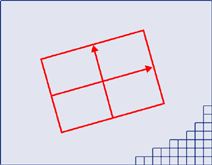
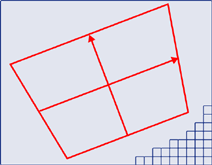
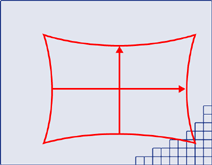
The following table shows the effects of the projection of a real-world rectangle in an image according to different calibration mode.
Modes |
Description |
Visualization |
|---|---|---|
No calibration |
|
|
The physical pixels are not squared. The image can appear stretched |
|
|
|
Affine isotropic transformation (rotation, translation and scaling) |
|
Further away objects appears smaller. Lines remains straight but angles are not preserved. |
|
|
Barrel distortion |
|
The advanced model
The advanced model (ECalibrationMode_Advanced .NET Python) is equivalent to a field-of-view calibration model with:
All modes activated.
5 distortion coefficients: \(k_1\), \(k_2\), \(k_3\), \(p_1\) and \(p_2\).
The empirical models
The empirical models are either based on a quadratic (ECalibrationMode_Quadratic .NET Python) or a bilinear (ECalibrationMode_Bilinear .NET Python) model.
These models do not expose their parameters.