EasyMailBarCode - Reading Mail Bar Codes
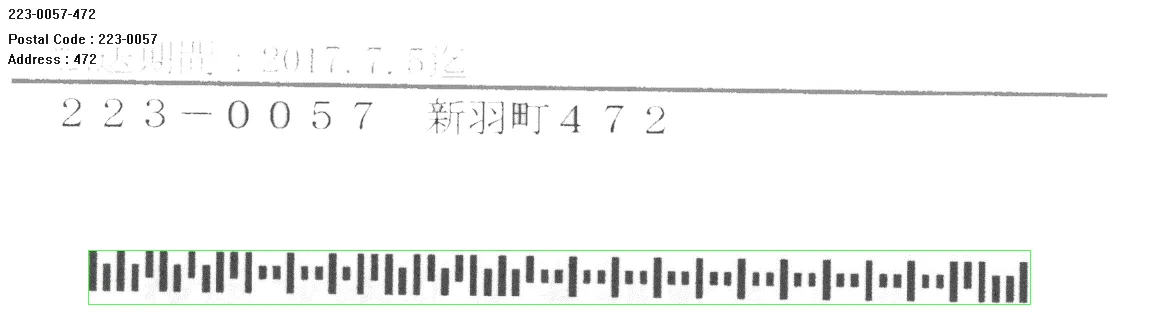
Mail bar code example.
Principles
A mail bar code is a 4-state bar code. This is a special kind of bar code where data is encoded on the height and position of the bars rather than their width.
Each bar can have one of 4 possible states:
Short and centered
Medium and elevated
Medium and lowered
Full height
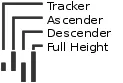
Types of bars in a 4-state bar code.
Specifications
The Mail Bar code Reader:
Detects and decodes postal 4-state bar codes.
Supports multiple mail bar codes in an image.
Supports various symbologies.
Supports the 4 main bar code orientations, with a tolerance of 3°.
Detects bars that are at least 3 pixels wide.
Workflow
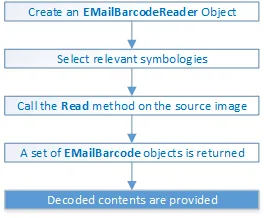
Workflow of EMailBarcodeReader.
Mail Bar Code Symbologies
The symbology of a mail bar code specifies how to decode the bar code and how to interpret its contents.
Every country uses its own flavor of mail bar code, or symbology. Some countries, like the US, even use multiple symbologies.
As of now, the EMailBarcodeReader .NET Python supports the following symbologies:
US
PLANET
POSTNET
Intelligent Mail
Japan
Japan Post
See also
A description of the properties and look of each symbology can be found here
Mail Bar Code Orientation
The EMailBarcodeReader .NET Python is designed to be used in mail-handling machines. As such it is optimized to handle the 4 main orientations you encounter in such machines:
No Rotation: The mail bar code is horizontal and read from left to right
Rotated
90°to the right: The mail bar code is vertical and read from top to bottomRotated
90°to the left: The mail bar code is vertical and read from bottom to topRotated
180°: The mail bar code is upside down, horizontal, and read from right to left.
For each of these orientations, an additional rotation of -3 to 3 degrees is allowed.
Checksum
Some symbologies specify the presence of a checksum in the bar code data.
This checksum is an additional character computed from all others encoded characters. It enables the reader to check the decoded character string coherence.
The
EMailBarcodeReaderallows the user to verify or not the checksum for all enabled symbologies.By default, checksum is not controlled.
To enable or disable checksum verification for all enabled symbologies, use
EMailBarcodeReader::SetValidateChecksum.NET Python.
Reading the Mail Bar Codes in an Image
To read all the mail barcodes in a given image:
Create an
EMailBarcodeReader.NET Python object.Optionally, select the relevant symbologies using
EMailBarcodeReader::SetExpectedSymbologies.NET Python.By default, Mail Bar code Reader will consider all supported symbologies.
Optionally, select the relevant orientations using
EMailBarcodeReader::SetExpectedOrientations.NET Python.By default, Mail Bar code Reader will test all supported orientations.
Call
EMailBarcodeReader::Read.NET Python on the source image or ROI.Each mail bar code detected is returned as an
EMailBarcode.NET Python object.Each
EMailBarcode.NET Python objects contains the following information:The decoded string, using
EMailBarcode::GetText.NET Python.The decoded string, split up in semantic parts, using
EMailBarcode::GetComponentStrings.NET Python.The bar code orientation, using
EMailBarcode::GetOrientation.NET Python.The bar code position, using
EMailBarcode::GetPosition.NET Python.
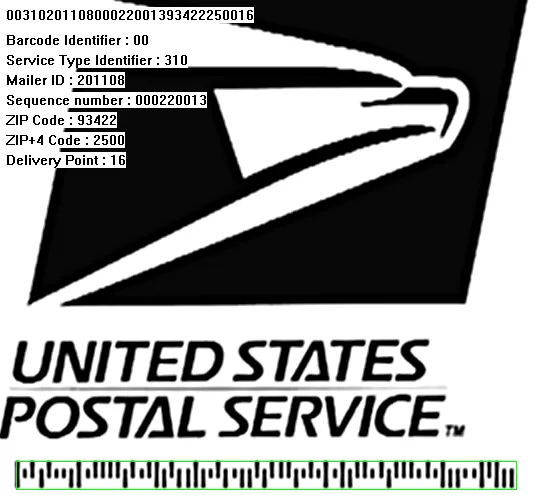
US Intelligent Mail bar code with highlighted position and decoded information.
Advanced Parameters
The advanced parameters of the EMailBarcodeReader .NET Python object are:
EMailBarcodeReader::SetEnableDottedBarcodes.NET Python activates the support for dotted barcodes (barcodes whose bars are printed with dots).By default, this property is set to false.

Dotted Mail Barcode.
EMailBarcodeReader::SetEnableClutteredBarcodes.NET Python activates the support for cluttered barcodes (barcodes in which some bars are connected).By default, this property is set to true.

Cluttered Mail Barcode.
EMailBarcodeReader::SetValidateChecksum.NET Python activates the validation of the bar codes checksums, if present.By default, this property is set to false.
Quick Links
List of all Classes, Structs and Enumerations of the EasyBarCode library.
Code snippets for the EasyBarCode library.
All the code symbologies read by the text and code reading libraries.