Easy3DLaserLine - Laser Line Extraction and Calibration
Easy3DLaserLine is used to reconstruct 3D objects from a laser-line triangulation system.
In a laser-line triangulation system, a laser line is projected on the object to measure. A camera is viewing the laser line from a different angle and position. The line deformation observed by the camera contains the shape information of the measured object.
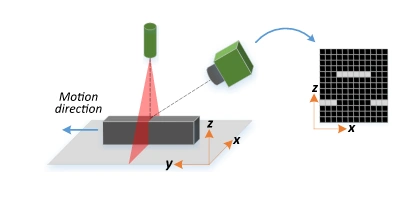
Setup of a laser-line triangulation system.
Scanning the object consists in moving it under the laser line and recording multiple images.
From the scanning you can reconstruct its 3D shape.
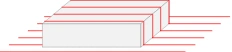
Representation of successive scans of a laser line upon an object.
A Laser Line Extraction (LLE) algorithm is required to create a depth map from a sequence of profiles of the object captured by the camera sensor.
The objective of an LLE algorithm is to measure the line position along a vertical profile in every column of a sensor frame, within a user-defined region of interest (ROI).
For every step of the object position, the detection analyzes each column of a frame individually and produces a row of output positions, stored as gray values.
The figure below illustrates this process.
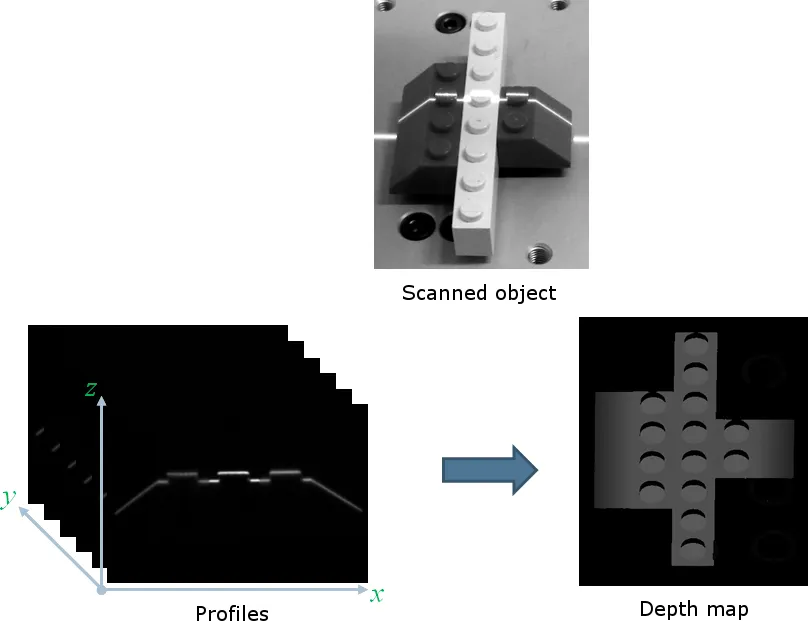
Computation of a depth map using the captured profiles on a scanned object.
The class ELaserLineExtractor .NET Python provides the laser line extraction functionality.
The line position returned by the laser line extraction algorithms is relative to the bottom of the region of interest. So, values in the depth map range from 0 (bottom of the ROI) to the height of the ROI.
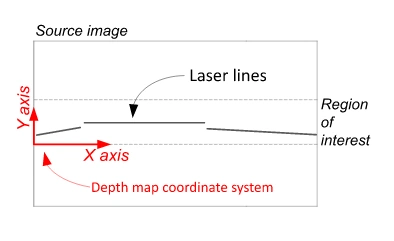
The generated depth map maps its values to the region of interest of the input profiles.
Contents
Principles of laser line triangulation and extraction to 3D data using Easy3DLaserLine.
Benchmark of hardware and software-based line extraction with Easy3DLaserLine.
How to calibrate the laser-line extraction process.
Quick Links
List of all Classes, Structs and Enumerations of the Easy3DLaserLine library.
Code snippets for the Easy3DLaserLine library.
See also
The 3D Laser Line Extraction sample in eVision Studio illustrates how to use the Easy3DLaserLine library. The 3D LLE with text reading sample further illustrates the use of OCR in combination with laser line extraction in a single pipeline.