Easy3DObject - Extracting 3D Objects
Easy3DObject extracts objects and their features from a ZMap.
The
E3DObjectExtractor.NET Python class uses a set of criteria to select the objects to extract.The extracted objects are instances of the
E3DObject.NET Python class.
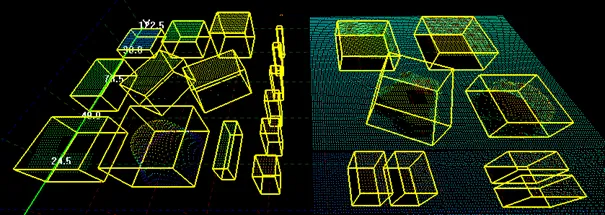
Representation of 3D objects.
The basic workflow is as follows:
Load or build a ZMap (from an image or a point cloud).
Construct an
E3DObjectExtractor.NET Python instance.Set the selection criteria of the
E3DObjectExtractor.NET Python instance.Extract the 3D objects, with or without an
ERegion.NET Python.Get and process the extracted objects list.
#include <eVision/Easy3D/Easy3DObject/E3DObjectExtractor.h>
using namespace eVision;
using namespace eVision::Easy3D;
// EZmap constructor
EZMap8 zMap;

// Extractor constructor
E3DObjectExtractor extractor;

// Setting a selection criterion
extractor.SetWidthRange(EFloatRange(10, 500));

// Extracts the objects from the EZMap
int regionNB = extractor.Extract(zMap);

// Retrieve the extracted objects
std::vector<E3DObject> objects = extractor.GetObjects();
using eVision;
using eVision.Easy3D;
// EZmap constructor
EZMap8 zMap = new EZMap8();

// Extractor constructor
E3DObjectExtractor extractor = new E3DObjectExtractor();

// Setting a selection criterion
extractor.WidthRange = new EFloatRange(10, 500);

// Extracts the objects from the EZMap
int regionNB = extractor.Extract(zMap);

// Retrieve the extracted objects
E3DObject[] objects = extractor.Objects;
import eVision
from eVision import Easy3D
# EZmap constructor
zmap = Easy3D.EZMap8()

# Extractor constructor
extractor = Easy3D.E3DObjectExtractor()

# Setting a selection criterion
extractor.WidthRange = eVision.EFloatRange(10, 500)

# Extracts the objects from the EZMap
regionNB = extractor.Extract(zmap)

# Retrieve the extracted objects
objects = extractor.Objects
Contents
Features that can be retrieved from a 3D object.
How to extract and use 3D objects.
Quick Links
List of all Classes, Structs and Enumerations of the Easy3DObject library.
Code snippets for the Easy3DObject library.
See also
The 3D objects extractor sample in eVision Studio illustrates how to use the Easy3DObject library.