EasySpotDetector - Detecting Spots with Deep Learning
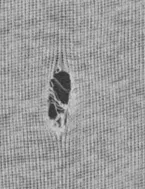
A particle detected by the EasySpotDetector library.
Warning
Please note that EasySpotDetector is deprecated and will be removed in release 27.6.
Purpose
EasySpotDetector uses local segmentation to extract salient objects from the background, then a deep learning classifier can sort them. It is applicable to many materials like films, coated surfaces, steel, battery foils, glass…
Detection of faint defects and contamination, even in noisy images.
Fast processing for in-line inspection.
Compatible with acquisition from line-scan and 2D cameras.
Optional pre-alignment of the region of interest on the part edges.
Optional deep learning classification of the defects.
Detecting Spots
To detect particles in an image:
Create an
ESpotDetector.NET Python object and configure the detection parameters.Call
ESpotDetector::Detect.NET Python.Retrieve the detected
ESpot.NET Python objects withESpotDetector::GetSpots.NET Python.
#include <eVision/EasySpotDetector/ESpotDetector.h>
using namespace eVision;

// Image constructor
EImageBW8 srcImage;

// Spot detector constructor
ESpotDetector detector;

// Setup the particle detector parameters with adequate values
EParticleDetectionParameters detectionParams;
detectionParams.Polarity = ESpotPolarity_Black;
detectionParams.Threshold = 12;
detectionParams.MinSize = 5;
detectionParams.MaxSize = 50;
detectionParams.MinArea = 25;
detector.SetParticleDetectionParameters(detectionParams);

// Activate the particle detection
detector.SetEnableParticleDetection(true);

// Perform the detection and get the number of detected spots
int32_t nSpot = detector.Detect(srcImage);

// Finally, get the detected spots
std::vector<ESpot> spots = detector.GetSpots();
using eVision;
// Image constructor
EImageBW8 srcImage = new EImageBW8();

// Spot detector constructor
ESpotDetector detector = new ESpotDetector();

// Setup the particle detector parameters with adequate values
EParticleDetectionParameters detectionParams;
detectionParams.Polarity = ESpotPolarity.Black;
detectionParams.Threshold = 12;
detectionParams.MinSize = 5;
detectionParams.MaxSize = 50;
detectionParams.MinArea = 25;
detector.ParticleDetectionParameters = detectionParams;

// Activate the particle detection
detector.EnableParticleDetection = true;

// Perform the detection and get the number of detected spots
uint nSpot = detector.Detect(srcImage);

// Finally, get the detected spots
ESpot[] spots = detector.Spots;
import eVision

# Image constructor
srcImage = eVision.EImageBW8()

# QR code reader constructor
detector = eVision.ESpotDetector()

# Setup the particle detector parameters with adequate values
detectionParams = eVision.EParticleDetectionParameters()
detectionParams.Polarity = eVision.ESpotPolarity.Black
detectionParams.Threshold = 12
detectionParams.MinSize = 5
detectionParams.MaxSize = 50
detectionParams.MinArea = 25
detector.ParticleDetectionParameters = detectionParams

# Activate the particle detection
detector.EnableParticleDetection = True

# Perform the detection and get the number of detected spots
nSpot = detector.Detect(srcImage)

# Finally, get the detected spots
spots = detector.Spots
Contents
Alignment, particle and scratch detection, and deep learning classification.
Quick Links
List of all Classes, Structs and Enumerations of the EasySpotDetector library.
Easy to understand, ready to copy code snippets for the EasySpotDetector library.
See also
The EasySpotDetector sample program detects particles and scratches and displays the results over the image: EasySpotDetector.