Measurement and Fitting Parameters
Finding Sample Points
All the gauges and ESamplePath .NET Python contain all the point measurement parameters, with default values that detect reasonably contrasted edges:
Transition strength:
SetThreshold.NET Python,SetMinAmplitude.NET Python andSetMinArea.NET Python.Transition type:
SetTransitionType.NET PythonTransition choice:
SetTransitionChoice.NET Python andSetTransitionIndex.NET Python.Local filtering for noise immunity:
SetThickness.NET Python andGetSmoothing.NET Python.Sampling area (rectangular by default) for transverse filtering
SetRectangularSamplingArea.NET Python.
Transition Strength
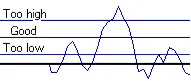
The threshold .NET Python level is very important:
Too high and significant transitions can be missed.
Too low and noise can cause false transitions.
To resolve this dilemma, the EasyGauge transition selection mechanism can reject low contrast or false edges:
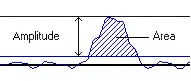
The transition strength is measured by the peak amplitude and the area.
Every edge measurement determine the peak amplitude and the area.
The peak amplitude is the difference between the peak value and the threshold.
The peak area is the area under the peak curve and the horizontal line at the threshold value.
If either value falls below the
minimum amplitude.NET Python or theminimum area.NET Python, the peak is disregarded and no point is assumed at that location.
Transition Type
Select the type of transition to find with SetTransitionType .NET Python:
Simple edges:
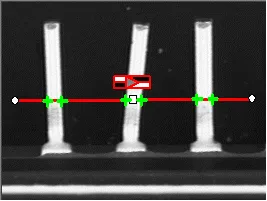
Black to white, white to black and indifferent polarities
Complex edges:
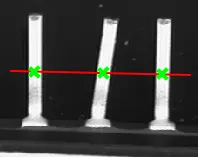
Complex “Black to white to black” transition type.
Hint
You cannot normally detect transitions using the default threshold value (20) as BWB or WBW transitions base the peak analysis on the gray level profile along the sample path and not its first derivative.
Selecting the Most Relevant Transition
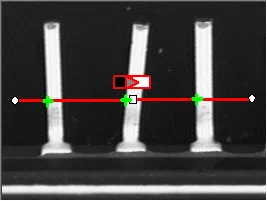
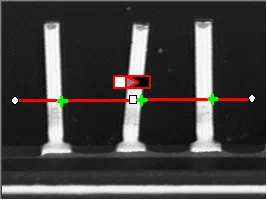
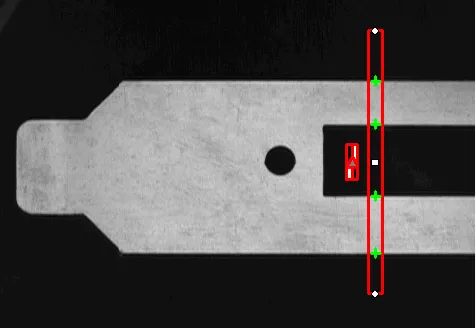
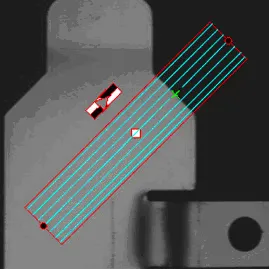
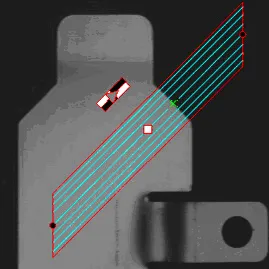
There can be multiple transitions that match the transition detection parameters. The parameter SetTransitionChoice .NET Python can be used to select the single most relevant transition. With point gauges, this parameter can have the value ETransitionChoice_All .NET Python, which will return all the transitions matching the other parameter of the detection.
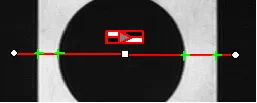
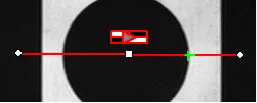
Multiple transitions measured (left) and single transition measured (right).
You can select the single most relevant transition based on 4 criteria:
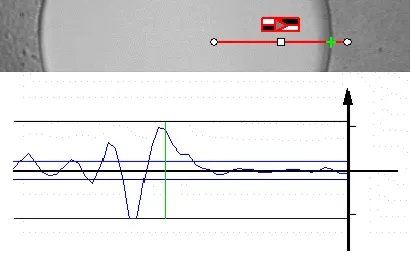
The highest peak |
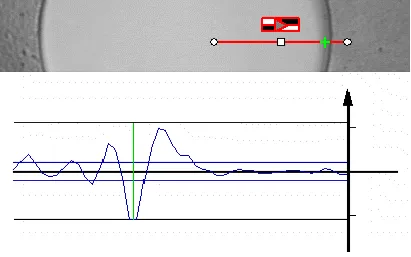
The peak with the largest area |
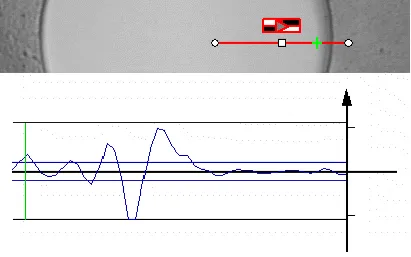
The peak closest to the gauge center |
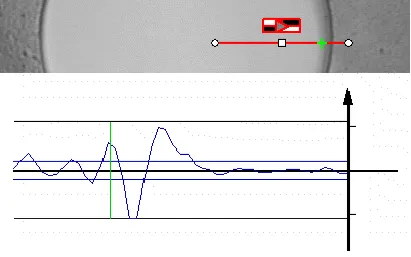
The nth peak encountered |
Note
When several peaks have the same value (same area, same amplitude…), the last peak is selected.
Filtering noise
Filtering the image locally can reduce the noise effects.
There are 2 types of filtering:
The transverse (lengthwise) filtering averages several parallel lines when sampling the image.
The longitudinal (crosswise) uniform filtering can also be applied to the resulting profile curve (
SetSmoothing.NET Python)
Configuring Sample Paths
Use
SetSamplingStep.NET Python to set the spacing between the paths.Use
GetNumSamples.NET Python to get the number of paths that are sampled.
Use
SetTolerance.NET Python to set the length of these paths that is the half-length of the line segment. The tolerance is how far to look for edge crossings around the nominal shape.Note
Note that the
EPointGauge.NET Python has no tolerance because it consists in the measurement of edge-crossing on its nominal line.
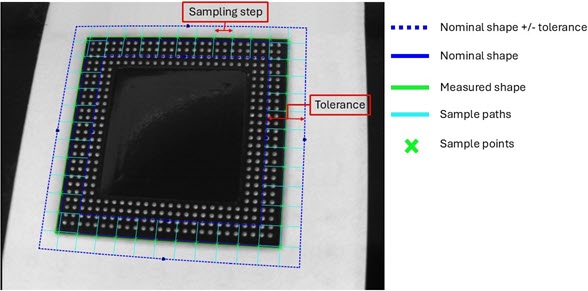
EasyGauge measurement concepts
Fitting Parameters
Outlier rejection parameters:
Skip ranges:
The skip ranges define the exclusion ranges for the paths. The sample point indexes in the skip ranges are not taken into account to fit the model.
Note
The skip ranges apply to all gauge models but the polygon gauge.
Use
AddSkipRange.NET Python to define several skip ranges.Use
RemoveSkipRange.NET Python,RemoveAllSkipRanges.NET Python andGetSkipRange.NET Python to manage the skip ranges.Use the attribute
EDrawingMode_PointsInSkipRange.NET Python with the methodDraw.NET Python to display the skipped points.