EasyOCR - Reading Texts
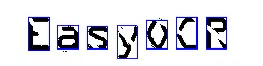
Characters recognized by the EasyOCR library.
Purpose
The EasyOCR optical character recognition library reads short texts (such as serial numbers, part numbers and dates).
It uses font files (pre-defined OCR-A, OCR-B and Semi-standard fonts, or other learned fonts).
Its template matching algorithm recognizes even badly printed, broken or connected characters of any size.
Characters can be filtered by class to improve reliability and speed.
Note
EasyOCR is superseded by EasyOCR2 and EasyDeepOCR. See the comparison of OCR methods.
Recognizing Characters
Create an
EOCR.NET Python object and load a font withEOCR::Load.NET Python.Call
EOCR::Recognize.NET Python to read the text in an image.
#include <eVision/EasyOcr/EasyOCR/EOCR.h>
using namespace eVision;
// Image constructor
EImageBW8 srcImage;
// EOCR constructor
EOCR ocr;
// Load the font file
ocr.Load("myFont.ocr");
// ...
// Recognize the characters
std::string text = ocr.Recognize(&srcImage, 10, EOCRClass_AllClasses);
// Alternatively
// Define the character filter (2 letters and 3 digits)
std::vector<uint32_t> charFilter;
charFilter.push_back(EOCRClass_UpperCase);
charFilter.push_back(EOCRClass_UpperCase);
charFilter.push_back(EOCRClass_Digit);
charFilter.push_back(EOCRClass_Digit);
charFilter.push_back(EOCRClass_Digit);
// Recognize the characters with class filtering
text = ocr.Recognize(&srcImage, 10, charFilter);
using eVision;
// Image constructor
EImageBW8 srcImage = new EImageBW8();
// EOCR constructor
EOCR ocr = new EOCR();
// Load the font file
ocr.Load("myFont.ocr");
// ...
// Recognize the characters
string text = ocr.Recognize(srcImage, 10, (int)EOCRClass.AllClasses);
// Alternatively
// Define the character filter (2 letters and 3 digits)
uint[] charFilter = new uint[5];
charFilter[0] = (uint)EOCRClass.UpperCase;
charFilter[1] = (uint)EOCRClass.UpperCase;
charFilter[2] = (uint)EOCRClass.Digit;
charFilter[3] = (uint)EOCRClass.Digit;
charFilter[4] = (uint)EOCRClass.Digit;
// Recognize the characters with class filtering
text = ocr.Recognize(srcImage, 10, charFilter);
import eVision
# Image constructor
src_image = eVision.EImageBW8()
# EOCR constructor
ocr = eVision.EOCR()
# Load the font file
ocr.Load("myFont.ocr")
# ...
# Recognize the characters
text = ocr.Recognize(src_image, 10, eVision.EOCRClass.AllClasses)
# Alternatively
# Define the character filter (2 letters and 3 digits)
char_filters = []
char_filters.append(eVision.EOCRClass.UpperCase)
char_filters.append(eVision.EOCRClass.UpperCase)
char_filters.append(eVision.EOCRClass.Digit)
char_filters.append(eVision.EOCRClass.Digit)
char_filters.append(eVision.EOCRClass.Digit)
# Recognize the characters with class filtering
text = ocr.Recognize(src_image, 10, char_filters)
Contents
Font learning, segmentation, recognition, and parameter tuning.
Quick Links
List of all Classes, Structs and Enumerations of the EasyOCR library.
Code snippets for the EasyOCR library.
See also
The EasyOcrRead sample program reads text in an image ROI using an OCR font file: EasyOcrRead.