Object Features
This section presents the various features that pertain to a 3D object.
Units
Both the E3DObjectExtractor .NET Python parameters and the E3DObject .NET Python features are expressed in metric units.
For example: if the resolution of the input
EZMap.NET Python is expressed in mm / pixel, the length parameter is expressed in mm.Use the
EZMap::GetResolution.NET Python andEZMap::SetResolution.NET Python accessors of theEZMap.NET Python to query and change its resolution.
All angles are expressed in degrees.
Object Plane and Base Plane
The E3DObjectExtractor .NET Python fits a plane to the pixels of each E3DObject .NET Python output:
Use
E3DObject::GetPlane.NET Python to access this plane.
The E3DObjectExtractor .NET Python also tries to fit a plane to the pixels surrounding an E3DObject .NET Python
This plane is called the base plane.
It is an estimation of the local background around the object.
If there are too many undefined pixels in this area, the base plane is equal to the reference plane of the input
EZMap.NET Python.
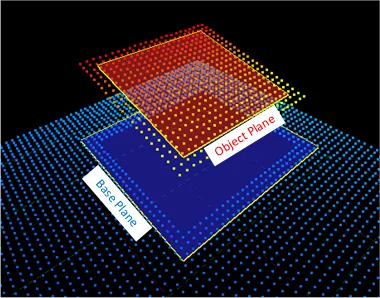
Representation of the base plane and the object plane.
Bounding Box
The bounding box is the minimal enclosing rectangle for all the object positions.
It is oriented in the XY plane of the ZMap space (rotation around the Z axis of the ZMap).
Its rotation is used as the orientation of the object (see
E3DObject::GetOrientation.NET Python).Its X and Y sizes are the object length and width (see
E3DObject::GetLength.NET Python andE3DObject::GetWidth.NET Python).Its Z size is always in the Z axis of the ZMap direction.
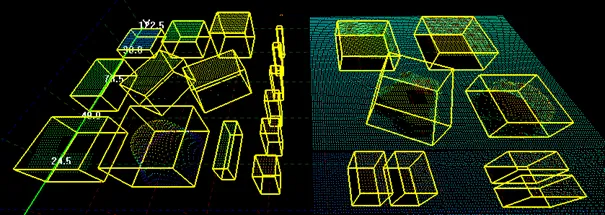
Representation of bounding boxes around 3D objects.
Length and Width
The length of an object is the largest dimension on the XY plane in the ZMap space. It is the same as the size of the major axis of the bounding box.
The width of an object is the smallest dimension on the XY plane in the ZMap space. It is the same as the size of the minor axis of the bounding box.
Use the E3DObjectExtractor::SetLengthRange .NET Python and the E3DObjectExtractor::SetWidthRange .NET Python accessors to set the ranges of allowed values for the length and the width.
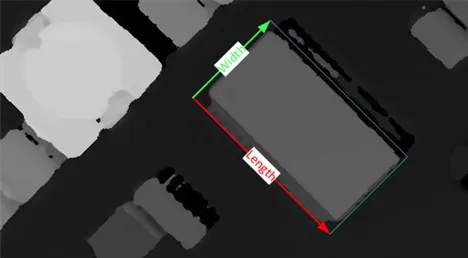 Length and width of 3D objects in a ZMap.
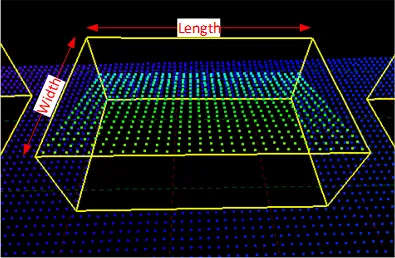 Length and width of 3D objects in a point cloud.
Local and Reference Top Positions and Heights
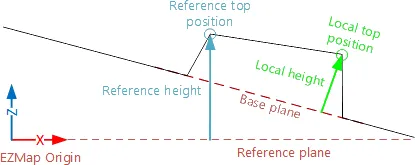
The local top position of an object is the position (3D coordinates) of the point in the E3DObject .NET Python that is the furthest from the base plane.
The local height of an object is the distance between the local top position and the base plane.
The reference top position of an object is the position (3D coordinates) of the point in the E3DObject .NET Python that is the furthest from the reference plane.
The reference height of an object is the distance between the reference top position and the reference plane.
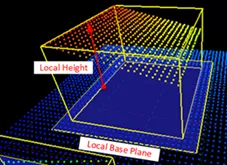
Reference height viewed in a point cloud representation.
If there are too many undefined pixels in the object surroundings:
The base plane is equal to the reference plane of the input
EZMap.NET Python.The local top position is equal to the reference top position.
The local height is equal to the reference height.
Use the E3DObjectExtractor::SetLocalHeightRange .NET Python and the E3DObjectExtractor::SetReferenceHeightRange .NET Python accessors to set the ranges of allowed values for the local and the reference height.
Average Position
The average position is the arithmetic mean of the 3D positions of the object, also known as the barycenter.
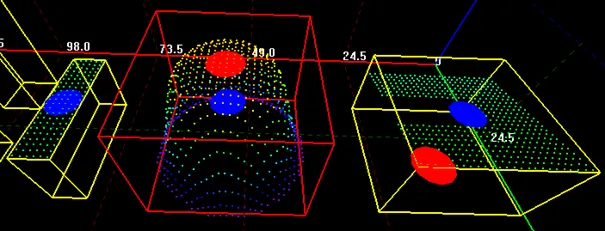
The average position is displayed in blue. The top position is displayed in red. The object on the left shows the average and the top positions at the same place. The object in the center shows the average position inside the object.
Aspect Ratio
The aspect ratio is the width (the smallest dimension on the XY plane) divided by the length (the largest dimension).
It lies between 0 and 1.
The smaller the ratio, the more elongated the object is.
A square has an aspect ratio of 1.
Use the E3DObjectExtractor::SetAspectRatioRange .NET Python accessor to set the range of allowed values for the aspect ratio.
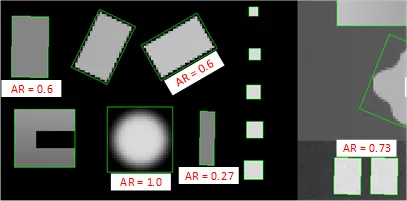
Aapect ratios of different objects in a ZMap representation.
Orientation Angle
The orientation angle is the angle between the X axis of the EZMap .NET Python and the longest axis (the length) of the object.
The angle is measured in the clockwise direction.
The value must lie between \(-90°\) and \(+90°\).
Use the E3DObjectExtractor::SetOrientationRange .NET Python accessor to set the range of allowed values for the orientation angle.
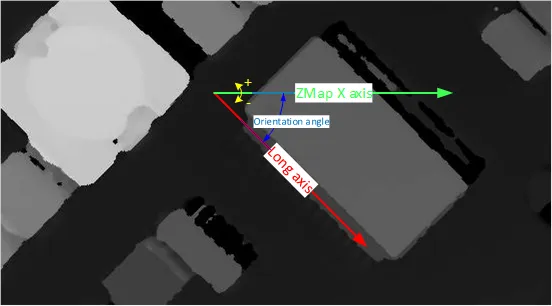
Representation angle viewed in a ZMap representation.
Local and Reference Tilt Angles
The local tilt angle is the angle between the base plane and the object plane.
A value of 0 means that the object top surface is parallel to its base.
The value must lie between \(0°\) and \(+90°\).
The reference tilt angle is the angle between the object plane and ZMap XY plane.
A value of 0 means that the object top surface is parallel to its base.
The value must lie between \(0°\) and \(+90°\).
Use the E3DObjectExtractor::SetLocalTiltRange .NET Python and the E3DObjectExtractor::SetReferenceTiltRange .NET Python accessors to set the range of allowed values for the tilt angles.
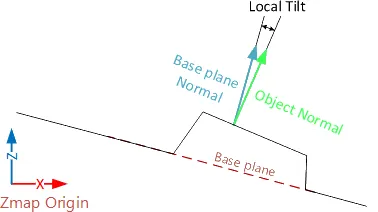 Local tilt.
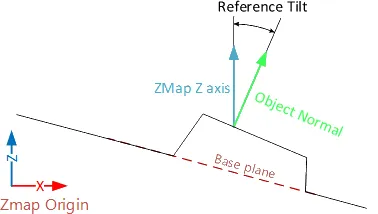 Reference tilt.
Area
The object area is the area of the top surface of the object projected on the reference plane of the EZMap .NET Python.
It is equal to the number of pixels in the object × the x-resolution of the
EZMap.NET Python × the y-resolution of theEZMap.NET Python.
Use the E3DObjectExtractor::SetAreaRange .NET Python accessor to set the range of allowed values for the area.
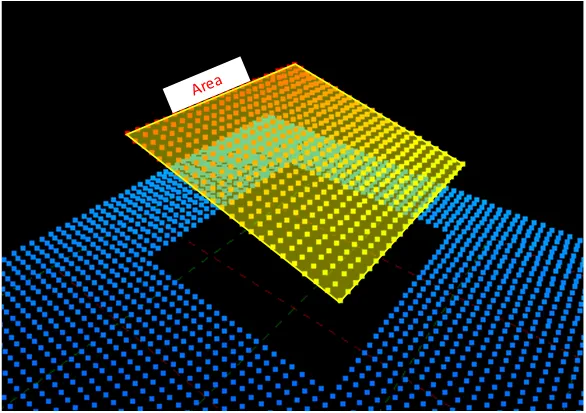
Area of an object in a point cloud representation.
Volume
The object volume is the volume that lies between the top surface and the base plane of the object.
Use the E3DObjectExtractor::SetVolumeRange .NET Python accessor to set the range of allowed values for the volume.
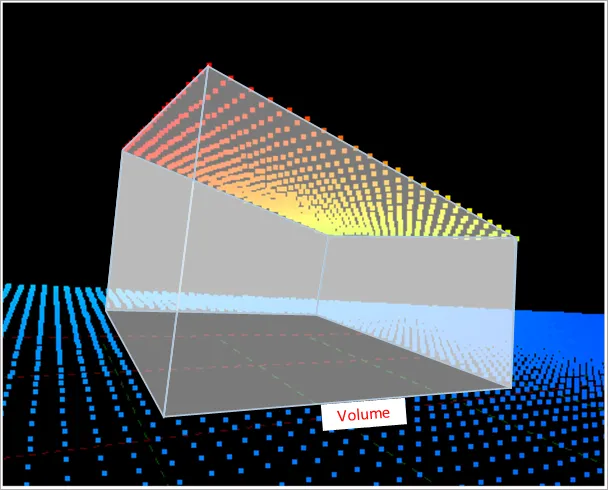
Volume of an object in a point cloud representation.
Sphere
This feature is disabled by default.
When enabled, a sphere is an object E3DSphere .NET Python that represents the sphere that best fits the object (calculated according to the least squares).